CP/M IDE
A VS Code extension for CP/M application development with an integrated serial terminal, a fast custom transfer protocol, and file transfer/build tooling.
Features
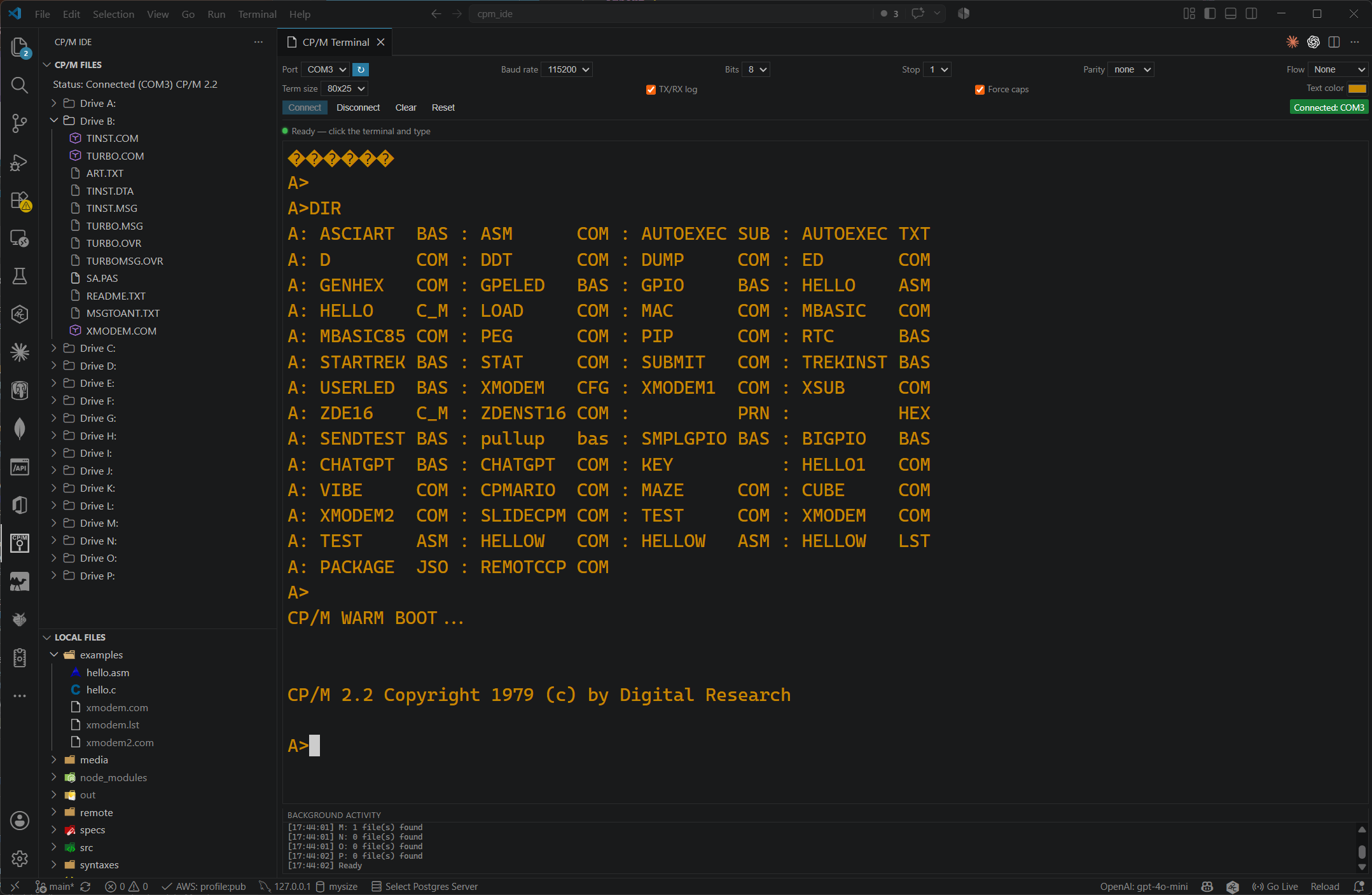
🔌 Integrated Serial Terminal
- Configurable serial connection: port, baud rate, data bits, stop bits, parity, and flow control (none/Xon-Xoff/RTS-CTS) - the port dropdown lists available ports in natural sorted order (
COM2 before COM10)
- Fixed-grid terminal display (80x25, 64x16, 40x24, 52x24) with selectable VT52/ANSI/None emulation, an adjustable text color and font, and a "Force caps" input mode
- Automatic detection of CP/M command prompts, including CP/M 3/MP/M's optional user-area digit (
A>, B2>, A15>, etc.)
- Detects and displays the connected device's CP/M version (e.g. "CP/M 2.2") once it's learned from a Remote CCP session
- Optional TX/RX hex-dump logging to a dedicated output channel, for diagnosing comms issues
- Transparent background command execution for device management (drive selects, directory scans, etc. run without cluttering the visible terminal) - a "Syncing…" overlay makes it clear when the terminal is busy and typing won't do anything
- The terminal panel opens in the same editor group as whatever is currently rightmost, instead of always splitting open a new column
- A connection reset (or disconnect) promptly cancels any in-progress background scan/transfer instead of letting it keep running against a connection that's gone
📁 File Transfer System
- Integrated file explorer (CP/M IDE sidebar) showing remote CP/M drives/files (sorted alphabetically) alongside a local workspace file tree
- Choose the transfer protocol via the Transfer Application setting/dropdown:
- Remote CCP (default) - a small custom resident program (see below), the fastest path for scanning drives/files and for all automatic transfers
- XMODEM - the original transfer protocol, plus dedicated manual send/receive commands for diagnosing device-side issues
- Slide - a windowed, CRC16, multi-file batch transfer protocol for sending several files to a drive in one go, via
SLIDECPM.COM; on microBeast, SLIDE.COM can be used the same way if it's already on the device, but only at 19,200 baud
- Drive/file scanning always tries Remote CCP first and transparently falls back to the slower CCP
DIR-driven scan if it's unavailable, regardless of which transfer application is selected
- Automatic
PIP copy of whichever helper (REMOTCCP.COM, XMODEM.COM, or SLIDECPM.COM) is needed from A: (or, for Remote CCP on microBeast, C:) to the target drive - SLIDE.COM is the one exception, since it must already be on the device
- Target-drive picker before each upload - only asks when there's genuinely more than one candidate drive (the last scan's detected drives, or the CCP's current drive as a fallback); skips the prompt entirely when there's just one
- Drag and drop between the Local Files and CP/M Files panels in either direction: drop onto a CP/M file/drive to target that drive directly (otherwise falls back to the usual drive picker), and drop onto a local file/folder to target its containing folder (otherwise falls back to the workspace root)
- Slide/
SLIDECPM.COM automatically detect whether the device-side firmware escapes bytes that wouldn't survive the BIOS console-output path (bit 7 gets stripped on some hardware) and adapt transparently per connection - works unmodified against both older, non-escaping device builds and newer ones that announce the capability, with no separate setting to manage
- Delete a remote file (with a confirmation prompt) via the inline delete icon in the CP/M Files panel, sent as the CCP's own
ERA command
🐞 Debugging with DDT
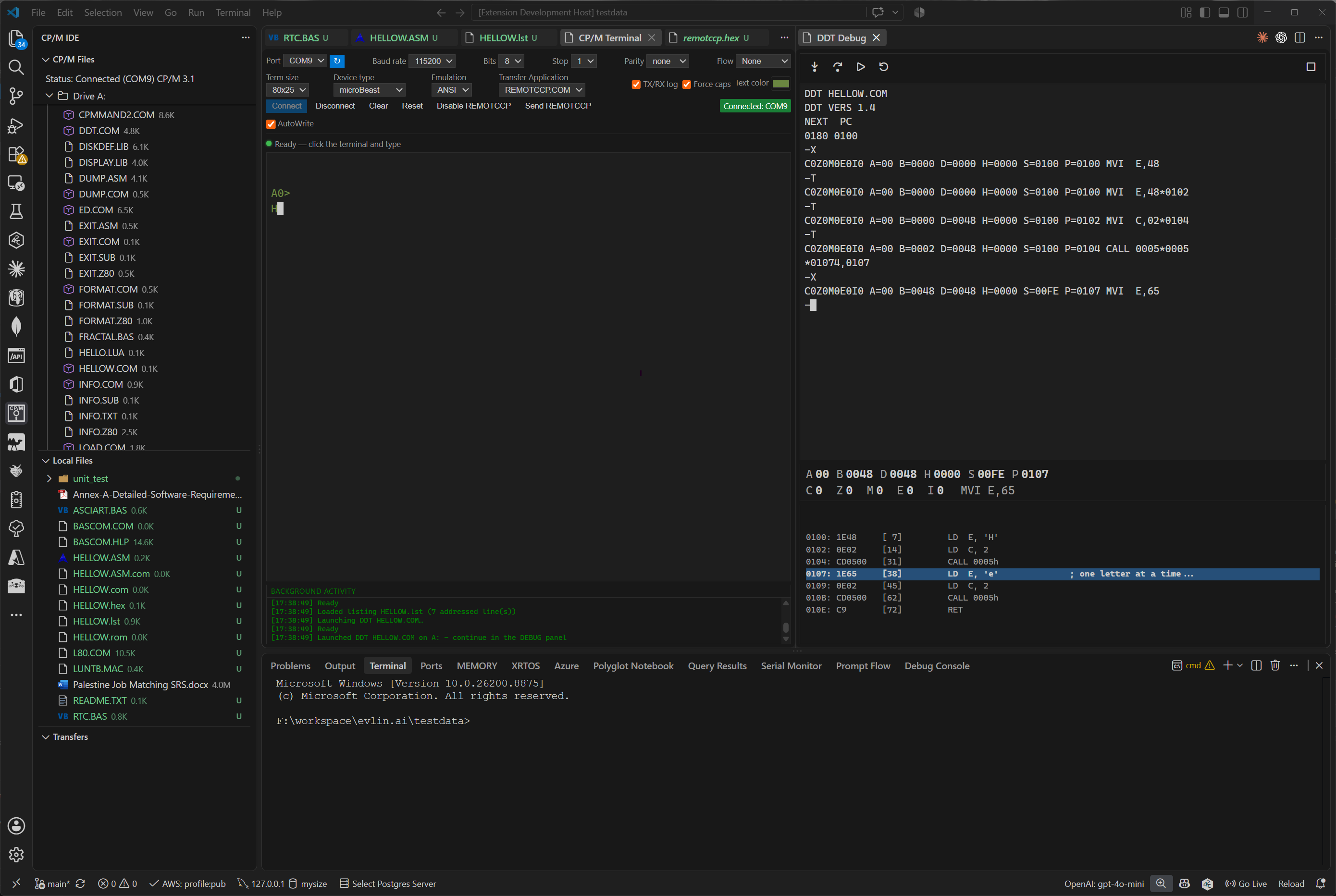
- Launches CP/M's native debugger (DDT) against a local
.asm/.com (building and transferring it first) or directly against a .com already on the device, via inline icons on the file
- A dedicated DDT Debug panel - opened automatically, or via its own icon in the CP/M Files view title bar - shows DDT's own output, live registers/flags, and (when a matching
.lst file is found next to the source) 11 lines of source centered on the current PC, updated after every step
- Step, Step Over (runs a
CALL to completion instead of stepping into it), Go, Restart, and End Session buttons drive the session - there's no free-typing into DDT, so the extension always knows exactly which response it's waiting for and keeps the display in sync automatically
- The debugged program's own output (anything it prints while running) is routed to the regular CP/M Terminal, so a program with its own visual output can still be debugged alongside DDT's prompt/register output in the separate panel
🖥️ Z80 Assembly Support
- Complete Z80 assembly syntax highlighting
- Support for various assembly syntaxes and directives
- Mnemonics highlighting for all standard Z80 instructions
- Numeric format support (hex, binary, decimal, octal)
🔨 Build Integration
- Support for local Z80 assembler integration
- C compiler integration for building
.COM files
- Optional Makefile-driven builds (used automatically when a Makefile is present and
cpmIde.makeCommand is configured)
- Configurable build tools via settings
- Build output captured in a dedicated channel
Installation
Local development
- Clone or download this repository
- Run
npm install to install dependencies
- Run
npm run compile to build the extension
- Open the folder in VS Code and press
F5 to launch the Extension Development Host
Package or publish
- Make sure the
publisher value in package.json matches your Visual Studio Marketplace publisher name
- Bump the extension version in
package.json
- Package a
.vsix file with npx @vscode/vsce package
- Publish to the Marketplace with
npx @vscode/vsce publish patch
- Use
minor or major instead of patch when you want a larger version bump
Configuration
Configure the extension via VS Code settings:
{
  "cpmIde.serialPort": "COM1",
  "cpmIde.baudRate": 9600,
  "cpmIde.dataBits": 8,
  "cpmIde.stopBits": 1,
  "cpmIde.parity": "none",
  "cpmIde.flowControl": "none",
  "cpmIde.enableSerialTrace": false,
  "cpmIde.forceCapitals": true,
  "cpmIde.textColor": "#cccccc",
  "cpmIde.fontFamily": "",
  "cpmIde.terminalSize": "80x25",
  "cpmIde.emulation": "Vt52",
  "cpmIde.transferApplication": "REMOTCCP.COM",
  "cpmIde.deviceType": "Generic",
  "cpmIde.autoWrite": true,
  "cpmIde.assembler": "z80asm",
  "cpmIde.assemblerPath": "",
  "cpmIde.zasmFlags": "-b",
  "cpmIde.compiler": "cc",
  "cpmIde.makeCommand": ""
}
| Setting |
Description |
cpmIde.serialPort / baudRate / dataBits / stopBits / parity / flowControl |
Serial connection parameters |
cpmIde.enableSerialTrace |
Logs every byte sent/received to the "CP/M IDE: Serial Trace" output channel - useful for diagnosing comms issues, noisy otherwise |
cpmIde.forceCapitals |
Converts typed input to uppercase in the terminal |
cpmIde.textColor |
Terminal output text color (also settable via the color picker next to "Force caps") |
cpmIde.fontFamily |
Terminal font override; leave empty to use the editor font |
cpmIde.terminalSize |
Fixed character grid for the terminal display; font size scales to fit it |
cpmIde.emulation |
Terminal escape-sequence handling: None (plain teletype), Vt52 (default), or ANSI |
cpmIde.transferApplication |
Which protocol automatic transfers use: REMOTCCP.COM (default), SLIDECPM.COM, SLIDE.COM, or XMODEM.COM. SLIDE.COM is microBeast-only, must already be installed on the device (no auto-copy from A:), and only works at 19,200 baud |
cpmIde.deviceType |
Selects device-specific behavior after installing Remote CCP; Generic by default, with extra handling for a few named boards (e.g. microBeast) |
cpmIde.autoWrite |
microBeast-specific: runs its A:WRITE step automatically after Remote CCP install |
Assembler Configuration
The extension supports multiple Z80 assemblers. Set cpmIde.assembler to one of:
- z80asm (default) - Syntax:
z80asm infile -o outfile
- zasm - Syntax:
zasm [flags] infile outfile
- Configure ZASM flags with
cpmIde.zasmFlags (default: -b for binary output)
- Example with listing:
"cpmIde.zasmFlags": "-b -l"
- tasm - Syntax:
tasm infile outfile
- other - Provide full command path in
cpmIde.assemblerPath
C Compiler Configuration
The extension supports multiple C compilers. Set cpmIde.compiler to one of:
- cc (default) - Traditional CP/M C compiler
- Generates object files (.o)
- sdcc - SDCC (Small Device C Compiler)
- Generates .COM files directly
- Set target architecture with
cpmIde.sdccTarget (default: z80)
- Supported targets:
z80, z180, r2k, r3ka
- Configure additional flags with
cpmIde.sdccFlags
- Example:
"cpmIde.sdccFlags": "--std-c99 --opt-code-size"
- other - Provide full command path in
cpmIde.compilerPath
Make Integration
If a Makefile/makefile is found in the workspace root and cpmIde.makeCommand is set (e.g. "make" or "mingw32-make -f Custom.mk"), "Build CP/M Project" runs that instead of assembling/compiling files individually. Leave makeCommand empty to always use the per-file build.
Usage
Opening the Serial Terminal
- Run command: "CP/M IDE: Open CP/M Serial Terminal" (or click the plug icon on the CP/M Files panel)
- Configure port settings if needed
- Once connected, the CP/M Files panel auto-scans drives and files, and the status line shows the port and (once detected) the device's CP/M version
File Transfer
- CP/M sidebar: Use the CP/M IDE activity bar icon to open the "CP/M Files" and "Local Files" panels
- To Device (local file area): Right-click any local file in Explorer, or use the inline icon in the Local Files panel → "Auto Send File"
- From Device: Click the inline download icon next to a remote file in the CP/M Files panel → "Auto Receive File"
- Drag and drop: Drag files from the Local Files panel onto the CP/M Files panel to upload, or the reverse to download - drop directly onto a target file/drive/folder to pick it as the destination, or onto empty space to fall back to the usual picker
- Batch send: Select multiple local files → "Send (Slide)" to transfer them all in one windowed transfer
- Manual XMODEM: "Manual Send (XMODEM)" / "Manual Receive (XMODEM)" bypass Remote CCP entirely, for diagnosing device-side issues
- Upload flow: Select the target drive (A:-P:); the extension ensures whichever helper program the chosen transfer method needs is present on that drive, copying it from
A: via PIP first if not (prompting for confirmation the first time)
- Delete: Click the inline delete (✕) icon next to a remote file in the CP/M Files panel, confirm, and it's removed via
ERA; the drive listing refreshes automatically once it's verified gone
Remote CCP
Remote CCP (remote/remotccp.asm, see specs/Remote CCP Specification.md) is a small resident CP/M program that answers short text commands over the same serial line used for interactive typing - selecting drives, listing files, and streaming file contents as hex-encoded blocks with per-block acknowledgement. It's the fastest and most reliable transfer path, used automatically once installed:
- On first use, if
REMOTCCP.COM isn't found on its home drive (A:, or C: on microBeast), you're asked whether to install it there. Several install methods are tried in order until one works: on microBeast, SLIDE.COM first (normally already on A: there), then XMODEM, ED, Intel HEX via PIP, and finally raw binary via PIP reading from RDR:
- Once present, it's used to scan drives/files (replacing the slower CCP
DIR-driven scan), and for automatic file transfers when cpmIde.transferApplication is set to REMOTCCP.COM (the default)
- If it's ever unavailable (or the install is declined) drive/file scanning transparently falls back to the CCP-command path - no functionality is lost, just some speed; a transfer explicitly set to use it instead reports the failure so you can pick a different transfer application
Building Projects
- Create
.asm or .c files in your workspace
- Run command: "CP/M IDE: Build Project" (or use the inline Assemble/Compile icons on individual files in the Local Files panel)
- Output files (
.COM) are created alongside source files, or via your configured Makefile
Debugging with DDT
- Click the debug icon on an
.asm file in the Local Files panel ("Debug Assembly") - this builds it, transfers the .COM to the current drive, and launches DDT; or click the debug icon on a .COM file already in the CP/M Files panel ("Debug (DDT, no transfer)") to launch DDT directly against it
- The DDT Debug panel opens automatically to the right of the terminal (or open/re-open it any time via its icon in the CP/M Files view title bar)
- If a
.lst file with the same name as the .com exists locally (next to the source for a local debug, or in the workspace root for a remote one), it's loaded and the source view stays centered on the current PC as you step
- Use the toolbar buttons to drive the session:
- Step - single-steps one instruction (
T)
- Step Over - same as Step, but if the current instruction is a
CALL, runs it to completion instead of stepping into it
- Go - runs unconditionally from the current PC (
G)
- Restart - sends Ctrl-C and relaunches DDT against the same file, if DDT looks stuck
- End Session - sends Ctrl-C and closes the panel
- Everything DDT itself prints (its prompt, register dumps, disassembly) stays in the Debug panel; anything the program being debugged prints while running goes to the regular CP/M Terminal instead
Architecture
Core Modules
- extension.ts - Extension entry point: command registration and connection-status UI
- dragAndDrop.ts - Drag-and-drop controllers for the CP/M Files/Local Files panels (both directions)
- transferPrompts.ts - Target-drive picker prompts shared by uploads, whether triggered by a command or a drop
- serialTerminal.ts - Serial port lifecycle, low-level I/O primitives (write/read/prompt-wait), and the public API the rest of the extension calls - most actual transfer/debug logic lives in the modules below, which it delegates to
- fileTransferSend.ts / fileTransferReceive.ts - Upload/download orchestration across the three transfer protocols, plus drive/file scanning
- fileDelete.ts - Remote file deletion via the CCP's
ERA command
- transferProtocol.ts / transferAvailability.ts - Per-protocol identity/availability (
REMOTCCP.COM/XMODEM.COM/SLIDECPM.COM/SLIDE.COM): what each is called, whether it's usable right now, and how it's launched
- remoteCcpInstall.ts / remoteCcpBootstrap.ts - Remote CCP's five-strategy self-install (Slide, XMODEM, ED, Intel HEX via
PIP, raw binary via PIP) and session launch
- ddtSession.ts - The DDT debug session state machine (command/response routing, Step/Go tracking) and launch
- deviceType.ts - Small device-type-driven helpers (
cpmIde.deviceType, Remote CCP's home drive) shared across the modules above
- serialTerminalPanel.ts - Webview host for the interactive terminal panel
- debugPanel.ts - Webview host for the DDT Debug panel (registers/flags, source listing, Step/Step Over/Go/Restart/End Session)
- listingFile.ts - Parses an assembler
.lst file into address-to-source-line entries for the DDT Debug panel's listing view
- remoteCcp.ts - Client for the Remote CCP protocol (drive/file listing, get/put)
- xmodem.ts - XMODEM protocol implementation (128-byte checksum variant) and the shared
SerialLink abstraction used by all transfer protocols
- slide-ts/ - Windowed, CRC16, multi-file Slide transfer protocol, including the escaping-capability negotiation (
protocol.ts, send.ts, recv.ts)
- transferQueue.ts - Queues/serializes background transfers so only one touches the wire at a time, and tracks their progress for the Transfers view
- fileExplorer.ts / localFileExplorer.ts - Tree view providers for the remote CP/M files and local workspace files
- build.ts - Build system integration for the assembler, compiler, and Makefile-driven builds
- remote/remotccp.asm - The Z80 assembly source for the on-device Remote CCP helper (assembled to
remote/remotccp.com, bundled with the extension)
- media/ - Webview UI for the terminal panel (
terminal.html/.js/.css) and the DDT Debug panel (debug.html/.js/.css)
File Transfer Protocols
Transfer protocols are available, selected via cpmIde.transferApplication (drive/file scanning always prefers Remote CCP regardless of this setting, falling back to CCP commands only if Remote CCP isn't available):
- Remote CCP (default) - custom command/response protocol purpose-built for this extension; fastest, with explicit ACKs around real disk I/O (drive selects, file creation/writes) instead of guessed delays. Requires
REMOTCCP.COM on the device (auto-installed on request). On microBeast, it's bootstrapped/looked up on C: instead of A:, since microBeast's post-install A:WRITE step (see cpmIde.autoWrite) can overwrite A:.
- XMODEM - standard 128-byte XMODEM; supports CRC-16 blocks when sending to a device that requests them, checksum-only when receiving from one. Also available directly via the manual send/receive commands. Requires
XMODEM.COM on the device (auto-copied from A: via PIP when needed).
- Slide - a sliding-window (4 frames in flight), 1024-byte-frame, CRC16 protocol for sending multiple files in a single batch. Requires
SLIDECPM.COM on the device (auto-copied from A: via PIP when needed).
- SLIDE.COM - microBeast-only variant of Slide. It only ever runs from
A: (never copied to or launched from another drive), so it's launched as A:SLIDE regardless of which drive is current/being transferred to. Unlike the other three, there's no bootstrap/copy support for it - it must already be on A: - and it only works at 19,200 baud.
Both Slide variants negotiate byte-escaping per connection rather than assuming it: some CP/M BIOS console-output paths strip bit 7 of every transmitted byte, so newer device firmware escapes anything that wouldn't survive that and announces the capability right after its wakeup signature. The extension watches for that announcement and only unescapes incoming bytes once a peer has actually declared it - a peer that never announces it (older firmware, or SLIDE.COM's raw UART path, which never needs escaping) is passed through unchanged. This means the same build works against old and new device-side firmware without a setting to flip.
All directory operations and file transfers are performed transparently, with command output hidden from the interactive terminal unless explicitly requested (e.g. via cpmIde.enableSerialTrace).
Requirements
- VS Code 1.80.0 or later
- Node.js 18+ recommended for development and publishing
- Serial port connection to a CP/M device
- Z80 assembler (z80asm, TASM, zasm, etc.) for assembly builds
- C compiler (compatible with CP/M targets) for C builds
Known Limitations
- Receiving a file over XMODEM always uses classic checksum mode; only sending adapts to CRC-16 if the device requests it
- Remote CCP requires installing a small resident helper on the device; some very constrained BIOS/BDOS builds may behave unexpectedly under its automated disk-select/file-create sequencing
- Debugging uses CP/M's native DDT rather than a from-scratch debugger, so it's bounded by whatever that specific DDT build supports
Development
# Install dependencies
npm install

# Compile TypeScript
npm run compile

# Watch for changes
npm run watch

# Run tests
npm run test

# Create .vsix package
npx @vscode/vsce package

# Publish to the Marketplace
npx @vscode/vsce publish patch
Publishing
This extension is configured in package.json with the name cpm-ide and publisher rockcat, so the Marketplace identifier is rockcat.cpm-ide unless you change one of those fields.
Before publishing, run the full validation flow:
npm installnpm run compilenpm run testnpx @vscode/vsce packagenpx @vscode/vsce publish patch
License
See LICENSE.txt.
Contributing
Contributions welcome! Please follow the coding standards and test before submitting pull requests.
Roadmap
- [x] Integrated CP/M debugger (DDT)
- [x] Source-level debugging support (listing view synced to the current PC)
- [ ] XMODEM-CRC support when receiving from the device
- [ ] Remote file editing
- [ ] Project templates
| |

