OmniJinja
OmniJinja is a VS Code extension for Python/Jinja development.
It connects Python backend code with Jinja templates and provides editor support beyond basic syntax highlighting.
OmniJinja is designed for Python projects that render Jinja templates through framework APIs such as Flask's render_template(...) or through native Jinja2 APIs such as Environment.get_template(...).render(...). It analyzes both sides of the Python--Jinja boundary:
- the Python side, where template paths, render-context variables, object properties, and custom filters are supplied;
- the Jinja side, where templates use placeholders, attribute accesses, loops, calls, filters, macros, and template-local variables.
The result is a more context-aware editing experience for Jinja templates and earlier feedback on Python/Jinja inconsistencies.
Key Features
OmniJinja provides editor support from three complementary perspectives:
- Python-to-Template assistance
- Template-to-Python validation
- Template-local Jinja support
1. Python-to-Template Assistance
OmniJinja analyzes Python rendering code and uses the extracted backend information to assist Jinja template editing.
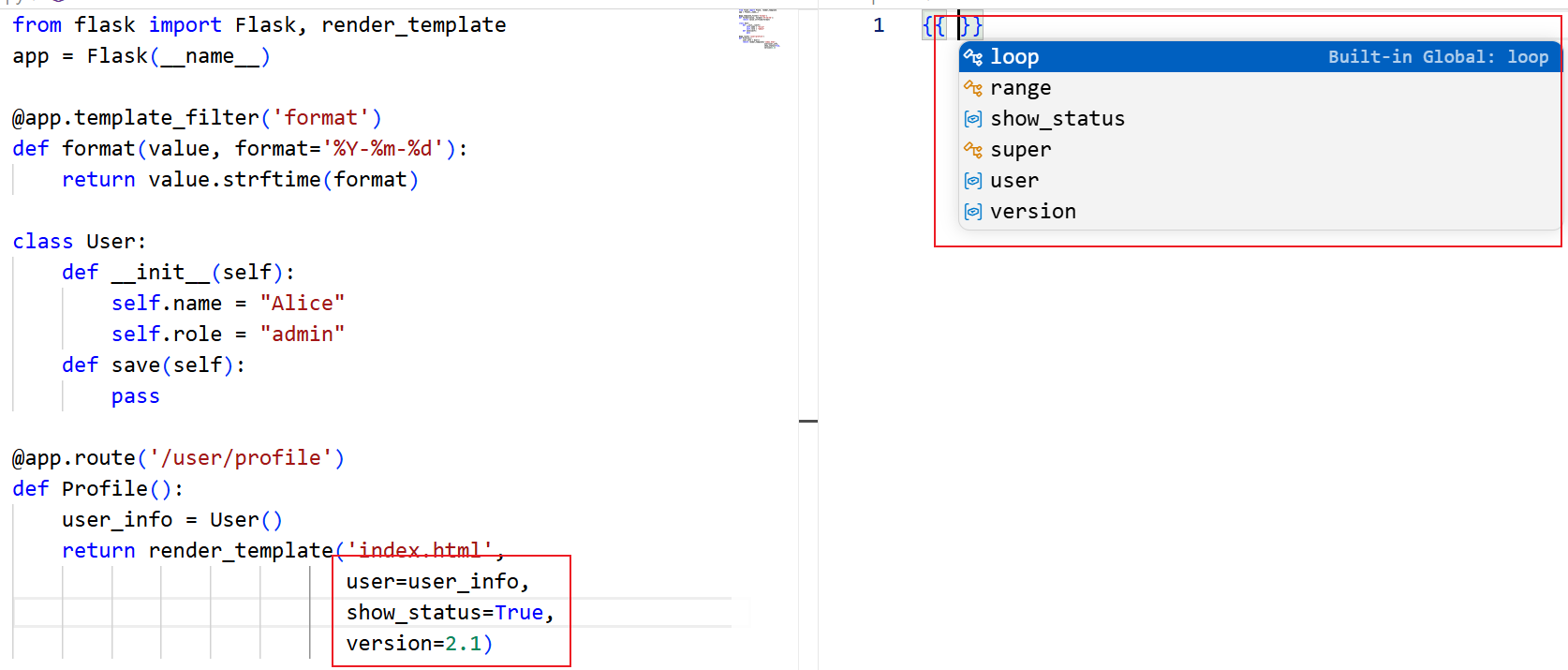
When Python code passes data to a template, for example:
return render_template(
    "index.html",
    user=user_obj,
    show_stats=True,
)
OmniJinja can use this render context to provide template-side editor features.
Supported features include:
- Placeholder completion for variables passed from Python, such as
user and show_stats;
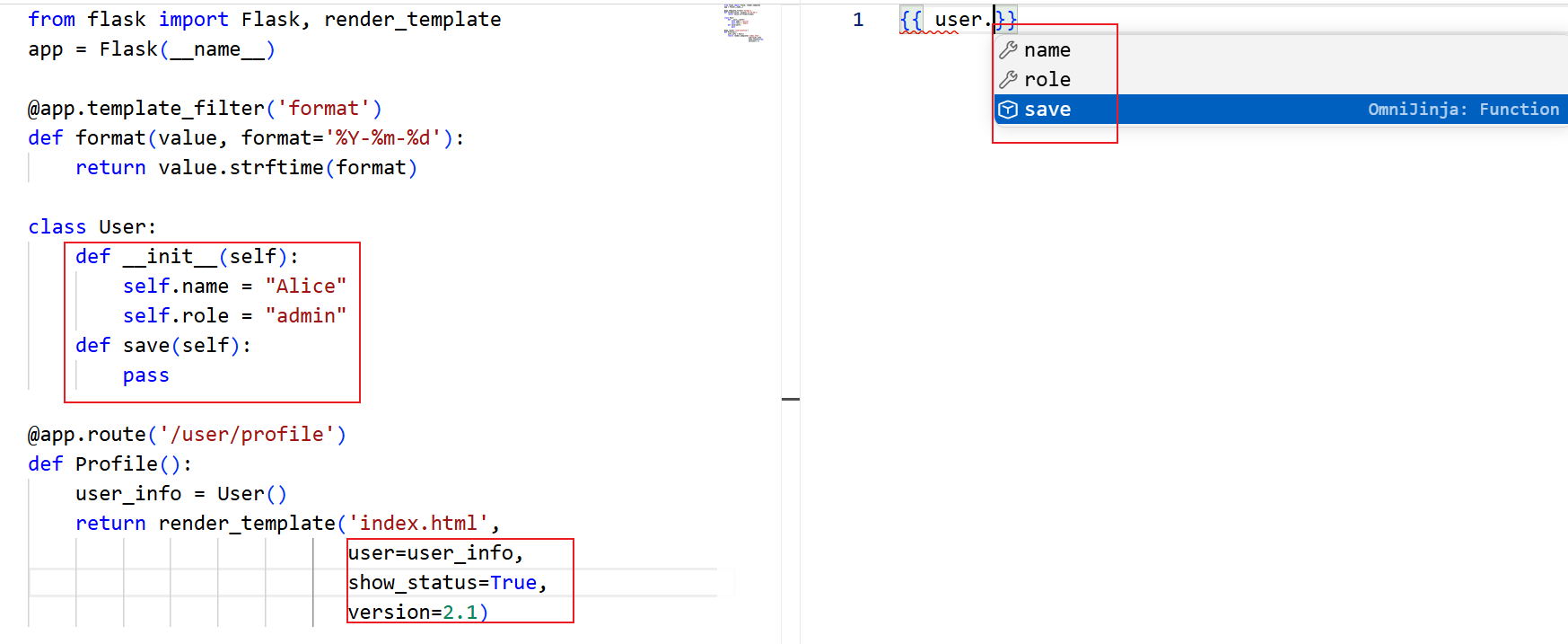
- Property completion for inferred object fields, such as
user.name or user.profile.avatar;
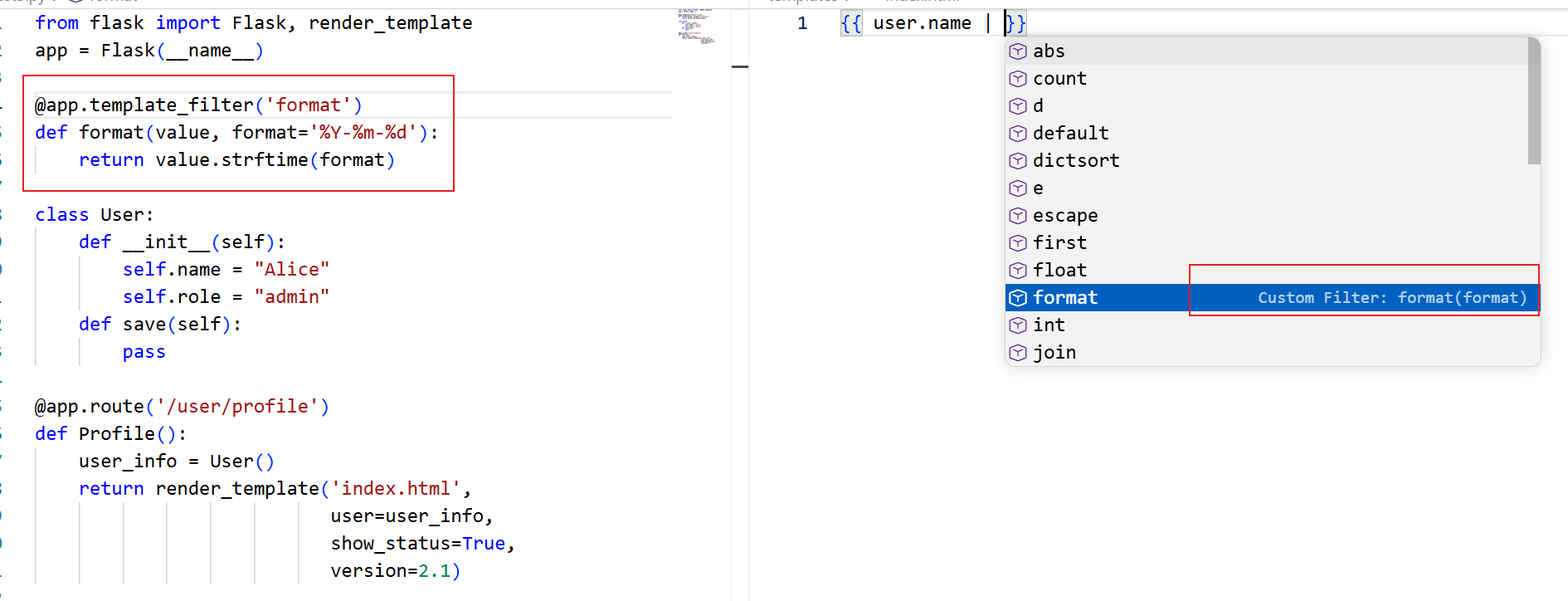
- Custom filter completion for filters registered in Python;
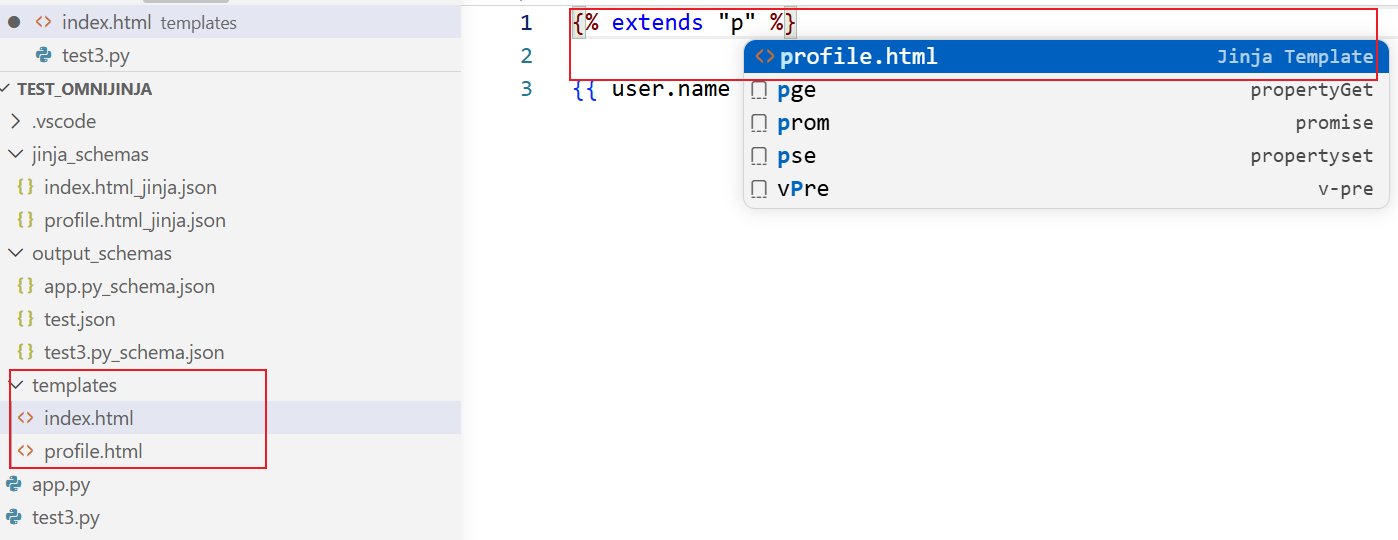
- Template path completion for
{% extends %} and {% include %};
- Hover information for Python-backed variables, properties, methods, and filters;
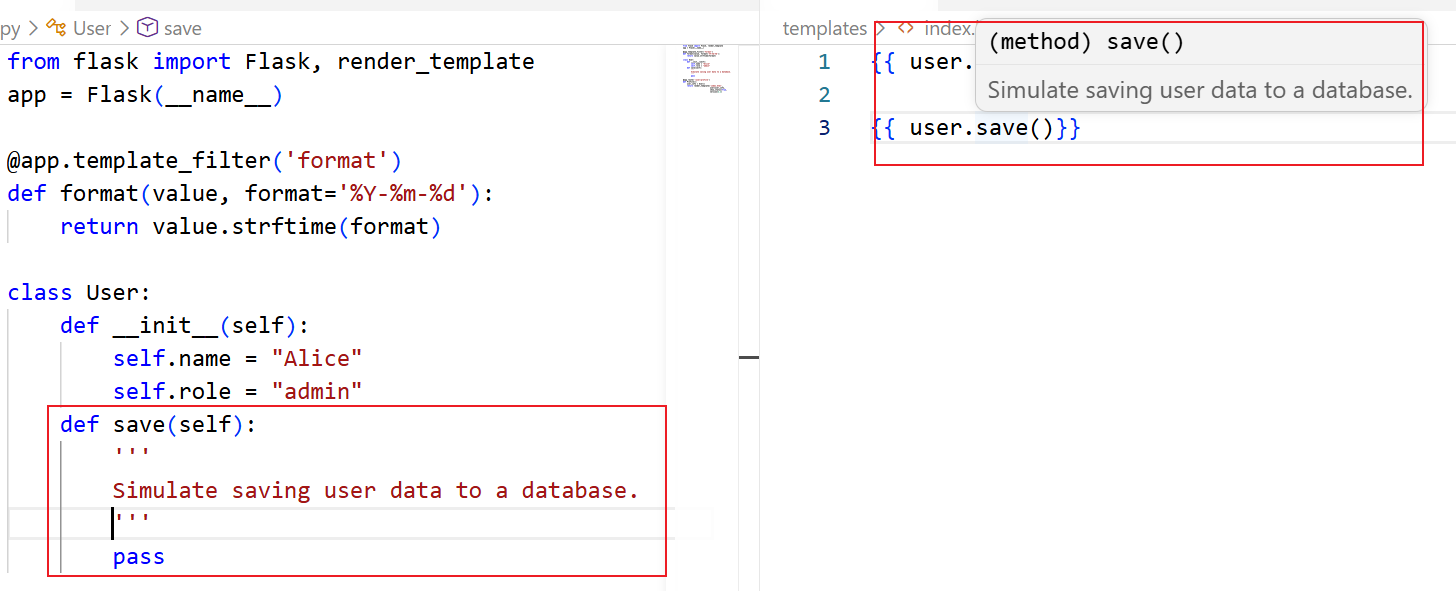
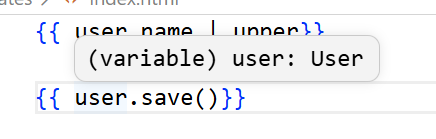
- Signature help for callable objects, methods, macros, and filters;
- Go to Definition from Jinja template usage to the corresponding Python definition when available;
- Backend-informed template diagnostics for issues such as undefined variable, missing attributes, incompatible loop targets, and unregistered filters.
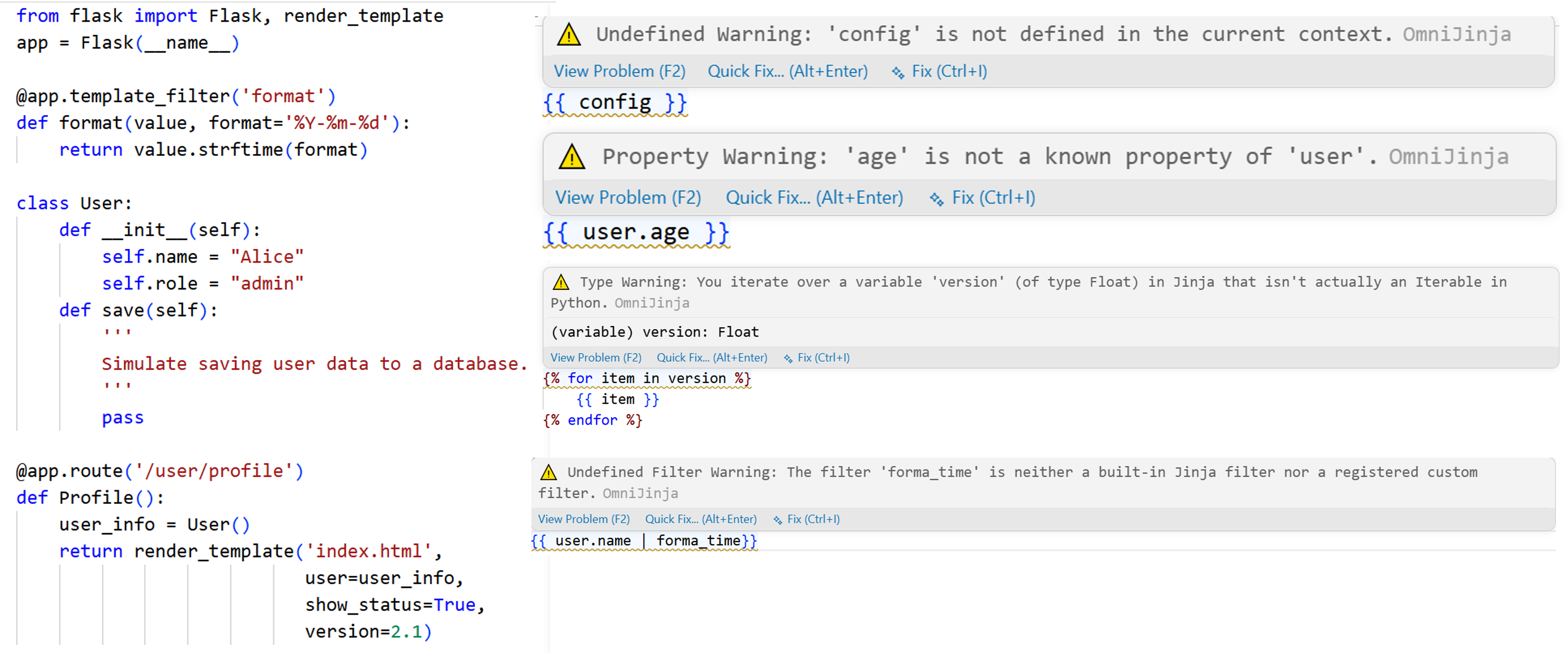
This means OmniJinja completion is not only based on Jinja syntax. It is driven by information extracted from the Python render context.
2. Template-to-Python Validation
OmniJinja also supports a template-first workflow. When a developer writes a Jinja template before completing the Python rendering code, OmniJinja extracts the data requirements of the template and checks whether the Python render context satisfies them.
For example, if a template uses:
<h1>{{ user.name }}</h1>
<p>{{ config.site_name }}</p>
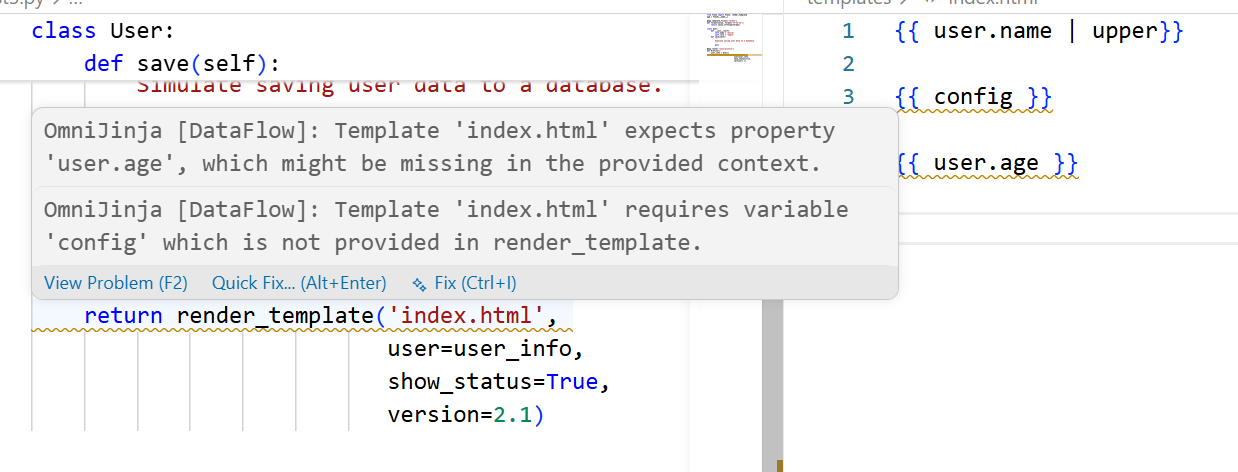
but the Python rendering call only provides user, OmniJinja can report that config is required by the template but missing from the Python render context.
Supported checks include:
- Missing render-context variables, when a template uses a variable that Python does not pass;
- Missing attributes, when a template accesses a field that is not found in the inferred Python object structure;
- Non-iterable loop targets, when a template iterates over a value that is not inferred as iterable;
- Non-callable call targets, when a template calls a value that is not inferred as callable;
- Render-site diagnostics, where missing or incompatible template requirements can be reported near the related Python rendering call.
This helps developers detect Python--Jinja data mismatches before running the application.
3. Template-local Jinja Support
OmniJinja also provides Jinja editing support that does not depend on Python backend information. These features improve local template writing, syntax checking, and repair.
Supported features include:
- Jinja syntax highlighting;
- Delimiter completion for
{{ }}, {% %}, and {# #};
- Built-in tag and filter completion;
- Tag snippet completion for common Jinja control structures;
- Macro and block support;
- Template-local variable scope handling for variables introduced by for, set, and macros;
- Jinja syntax diagnostics for specific syntax errors;
- Quick fixes for specific Jinja syntax errors;
- Local ignore actions for suppressing specific warnings during the current editing session.
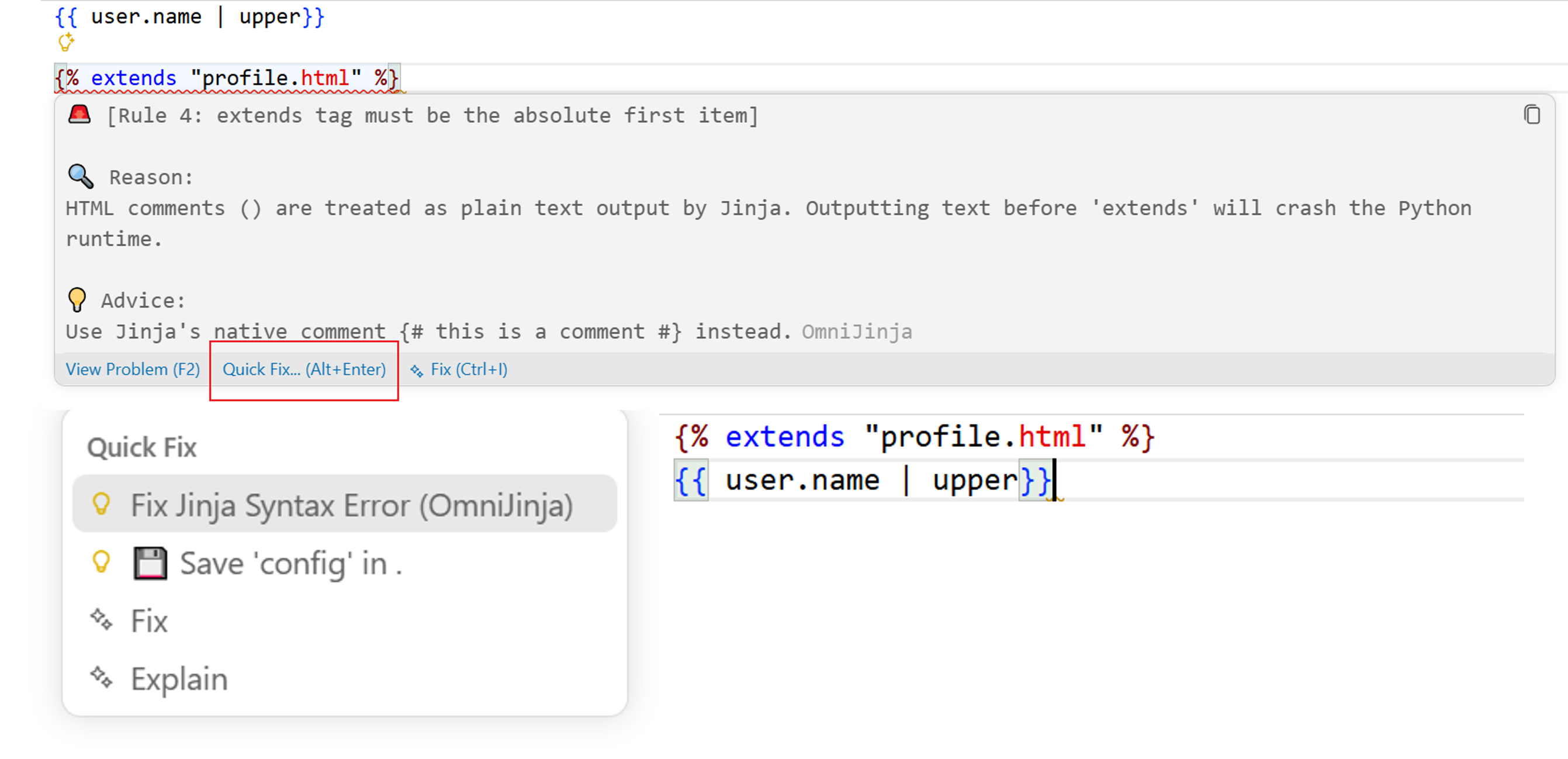
Supported Jinja Syntax Diagnostics and Fixes
OmniJinja uses a rule-based checker for common structural Jinja syntax issues.
| Rule |
Diagnostic Category |
Examples |
Quick Fix |
| Rule 1 |
Nested delimiters |
{% if {{ user }} %}, {{ {{ user }} }} |
Yes |
| Rule 2 |
Delimiter and block matching errors |
unclosed {{, mismatched {% if %} / {% endfor %}, missing {% endif %} |
Yes |
| Rule 3 |
Invalid property access syntax |
user->name, user..name, user. |
Yes |
| Rule 4 |
Incorrect extends usage |
{% extends %} not at the top, duplicate {% extends %} tags |
Yes |
| Rule 5 |
Jinja code inside HTML comments |
<!-- {{ user.name }} --> |
No |
Rule 5 is reported as a warning because Jinja code inside HTML comments may still be executed by the template engine. OmniJinja reports this pattern but does not automatically rewrite it, since the intended behavior may depend on the developer.
4. Cross-Template Dependency Tracking
OmniJinja intelligently builds an inheritance and dependency tree across your Jinja files. It fully resolves multi-file scopes, providing seamless completions and validation across boundaries.
Inheritance (extends): When a child template extends a base template, OmniJinja automatically resolves and suggests global variables (e.g., {% set %}), macros, and overridable block names defined in the parent. When writing {% block ... %} in the child template, inherited parent blocks are suggested for quick override.
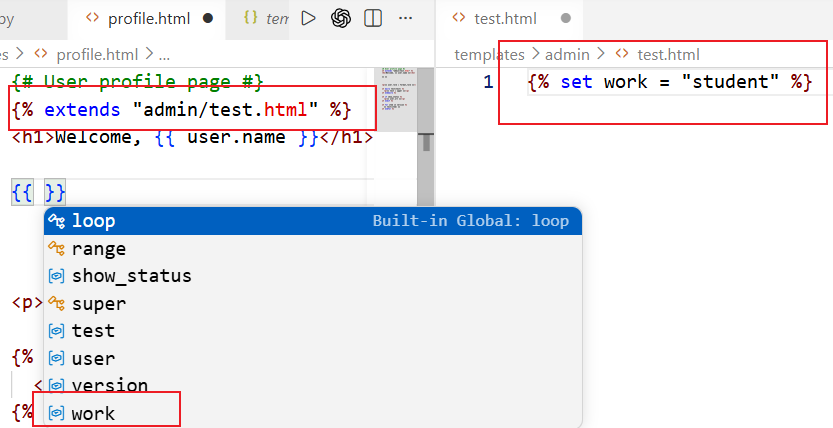
Partials (include): When a template includes a component, OmniJinja ensures that variables provided by the Python backend to the parent view are correctly recognized inside the included "orphan" component.
Modules and Namespaces (import / from ... import): OmniJinja fully supports Jinja's macro importation syntax. If you {% import 'macros.html' as ui %}, typing ui. will trigger completions for all macros and global variables exported by macros.html.
Together, these features provide both language-level Jinja support and cross-file Python--Jinja consistency checking inside VS Code.
Installation
OmniJinja is available as a VSCode extension.
You can install it in one of the following ways:
- Open VSCode.
- Go to the Extensions view.
- Search forOmniJinja.
- Click Install.
Alternatively, you can install it from the VSCode Marketplace:
OmniJinja on VSCode Marketplace
After installation, open a Python/Jinja project in VSCode.OmniJinja will activate automatically when you open supported files such as.py,.html,.jinja,.jinja2, or.j2.
Requirements
OmniJinja requires a Python environment.
The extension attempts to use one of the following commands from your system PATH:
python3
python
For best results, open VS Code at the root of your Python/Jinja project so that OmniJinja can locate Python files, template files, and template folders correctly.
Supported Files
OmniJinja activates for the following file types:
.py.html.jinja.jinja2.j2
Usage
- Open a Python/Jinja project in VS Code.
- Make sure Python is available in your system PATH.
- Open a Python file or Jinja template.
- Start editing your template.
Try the following interactions:
- type
{{ to trigger placeholder completion;
- type
. after a Python-backed variable to trigger property completion;
- type
| to trigger filter completion;
- type
{% to trigger Jinja tag completion;
- hover over a variable or filter to inspect available information;
- use
Ctrl+Click or Cmd+Click to navigate to a Python definition when available;
- check the Problems panel for Python--Jinja diagnostics;
- use the Quick Fix menu for supported Jinja syntax repairs.
Known Issues
OmniJinja uses static analysis, so some dynamic Python behavior may not be fully recovered.
Current limitations include:
- dynamically generated template paths may not always be resolved;
- attributes created through complex runtime behavior may be missed;
- diagnostics for dynamic objects may be conservative;
- very large projects may take a few seconds during the initial analysis;
- locally ignored diagnostics are currently not persisted across VS Code reloads.
Feedback and Issues
Bug reports, feature requests, and examples of unsupported Python/Jinja patterns are welcome.
When reporting an issue, please include:
- a minimal Python/Jinja example;
- the expected behavior;
- the actual behavior;
- your Python version;
- your VS Code version;
- the OmniJinja version.
License
This project is licensed under the Mulan Permissive Software License,Version2(Mulan PSL v2).
See the LICENSE file for details.
Acknowledgments
OmniJinja is built for developers who work across Python backend code and Jinja templates and want earlier feedback directly inside the editor.
Enjoy building with Jinja!

