ARXML Tree Viewer
Visualize and navigate AUTOSAR ARXML files directly inside VS Code. The extension parses the document into a tree, keeps bookmarks that survive reloads, and lets you jump between references without losing your spot.
Documentation Map
Installation
- Install the extension from the VS Code Marketplace.
- Open any
.arxml or .cdd file to activate the extension. The ARXML Tree View is available in the Activity Bar.
- Run
npm install and npm run esbuild inside the repository if you are developing the extension locally.
Features
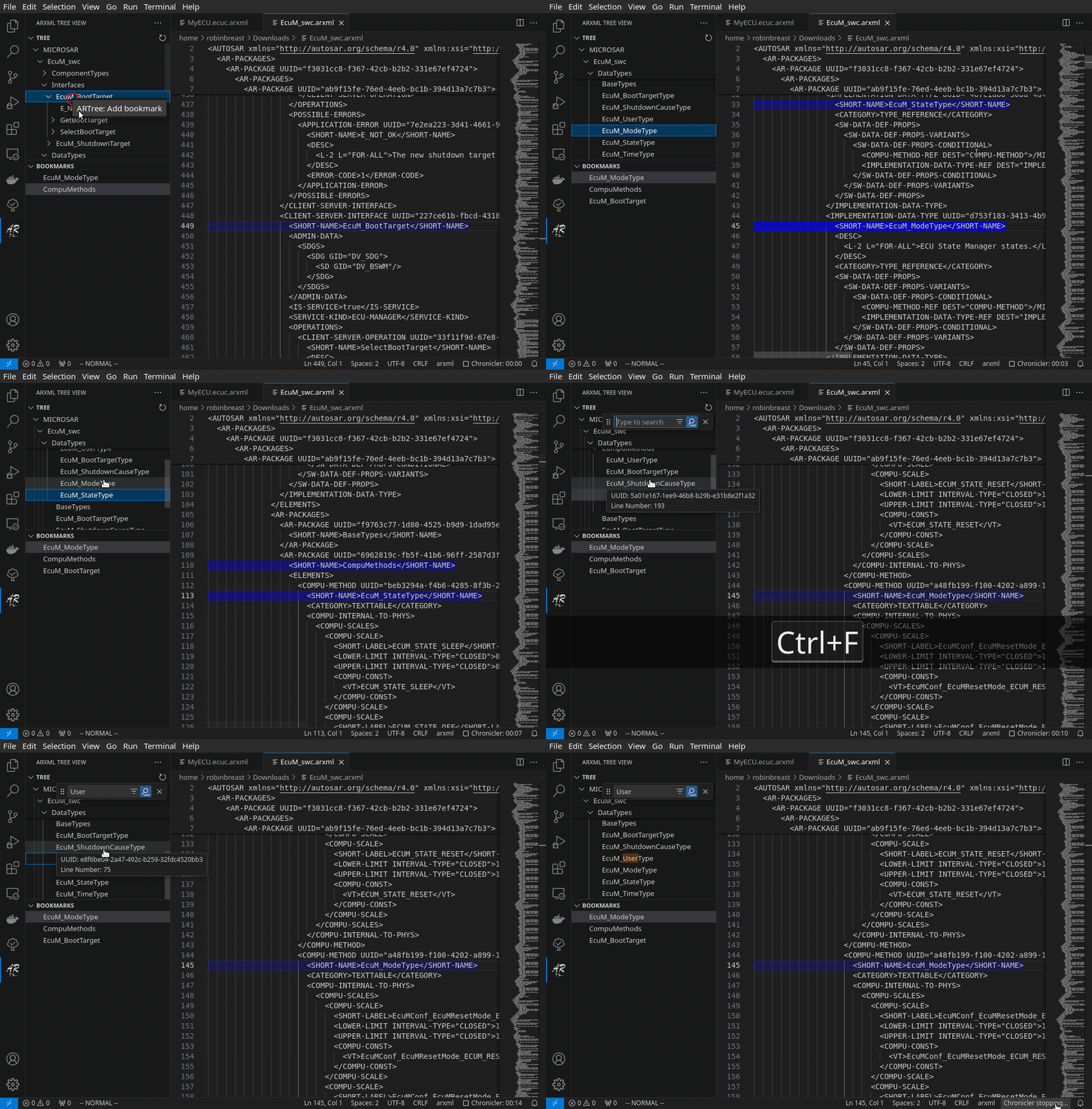
- Tree View: Streams the ARXML file with a SAX parser so nested components show up regardless of formatting. Selecting a node reveals the exact range in the editor.
- Cross-File Hover Navigation: Hovering over any
*REF DEST="..." element shows a clickable link that jumps to the matching ARPATH, even if it's in a different open ARXML file. The hover tooltip displays the target filename for cross-file references.
- Persistent Bookmarks: Add bookmarks from the tree view context menu. Entries are stored per-workspace so they survive editor reloads.
- Focus Sync: Clicking in the editor highlights and focuses the closest node in the tree, keeping both views aligned.
Usage
Tree View
Use the ARTree: Refresh command or the refresh button in the tree view title to rebuild the tree. Selecting a node reveals it in the editor, and the Focus node command keeps the tree selection in sync with your caret.
Filter Controls
Filtering is integrated directly into the ARXML Explorer view.
Filter Controls panel:
- Filter Controls header shows On/Off and toggles File Filter via the icon
- Filter fields: Name, ARPATH, Element
- Per-field modes: right-click each field to choose
Contains, Regex, or Glob
- Recent Filters: last 20 filters with quick apply, edit, and remove
Keyboard Shortcuts:
Ctrl+Shift+F (Cmd+Shift+F): Toggle filter controlsCtrl+F (Cmd+F): Toggle File Filter (when ARXML Explorer is focused)Esc: Clear active filter (when ARXML Explorer is focused)
Custom Views
Create and manage custom views to reshape the tree structure:
Managing Views:
- Select a view from View Controls → Custom Views
- Edit views via Edit Custom Views (also available from the View Controls menu)
- Toggle custom views from the View Controls header icon
Import/Export:
- ARTree: Export all custom views: Save all custom views to JSON file
- ARTree: Export selected custom views: Export specific views to JSON file
- ARTree: Import custom views: Import views from JSON file with conflict resolution
- Exported files include metadata and versioning for compatibility
Storage Options:
Bookmarks
Right-click any tree node and choose ARTree: Add bookmark. The bookmark appears in the Bookmarks tree. Use the context menu (or the command palette) to remove entries. Selecting a bookmark reveals it in the editor and tree.
Hover Links & Go-To
Move the cursor over a REF DEST="..." element to get a trusted link. The extension searches across all open ARXML files to find the target. If found in a different file, the hover shows a 📄 icon with the filename. Clicking the link executes ARTree: Goto node, which resolves the ARPATH and reveals it in the correct file, even opening the file if needed.
Commands
Use the Command Palette and search ARTree: to discover commands. The canonical manifest is in package.json under contributes.commands.
Tree Navigation:
ARTree: Refresh — rebuild the tree for the active ARXML fileARTree: Reveal in file — jump to the range represented by the selected nodeARTree: Focus node — focus the node in the tree without changing selectionARTree: Goto node — used by hover links to resolve ARPATH references
Filtering:
ARTree: Toggle Filter Controls — show/hide filter controls (Ctrl+Shift+F)ARTree: Toggle File Filter — enable/disable file filter (Ctrl+F)ARTree: Clear Filter — clear active filter (Esc)
Bookmarks:
ARTree: Add bookmark — store the node in the persistent bookmark listARTree: Remove bookmark — delete the selected bookmark
Custom Views:
Edit Custom Views — open custom views configurationARTree: Select Custom View — select a custom view from available definitionsARTree: Apply Custom View — apply a selected custom view in the integrated treeToggle Custom View — enable/disable the current custom viewARTree: Add custom view — create a new custom view definitionARTree: Remove custom view — remove a custom view definitionARTree: Apply custom view — alternate tree-view command entry (most users use ARTree: Apply Custom View)ARTree: Export all custom views — export all views to JSON fileARTree: Export selected custom views — export specific viewsARTree: Import custom views — import views from JSON file
The extension is optimized for large ARXML files:
Automatic Optimization:
- Files with 1000+ nodes automatically use optimized rendering
- Lazy loading and chunked processing for large trees
- Intelligent caching with background processing
- Debounced filter application (200ms default, configurable 100-5000ms) to prevent lag
- For very large ARXML files, workspace search/indexing can fall back to filesystem reads instead of relying only on VS Code text-document synchronization
Search Performance:
- Real-time result counting for applied filters
- Performance-optimized counting for large trees
- Background processing ensures UI remains responsive
Fine-tune refresh behavior and debouncing to match your workflow:
arxmlTree.refreshMode (default: onChange)
onChange: Tree updates on every keystroke (most responsive, higher CPU usage)onSave: Tree updates only when file is saved (lower CPU); hover and selection sync parse only the active document, so cross-file references may show stale information until savedmanual: Requires explicit refresh via ARTree: Refresh command (lowest CPU, best for very large files); hover and selection sync parse only the active document, so cross-file references may show stale information until manual refresh
arxmlTree.debounceDelay (default: 200ms, range: 100–5000ms)
- Delay in milliseconds before tree refresh is triggered
- Higher values reduce CPU usage but increase latency between edits and tree updates
- Recommended: 200–500ms for most workflows
arxmlTree.adaptiveDebounce (default: true)
- Automatically increases debounce delay for large files to maintain UI responsiveness
- Disable if you prefer consistent refresh timing regardless of file size
arxmlTree.workspaceSearchLargeFileThresholdMB (default: 50, range: 10–500)
- Size threshold used by workspace search to switch to conservative large-file mode
- Larger/equal files are parsed more conservatively (sequentially) and prefer filesystem fallback
- Lower this if you want earlier stability protections; raise it if you prefer maximum throughput
Limitations & Tips
- Cross-File Navigation: The extension can only navigate to references in currently open ARXML files. If a reference shows "Not found in open files", open the target ARXML file containing that definition.
- Very Large Files: VS Code may disable document synchronization for extremely large files. Workspace search uses a filesystem parsing fallback beyond
arxmlTree.workspaceSearchLargeFileThresholdMB (default 50MB), so you no longer need to split files just for workspace indexing/search.
- ECUC Definitions: Some AUTOSAR ECUC module definitions (like
/MICROSAR/Rte/...) may be in separate definition files. Open these files for full navigation support.
- Error Handling: The extension provides comprehensive error feedback through notifications. Look for visual indicators and retry options when operations fail.
- Parsing requires valid XML. If the document contains syntax errors the extension reports them in VS Code's notification area.
- Bookmark ranges are not updated automatically if you edit above the saved lines. Use the ARPATH link inside the bookmark tooltip to re-sync when needed.
- Large ARXML files are parsed incrementally, but frequent edits can still be expensive. Edits are debounced to avoid rebuilding the tree on every keystroke.
Contributing & Testing
The repository includes comprehensive unit and integration tests:
Test Coverage:
- Unit tests for search functionality, filters, and stores
- Integration tests for WebView messaging and custom view integration
- Parser and bookmark manager tests
Development:
- Run
npm run compile first to catch TypeScript errors early
- Run
npm run lint for code quality checks
- Run
npm test to execute all tests (pretest runs compile + lint first)
- Run
npm run esbuild for development builds
- Run
npm run vscode:prepublish for production builds
Single source of truth:
TypeScript strict checks are enabled (noImplicitReturns, noFallthroughCasesInSwitch, noUnusedParameters).
Prefix intentionally unused function parameters with _ (for example, _token) to satisfy compilation.
ESLint uses eslint.config.js (flat config, ESLint 9+) and is run via npm run lint.
Contributions are welcome—please document new commands or settings in this README and ensure tests pass.

