ADR Explorer
Browse, analyze, and tidy your Architecture Decision Records in a graph + timeline view. Two ways to run it:
npx adr-explorer — local web app, opens in your default browser. No editor required.- VS Code extension — same UI, hosted in a webview tab.
Both targets ship from the same repo and share the same UI bundle.


Install the VS Code extension: marketplace.visualstudio.com/items?itemName=reza-janm.adr-explorer
Features
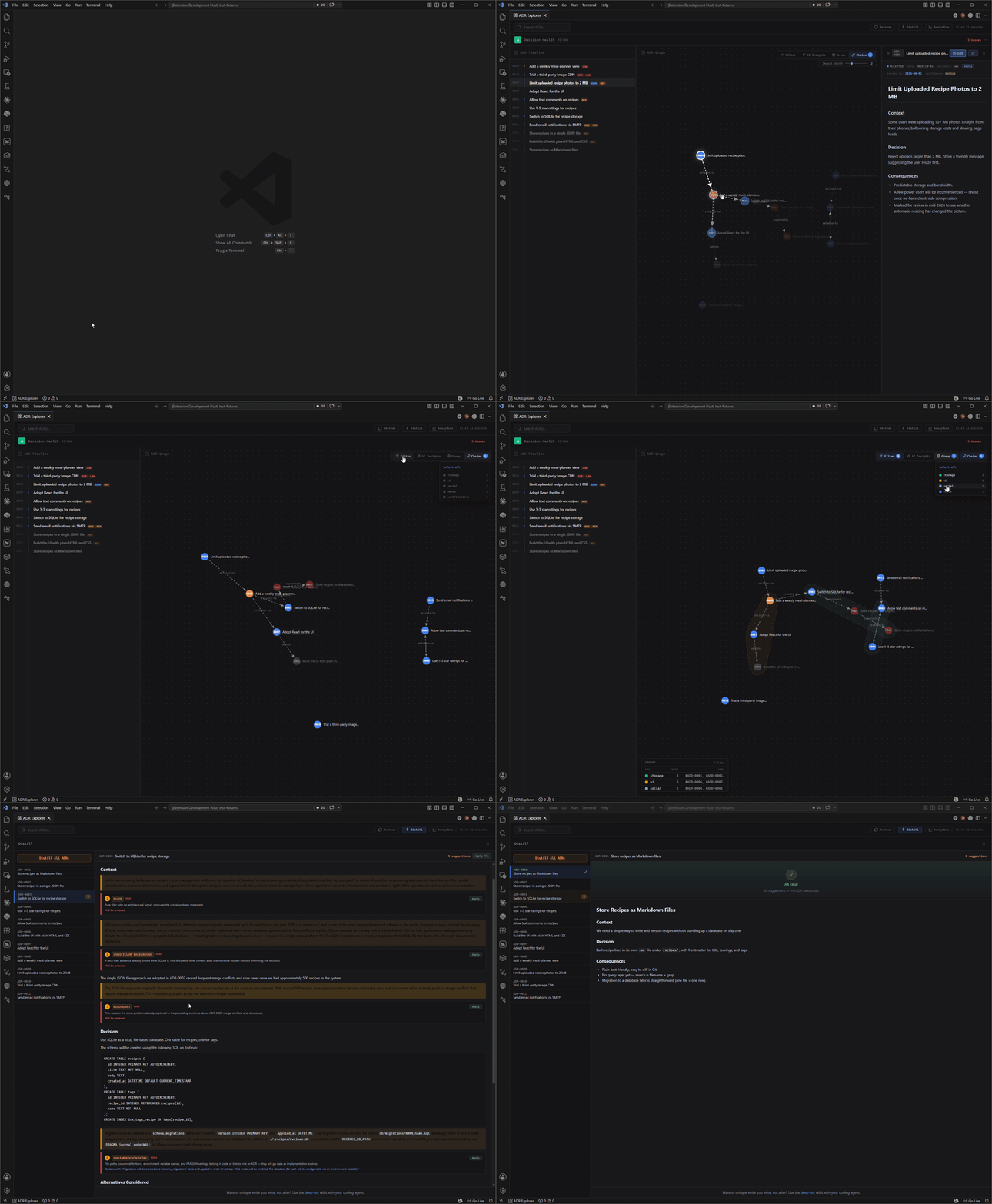
- Force-directed graph of decisions with
supersedes / amends / relates-to edges.
- Timeline panel sorted by date, with status, review, and confidence badges.
- Health dashboard — score (A–F), stale decisions, orphans, supersession chains, zombie decisions, missing deciders.
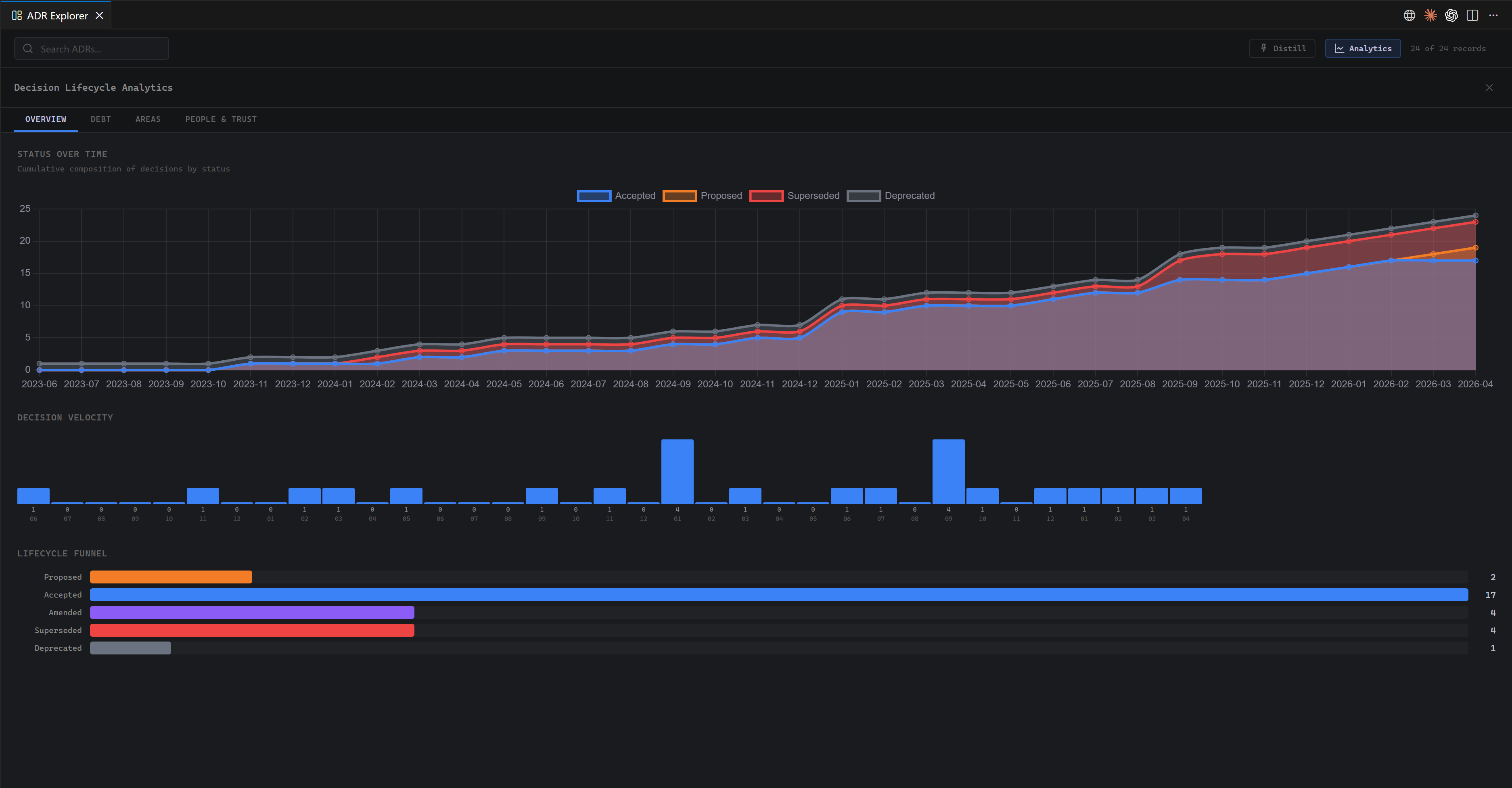
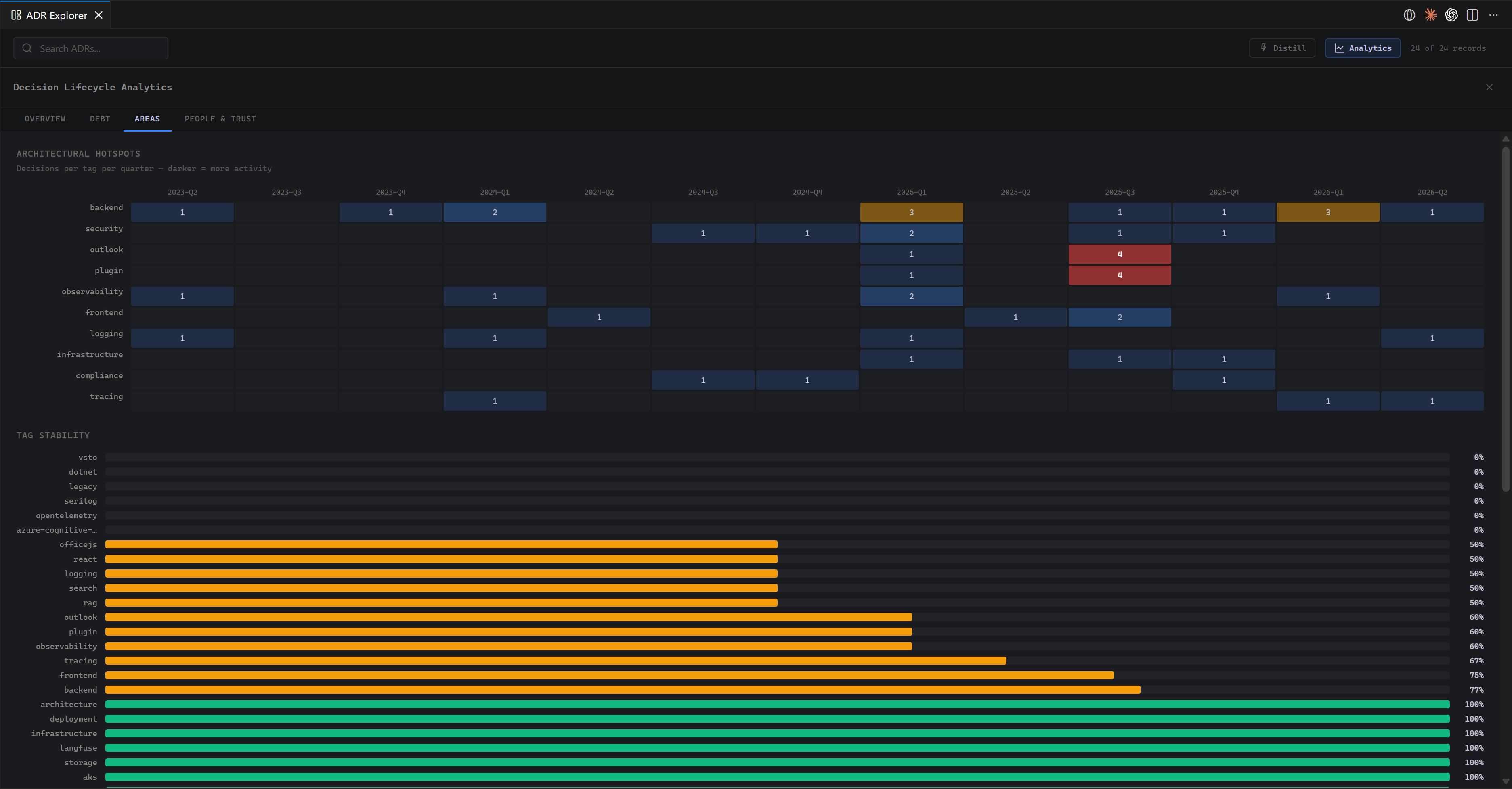
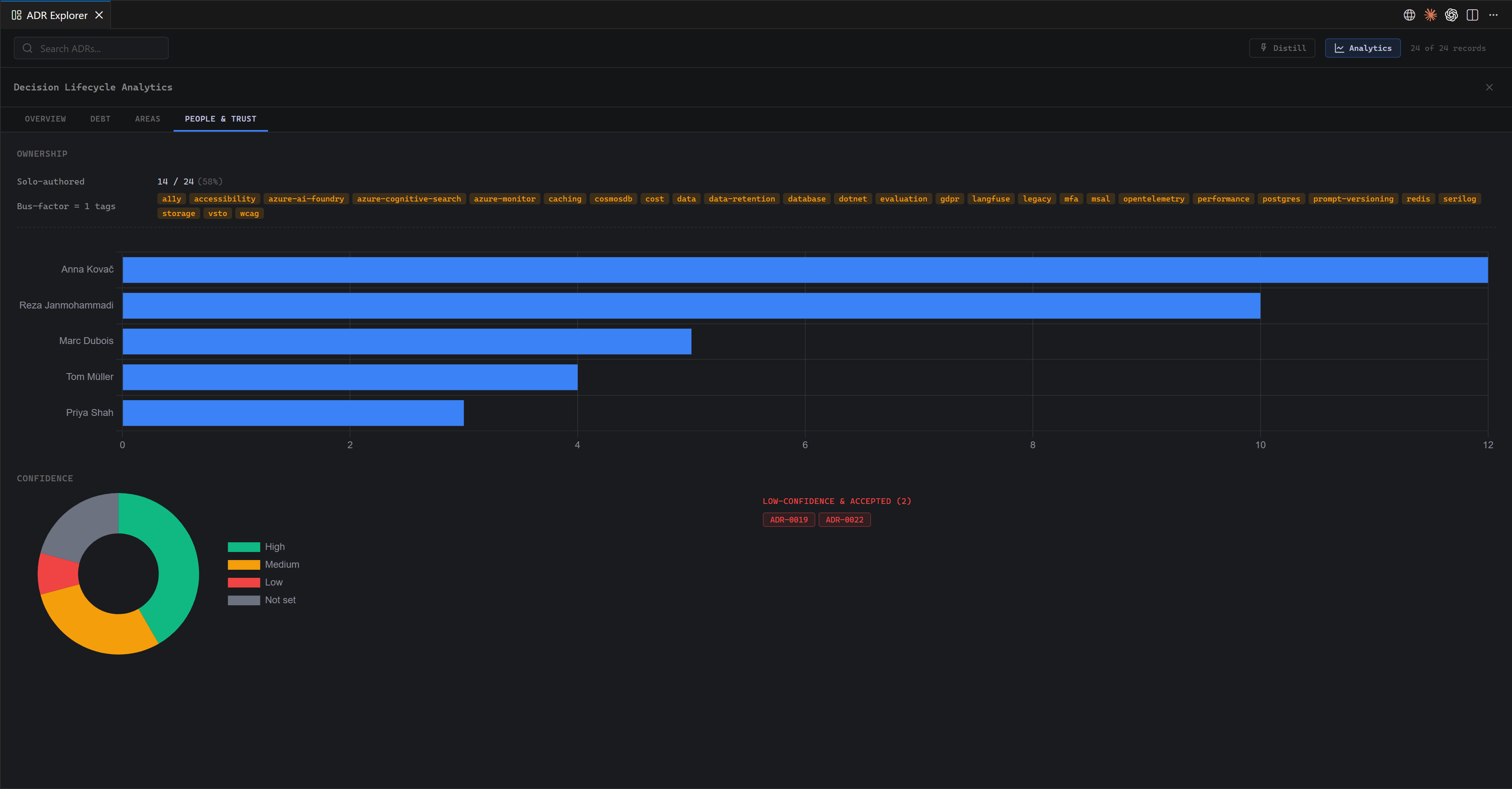
- Lifecycle analytics — velocity, status-over-time, decision debt, hotspots, ownership/bus factor, confidence distribution.
- AI Insights (opt-in) — Claude reviews the whole graph for contradictions, missing relations, and staleness.
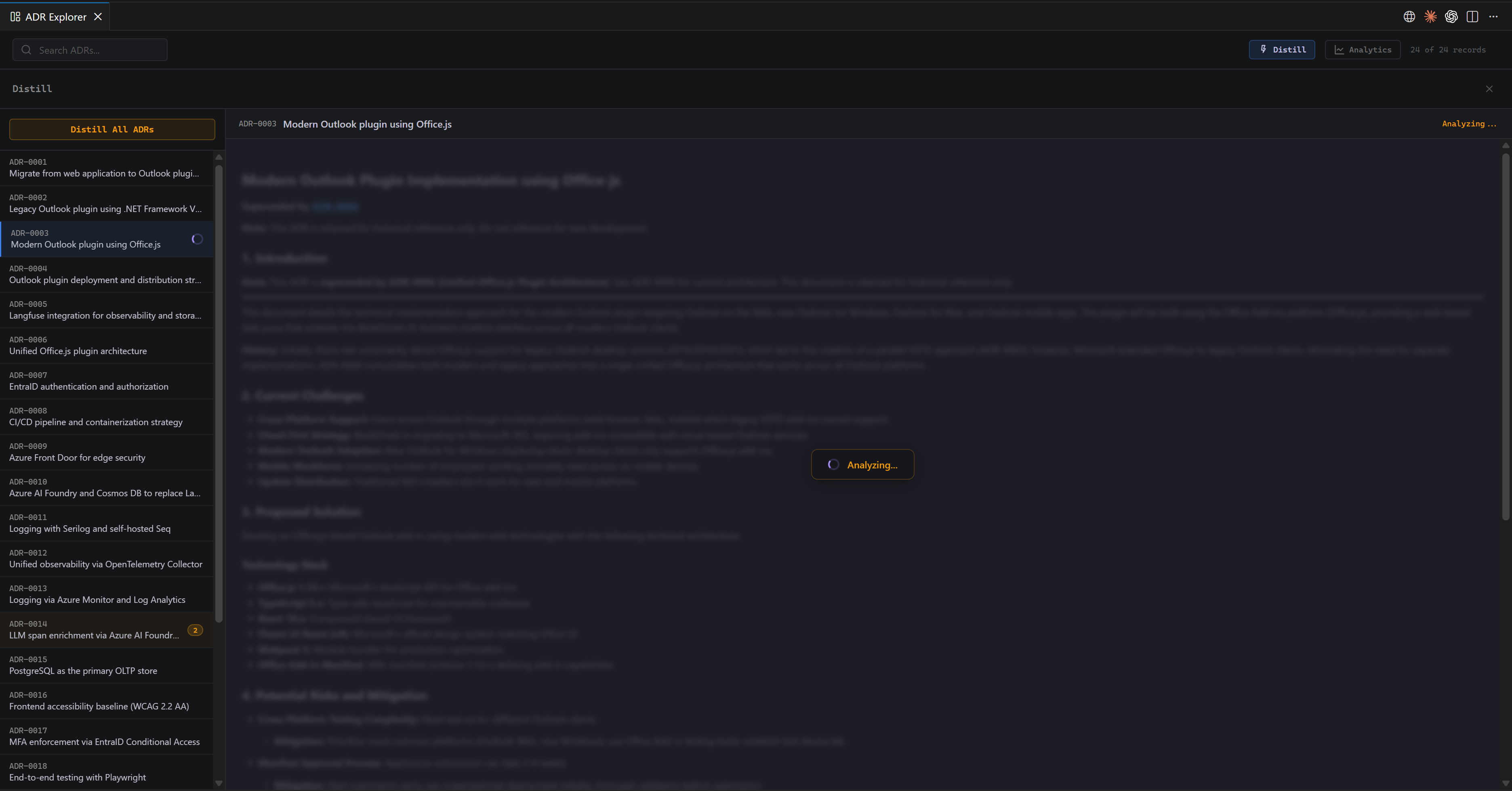
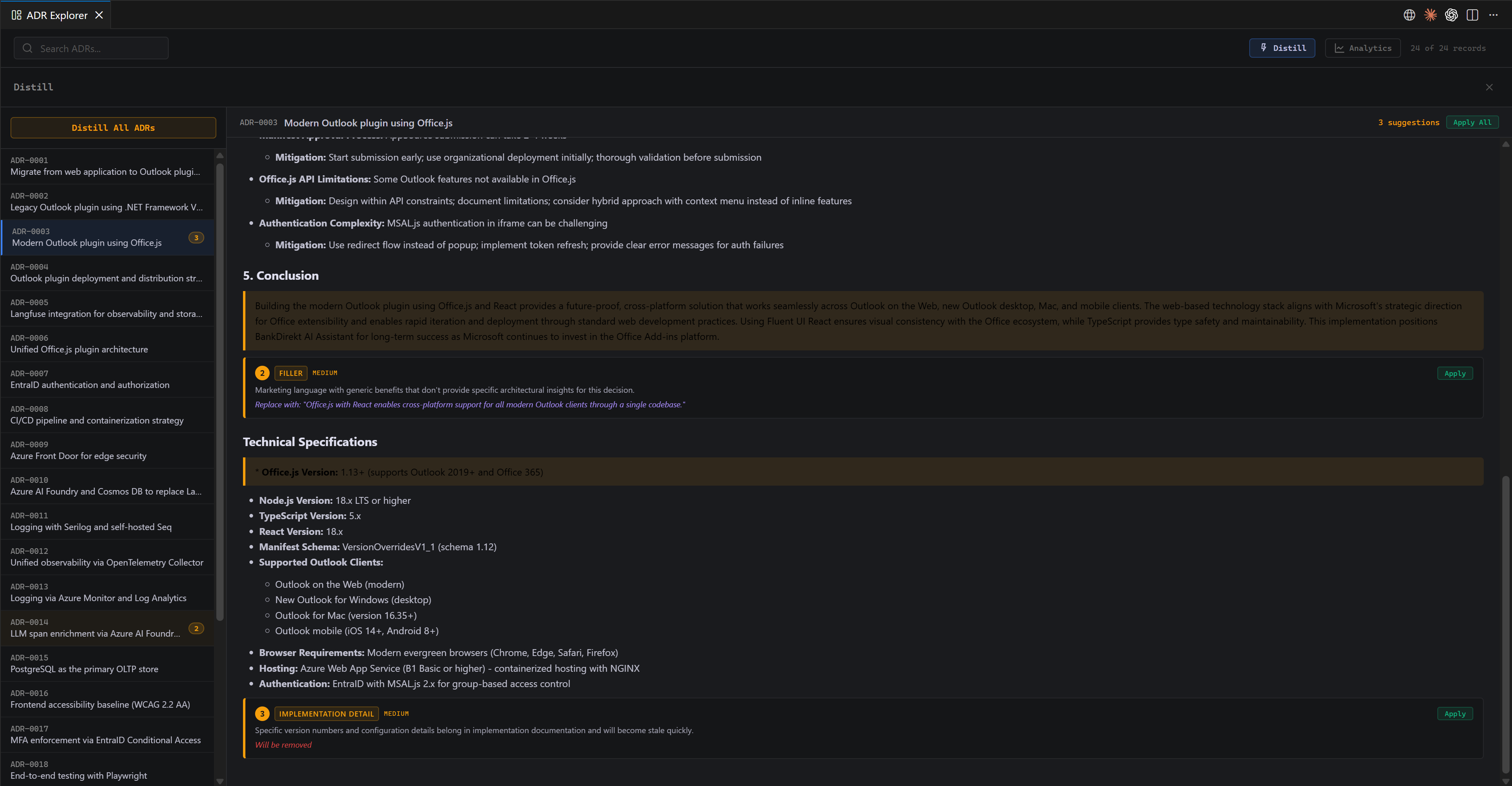
- AI Distill (opt-in) — Claude flags filler, redundant sections, and over-detailed alternatives in individual ADRs, with one-click apply.
- Live file watching — edits on disk show up immediately.
Graph view
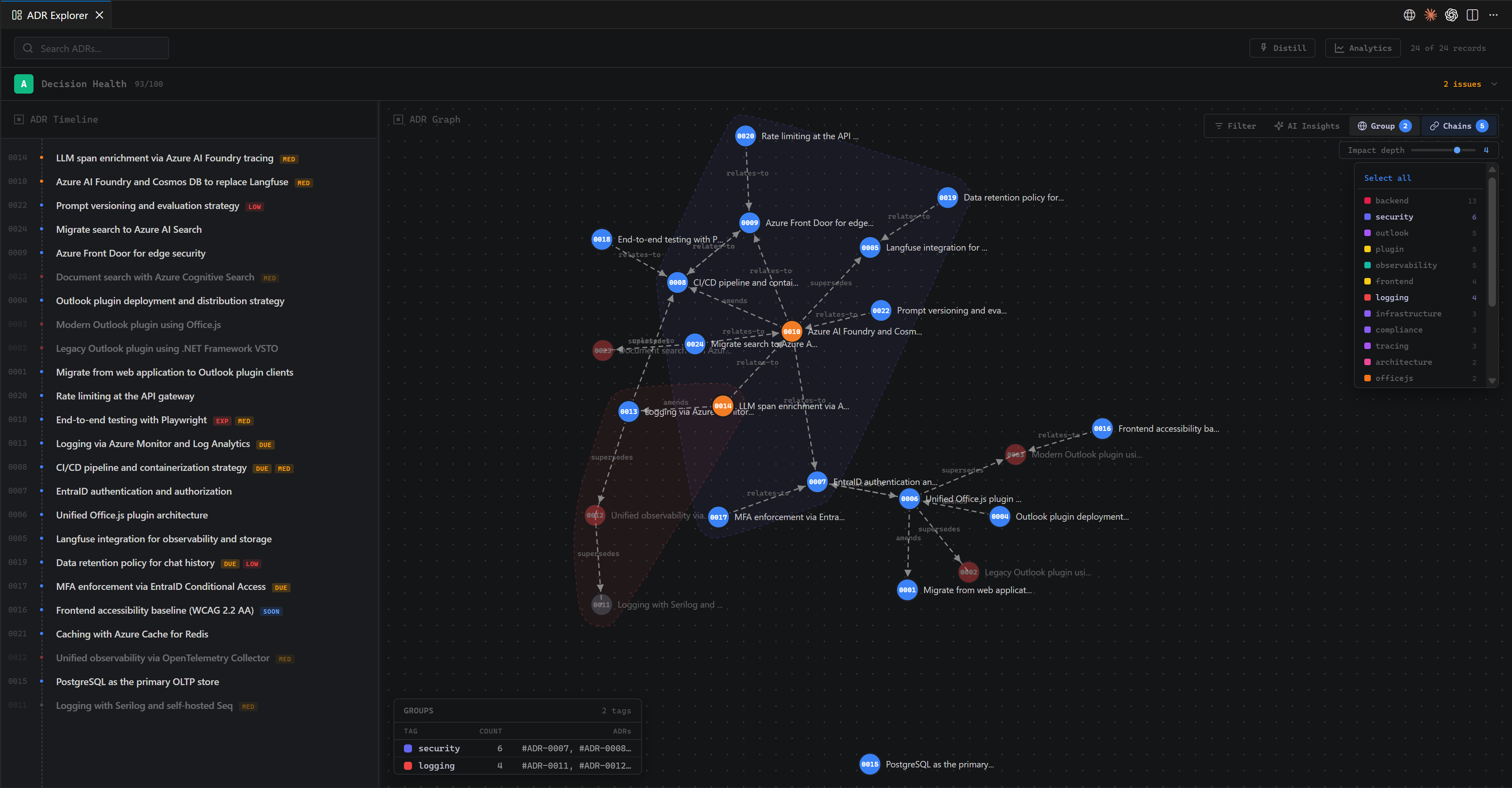
Group decisions by tag, status, or decider to see clusters at a glance:
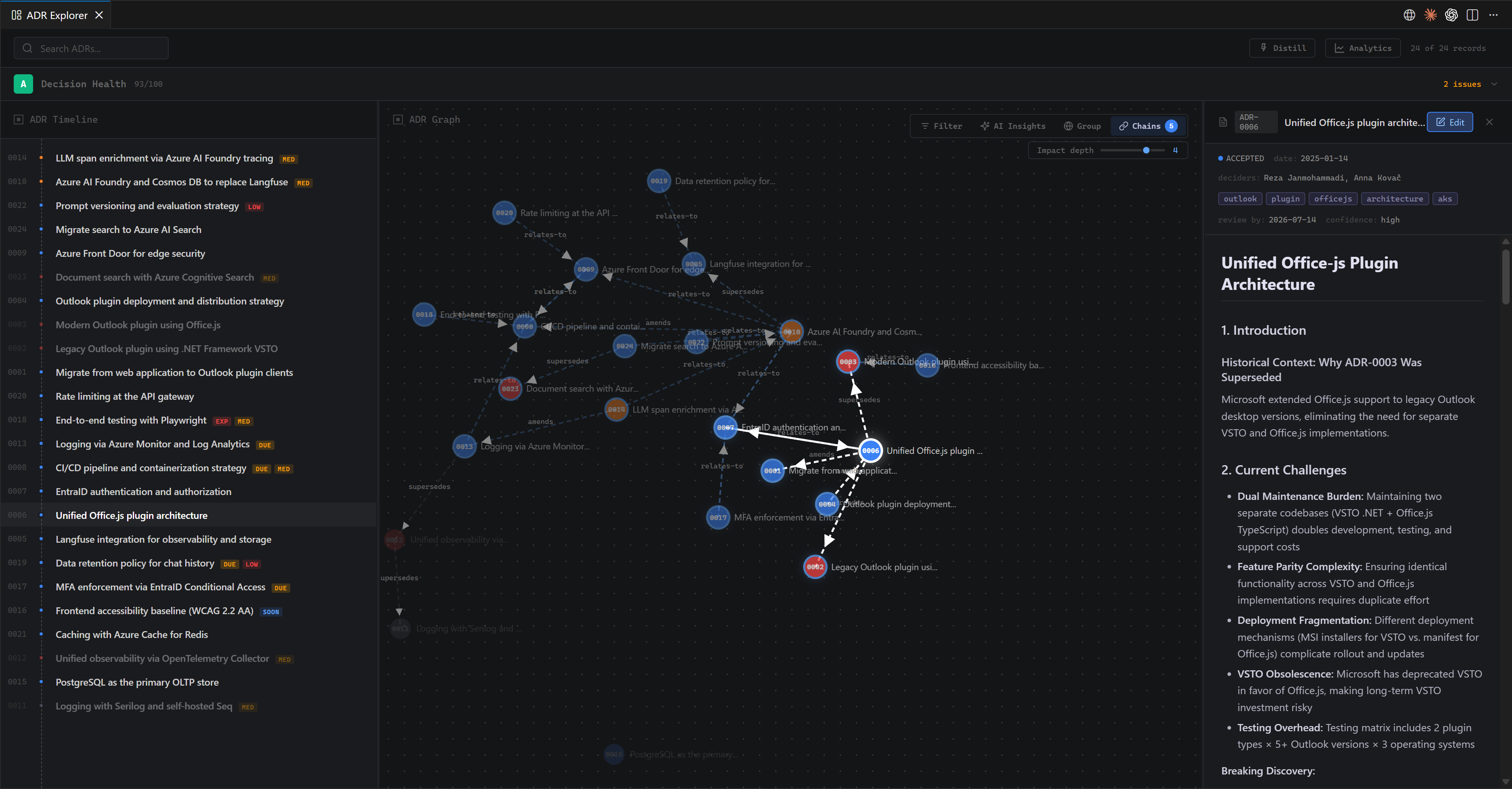
Trace supersession chains to understand how a decision evolved:
Health dashboard
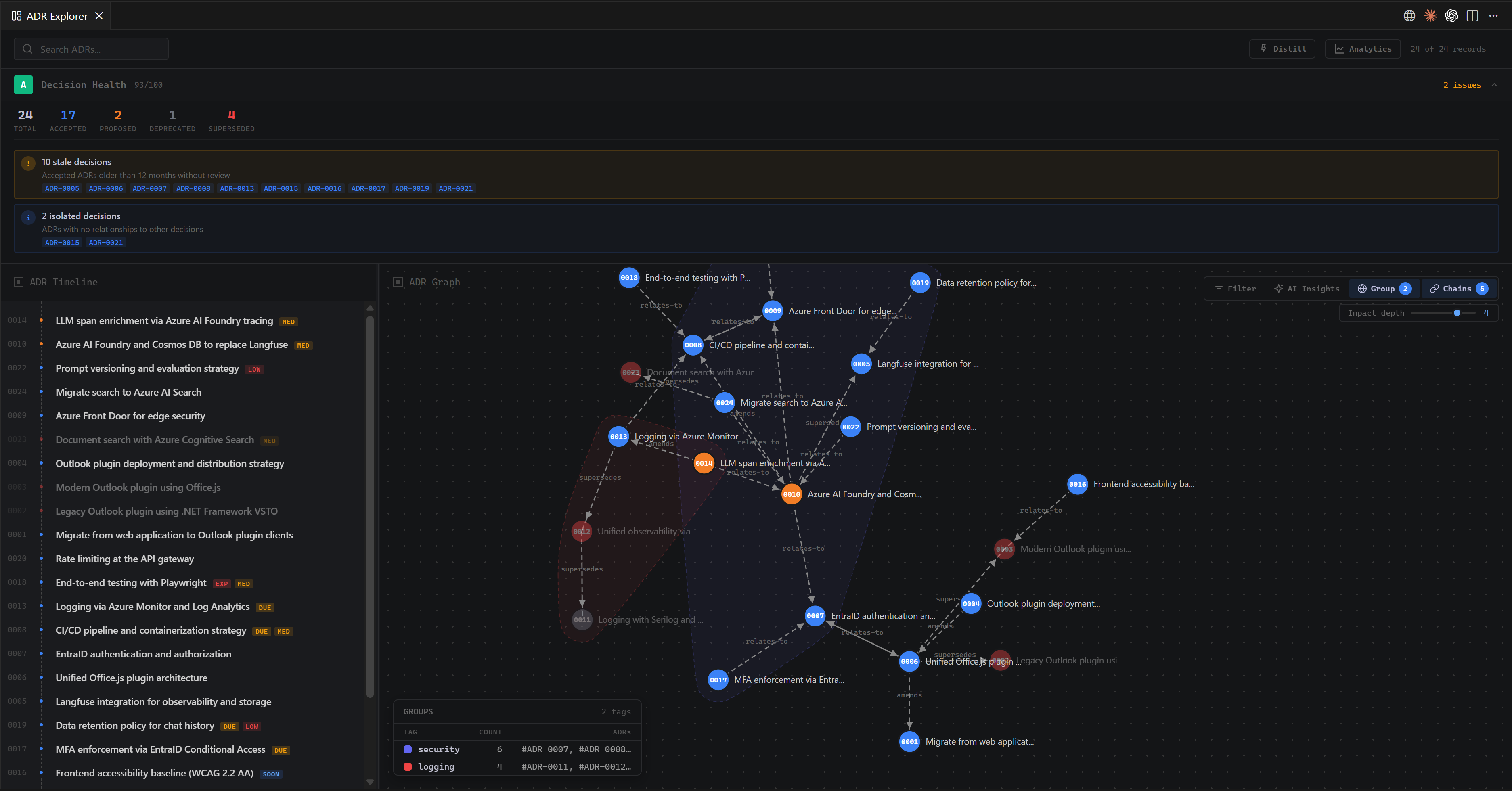
Score the corpus (A–F) and surface stale, orphan, zombie, and incomplete decisions:
Lifecycle analytics
Velocity, status-over-time, and decision debt:
Hotspots by area / tag:
Ownership and bus-factor by decider:
AI Distill
Claude flags filler and over-detail per ADR, with one-click apply:
Authoring ADRs with deep-adr
ADR Explorer reads and audits an ADR corpus. It doesn't write the decisions for you. For that, use its companion: deep-adr — four coding-agent skills (adr-discovery, draft-adr, adr-critique, c4-model) that co-think each decision with you and push back on weak reasoning. Works with Claude Code, Cursor, OpenCode, GitHub Copilot, and other agents supported by the skills CLI.
deep-adr (discover + draft + critique + C4) → *.md on disk → ADR Explorer (visualize + audit + distill)
The two cover opposite halves of the ADR lifecycle:
|
deep-adr |
ADR Explorer |
| When |
While authoring decisions |
After many exist |
| Mode |
Discover + co-author + critique + model |
Visual audit + distill |
| Surface |
Coding-agent skills (Claude Code, Cursor, Copilot, …) |
Browser / VS Code webview |
Install the skills once and they'll be available next time you ask your coding agent to discover, draft, critique, or model an ADR. See the deep-adr README for setup.
Quick start (npx, no VS Code required)
From the directory containing your ADRs:
npx adr-explorer
That's it. A browser tab opens at http://127.0.0.1:<port>/?token=… showing the explorer.
By default, ADRs are discovered in any folder named adr/, adrs/, or decisions/, at any depth. That covers the common conventions:
**/adr/*.md, **/adrs/*.md**/decisions/*.md- nested variants like
docs/adr/*.md, doc/adr/*.md, and docs/architecture/decisions/*.md
ADR files must be named with a leading number (e.g. 0001-title.md); other markdown is ignored.
If your folder is named something else (e.g. architecture-decisions/), add it with --glob instead of moving files. --glob is repeatable and accepts a bare folder name, a folder glob, or a full file glob:
npx adr-explorer --glob architecture-decisions --glob "team/decisions/**"
You can also point --root at a specific directory to scan:
npx adr-explorer --root path/to/decisions
Don't know where they are, or nothing showed up? When no ADRs are found, the No ADRs found yet screen shows which folder is being scanned and lets you add more — Browse… to pick a folder (a native dialog in VS Code, an in-app folder browser in the CLI) or just type one. Changes apply and rescan instantly, no restart needed. In the CLI this lasts for the session; in the VS Code extension it's saved to the adrExplorer.folders setting.
Enabling AI features
Distill and Insights require an Anthropic API key (BYOK — calls go directly from your machine to Anthropic, nothing else sees them):
export ANTHROPIC_API_KEY=sk-ant-...
npx adr-explorer --with-ai
Without --with-ai, the AI buttons are hidden and the tool runs as a viewer/analyzer.
CLI flags
| Flag |
Default |
Effect |
--root <dir> |
cwd |
Directory to scan for ADRs |
--glob <pattern> |
— |
Extra folder/glob to scan beyond the built-in conventions. Repeatable |
--with-ai |
off |
Enable Distill + Insights (requires ANTHROPIC_API_KEY) |
--read-only |
off |
Suggestions are visible but Apply is disabled — files cannot be modified |
--port <n> |
random |
Bind to a specific port |
--host <addr> |
127.0.0.1 |
Bind address. Don't set this to 0.0.0.0 on untrusted networks |
--no-open |
opens |
Don't auto-open the browser; just print the URL |
--help, -h |
— |
Show help |
--version, -v |
— |
Print package version |
Security model
- Bound to
127.0.0.1 by default.
- A random per-session bearer token gates both HTTP and WebSocket; the URL printed in the terminal contains it.
- Apply Distill writes to local files via Node
fs. Pass --read-only to disable that path entirely.
Quick start (VS Code extension)
- Install the extension from the VS Code Marketplace (or
vsce package + install locally).
- Open a folder containing ADRs.
- Click the ADR Explorer icon in the Activity Bar (left sidebar) and hit Open ADR Explorer, or run
ADR Explorer: Open from the command palette.
The VS Code path uses the GitHub Copilot Language Model API (Claude via Copilot), so no API key is needed if you have Copilot. The npx path uses the Anthropic API directly.
If your ADRs live in a folder the built-in conventions don't cover, add it via the adrExplorer.folders setting (Settings → search "ADR Explorer", or settings.json). Each entry can be a bare folder name, a folder glob, or a full file glob, and changes apply live (no reload needed). You can also add folders from the explorer's empty-state screen, which writes back to this same setting:
"adrExplorer.folders": ["architecture-decisions", "team/decisions/**"]
Standard markdown with YAML frontmatter. Filenames must start with a number (e.g. 0001-use-rest-for-public-api.md).
---
title: "Use REST for the public API"
status: accepted          # proposed | accepted | deprecated | superseded
date: 2025-01-15
deciders: ["Alice", "Bob"]
supersedes: []            # list of ADR numbers/IDs
amends: []
relates-to:
  - id: 0003
    reason: "Builds on the auth model"
tags: ["api", "backend"]
review-by: 2026-01-15     # optional
expires: 2027-01-15       # optional
confidence: high          # optional: high | medium | low
---

# Use REST for the public API

## Context
...

## Decision
...

## Consequences
...
The frontmatter parser is lenient — only status defaults to proposed if missing or invalid, and date defaults to today. ADR IDs are derived from the leading number in the filename and zero-padded to 4 digits (ADR-0001).
Development
git clone https://github.com/janmohammadi/adr-explorer
cd adr-vs-code
npm install
npm run build           # produces dist/{extension,explorer,cli,host-shim}.js
npm run watch           # rebuild on change
npm run lint            # tsc --noEmit
node dist/cli.js --root test-fixtures   # smoke test the CLI
Repo layout
src/
  core/              # host-neutral: types, parser, repository, analyzers, message router, interfaces
  adapters/
    vscode/          # vscode.lm / Webview / DiagnosticCollection bindings
    node/            # @anthropic-ai/sdk + ws + chokidar + fast-glob bindings
  cli/               # CLI entry, Express + ws server, browser launcher
media/explorer/      # webview UI (D3 force graph, charts, panels)
dist/                # bundled output (extension.js, explorer.js, cli.js, host-shim.js)
test/                # validator tests
test-fixtures/       # example ADRs used for smoke tests
The core/ layer has zero vscode imports and runs identically inside the extension and the CLI. The two adapters/* directories implement three interfaces — LMProvider, AdrFileSystem, Host — that the message router consumes.
Building both targets
esbuild.js produces four bundles in one pass:
| Bundle |
Source |
Target |
dist/extension.js |
src/adapters/vscode/extension.ts |
Node CJS, vscode external |
dist/cli.js |
src/cli/index.ts |
Node CJS, shebang, vscode external |
dist/explorer.js |
media/explorer/explorer.js |
Browser IIFE |
dist/host-shim.js |
media/explorer/host-shim.js |
Browser IIFE (CLI lane only) |
License
MIT — see LICENSE.

