CloakCode — drive GitHub Copilot from your phone
Watch, unblock, and steer your GitHub Copilot chat sessions from a phone (or another
machine) — with zero code-sync to GitHub. Your code never leaves your machine; CloakCode adds
no new egress — it mirrors Copilot's own transcript and relays your prompts to your devices, and
never logs secrets or raw code.
|
|
|
 |
 |
 |
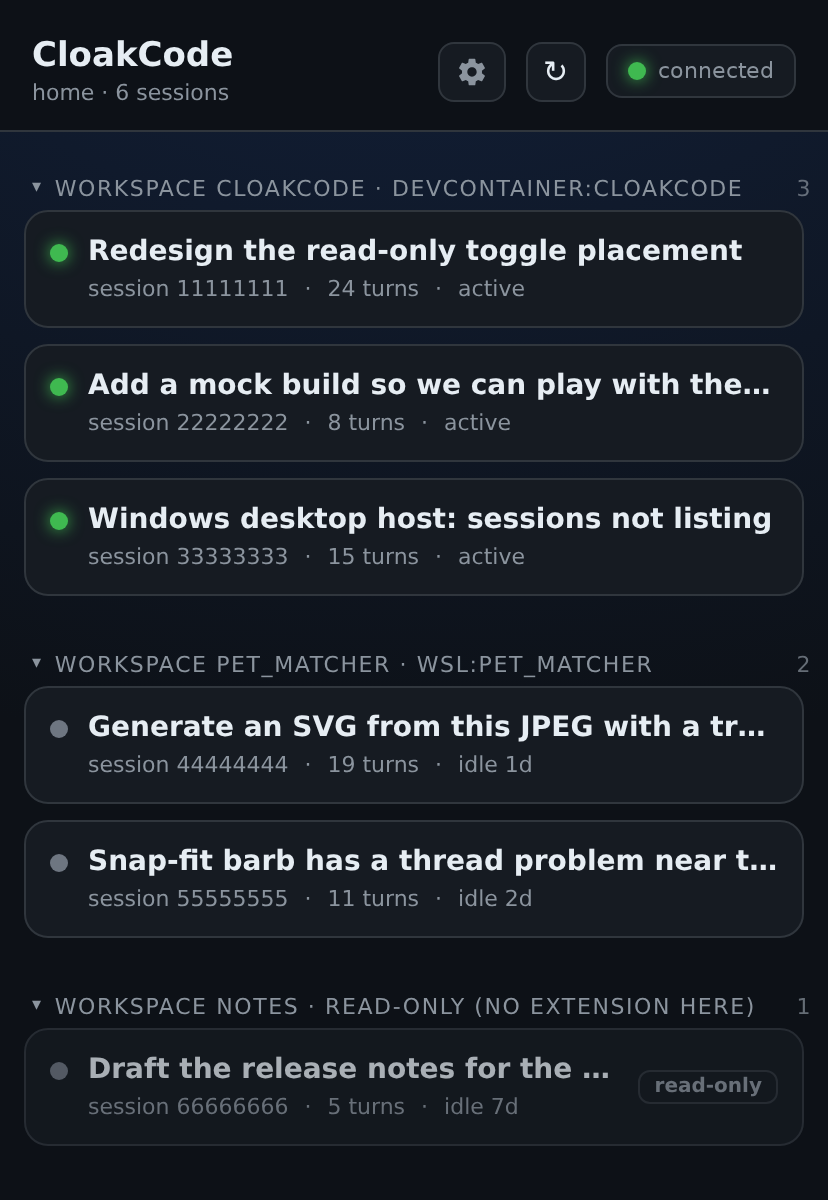
| Every session, every machine — dev container, WSL and host in one list, grouped by workspace, live/idle at a glance. |
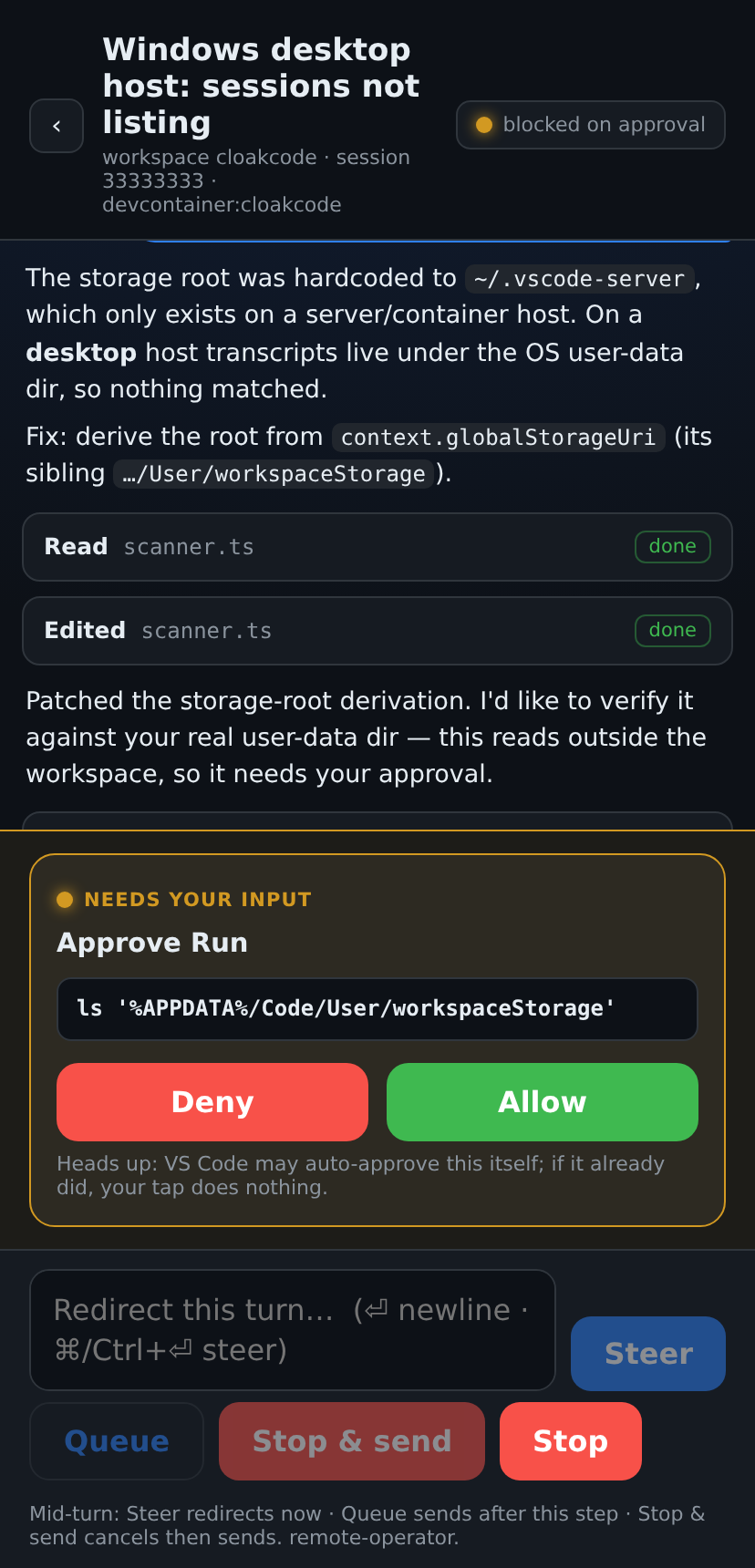
Approve a held tool call — the agent is paused on a command; allow or deny it from the phone and the run continues. |
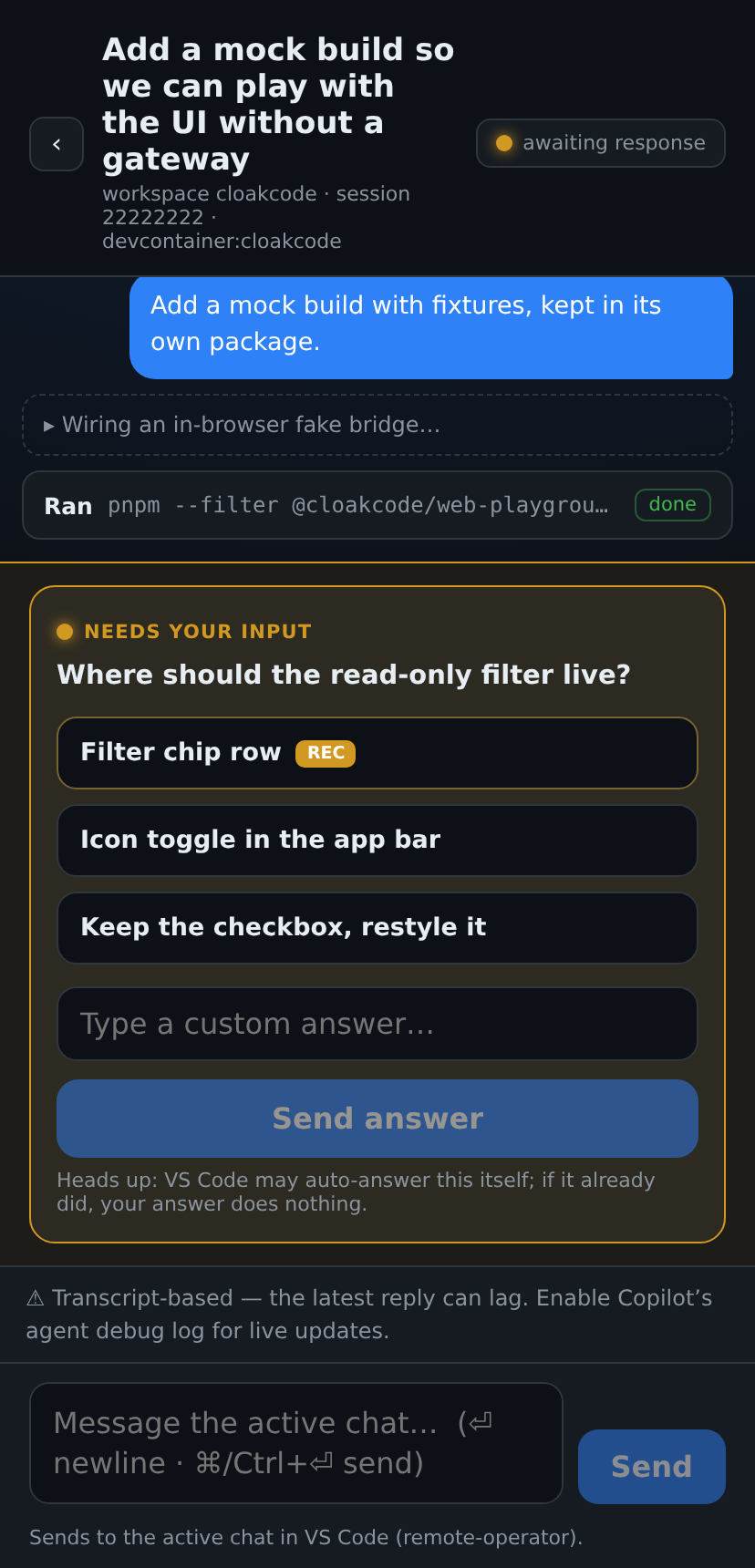
Answer a blocker — the multiple-choice question Copilot asked, rendered richly, with a free-text option. |
Why this exists, in prose:
Your Copilot agent is waiting for you — and you're not at your desk.
The problem
You kick off a long Copilot agent task in VS Code, then step away from your desk. Minutes
later Copilot is blocked — waiting on a question or a tool-call approval — and it just
sits idle until you're back. The existing remote options don't cover it either: the Copilot
web/CLI flows don't help when the repo isn't on GitHub, when you use your own models,
or when the session is already running in your editor.
What CloakCode does
CloakCode mirrors your existing VS Code Copilot chat to a phone-first web app, so you can:
- See your live sessions and transcripts, and get notified the moment one is blocked.
- Answer a question or steer the agent with a new message.
- Stop a running turn, or queue the next instruction.
- Approve / deny a tool call from your phone.
…all while you keep using VS Code's own Copilot UI at your desk — pick up on the phone, drop
back to the desktop, no context lost.
How it works
- A tiny bridge runs inside VS Code (bound to
127.0.0.1) and serves a phone-friendly PWA.
- It mirrors your Copilot transcript and detects blockers (an interactive tool call awaiting
input); your replies are relayed back into the session.
- Your phone reaches it over your own private tunnel — never through GitHub.
- Zero code-sync: CloakCode adds no path that uploads your workspace anywhere. The mirror and
your replies cross only localhost and your authenticated tunnel.
Which setup do I need?
CloakCode runs in one of two shapes. Start at the top row and stop at the first one that
matches you.
| Your situation |
Shape |
What to set |
| Just trying it, phone on the same machine / Codespaces |
Embedded |
Nothing. Run Show Phone Link. |
| One VS Code window, phone anywhere |
Embedded + tunnel |
cloakcode.tunnel: devtunnel, then Set Up Phone Tunnel. |
| Several windows or machines behind one phone URL |
Standalone gateway |
Run the gateway, paste its pairing URL into cloakcode.gatewayUrl. |
You already have Tailscale / WireGuard / ssh -L |
Either, no Dev Tunnel |
Leave cloakcode.tunnel: off and set CLOAKCODE_PUBLIC_URL to your own address. |
Embedded is the default and needs zero configuration; reach for the gateway only when you want
one endpoint in front of several windows. Full network/deployment detail — dev containers, WSL,
firewall lockdown — lives in docs/07 — Deployment.
Get started — local / same machine (no tunnel)
- Install the extension and reload VS Code.
- Run CloakCode: Show Phone Link from the Command Palette.
- In Codespaces / a remote, this gives a URL your phone can open directly (VS Code
forwards it for you).
- In local VS Code, the URL is loopback (
127.0.0.1) — great on the same machine, but a
phone can't reach it. Add a tunnel for phone access (next section).
Open the link (or scan the QR) and you'll see your live Copilot sessions.
Get started — phone access via a private Dev Tunnel
To reach your sessions from a phone off your network, CloakCode can host a private Microsoft
Dev Tunnel for you — sign-in required to open the link, never anonymous:
Install the devtunnel CLI once → https://aka.ms/DevTunnelCliInstall
Enable it — either accept the one-time "Enable Dev Tunnel?" prompt on first activation, or
set it yourself:
"cloakcode.tunnel": "devtunnel"
Run CloakCode: Set Up Phone Tunnel. If you're not signed in, CloakCode opens a terminal and
runs devtunnel user login for you (choose GitHub or Microsoft — device-code is offered for
containers/remotes). Finish in the terminal, then click Set Up Phone Tunnel again.
Run CloakCode: Show Phone Link and scan the QR on your phone.
Enabling the setting is all it takes — CloakCode drives the CLI-install prompt and the login for
you. Prefer your own tunnel? Set the CLOAKCODE_PUBLIC_URL environment variable to its URL and
CloakCode uses that instead.
This setup command is for the embedded bridge. If the extension connects to a
Docker gateway, enable and sign in to the tunnel in the gateway container instead;
the gateway image bundles the CLI. See
gateway Docker setup.
When embedded tunnel setup fails, check Output → CloakCode for
tunnel.cli: it reports the executable found on the extension host's PATH,
or that none was found. The terminal's PATH can differ from the extension host's;
the log does not print the whole PATH or any login tokens.
Live blocker overlay (optional)
CloakCode installs a small Copilot notifier hook (a single per-environment file) so your phone
sees a pending tool call the instant it appears. The hook only notifies — it never approves or
denies anything. It's on by default (cloakcode.installHook); turn it off to manage it yourself.
Settings
Every setting is listed here. All are also documented inline in the Settings UI (search
CloakCode). The gateway/auth ones are machine-scoped on purpose: opening someone else's
repo must never redirect your extension at their gateway.
| Setting |
Default |
What it does |
cloakcode.tunnel |
off |
off = VS Code's automatic forwarding; devtunnel = host a private Dev Tunnel and get a phone URL automatically. |
cloakcode.gatewayUrl |
(empty) |
Connect to a standalone gateway instead of hosting in-editor. Paste the pairing URL it prints — for a self-signed wss:// gateway that URL also carries its certificate pin as a #fp=… fragment. Empty = embedded. |
cloakcode.embeddedBridge |
true |
Host CloakCode's own bridge + PWA when there is no gateway to use (none configured, or the configured one is unreachable). Turn off to make the window strictly gateway-only — it then starts nothing instead of quietly serving a second hub. |
cloakcode.gatewayToken |
(empty) |
Shared secret to register with a gateway that requires provider auth (machine-to-machine; never shown to the phone). |
cloakcode.gatewayCertFingerprint |
(empty) |
Expected SHA-256 fingerprint of the gateway's TLS cert — the out-of-band pin, normally filled by pasting the pairing URL above. Needed only when you vouch for the certificate (a self-signed gateway); one a real authority already vouches for needs nothing. The exact cert is verified on every wss:// connect and a mismatch fails closed. |
cloakcode.mfa |
auto |
Phone → embedded bridge two-factor (TOTP). auto = require a code only when the bridge is exposed (a tunnel is configured); required = always; off = never. Inert in gateway mode — the gateway runs its own operator auth. |
cloakcode.mfaEnrolment |
browser |
How the embedded bridge's TOTP pairing secret reaches you. browser = the app shows the QR when you connect; strict = the secret never crosses the wire — the QR appears only in VS Code (Pair Operator Access) and the app just takes the code. |
cloakcode.port |
(auto) |
Localhost port (bound to 127.0.0.1). Unset → try 3543 then an ephemeral port; 0 = always ephemeral; a fixed value locks that port and keeps the phone URL stable across reloads. |
cloakcode.installHook |
true |
Install the Copilot notifier hook that powers the live-pending overlay. |
cloakcode.surfaceDebounceMs |
3000 |
Wait this long before showing a pending tool call, so VS Code's fast auto-approvals resolve first. |
cloakcode.logLevel |
info |
Verbosity of the CloakCode output channel. Local only — no telemetry. |
There is no CA-certificate setting. A gateway whose certificate a real authority already
vouches for (a public CA, or your organization's root deployed to this machine) validates against
the system trust store with nothing to configure; a self-signed one is pinned by fingerprint
(cloakcode.gatewayCertFingerprint), which the pairing URL fills for you.
Environment variables
Each overrides the matching setting — useful for containers, CI, and scripted setups where a
settings.json is awkward.
| Variable |
Overrides |
Notes |
CLOAKCODE_GATEWAY_URL |
cloakcode.gatewayUrl |
Point this window at a gateway. The dev-container F5 flow uses it to reach the host. |
CLOAKCODE_GATEWAY_TOKEN |
cloakcode.gatewayToken |
Static provider secret, for headless setups that can't do an interactive sign-in. |
CLOAKCODE_GATEWAY_PORT |
cloakcode.port |
Embedded bridge port; same rule as the setting. |
CLOAKCODE_PUBLIC_URL |
— |
Bring your own tunnel: forces the phone URL CloakCode advertises, instead of asExternalUri or a Dev Tunnel. Counts as exposed, so cloakcode.mfa: auto turns TOTP on. |
Commands
Run from the Command Palette (prefix CloakCode:):
| Command |
Purpose |
| Show Phone Link |
Open the QR / phone URL for this window. |
| Set Up Phone Tunnel |
Guided Dev Tunnel setup (install + sign-in). |
| Reconnect |
Re-establish the bridge / gateway connection. |
| Set Instance ID |
Name this machine for a stable, distinct phone URL. |
| Pair Operator Access (TOTP) |
Show the QR to enrol an authenticator for phone auth. Embedded mode only. |
| Reset Operator Access (TOTP) |
Regenerate the phone-auth TOTP secret (lockout recovery). Embedded mode only. |
| Sign in to Gateway |
Enter a TOTP code to authenticate this window with a gateway. Gateway mode only. |
| Sign out of Gateway (forget token) |
Discard the stored provider token for this gateway. Gateway mode only. |
| Install / Repair Copilot Hook |
(Re)install the notifier hook. |
| Remove Copilot Hook (all workspaces) |
Remove the per-environment hook. |
| Enable Copilot Agent Debug Log (live updates) |
Turn on the Copilot debug log CloakCode reads for live turn tracking. |
| Show Diagnostics |
Dump current status for troubleshooting. |
Mode-gated commands. The Command Palette hides commands that don't apply to the current mode
(via the cloakcode.embedded context key): the two Operator Access (TOTP) commands manage the
embedded bridge's own phone auth and appear only when this window runs the embedded gateway;
Sign in to Gateway appears only in gateway mode (cloakcode.gatewayUrl set). See Sharing
one hub across windows below.
Naming this instance (the instance id)
Each window has an instance id — a short display label that identifies it on the phone (on the
session-list group) and, when phone auth is enabled, doubles as the authenticator label. The
authenticator issuer is always CloakCode, so your app shows it as CloakCode: <instance-id>.
- Default (auto):
<env-kind>:<workspace> — e.g. local:cloakcode, wsl:my-repo, or a
dev-container's name from devcontainer.json. This already distinguishes one workspace/window
from another, so you normally don't need to set anything.
- Override: run CloakCode: Set Instance ID to name it yourself (stored per-workspace). Leave
it empty to fall back to the auto default.
The standalone gateway has its own separate identity (CLOAKCODE_INSTANCE_ID, defaulting to
the machine hostname) — see the gateway package.
When you connect to a gateway, the phone shows that gateway's name in the app header.
The embedded bridge (default) — how binding works
With cloakcode.gatewayUrl empty, the window hosts everything itself: it serves the PWA and
the /bridge WebSocket on a single port bound to 127.0.0.1. Nothing listens on your network.
- Port choice (
cloakcode.port): unset → try 3543, and if it's taken fall back to a free
ephemeral port; 0 → always ephemeral; a fixed number → lock that port, so the phone URL
never silently moves.
- Reaching it from a phone — the loopback bind is deliberate, so something must front it:
VS Code's own forwarding (Codespaces/remote, automatic), a private Dev Tunnel
(
cloakcode.tunnel: devtunnel), or your own overlay via CLOAKCODE_PUBLIC_URL.
- Two-factor follows exposure. With
cloakcode.mfa: auto (the default) the bridge asks the
phone for a TOTP code as soon as it is exposed — a tunnel or a public URL — and stays open for
pure-loopback use. Pair with CloakCode: Pair Operator Access (TOTP).
- A dev container / WSL window binds loopback inside that namespace, which the host phone
can't see. VS Code's automatic forwarding usually handles it; see
docs/07 — Deployment
when it doesn't.
Sharing one hub across windows — the standalone gateway
To let several windows or machines share one phone endpoint, run the standalone
CloakCode gateway (npx @cloakcode/gateway
or the Docker image) and point the extension at it. The gateway binds two separate listeners:
the operator listener (the phone + PWA, loopback + your tunnel) and the provider listener —
the one this extension connects to, wss:// on port 3544 by default.
Background: why the gateway exists,
and deploying it without opening doors you shouldn't.
1. Point the extension at it
Open the gateway's app → Settings → Connect an extension (or read its startup console) and copy
the pairing URL, then:
"cloakcode.gatewayUrl": "wss://<gateway-host>:3544#fp=<sha256-pin>"
Paste it whole — CloakCode splits the #fp= fragment off locally and keeps it as the certificate
pin, so the address and its pin can't drift apart.
2. How wss:// is trusted
| Gateway certificate |
What you set |
Behaviour |
| Auto self-signed (the default — generated once, then persisted) |
The pairing URL, i.e. the URL + fingerprint |
The extension accepts only the certificate matching that pin and uses it as the trust anchor. |
| Real CA — public, or your org's root already on this machine |
Just the URL |
Validated against the system trust store. No fingerprint setting at all. |
Plain ws:// (gateway run with CLOAKCODE_PROVIDER_INSECURE=1) |
Just the ws:// URL |
No TLS. Trusted networks only; both sides warn. |
The pin is checked on every connect and a mismatch fails closed — CloakCode never falls back
to trust-on-first-use, and TLS session resumption is disabled so the certificate is re-verified
rather than replayed. The fingerprint is an integrity pin, not a secret; the private key never
leaves the gateway.
3. Authenticate this window (provider auth)
Two accepted credentials — use whichever suits the machine:
- Interactive (recommended). Run CloakCode: Sign in to Gateway and enter the current 6-digit
code from the authenticator you enrolled against the gateway (not the embedded bridge's
"Pair Operator Access" code). The issued token is stored per gateway URL, so switching between
gateways never re-pairs. Sign out of Gateway (forget token) discards it.
- Headless. Set
cloakcode.gatewayToken (or CLOAKCODE_GATEWAY_TOKEN) to the gateway's
CLOAKCODE_GATEWAY_TOKEN. Machine-to-machine only — never shown to the phone.
What happens if the gateway isn't there
- Unreachable at startup → logs a warning and falls back to the embedded bridge, unless you set
cloakcode.embeddedBridge: false, which makes the window strictly gateway-only and starts nothing
rather than quietly serving a second, competing hub.
- Reachable but requires sign-in → no fallback. It stays in gateway mode and asks you to
authenticate, again so it never spins up a second hub behind your back.
The two Pair / Reset Operator Access (TOTP) commands manage the embedded bridge's own phone
auth, so they're hidden in gateway mode; Sign in / Sign out of Gateway are hidden in embedded
mode. See the gateway package for npm / Docker usage.
Privacy & security
- No code-sync. CloakCode never pushes or uploads your workspace to GitHub or anywhere else.
- Localhost + your tunnel only. The bridge binds
127.0.0.1; remote access is via your
private Dev Tunnel (sign-in required), never a public or anonymous endpoint.
- Local logs only (View → Output → CloakCode) — no telemetry.
How that holds up under scrutiny — the threat model, certificate pinning, and why a network
attacker can't defeat the pin:
Security by construction.
Troubleshooting
- "Phone link is loopback" — you're in local VS Code without a tunnel. Set
cloakcode.tunnel: devtunnel (and run Set Up Phone Tunnel), or set CLOAKCODE_PUBLIC_URL.
- Logs: View → Output → CloakCode (raise
cloakcode.logLevel to debug).
- CloakCode: Show Diagnostics dumps the current state.
Install from a .vsix
Every GitHub Release attaches the .vsix plus
install.sh / uninstall.sh:
code --install-extension cloakcode-<version>.vsix
# or, from the downloaded folder:  ./install.sh   (CODE_BIN=code-insiders for another editor)
Background reading
The repository docs are the reference; the Driving Copilot from anywhere series is the narrative —
why each decision was made, and what was tried first.
- Your Copilot agent is waiting for you — and you're not at your desk
- One phone link for every window — now behind a code
- Deploying the gateway: containers, WSL, and your LAN
- Security by construction: drive it from your phone, keep your code on your machine
Built by Likhan Siddiquee — likhansiddiquee.com ·
LinkedIn.
CloakCode is open source (MIT) — https://github.com/lsiddiquee/CloakCode.

