Project Control Studio for VS Code
Project Control Studio brings personal planning, shared GitHub issues, read-only reviews and progress reports into a simple VS Code workspace.
The workspace
Run Project Control Studio: Open Workspace for the full editor view. The Activity Bar and Open Board command remain available for the sidebar.
- Overview: compact personal-task totals, completion and overdue counts. Example cards are excluded; shared issues are not mixed into local totals.
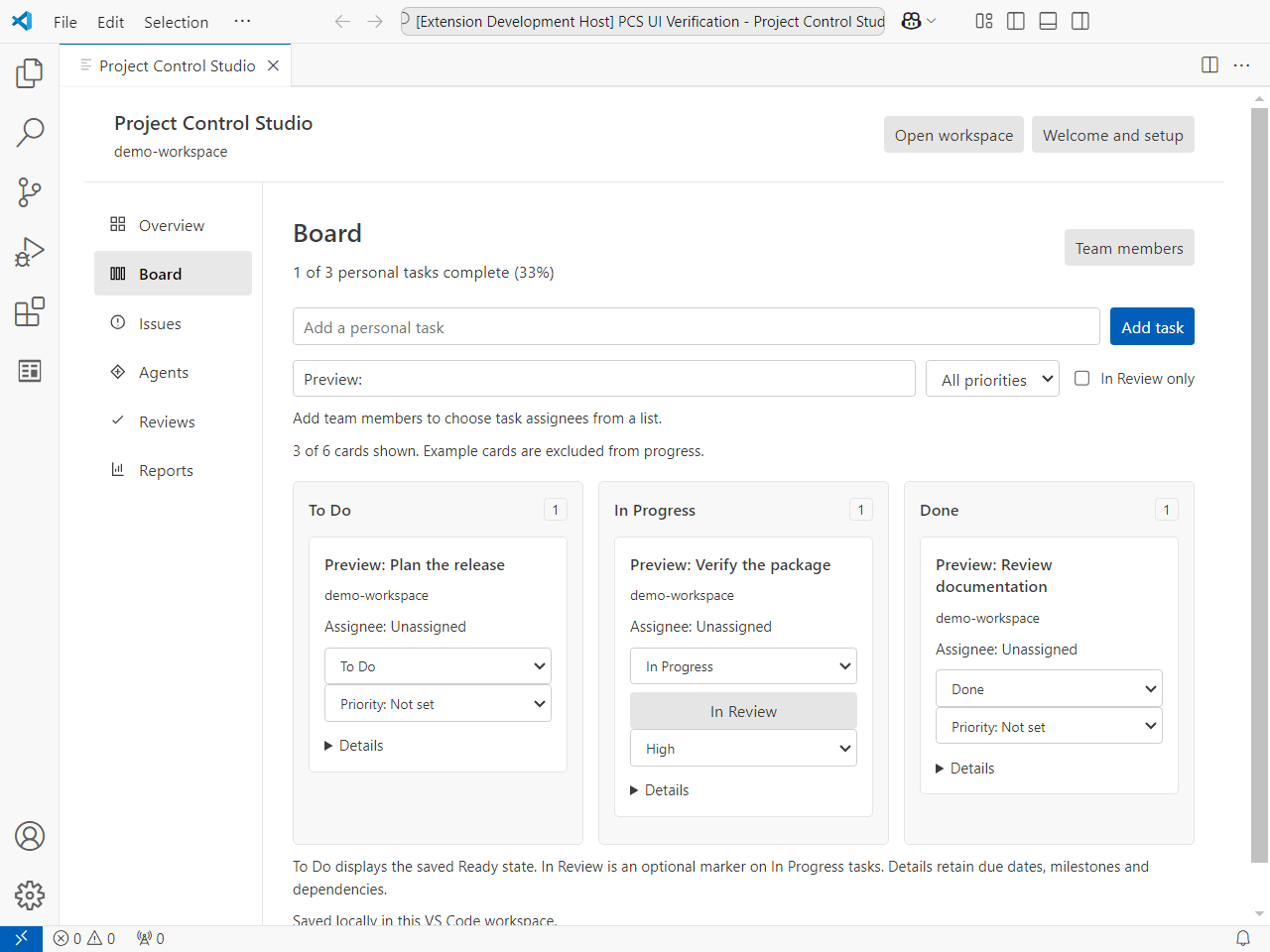
- Board: three columns, personal search/priority/review filters, editable status and priority. Details contains assignee editing, due date, milestone, dependencies and the review shortcut.
- Issues: existing multi-repository GitHub issues, filters, assignees and time tracking. GitHub stays the shared source of truth.
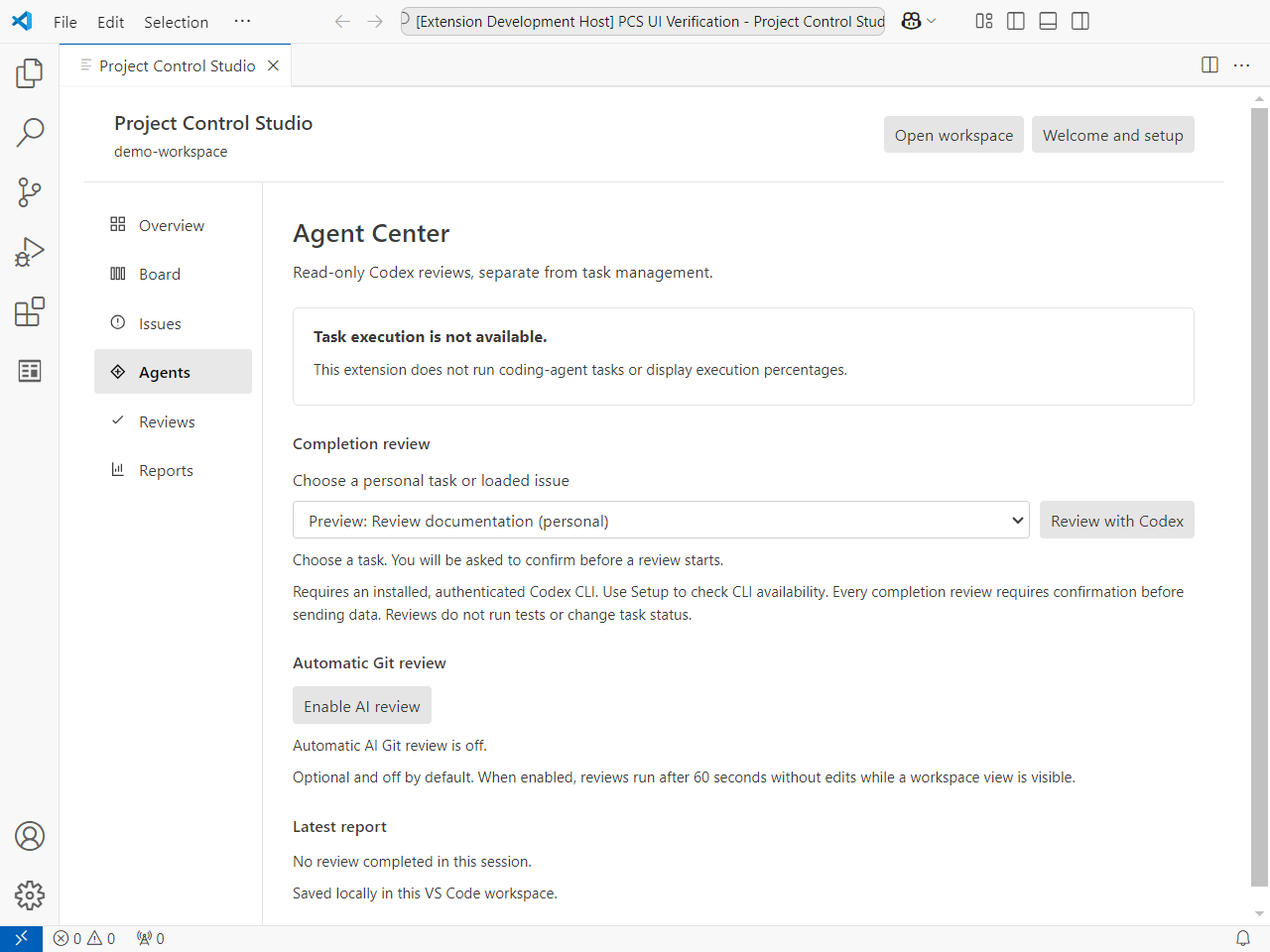
- Agents: optional read-only completion reviews and automatic Git review configuration. Coding-agent execution is unavailable.
- Reviews: read-only Git inspection and reports completed in this extension session, with actual completion times. Reports are advisory, not approvals.
- Reports: Markdown/Mermaid exports and optional Teams sharing. Connecting Teams enables automatic local-task snapshots only after preview and consent.
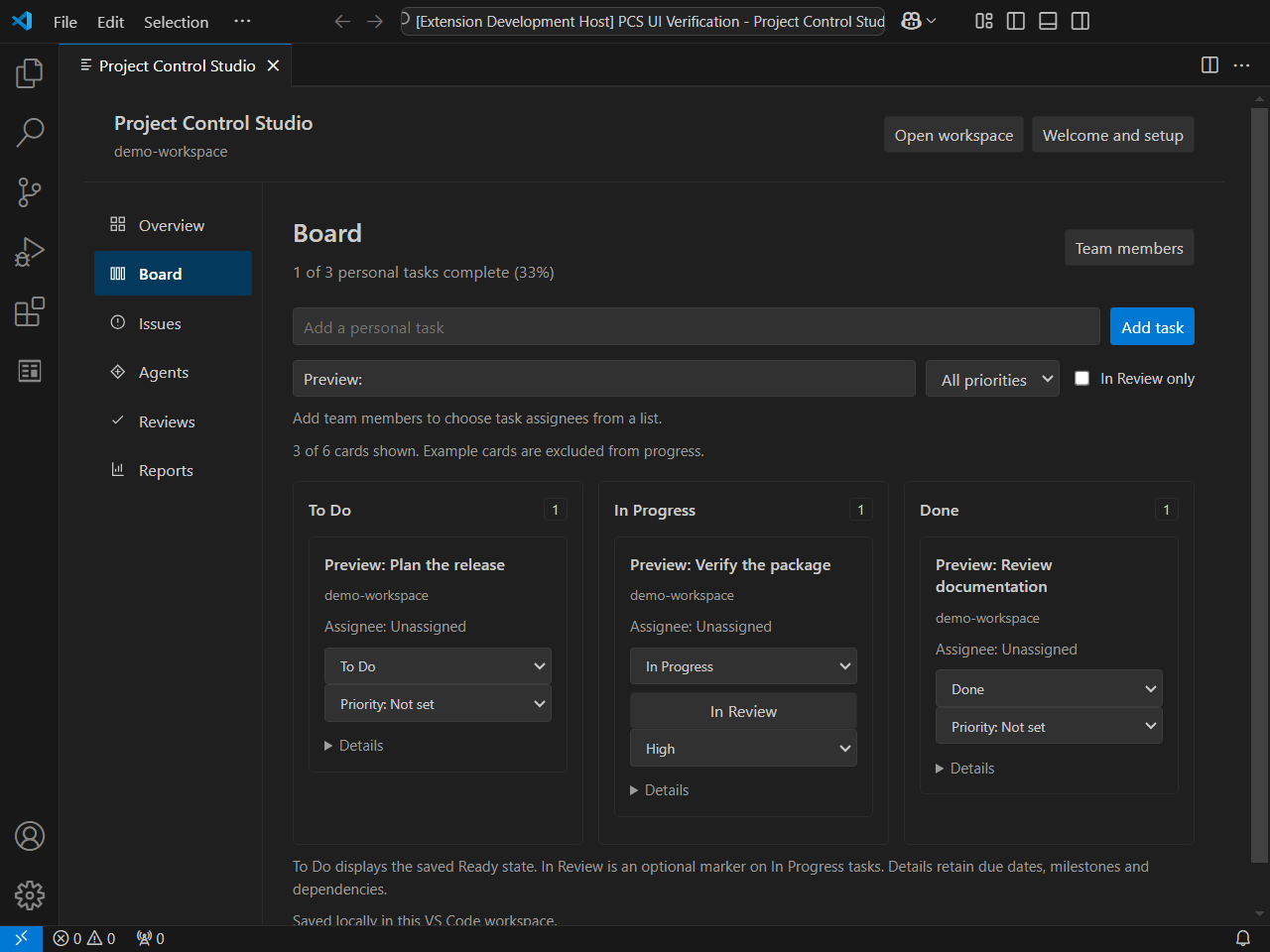
The layout follows the VS Code theme, supports keyboard navigation and stacks the same three board sections in narrow views. Overall personal progress stays scoped to all non-example personal tasks even when the board is filtered. In Review markers are shown only while the task is In Progress; they do not mean human approval or Codex completion. Priority and review markers stay in board format v1; existing exports retain their previous fields.
Pre-Release scope and verification limits
This is a Windows-first desktop Pre-Release, tested on Windows x64 with VS Code 1.96.4. Current-version GUI, minimum VS Code 1.80, macOS, Linux, ARM and remote-host acceptance are not established. Keyboard/focus, light/dark and responsive-layout checks are bounded; complete screen-reader, high-contrast and zoom/dialog acceptance is unverified. No WCAG conformance claim is made.
Personal tasks work without GitHub, Teams or Codex. Native GitHub authentication/multi-repository live acceptance, Teams end-to-end delivery, and the full Codex review success/failure matrix remain unverified for this release. Automated boundary tests do not prove those live flows. Optional integrations are experimental; do not rely on a review report as human approval. Codex task execution is unavailable. Connecting Teams can post and enable automatic snapshots only after preview and consent; review the sharing instructions before connecting.
Installation and updates
Project Control Studio is preview software. Choose Install Pre-Release Version on the Raresteak Marketplace listing when available, or use Extensions: Install from VSIX... with a supplied package. No development directory or npm installation is needed. Marketplace installations use VS Code's normal extension update mechanism; VSIX users install newer packages manually.
The publisher is Raresteak (raresteak), with extension identity raresteak.project-control-studio. The older development identity owns separate storage. Migration is explicit; neither identity deletes the other's data.
Move an existing development board
- Keep the original development VSIX and VS Code profile data. Install the supplied local-only PCS Development Board Exporter VSIX in the same profile, then open the original workspace. This temporarily replaces the old development extension with an export-only helper; never publish that helper.
- Run Project Control Studio Migration: Export Development Board. Save the validated JSON privately, outside source repositories. The helper reads only the v1 personal board; it does not read credentials or change source state.
- Install Raresteak, open that same workspace and run Project Control Studio: Import Personal Board. Review the source identity and add/skip counts, then explicitly confirm. The import preserves IDs, status, owner, dates, milestones, dependencies, priority and review markers. Unsaved example cards are replaced; saved existing tasks are preserved.
- A private pre-import recovery file is saved in the extension profile's
migration-backups directory before any commit. Reimporting identical IDs is a no-op; conflicting IDs or same-content/different-ID duplicates are rejected. Invalid graphs, cycles, unknown metadata, edited/partial files and oversized transfers are rejected without discarding fields. Limits: 2,000 tasks / 4 MiB board data. A changed board after preview cancels the import.
- If a write fails, keep the backup, reload and inspect before retrying. Project Control Studio: Restore Personal Board Backup explicitly restores a recovery file and creates a redo backup first. It does not accept an ordinary transfer as a replacement backup. Original development storage remains intact throughout.
- Check task counts/fields and a normal reload before retiring the old identity. Do not edit SQLite databases. The Markdown status report is still a useful reference, but is not a lossless import file.
Raresteak also has Export Personal Board for a validated JSON snapshot. These local transfers never notify Teams or change GitHub, credentials, repository selections, running timers, settings or automatic-review consent. Select repositories again, reconnect Teams only after preview and approval, and avoid logging old timer intervals twice. The existing projectControlStudio.teamMembers setting name remains unchanged. The export helper has no ordinary board commands, so it can coexist with Raresteak during migration; restore the old VSIX afterward only if you intend to resume the old application.
Personal writes are serialized within one extension provider. Normal deactivation waits for already accepted writes, within the host's shutdown allowance. Use VS Code's normal Reload Window command; immediate raw renderer reload, forced termination, power loss, and competing extension instances are not crash-durability guarantees.
This desktop Preview has bounded Windows acceptance evidence. Other operating systems, remote hosts and the complete minimum-version/accessibility matrix require separate verification. The distributable contains readable JavaScript runtime files, even though the source repository is private and the license is proprietary; no source maps are included.
Run Project Control Studio: Welcome and Setup for optional GitHub, repository, Teams and Codex steps. Personal tasks work without any of these services. Open a trusted local folder for persistent project-specific planning. Desktop VS Code is supported; browser-only and virtual workspaces are unsupported. Git features require Git on PATH. Codex reviews require a separately installed and authenticated CLI. Dependencies run on the workspace extension host in remote sessions.
Open it
- Install the supplied
0.17.6 stabilization VSIX in VS Code with Extensions: Install from VSIX....
- Click the Project Control Studio icon in the Activity Bar, or run Project Control Studio: Open Board from the Command Palette.
Current preview
- Add tasks and move them between To Do, In Progress, and Done. To Do retains the saved Ready status. Set an optional priority; mark an In Progress task In Review without adding a fourth persisted workflow state.
- Select a task assignee from the project member list and set a due date. Click Team members to edit the roster; it is saved in workspace settings.
- Group tasks under milestones by entering a milestone name; existing names are suggested as you type.
- Link prerequisite tasks. Cycles are rejected, and the Mermaid export shows task dependencies and statuses.
- Connect multiple GitHub repositories to show their issues together. In a multi-root VS Code workspace, add each Git repo with File → Add Folder to Workspace…. Manage repos lists their GitHub origins and lets you enter another
owner/repository. Each teammate selects the same repositories. Use the repository filter to focus on one repo; each issue card shows its repo, and creating a task asks which selected repo to use. Updates refresh about every 30 seconds while the panel is visible; a repo that fails to load is reported while other selected repos continue to load.
- Create issues with a description and acceptance criteria, then choose repository labels and an open milestone. Assign one or more members, filter loaded issues by repository, search, status, assignee, project group, milestone, label, or overdue milestone, and open or close issues inside the sidebar. GitHub may require repository write permission to create project-group labels, assign groups, or log time.
- Group shared issues by entering a project group on creation or changing an issue's Project group field. Groups are shared GitHub labels named
Project: <name>.
- Start a timer on an open issue, then select Stop & log to add a time-entry comment visible to that repository's team. Use Load time or Refresh time to read the shared total and per-member time. The running timer is saved locally per VS Code workspace and continues counting until stopped, including across VS Code restarts; the logged entry is shared. Totals scan up to 2,000 comments per issue.
- See local branches, changed files, and upstream ahead/behind counts; the Git view is read-only.
- Open a changed file's unified diff directly from the Git list, or open VS Code's Source Control view.
- Tasks under Board, including assignees, due dates, milestones, and dependencies, are personal to this VS Code workspace. Shared team work lives in GitHub Issues. Issue descriptions are shown as plain text; the issue link opens on GitHub.
- Export a Markdown status report grouped by milestone, with due dates and dependencies, or a Mermaid milestone/dependency diagram using the save dialog.
- GitHub Projects, two-way Teams updates, and Codex task execution are not included yet. Local member names and GitHub issue assignees are separate lists.
AI completion checks
Select Review in Agents under a personal task's Details or on a GitHub issue, then Review with Codex in Agents. It uses the OpenAI Codex CLI from the installed Codex VS Code extension or from PATH. Before running, the extension confirms what will be sent. Codex can inspect the selected local repository in read-only mode; without a matching checkout, it receives only the task/issue details and cannot assess implementation. The checker maps each acceptance criterion to code evidence, calls out partial or missing work, and explains its confidence. It uses an ephemeral session, ignores user config, disables MCP servers, opens its result as a Markdown report, and never changes files or task status. It does not run tests, so treat the assessment as a static review and run the suggested verification yourself.
Automatic Git review
In Agents, select Enable AI review and confirm once to opt in for this VS Code workspace. While a Project Control Studio workspace view is visible, it checks local Git repositories every 30 seconds and reviews staged, unstaged, and untracked changes after 60 seconds without further edits. The review uses Codex CLI in read-only ephemeral mode, looks for concrete code defects, and makes a Markdown report available through Open last automatic review in Reviews. It does not review already committed changes, run tests, or modify files or Git state. Changed diffs and relevant repository context are sent to the signed-in Codex provider and may use account quota. Disabling stops future reviews; a review already running will finish.
Share progress in Teams
- In the target Teams channel, select More options (...) > Workflows and create a webhook workflow such as Send webhook alerts to a channel. Set the trigger to Anyone, then copy its current webhook URL. The URL acts like a password.
- In Project Control Studio, select Connect Teams and paste the URL. Review the exact Markdown snapshot and sharing schedule in the confirmation before enabling. VS Code stores the URL in Secret Storage on this device; it is not copied to workspace settings. Connecting posts the current non-example tasks and turns on automatic updates. Reports are sent as Adaptive Cards for the workflow's Post card in a chat or channel action, including workflows that pass
first(triggerBody()?['body'])?['text'] as the card input.
- After that, adding or changing a local task posts an updated snapshot after about two seconds. Quick consecutive edits are combined. Share now sends the latest snapshot immediately.
Each teammate who shares updates must connect a webhook on their own VS Code device. The messages are snapshots of that person's local board; they do not combine local boards or let teammates edit this board. The extension confirms that the Workflow accepted a request, not that its later Teams action succeeded; check the Workflow run history if no message appears. Disconnect Teams to stop automatic posts. Treat the webhook URL like a password. Add a co-owner to the Teams Workflow so it remains manageable if its creator leaves.
After connecting GitHub and Teams, use Share GitHub issue summary for a one-time shared-work update. Review the exact Markdown snapshot before sending. It contains counts for all currently loaded issues, links and metadata for up to 20 recent issues, loaded time totals, and the last-refresh time; issue descriptions are excluded. GitHub changes do not post automatically.
For the same assignee choices in each teammate's workspace, commit the projectControlStudio.teamMembers entry in .vscode/settings.json. Task data itself remains local until posted to Teams.
Help, privacy and screenshots
See SUPPORT.md for connection troubleshooting and PRIVACY.md for data handling. Public support: https://github.com/Nomuntergel11/project-control-studio-support/issues. The source repository is private. Proprietary terms are included in LICENSE. Please report problems with this preview through the public support tracker. Never attach tokens, Teams webhook URLs, private issue bodies or sensitive code to support reports.
For Marketplace screenshots, capture a clean demo workspace: personal board, optional setup, and a shared issue board using synthetic data. Remove account names, private repositories, paths and webhook URLs. The screenshots below were captured from the installed 0.17.6 runtime in VS Code 1.96.4, using synthetic personal tasks in an isolated profile. The development-host title identifies the separate test harness; the extension itself was installed from VSIX. These are real renders, not mockups. Listing approval remains a publisher step.
License
Proprietary software. Copyright (c) 2026 Nomuntergel Tengis. Personal and internal-business use is permitted under the included LICENSE; source rights and redistribution rights are reserved except where applicable law provides otherwise.

