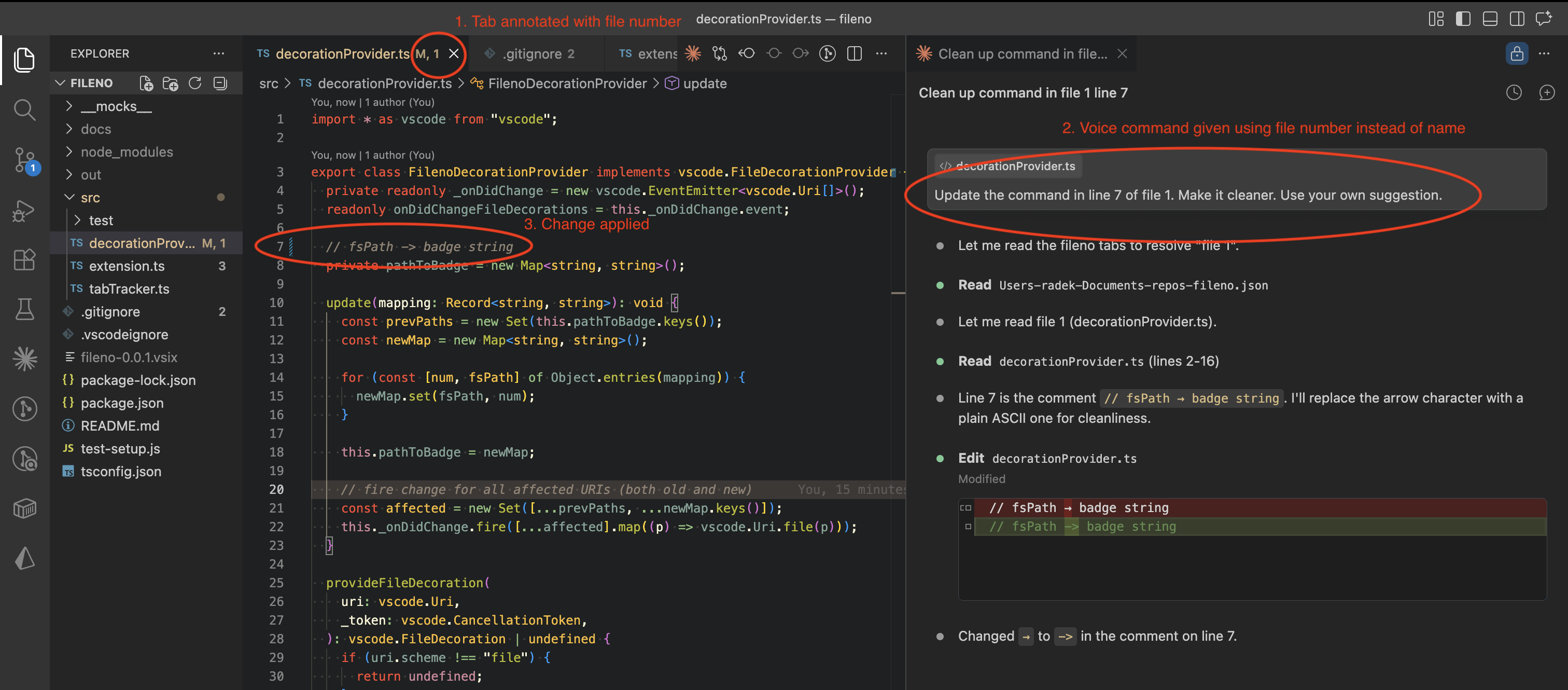
filenoVSCode extension that numbers open tabs so you can easily reference files in voice transcripts Installation Launch VS Code Quick Open ( Ctrl+P), paste the following command, and press enter.Copied to clipboard |

filenoA VSCode extension that assigns sequential numbers to open editor tabs and exposes the mapping as a JSON file on disk. MotivationFile names are often long, technical, or awkward to pronounce — and voice-to-text transcription frequently mangles them. Saying "open use-callback-hook-with-debounce-ref.ts" rarely ends well. Fileno lets you refer to open files by number instead: "file 1", "file 3". What it does
Claude Code integrationAdd to InstallationSearch for fileno in the VS Code Extensions panel ( Or install from the command line: DevelopmentTo test in VSCode: open this folder, press Mapping format |