Skip to content
| Marketplace
Sign in
Visual Studio Code>Other>Tetrix - Break TimerNew to Visual Studio Code? Get it now.
Tetrix - Break Timer

Tetrix - Break Timer

r-seize

|
1 install
| (0) | Free
A mini Tetris game built into VS Code to force real breaks between two coding rushes.
Installation
Launch VS Code Quick Open (Ctrl+P), paste the following command, and press enter.
Copied to clipboard
More Info

Tetrix icon

Tetrix — Break Timer

Staring at code for hours in a row kills your focus. Tetrix is a mini Tetris game built right into VS Code that steps in between two intense coding sessions, giving your brain a real, deliberate pause instead of another five minutes doomscrolling. Once the break starts, a cooldown locks the game back up — so it stays a reset, not a distraction.

Screenshots

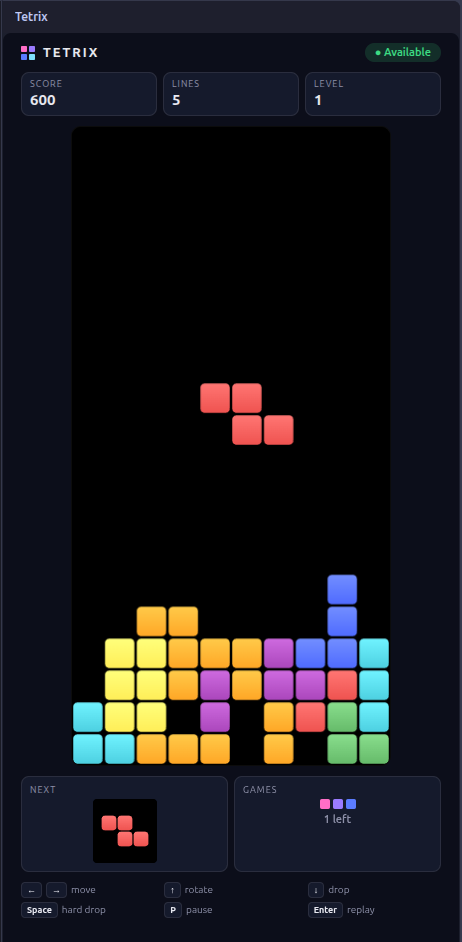
Tetrix in-game view
In game
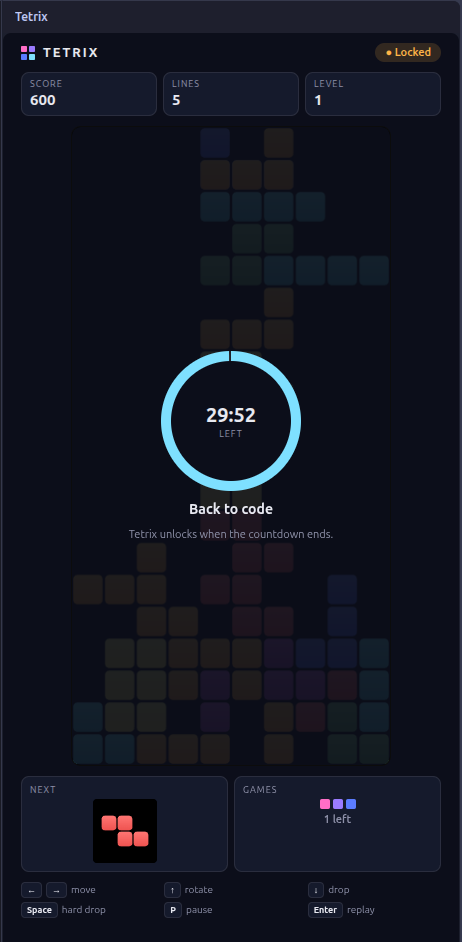
Tetrix locked view with countdown
Locked (break cooldown)

How it works

  • Open the game from the Tetrix icon in the Activity Bar (left sidebar) — it plays right there, no new editor tab.
  • You can play a limited number of games per break (tetrix.maxGamesPerBreak).
  • Once that quota is reached, the game locks for tetrix.cooldownMinutes minutes (30 min by default): no new game can start until the countdown — shown live in the sidebar and in the status bar — reaches zero.
  • Optionally, cap the number of breaks per day and/or the maximum duration of a single break.

Commands

Command Description
Tetrix: Take a Break Opens the Tetrix view in the sidebar
Tetrix: Show Break Status Shows the current state (available / locked / limit reached)
Tetrix: Reset State (debug) Resets the cooldown and counters

Controls

  • ← →: move
  • ↑: rotate
  • ↓: soft drop
  • Space: hard drop
  • P: pause
  • Enter: play again (when a game is still available in the current break)

Settings (settings.json)

Key Default Description
tetrix.cooldownMinutes 30 Lock duration after a break
tetrix.maxGamesPerBreak 1 Number of games allowed per break
tetrix.maxBreaksPerDay 0 (unlimited) Maximum number of breaks per day
tetrix.breakDurationMinutes 0 (disabled) Auto-closes the game after X minutes, regardless of games left
tetrix.showStatusBarItem true Shows the Tetrix status in the status bar

Example for a looser configuration (3 games, 15 min lock, 5 breaks/day max):

{
  "tetrix.maxGamesPerBreak": 3,
  "tetrix.cooldownMinutes": 15,
  "tetrix.maxBreaksPerDay": 5
}

Development

npm install
npm run compile

Then press F5 in VS Code to launch a development window with the extension loaded.

Bugs & Suggestions

Tetrix is open source. Found a bug, have an idea for a new setting, or just want to suggest an improvement? Head over to the GitHub repository and open an issue — contributions and pull requests are welcome too!

github.com/r-seize/Tetrix

Links

  • Repository: github.com/r-seize/Tetrix
  • Contact us
  • Jobs
  • Privacy
  • Manage cookies
  • Terms of use
  • Trademarks
  • Your Privacy Choices
  • Consumer Health Privacy
© 2026 Microsoft