Git Crack
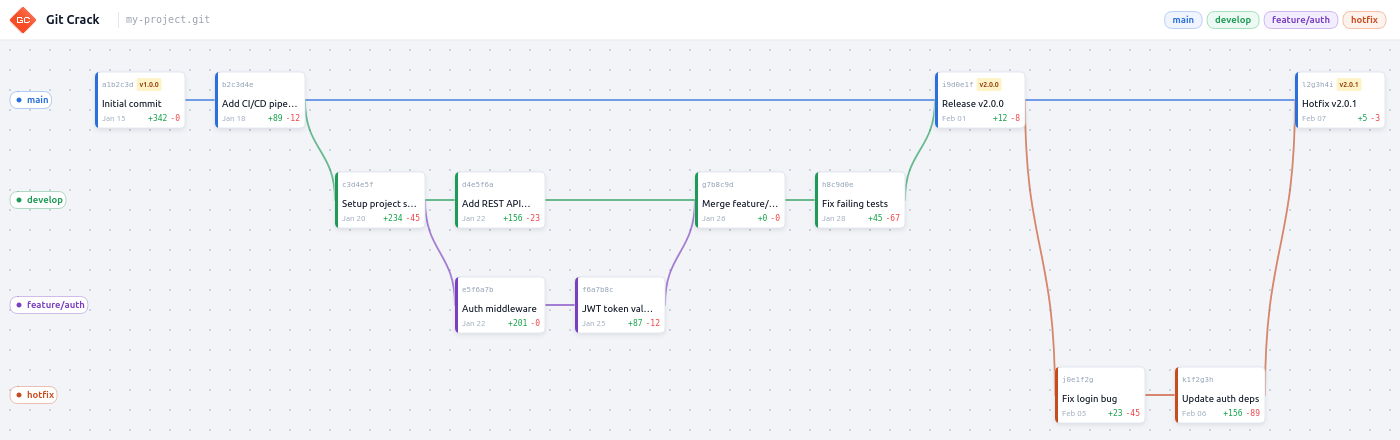
Visualize your Git history as an interactive node graph - directly inside VS Code.
Features
|
|
| Interactive graph |
Commits rendered as cards on an infinite zoomable, pannable canvas. |
| Branch lanes |
Each local branch occupies its own color-coded horizontal lane. |
| Bézier edges |
Smooth curves connect commits to their parents, including merge commits. |
| Commit detail panel |
Click a commit card to see author, date, diff stats, and changed files. Open any file directly in the editor. |
| Right panel |
Tabbed sidebar with a scrollable Commits list and a Branches list. Click any entry to fly the graph to that position. |
| Branch navigation |
Prev / Next buttons navigate through branches in chronological order. |
| Branch labels |
Branch names displayed above the first commit of each lane, never overlapping edges. |
| Branch tooltip |
Hover any edge to see the branch name in a floating tooltip. |
| Pan & zoom |
Scroll to pan, Ctrl+scroll to zoom toward cursor, drag or middle-click to pan. |
| Fit all |
One click to zoom out and frame every commit in the viewport. |
| HEAD indicator |
The current HEAD commit is highlighted with a HEAD badge and a blue top border on its card. Updates automatically on checkout. |
| Auto-refresh |
Graph updates automatically on commit, branch switch, or branch creation - no need to reopen the panel. |
| Search |
Filter commits by message, author or hash. Filter branches by name. Real-time, in the right panel. |
| Light & dark theme |
Follows VS Code's theme automatically, or force a theme via settings. |
| Configurable |
Control max commits, theme, and commit list threshold through VS Code settings. |
Installation
Ctrl+Shift+X -> search Git Crack -> Install.
Or from a .vsix file:
code --install-extension git-crack-0.1.2.vsix
Usage
- Open a folder that contains a Git repository.
- Run Git Crack: Open Graph from the Command Palette (
Ctrl+Shift+P).
- The Git Crack icon also appears in the editor title bar for quick access.
Commands
| Command |
Description |
| Git Crack: Open Graph |
Open the interactive commit graph for the current workspace |
Navigation
| Action |
How |
| Pan |
Click and drag the canvas |
| Pan (alternative) |
Middle-click and drag |
| Zoom in / out |
Ctrl + scroll wheel (zooms toward cursor) |
| Scroll |
Scroll wheel (pans the canvas) |
| Zoom buttons |
+ / − in the toolbar |
| Fit all |
Fit icon in the toolbar - frames every commit |
| Select a commit |
Click a commit card |
| Deselect |
Click the canvas background |
| Fly to a commit |
Click any row in the Commits tab (right panel) |
| Navigate branches |
Prev / Next buttons (bottom-left), chronological order |
| Open a changed file |
Click a filename in the detail panel |
| Close detail panel |
Click the ✕ button |
| Branch tooltip |
Hover any edge line |
Commit card
Each commit is displayed as a card:
┌─[branch color]──────────────────────────┐
│ a1b2c3d  [v1.0.0]                       │  ← short hash + tag (if any)
│ Fix login redirect on mobile            │  ← commit message
│ 3 hours ago                  +12  −4   │  ← relative date + diff stats
└─────────────────────────────────────────┘
Configuration
File > Preferences > Settings -> search gitCrack, or edit settings.json directly.
| Setting |
Default |
Description |
gitCrack.theme |
"light" |
Color theme: "light" or "dark". Overrides VS Code's auto-detection. |
gitCrack.maxCommits |
500 |
Maximum number of commits to load from git history. |
gitCrack.commitListThreshold |
20 |
Show the commit list panel when commit count exceeds this value. |
Example settings.json:
{
  "gitCrack.theme": "dark",
  "gitCrack.maxCommits": 300,
  "gitCrack.commitListThreshold": 30
}
Branch colors
Branches are assigned colors in this order, cycling after 7:
| # |
Color |
Hex |
| 1 |
Blue |
#2A6FDB |
| 2 |
Green |
#1E9956 |
| 3 |
Purple |
#7A3FBF |
| 4 |
Orange-red |
#C84B1E |
| 5 |
Amber |
#D97706 |
| 6 |
Cyan |
#0891B2 |
| 7 |
Pink |
#BE185D |
main / master is always assigned first (lane 0, blue). develop is second.
Contributing
Bug reports and feature requests welcome - github.com/r-seize/git-crack/issues. Include the git log output and a description of what you expected to see.
License
GPL-3.0 © r-seize

