
QueryGuard — Real-time Database Impact & Safety Analyzer
English | Español
Stop guessing. See the impact of your ORM mutations BEFORE you hit save.
QueryGuard is a VS Code extension that predicts the impact of your Prisma, Supabase, and Drizzle queries in real-time. It analyzes your AST as you type to estimate how many rows will be affected, including recursive cascade deletions and potential foreign key violations.
English Documentation
The Safety Co-pilot (Philosophy)
QueryGuard is designed as a complementary safety layer for your development workflow. It is not a database manager, a GUI, or a schema visualizer. Its sole purpose is to act as a pre-flight check: providing real-time warnings and safe simulations directly where you write your code, helping you avoid accidental "mass-deletes" or unintended data mutations before they even reach your CI/CD or production logs.
How to Use
- Secure Connection: Press Ctrl+Shift+P and run QueryGuard: Connect to Database. Enter your PostgreSQL connection string. It is stored in VS Code's SecretStorage and never shared.
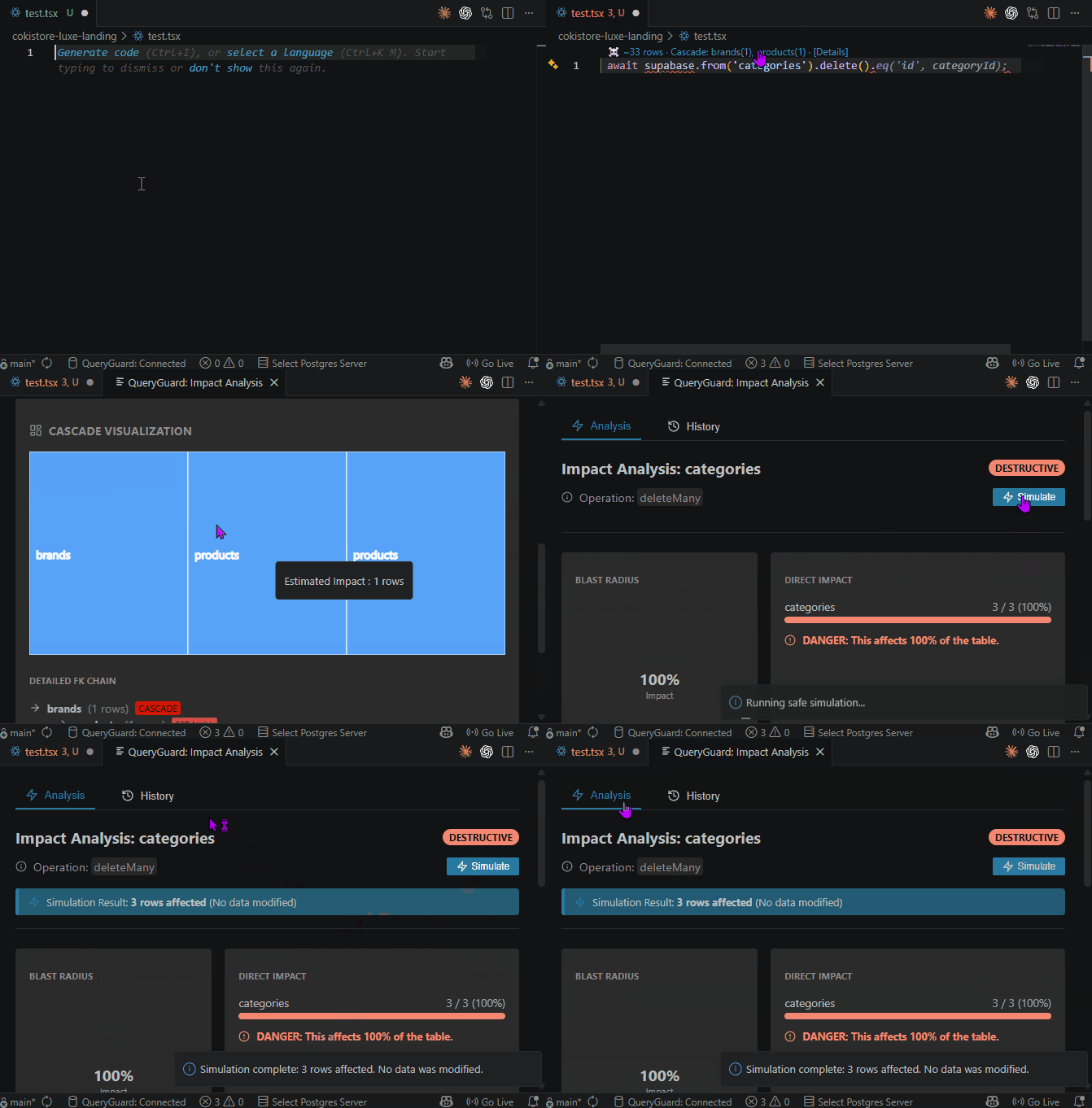
- Write Code: As you type Prisma, Supabase, or Drizzle mutations, a CodeLens will appear above the line showing the estimated affected rows.
- Explore Impact: Click the CodeLens to open the Impact Analysis Panel. You will see a Blast Radius chart and a tree of cascading deletions.
- Run Simulation: Click the Simulate button in the panel. QueryGuard executes the real query inside a BEGIN...ROLLBACK transaction to give you a 100% accurate row count without modifying data.
Key Features
- Real-time Row Estimation: Uses PostgreSQL internal statistics (n_live_tup) for instant "worst-case" calculations as you type.
- Visual Cascade Analysis: Traces Foreign Keys (FKs) recursively to show the full impact on related tables.
- Safe Dry-Run Simulation: Execute real queries against live data with zero risk of modification.
- Analysis History: Keep track of previous estimations in the side panel.
Technical Requirements & Compatibility
- Database Support: Currently, QueryGuard exclusively supports PostgreSQL (including Supabase, Neon, CockroachDB, and AWS RDS).
- ORM Support:
- Supabase: .from().delete() and .from().update() chains.
- Prisma: delete, update, deleteMany, and updateMany.
- Drizzle ORM: delete() and update() (with and without .where()). The insert() operation is non-destructive and therefore not detected as a risk mutation.
- Simulation Note: While detection is automatic, the Simulation feature requires explicit filters (like .eq() or where: {}) to accurately translate your ORM logic into safe test SQL. Additionally, for UPDATE operations, the simulation executes DELETE in a ROLLBACK to capture the actual row count for SET NULL/RESTRICT cascades — the visual cascade estimation for UPDATE is informational only.
Configuration Reference
You can customize QueryGuard behavior in your VS Code settings.json:
queryguard.enabled: (boolean) Enable or disable real-time analysis. Default: true.queryguard.showCodeLens: (boolean) Show inline impact estimations. Default: true.queryguard.sslMode: (string) SSL connection mode (auto, disable, require, verify-ca, verify-full). Default: auto.queryguard.analysisDebounce: (number) Delay in milliseconds before re-analyzing code. Range: 100–10000ms. Default: 750.queryguard.cacheTTL: (number) Schema cache time-to-live in seconds. Range: 30–86400s. Default: 300.
Architecture
QueryGuard works by parsing your code into an Abstract Syntax Tree (AST).
- Detection: It identifies ORM calls that mutate data.
- Schema Analysis: It fetches your database schema (tables, columns, foreign keys) and caches it.
- Impact Logic: It calculates the "Blast Radius" by recursively following CASCADE rules in your schema.
- Simulation: It uses a dedicated Worker thread to run a real query inside a Transaction that is always rolled back, ensuring 100% accuracy with zero risk.
Troubleshooting
- No CodeLenses appearing: Ensure your database is connected via the Command Palette.
- Connection errors: If using a remote database, try setting
queryguard.sslMode to require.
- Inaccurate row counts: QueryGuard uses
n_live_tup for instant estimates, which might be slightly out of sync with real data. Use the Simulate feature for 100% accuracy.
Documentación en Español
Tu Copiloto de Seguridad (Filosofía)
QueryGuard está diseñado como una capa de seguridad complementaria para tu flujo de trabajo. No es un gestor de bases de datos ni una interfaz gráfica. Su único propósito es actuar como una inspección previa: proporcionando avisos en tiempo real y simulaciones seguras directamente donde escribes tu código, ayudándote a evitar "borrados masivos" accidentales antes de que lleguen a tus logs de producción.
Cómo usarlo
- Conexión Segura: Presiona Ctrl+Shift+P y ejecuta QueryGuard: Connect to Database. Ingresa tu cadena de conexión de PostgreSQL. Se guarda en el SecretStorage de VS Code y nunca se comparte.
- Escribe Código: Mientras escribes mutaciones de Prisma, Supabase o Drizzle, aparecerá un CodeLens encima de la línea mostrando las filas afectadas estimadas.
- Explora el Impacto: Haz clic en el CodeLens para abrir el Panel de Análisis de Impacto. Verás un gráfico de Radio de Impacto y un árbol de eliminaciones en cascada.
- Simulación Segura: Haz clic en el botón Simulate en el panel. QueryGuard ejecutará la consulta real dentro de una transacción BEGIN...ROLLBACK para darte un conteo 100% exacto sin modificar datos.
Funciones Principales
- Estimación en Tiempo Real: Utiliza estadísticas internas de PostgreSQL (n_live_tup) para cálculos instantáneos del "peor de los casos" mientras escribes.
- Análisis Visual de Cascadas: Rastrea Claves Foráneas (FKs) de forma recursiva para mostrar el impacto total en tablas relacionadas.
- Historial y Exportación: Mantén un registro de tus análisis en el panel lateral. Exporta tus datos a CSV o JSON (se copian al portapapeles para que los pegues directamente en Excel, Bloc de Notas o reportes).
- Simulación de Prueba Segura: Ejecuta consultas reales contra datos en vivo con riesgo cero de modificación.
Requisitos Técnicos y Compatibilidad
- Bases de Datos: Actualmente, QueryGuard soporta exclusivamente PostgreSQL (incluyendo Supabase, Neon, CockroachDB y AWS RDS).
- ORMs Soportados:
- Supabase: Cadenas .from().delete() and .from().update().
- Prisma: Soporte para delete, update, deleteMany y updateMany.
- Drizzle ORM: delete() y update() (con y sin .where()). La operación insert() no es destructiva y por tanto no se detecta como mutación de riesgo.
- Nota de Simulación: Aunque la detección es automática, la función de Simulación requiere filtros explícitos (como .eq() o where: {}) para traducir con precisión la lógica de tu ORM al SQL de prueba seguro. Además, para operaciones UPDATE, la simulación ejecuta DELETE en un ROLLBACK para capturar el conteo real de filas de cascadas SET NULL/RESTRICT — la estimación visual de cascadas para UPDATE es solo informativa.
Gabriel Silva Avila


| |

