i18n Translation Editor – Missing Keys & Inline Preview
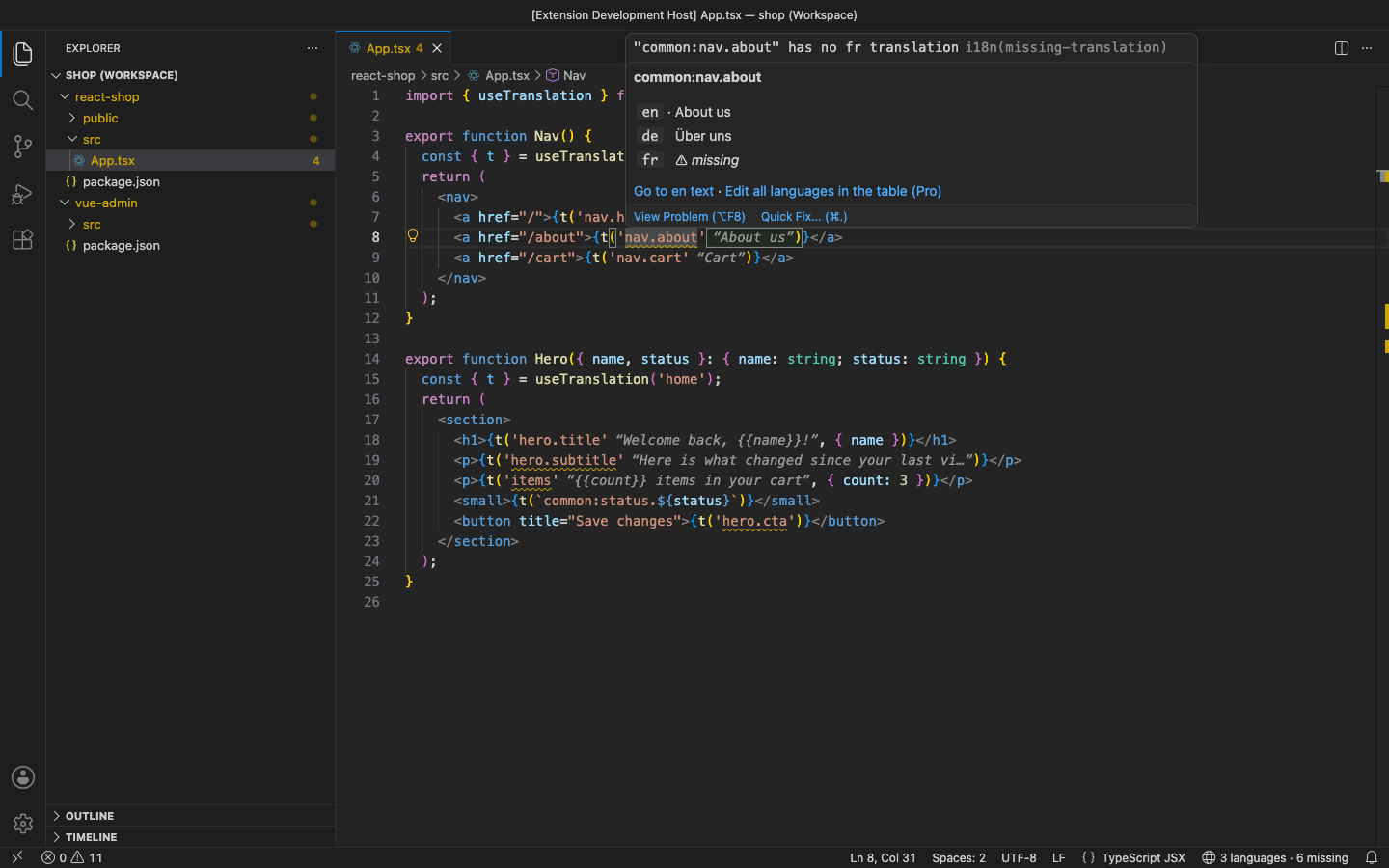
See the real text next to every t('key') in your code, hover for every language, and get a warning wherever a language is missing a translation. It works with i18next / react-i18next, vue-i18n, next-intl and react-intl, reads JSON (nested, flat or FormatJS) and YAML locale files, and finds them without any setup.
Why this one
- No setup. It finds
locales/en.json, public/locales/en/common.json (i18next namespaces), messages/de.json (next-intl), src/locales/fr.yaml (vue-i18n) and similar layouts by itself. i18n: Show Detected Locale Files lists exactly what it found. Only real ISO language codes count, so app.json is never taken for a language.
- Namespaces and scopes are understood.
useTranslation('home') + t('hero.title') is home:hero.title, useTranslations('Nav') + t('home') is Nav.home, and t('items') finds items_one / items_other.
- Edits keep your files as they are. Indentation, key order, comments in YAML and flat or nested style are all kept. Every change can be undone with Ctrl+Z.
- Nothing leaves your machine. No account, no telemetry. The only network call is DeepL, which runs only when you start it with your own key (Pro).
Free features
- Inline translations: the source text (or any language you pick) appears in italics after
t('key'), $t, i18n.t, i18next.t, t.rich, <FormattedMessage id>, formatMessage({ id }), <Trans i18nKey>, v-t, $_ and 'key' | translate. You can add your own patterns.
- Hover with the key's text in every language, a marker on each missing one, and links to the source text and the table.
- Missing-key warnings per language:
"home:hero.subtitle" has no fr translation on the usage in code, and on the key in the source locale file. Unknown keys and duplicate keys get their own warnings.
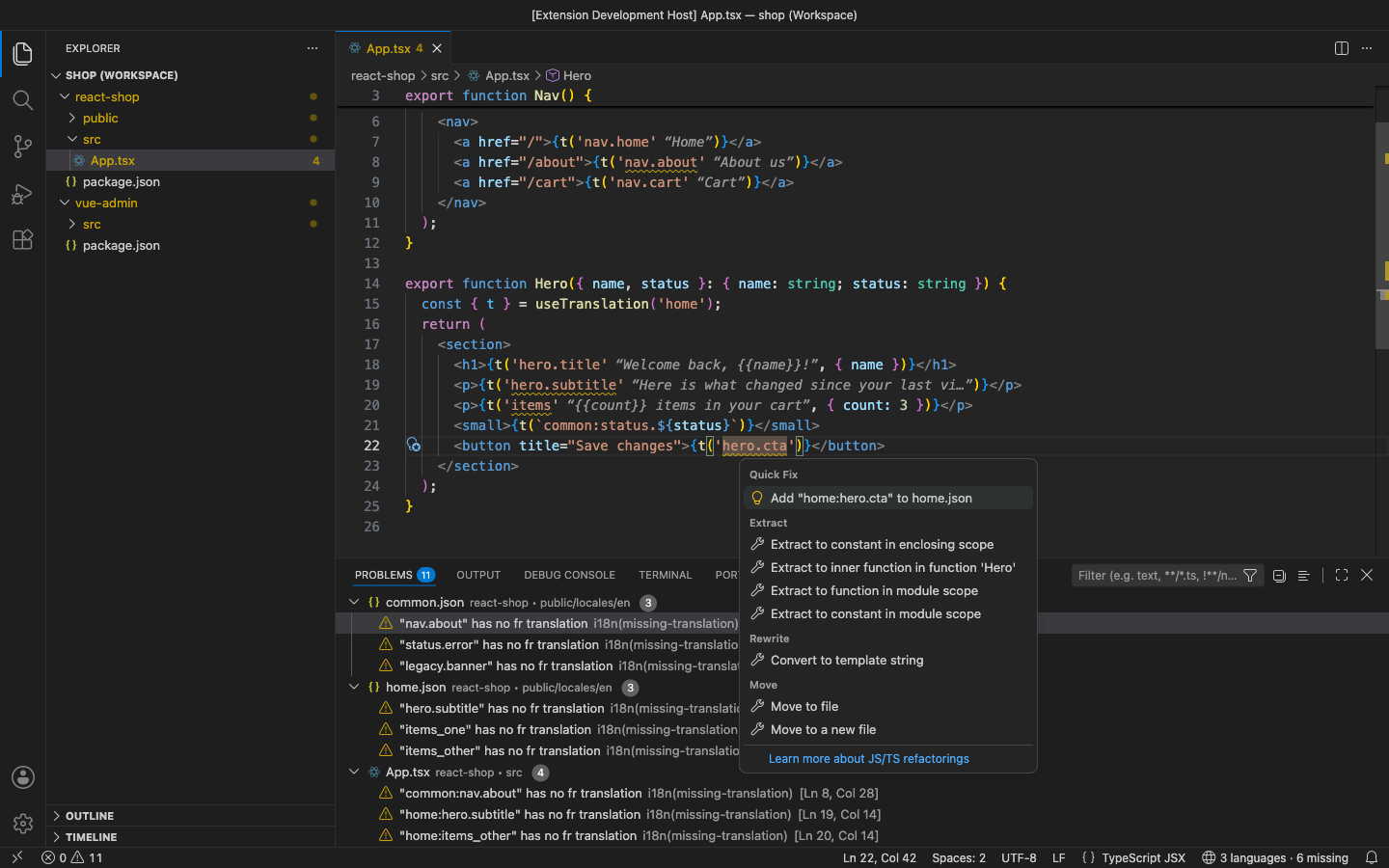
- Go to definition (Ctrl+Click / F12) from a key in code to the key in every locale file.
- Quick fixes: Add "key" to home.json for an unknown key (in the right namespace file), and Fill fr with the en text for now.
- Status bar: how many languages you have and how many translations are missing.
Pro (licence key, checked offline)
$36 lifetime, or $12 a year, per developer. Everything above stays free. Pro adds:
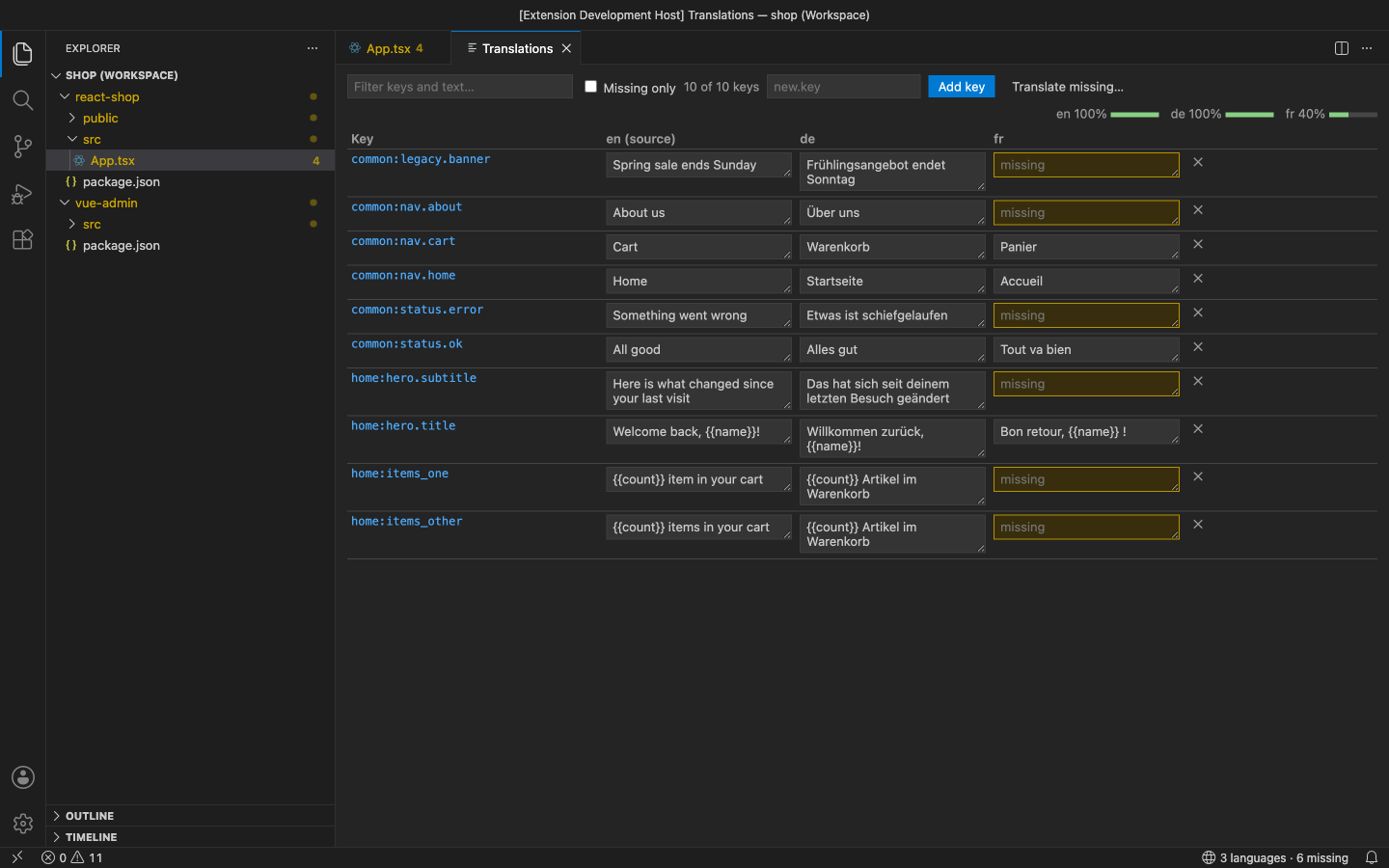
- Translation table: every key in every language side by side, with progress per language. Edit a cell, add or delete a key (in all languages at once), filter with Missing only or search keys and text, and click a key to jump to it.
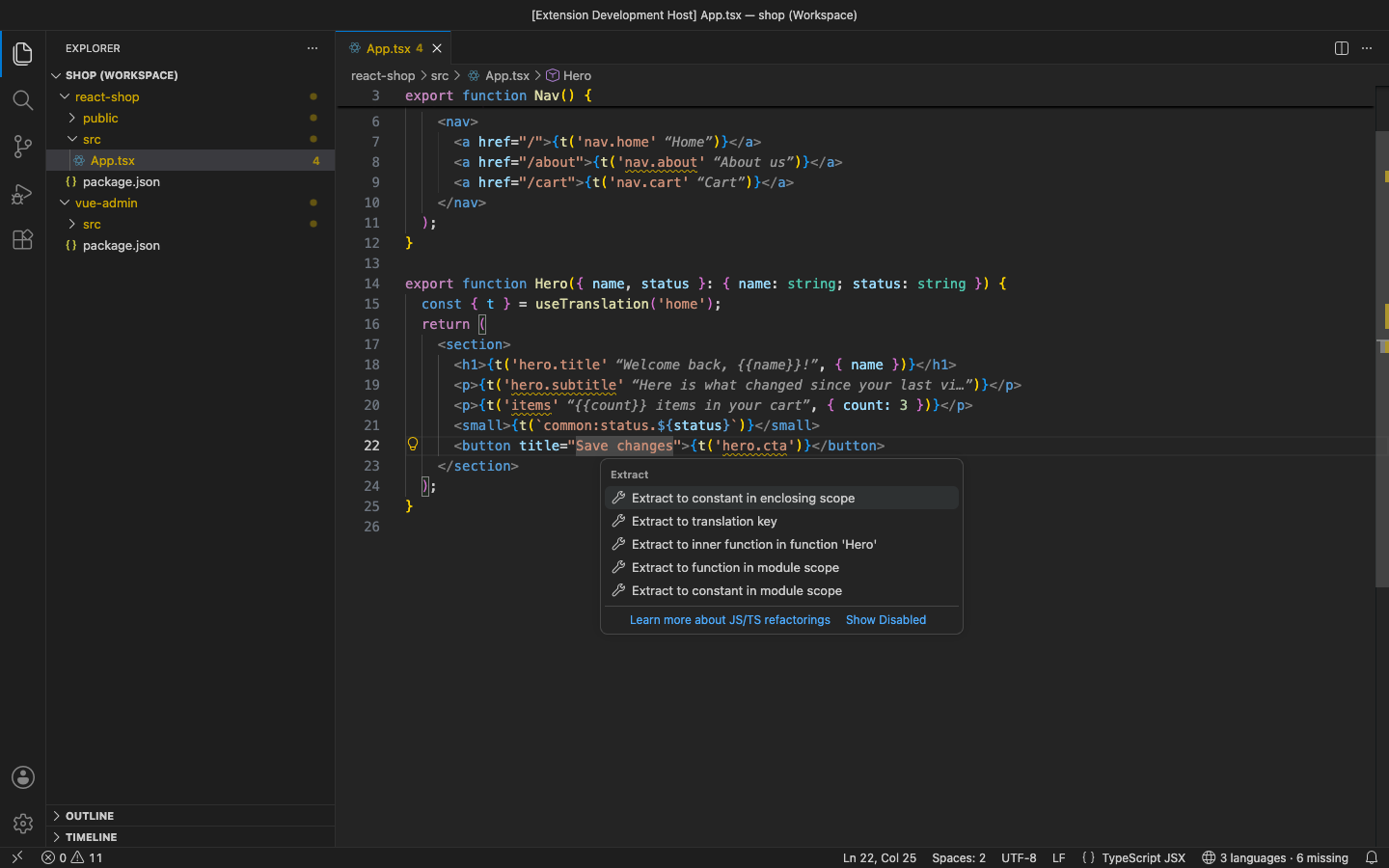
- Extract to translation key: a code action on a hard-coded string. It suggests a key from the file and the text, writes the text to the source locale (in the namespace the component uses), and replaces the string with
t('key'), $t('key') in a Vue template, {t('key')} / attr={t('key')} in JSX, or intl.formatMessage({ id }) for react-intl.
- Unused-key cleanup: scans your code and lists the keys nothing uses. Keys under a dynamic prefix such as
t(`status.${x}`) and plural forms count as used. You can also keep keys with i18nEditor.keepKeys. Remove the checked keys from every language in one step.
- Rename key everywhere: rename one key, or a whole group (
nav → menu), in every locale file and every usage in code. Scopes and namespaces are respected, and any usage that can't be changed safely (a dynamic key) is listed.
- XLIFF 1.2 and CSV export / import: export for translators or a spreadsheet (one XLIFF
<file> per language, needs-translation on missing ones) and import the result. Only cells that changed are written. XLIFF 2.0 and Excel's ; CSV are read too.
- Machine translation with your own DeepL key: Translate Missing with DeepL fills the missing values. Placeholders such as
{{name}}, {count} and %s are protected and checked, and a translation that loses one is not written. The key is kept in VS Code SecretStorage.
In the free version, the (Pro) commands say what they do and offer Get Pro when you use them. The status bar and the hover lead to the table. There are no timed pop-ups.
Settings
| Setting |
Default |
|
i18nEditor.localePaths |
[] (auto-detect) |
e.g. ["src/i18n/{locale}.json"] or ["public/locales/{locale}/{ns}.json"] |
i18nEditor.sourceLocale |
en |
the language you write first |
i18nEditor.previewLocale |
source |
language shown inline |
i18nEditor.inlinePreview / .previewMaxLength |
true / 40 |
inline text on/off and length |
i18nEditor.missingSeverity |
warning |
error, warning, information, hint or off |
i18nEditor.keySeparator |
. |
nesting separator |
i18nEditor.namespaceSeparator |
auto |
: for i18next, . for vue-i18n / next-intl |
i18nEditor.defaultNamespace |
translation |
namespace for keys written without one |
i18nEditor.customCallPatterns |
[] |
extra regexes with a key group |
i18nEditor.keepKeys |
[] |
Pro: never report these as unused (errors.*) |
i18nEditor.scan.include / .exclude / .maxFiles |
code files, no node_modules |
Pro: what cleanup and rename read |
i18nEditor.deepl.formality |
default |
Pro: DeepL formality |
Requirements
VS Code 1.90+ (or VSCodium, Cursor, Windsurf). Nothing else to install. It works alongside the Vue, Svelte and Astro language extensions.
Privacy
No account and no telemetry. The only network call is DeepL, made only when you run it with your own key. See PRIVACY.md. Support: support@puzaricloud.in
| |

