GitHub Actions Runs & Live Logs
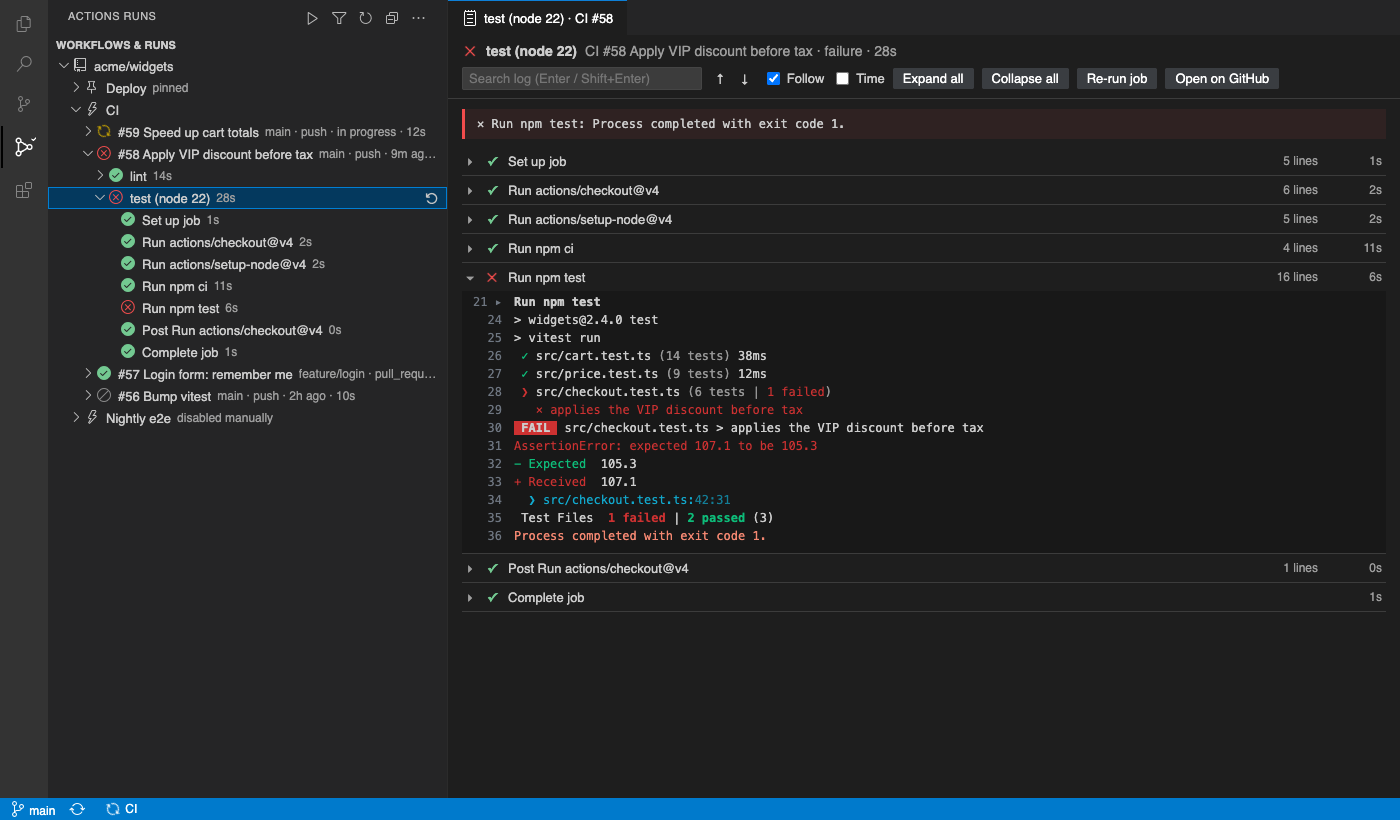
Watch your GitHub Actions runs inside VS Code. The view refreshes by itself, so there is no Refresh button to keep pressing. Logs open in an editor tab, not the browser, and keep updating while the job runs.
Free for your repository. Sign in with the GitHub account VS Code already uses, so no token is needed.
Why this one
- Refreshes by itself. The tree polls every 5 s while something is running and every 60 s when nothing is. It slows down when nothing changes or when you get near the API rate limit.
- It uses ETag conditional requests. A
304 Not Modified answer doesn't count against your GitHub rate limit.
- Logs in VS Code.
- Each step is a fold, and
##[group] blocks fold inside it.
- ANSI colours are shown, including 256-colour and truecolor.
- Failed steps open automatically, and the
##[error] lines are listed at the top.
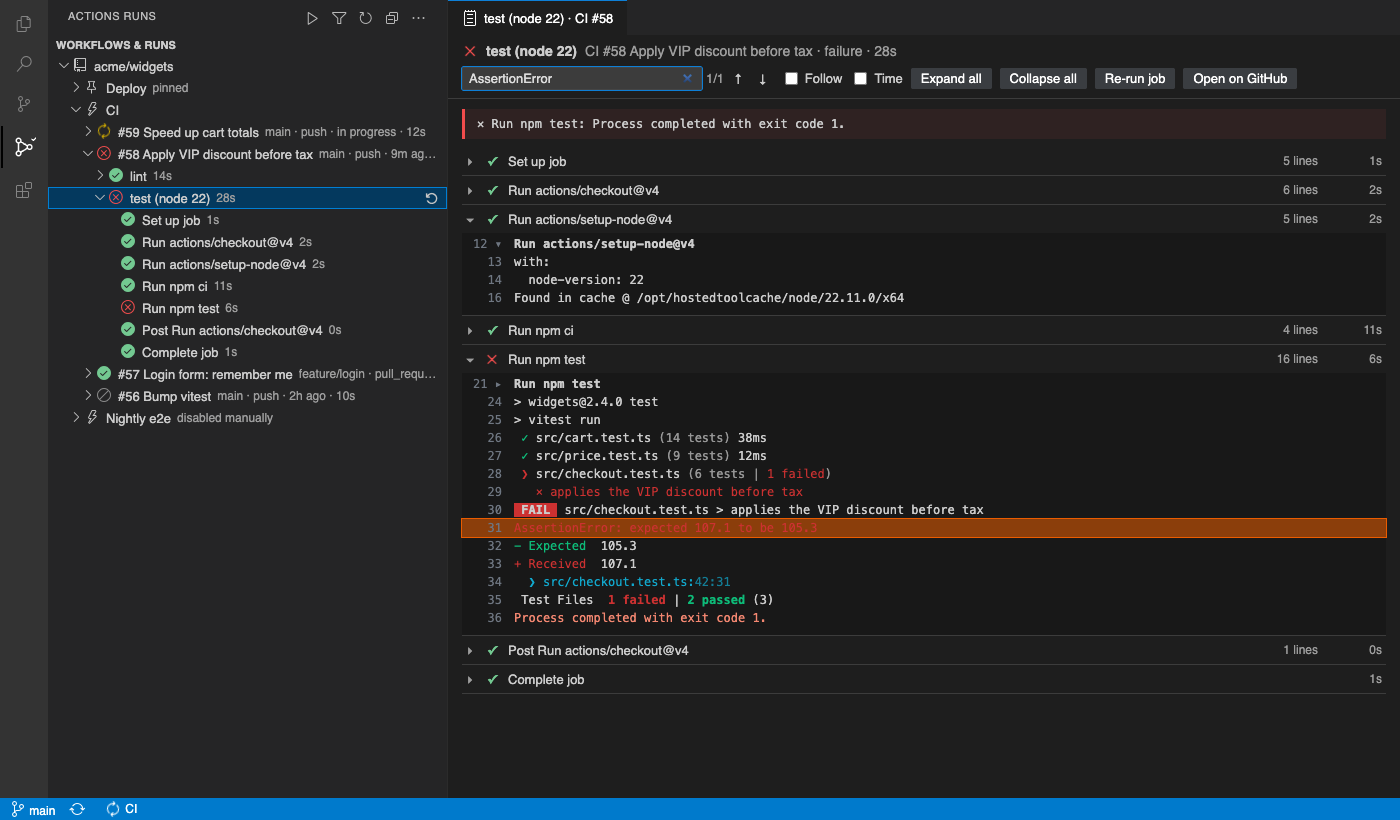
- Search the log with match navigation.
- Turn timestamps on or off.
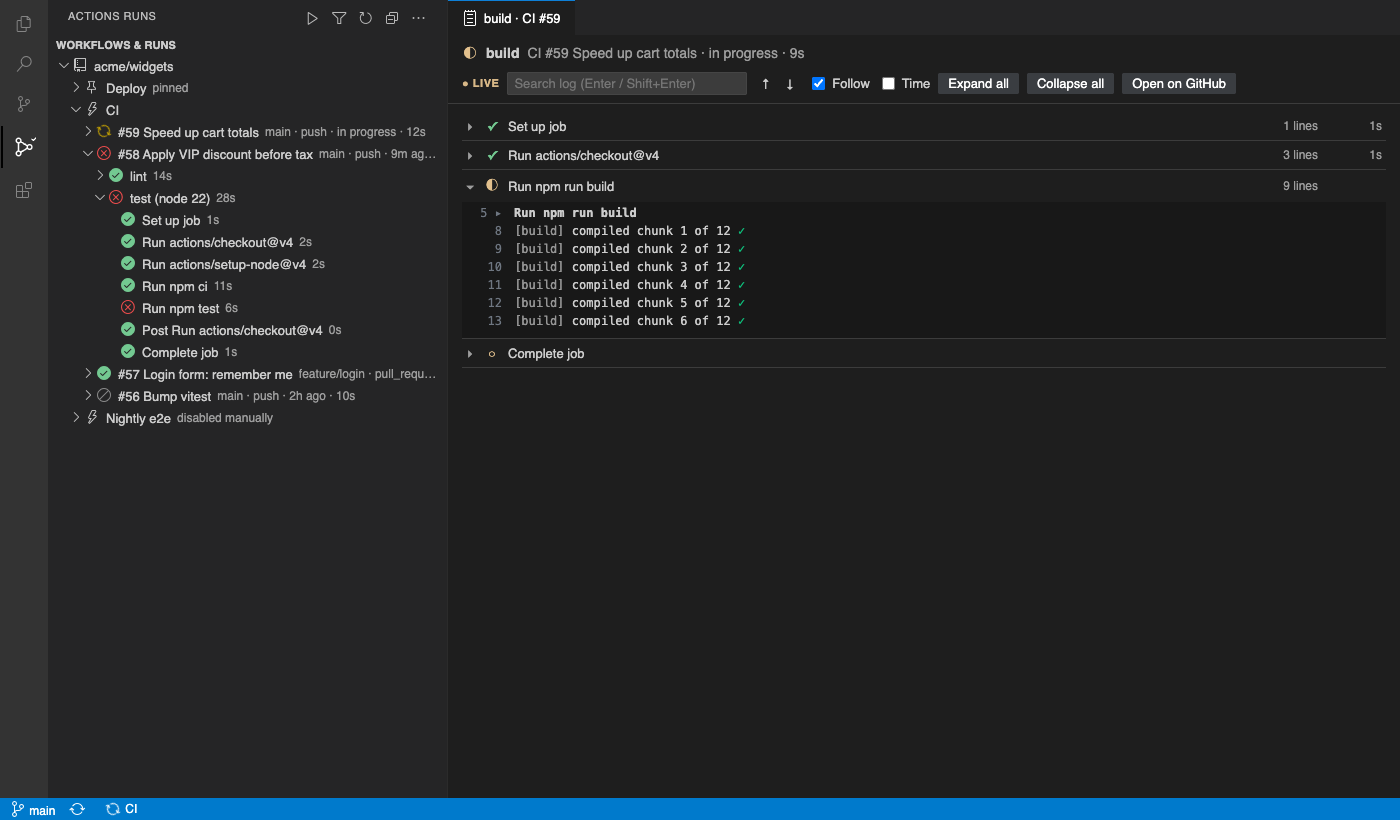
- Live tail. While a job runs, its steps update live, the log grows in place and the view follows the newest line.
- GitHub Enterprise Server. Set
githubActionsRuns.enterpriseUrl.
- Sign-in uses VS Code's GitHub Enterprise provider when
github-enterprise.uri matches your server, otherwise a Personal Access Token.
- Repos are detected from your git remote, including servers on a custom port.
- Your token stays with GitHub. Log and artifact downloads follow GitHub's storage redirect without forwarding your token.
Free features (one repository)
- Tree view: repository → workflows → runs → jobs → steps.
- Status icons for success, failure, in progress, queued, waiting, cancelled and skipped.
- Each run shows its branch, event, age and duration.
- The repository is auto-detected from the workspace's git remote.
origin is preferred, and ssh, https and worktrees all work.
- Run actions:
- Re-run failed jobs, re-run all jobs and re-run a single job, from the tree or from the log viewer.
- Cancel a run (you're asked to confirm first).
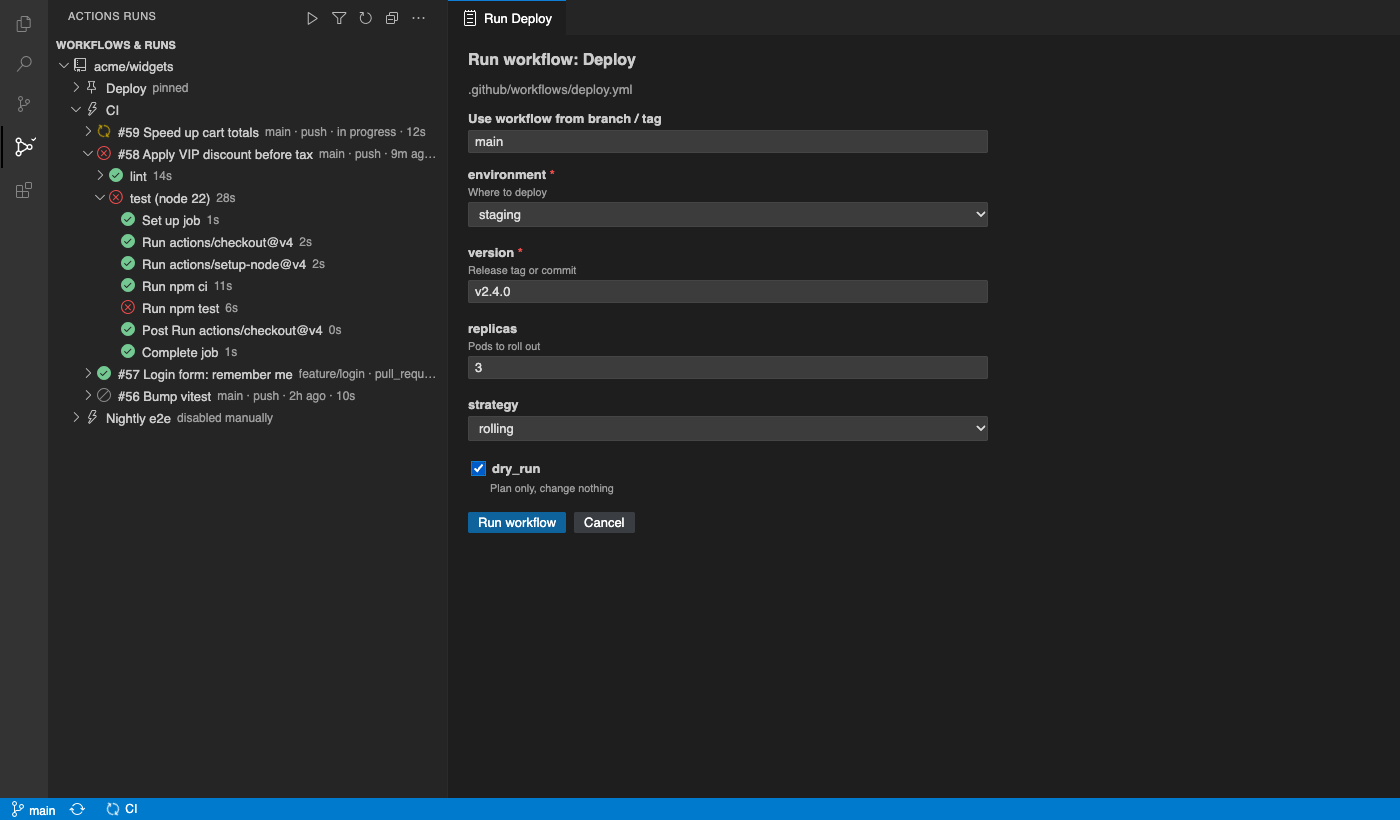
- Run workflow (workflow_dispatch) opens a form built from the workflow file:
- a branch or tag picker;
string and number inputs as text fields, choice inputs as a dropdown, environment inputs as a dropdown of your repo's environments, and boolean inputs as a checkbox;- required fields and defaults are applied;
- values are checked before anything is sent.
- Status-bar badge for the latest run on your current branch. It turns red on failure, and clicking it opens the logs.
- Notification when a run you started finishes. This covers runs you pushed, dispatched or re-ran. The notification offers Show logs and Open on GitHub.
Pro (licence key, works offline)
$19 a year, or $29 lifetime, per developer. Everything above stays free. Pro adds:
- Several repositories. Every repo in a multi-root workspace, plus any
owner/repo you add (githubActionsRuns.extraRepos).
- Organisation view (
githubActionsRuns.orgs): an organisation's most recently pushed repositories, in one tree.
- Run history filters by branch, status, event and actor. They are applied on the server, so older runs are found too.
- Artifact download. Pick a run's artifacts and save them as
.zip. Expired artifacts are skipped.
- Pinned workflows stay at the top of the tree.
- Notification rules, for example any actor, branch
main, failures only, or workflow Deploy*, always.
The free version shows the first repository, followed by a single "N more repositories (Pro)" row. Pro commands explain themselves when you use them. There are no timed pop-ups.
Get a key at https://puzaricloud.in/apps/github-actions/, then run Actions Runs: Enter Pro License Key.
Getting started
- Open a folder that is a clone of a GitHub repository.
- Click the Actions Runs icon in the activity bar, then Sign in to GitHub.
- GitHub Enterprise Server:
- Set
githubActionsRuns.enterpriseUrl to your server, for example https://github.example.com.
- Then either set
github-enterprise.uri to the same URL, or run Actions Runs: Use a Personal Access Token.
- A classic token needs the
repo scope.
- A fine-grained token needs Actions: read & write and Contents: read.
Settings
| Setting |
Default |
Meaning |
githubActionsRuns.enterpriseUrl |
– |
GitHub Enterprise Server URL |
githubActionsRuns.pollActiveSeconds |
5 |
Refresh interval while something runs; backs off automatically |
githubActionsRuns.pollIdleSeconds |
60 |
Refresh interval when idle |
githubActionsRuns.runsPerWorkflow |
10 |
Runs listed per workflow |
githubActionsRuns.statusBar |
true |
Branch badge in the status bar |
githubActionsRuns.notifyOnFinish |
true |
Notify when your run finishes |
githubActionsRuns.notifyRules |
[] |
Pro: custom notification rules |
githubActionsRuns.extraRepos / orgs |
[] |
Pro: more repositories and organisations |
Limits
- Live logs depend on GitHub. Logs come from GitHub's REST API, which publishes a running job's log text as GitHub makes it available. Until then, step status still updates live and the viewer says it is waiting.
- Needs a local workspace. Repository detection reads
.git from the workspace, so vscode.dev and virtual workspaces aren't supported.
Privacy
- No telemetry. The extension talks only to GitHub (or your GHES server), using your own token.
- Tokens stay in VS Code's SecretStorage. That covers both the GitHub sign-in and any Personal Access Token.
- Licence keys are checked offline.
See PRIVACY.md. This extension is not made by or affiliated with GitHub.
Support: support@puzaricloud.in
| |

