AI Code Review - GPT, Claude, Gemini, DeepSeek, Ollama
AI code review inside VS Code, with the model you choose. Review your uncommitted changes, a file or a selection before you commit. Findings show up where problems normally do: squiggles in the editor, the Problems panel and a tree next to Source Control. Use your own API key or a local model. There is no account, no sign-in and no daily limit, and your code goes only to the provider you pick.
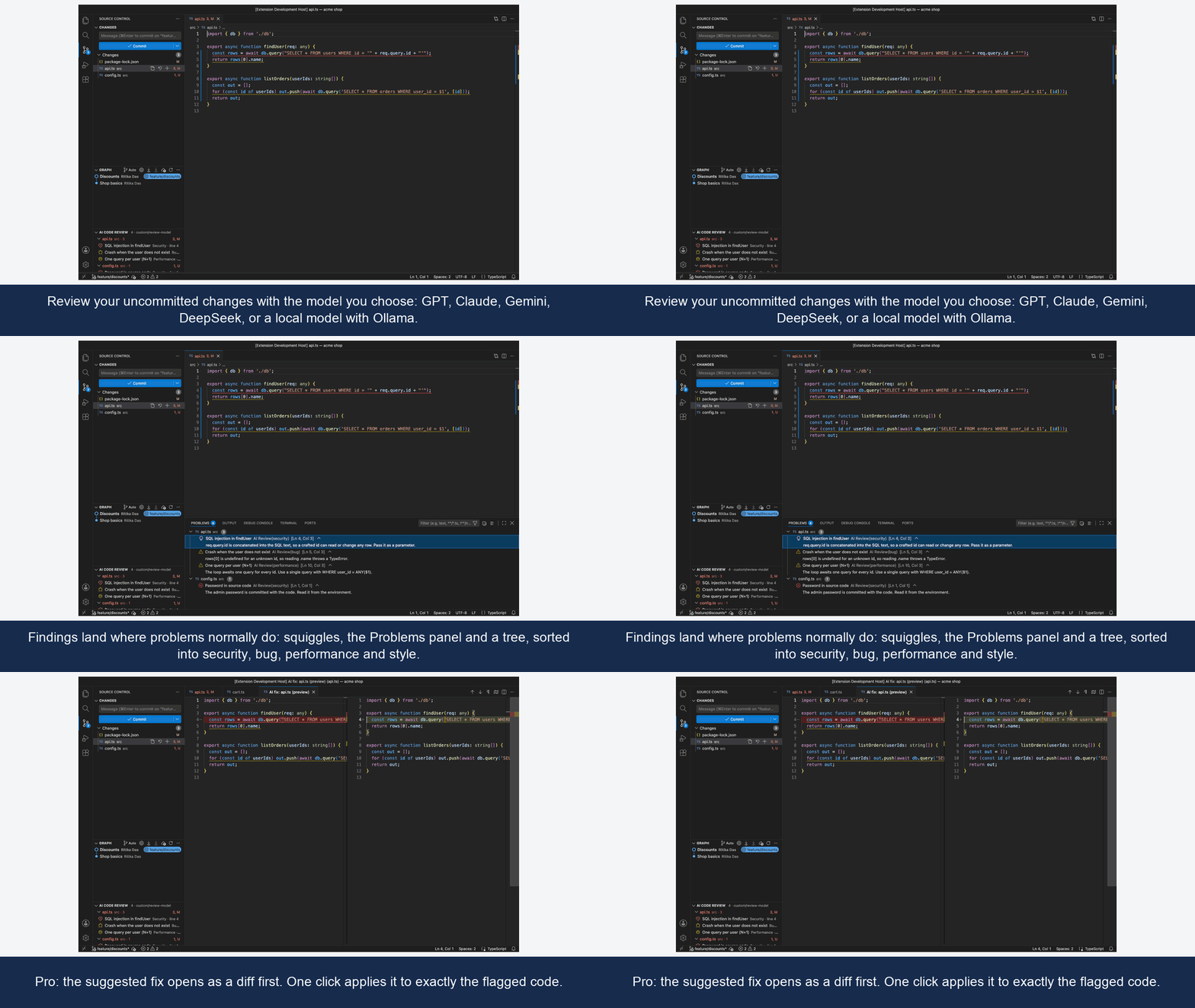
Why this one
- No account, no sign-in, no e-mail. Install it, pick a provider, review.
- No daily request limit. With your own key the only limit is your provider's. With a local model there is none.
- Your code goes only where you send it. Straight from your machine to the provider you chose, or nowhere at all with Ollama or LM Studio. Nothing passes through our servers, because we have none in this path.
- It runs only when you ask. No completion engine, no background indexing, no telemetry.
- You see the size first. The estimated tokens are shown before a large review or the first review with a cloud provider is sent.
Free features
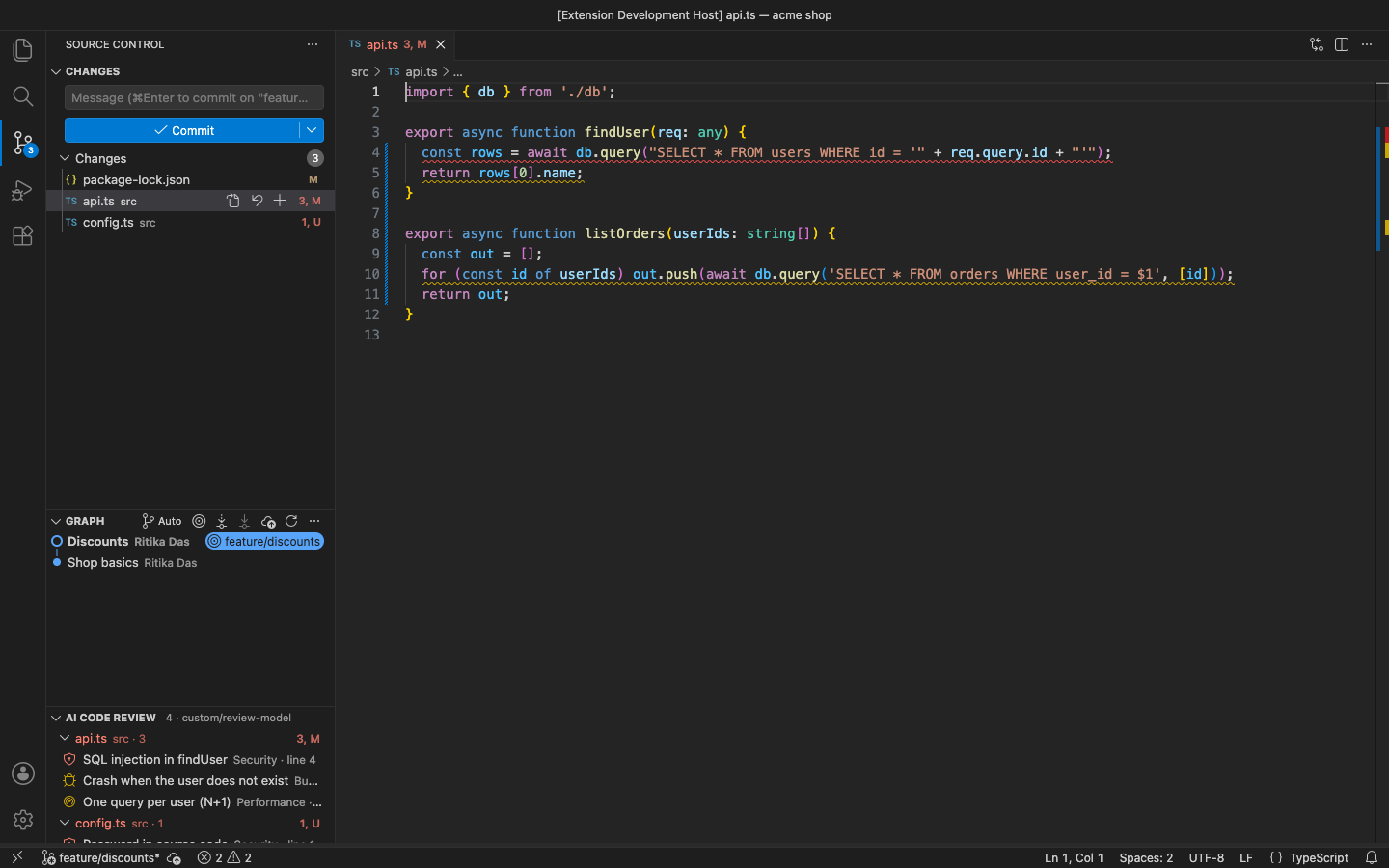
- Review Uncommitted Changes: a button in the Source Control title bar. Staged, unstaged and new files, or staged only.
- Review Current File and Review Selection from the editor context menu.
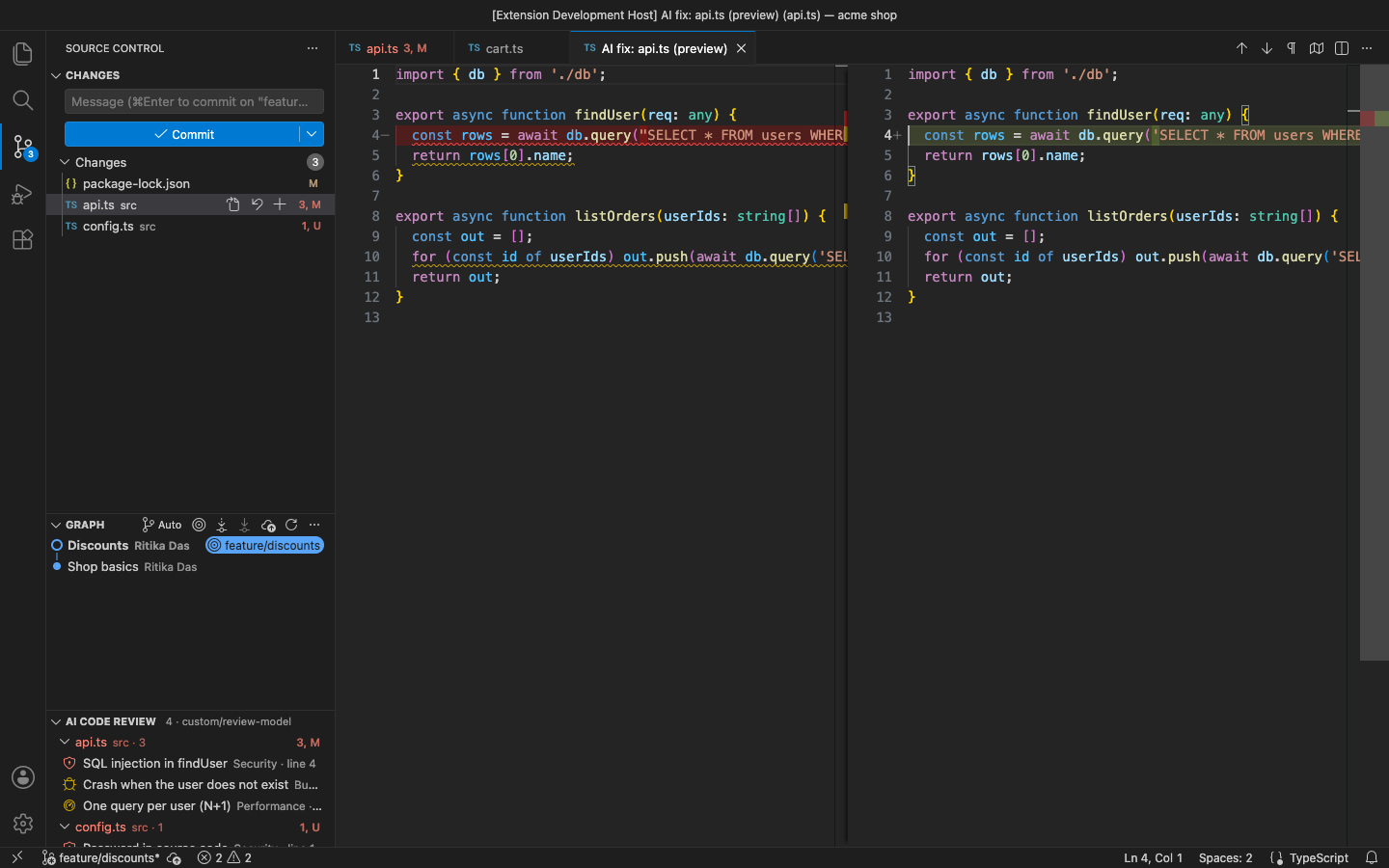
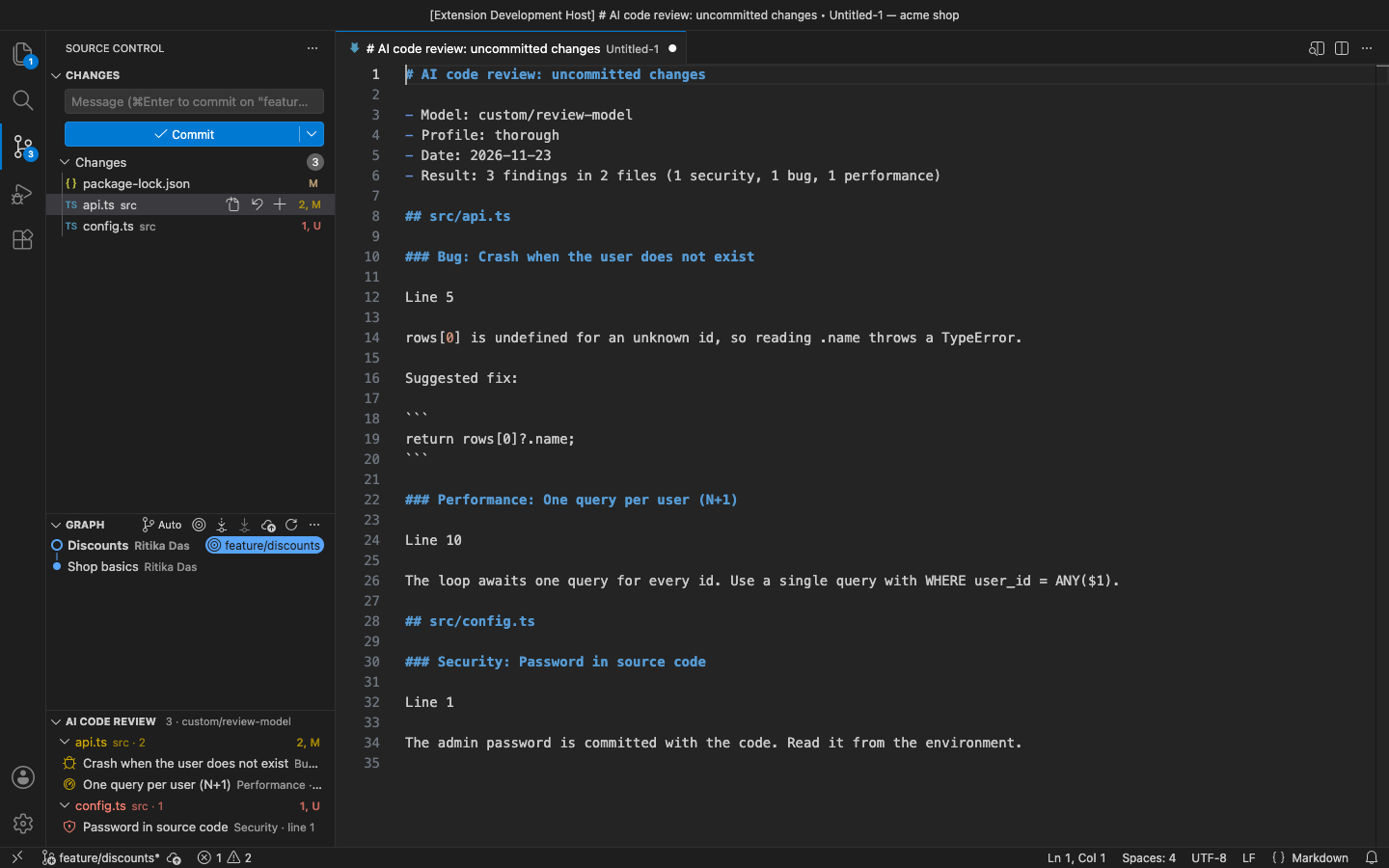
- Findings as diagnostics with a category (security, bug, performance, style): squiggles, the Problems panel, and an AI Code Review tree grouped by file. Hover a finding to read the suggested fix.
- Ignore finding as a quick fix. It stays away in later reviews.
- Review profiles: quick (bugs and security only), thorough, security.
- Output language: findings in English, Deutsch, 日本語 or any language you type.
- Large changes: files are packed into requests under a token budget, large files are split between hunks, nothing is cut off. Lock files, minified and generated files, images and build folders are skipped; add your own globs.
- Local models and one cloud provider, with any model name. Test Connection checks the setup.
Providers
| Provider |
Key |
Default model |
| Ollama (local) |
none |
qwen2.5-coder:7b |
| LM Studio (local) |
none |
the loaded model |
| Any OpenAI-compatible endpoint (llama.cpp, vLLM, LiteLLM, a company gateway) |
optional |
you type it |
| Editor language models (for example GitHub Copilot, when your editor has them) |
none |
the editor's |
| OpenAI (GPT) |
yours |
gpt-5-mini |
| Anthropic (Claude) |
yours |
claude-haiku-5-5 (or claude-sonnet-5-5, claude-opus-5-5) |
| Google Gemini |
yours |
gemini-2.5-flash |
| DeepSeek |
yours |
deepseek-chat |
| Mistral |
yours |
mistral-small-latest |
| Groq |
yours |
llama-3.3-70b-versatile |
| xAI (Grok) |
yours |
grok-code-fast-1 |
| OpenRouter |
yours |
openai/gpt-5-mini |
| Qwen (DashScope), Moonshot (Kimi) |
yours |
qwen-plus, kimi-k2-turbo-preview |
| Azure OpenAI |
yours |
your deployment |
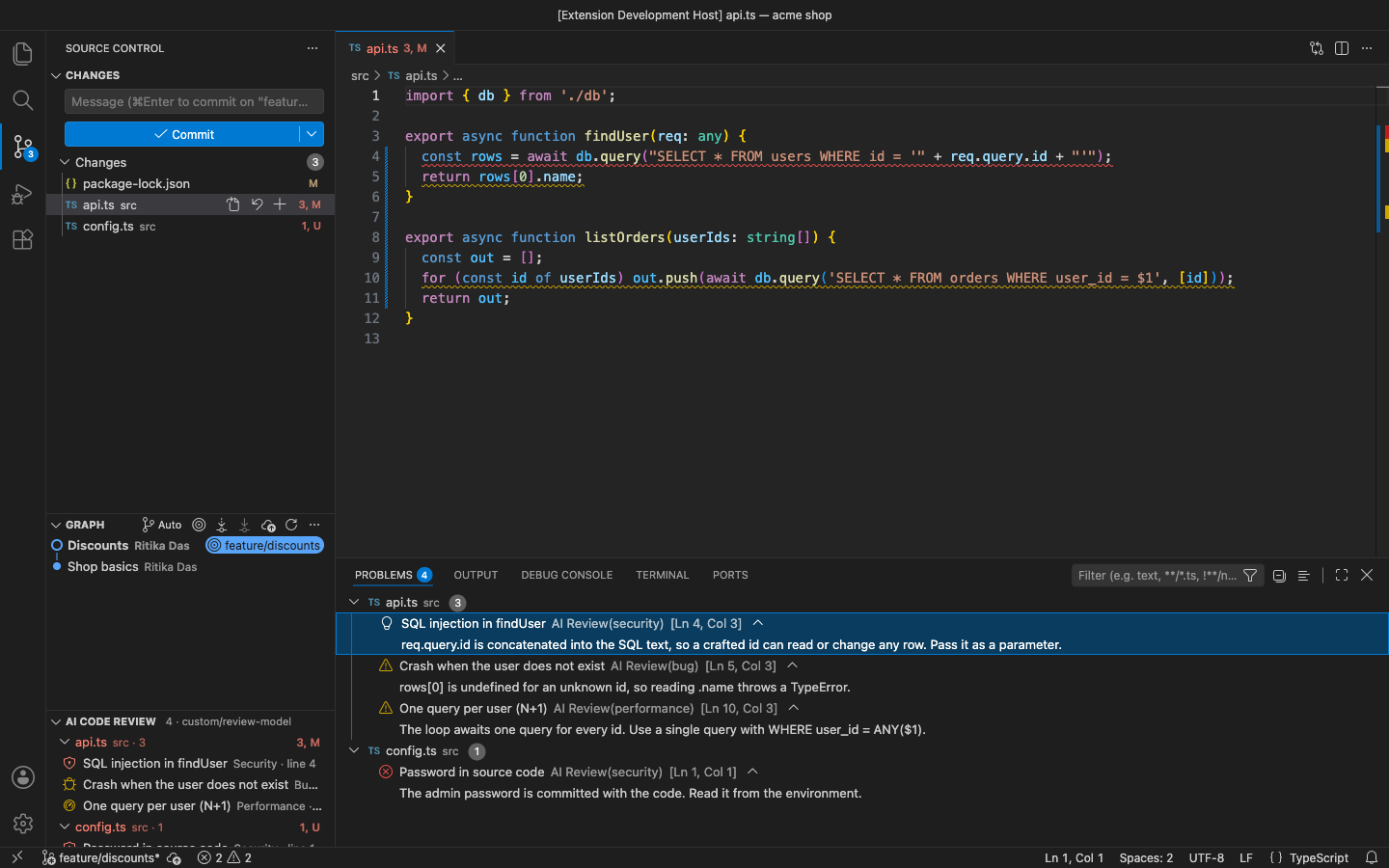
Run AI Code Review: Choose AI Provider and Model. The model is free text, so a model released tomorrow works today. Keys are kept in the editor's SecretStorage, never in settings.
Pro (licence key, checked offline)
$19 a year, or $57 for a lifetime licence, per developer. Everything above stays free. Pro adds:
- Branch review: every change on your branch against the base branch (
origin/main or the one you set), before you push or open a pull request.
- Apply AI fix: the suggested change opens as a diff first. One click applies it to exactly the flagged code.
- Team rules: put a
.ai-review.md file in the repository root ("money is integer cents", "every SQL statement uses parameters"). Every review follows it, for everyone on the team.
- Export to Markdown and Copy as PR comment: the review grouped by file, ready to paste into GitHub, GitLab, Azure DevOps or Bitbucket.
- Any number of cloud providers side by side.
Pro commands are visible in the free version and marked "(Pro)". Using one says what it does and links to the upgrade page: in full the first time, in one line after that. There are no timed pop-ups.
Get Pro: https://puzaricloud.in/apps/ai-code-review/ · then run AI Code Review: Enter Pro License Key.
Settings
| Setting |
Default |
|
aiCodeReview.provider, model, baseUrl |
ollama |
set by Choose AI Provider and Model |
aiCodeReview.profile |
thorough |
quick, thorough, security |
aiCodeReview.outputLanguage |
English |
language of the findings |
aiCodeReview.exclude |
[] |
more globs to skip, like in .gitignore |
aiCodeReview.maxTokensPerRequest |
12000 |
lower it for small local models |
aiCodeReview.confirmBeforeSending |
large |
always, large, never |
aiCodeReview.timeoutSeconds |
300 |
per answer; local models get three times as long |
aiCodeReview.rulesFile, baseBranch |
.ai-review.md, auto |
Pro |
FAQ
Does my code go to PuzariCloud? No. Requests go from your editor to the provider you chose and nowhere else.
What does a review cost? With your own key you pay your provider for the tokens; the estimate is shown before large reviews. Local models cost nothing.
How fast is a local model? It depends on your hardware. On a laptop CPU an 8B model needed about three minutes for a 15-line change in our test; with a GPU or Apple Silicon it is far quicker. Cloud models answer in seconds.
Which model should I use? A current mid-size cloud model finds more and invents less than a small local one. For private code on a laptop, qwen2.5-coder:7b with the quick profile is a reasonable start.
Does it work in VSCodium, Cursor and Windsurf? Yes. It uses only stable extension APIs. The "editor language models" provider needs an editor that has them.
Does it post to my pull request? No. Copy as PR comment puts Markdown on the clipboard and you paste it.
Can it be wrong? Yes. It is a language model reading a diff. Treat findings as a second pair of eyes, and read a fix before you apply it.
Privacy
No account and no telemetry. The only network connections go to the provider you configured. Changes are read through VS Code's built-in Git extension; this extension starts no programs. See PRIVACY.md. Support: support@puzaricloud.in
An independent extension. The provider and model names belong to their owners; it is not made or endorsed by any of them.

