Skip to content
| Marketplace
Sign in
Visual Studio Code>AI>PromptMindNew to Visual Studio Code? Get it now.
PromptMind

PromptMind

promptmind

|
4 installs
| (1) | Free
AI-powered prompt classification and template expansion for Copilot Chat. Type natural phrases to auto-generate optimized prompts.
Installation
Launch VS Code Quick Open (Ctrl+P), paste the following command, and press enter.
Copied to clipboard
More Info

PromptMind

Better prompts → Better Copilot responses → Faster development

AI-powered VS Code extension thatclassifies natural language prompts and auto-generates optimized Copilot Chat prompts using proven prompt-engineering best practices.It helps developers, engineers, and product builders write better prompts faster---so you get higher-quality responses from GitHub

Publisher

Duddu Arun Kumar


User Interface

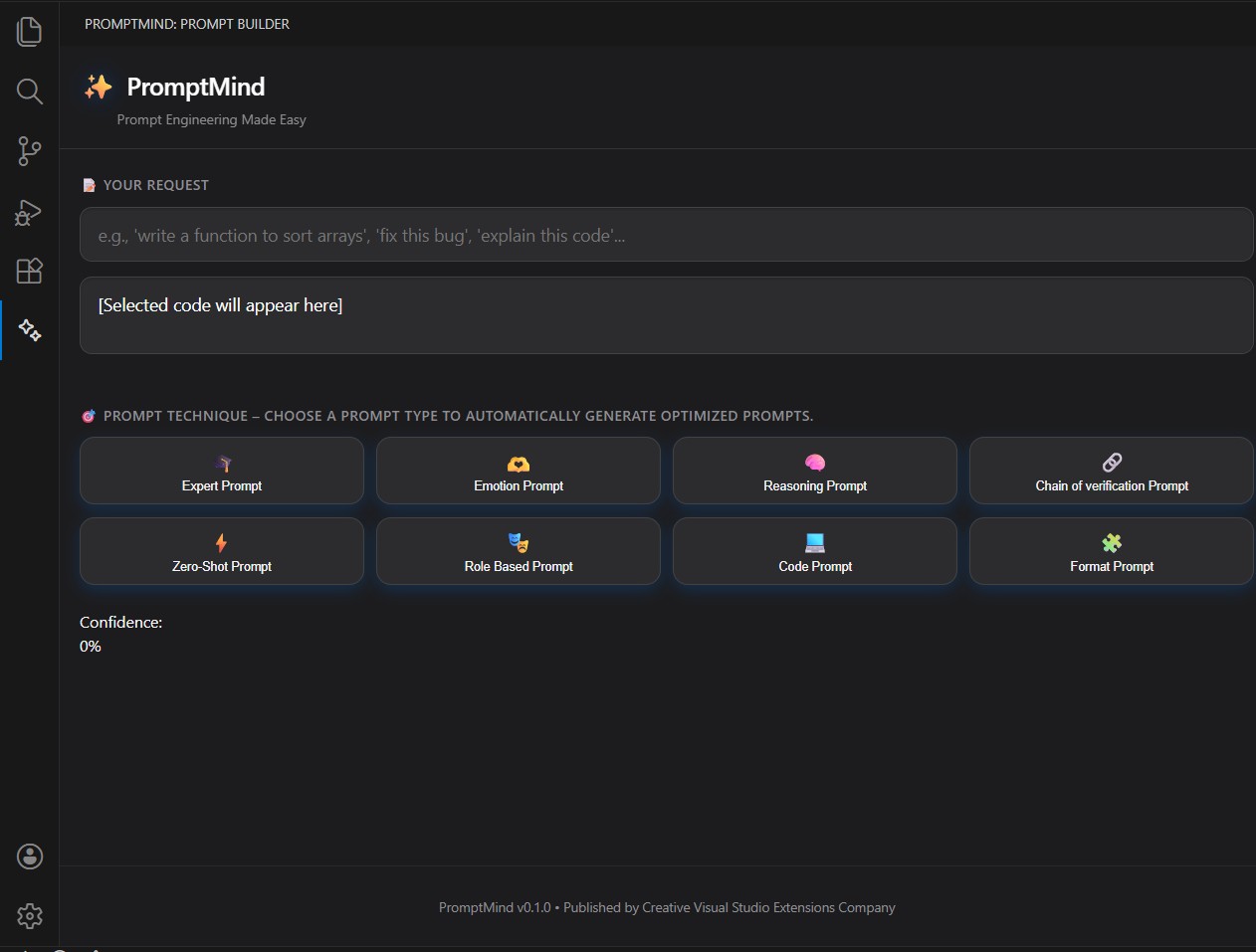
PromptMind Interface

✨ What It Does

  • You write a simple natural language request
  • The extension intelligently classifies the intent
  • You choose a Prompt Type from the UI
  • The extension generates 4 optimized prompt variations
  • You can:
    • 📋 Copy any prompt
    • 🚀 Send directly to Copilot Chat

This removes guesswork from prompt writing and improves Copilot output quality.


🎯 Why Use This?

Most Copilot users waste time rewriting prompts or struggle with:

  • Vague outputs
  • Poor structure
  • Missing context
  • Inconsistent quality

Prompt Intent Generator solves this by applying proven frameworks automatically.

🧠 Supported Prompt Types

You can select from the following prompt strategies directly in the UI:

  • Expert Prompt\
  • Emotion Prompt\
  • Thread of Thought Prompt\
  • Chain of Verification Prompt\
  • Zero-Shot Prompt\
  • Role-Based Prompt\
  • Instructional Prompt\
  • Code Generation Prompt\
  • Formatting Prompt\
  • Analytical Prompt\
  • Test Case Prompt

Each type is designed using prompt engineering best practices tailored for that intent.

⚡ Key Features

  • ✅ AI-powered prompt classification\
  • ✅ Generates 4 optimized prompts per request\
  • ✅ One-click Copy Prompt\
  • ✅ One-click Send to Copilot Chat\
  • ✅ Clean, developer-friendly UI\
  • ✅ Designed for productivity and prompt quality

🖥️ How It Works

  1. Open the extension inside VS Code\
  2. Enter your raw prompt (e.g., "Write unit tests for this service")\
  3. Select a prompt type (e.g., Test Case Prompt)\
  4. Instantly receive 4 optimized prompt options\
  5. Copy or send directly to Copilot Chat

🚀 Ideal For

  • Software Engineers
  • AI Engineers
  • Prompt Engineers
  • Product Developers
  • Tech Leads
  • Anyone using GitHub Copilot Chat

📄 License

Creative Visual Studio Extensions

Support

  • GitHub Issues
  • VS Code Extension Marketplace
  • Email support: arun4duddu@gmail.com

Made with ❤️ by PromptMind Team

  • Contact us
  • Jobs
  • Privacy
  • Manage cookies
  • Terms of use
  • Trademarks
© 2026 Microsoft