Codicil for VS Code
See, review and control what your AI coding agents know about your project.
Your agent forgets the decision you explained yesterday, suggests the library
you deliberately removed, and rebuilds the thing you already tried. Codicil
fixes that by keeping project knowledge — rules, decisions, architecture,
conventions — as Markdown in .codicil/, committed alongside your code.
This extension is your window onto it: read it, review what agents suggest, and
see exactly what an agent is told for the file you're editing.
Features
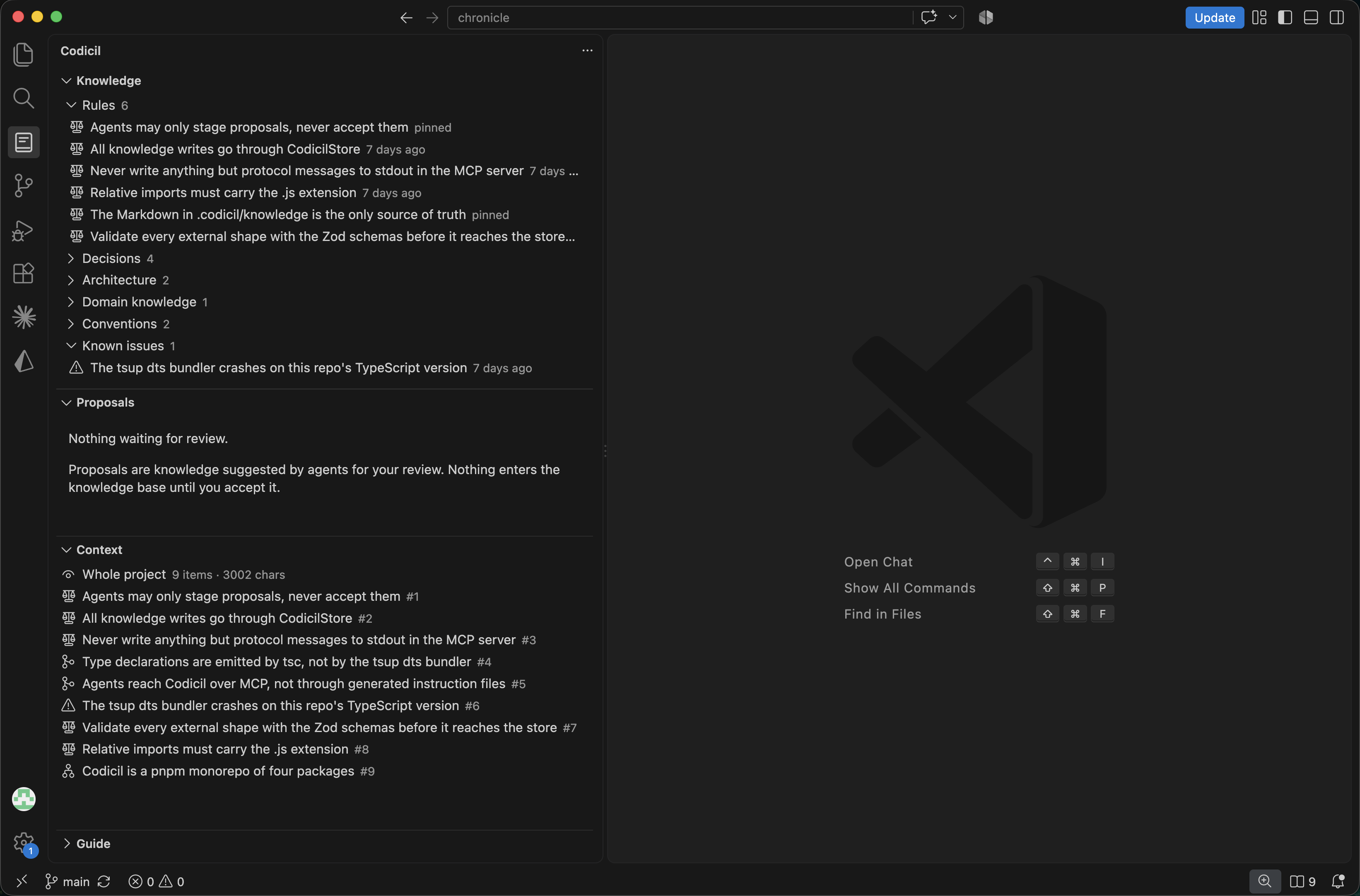
Knowledge
Everything the project knows, grouped by type, status or scope. Open an item to
read the full Markdown record — then edit, verify or archive it. A live summary
shows how much is in play, stale, or waiting on you.
Proposals
Agents stage what they judge worth remembering. Review each proposal as a diff
and accept or reject it. Nothing reaches the knowledge base without your say-so.
You propose, they suggest — you decide. There is deliberately no way for an
agent to accept its own proposals.
Context
The exact package an agent would receive for the file you're editing — in the
order it would see it, including what was dropped for the budget and why.
Verify & Doctor
Knowledge items can carry checks (a file that must exist, a pattern that must
not appear). Re-run them against your code per item or all at once. Doctor
scans for merge conflicts, broken files and dangling references.
Getting started
- Install the extension and open a project.
- Open the Codicil view in the Activity Bar and click Initialize
Codicil. This creates the
.codicil/ folder.
- Capture your first note: select code or text, right-click, and choose
Codicil: Remember the selected text — or run Codicil: Remember
this from the Command Palette.
- Connect your agent so it can read and propose knowledge over MCP. Use the
built-in setup commands for your client:
Codicil: Configure MCP for CopilotCodicil: Configure MCP for CursorCodicil: Configure MCP for Claude Code
The Guide view walks through the full workflow, available actions and check
syntax at any time.
Tip: When you capture a note, Codicil infers its type and scope from the
sentence and shows you the guess before saving — so you can correct it in one
click.
Commands
| Command |
What it does |
Codicil: Set up the knowledge layer |
Create .codicil/ in this project |
Codicil: Remember this |
Capture knowledge; type and scope inferred for you |
Codicil: Remember the selected text |
Capture the current editor selection |
Codicil: What does the agent know here? |
Show context for the open file |
Codicil: Verify against the code |
Re-check a single item |
Codicil: Verify everything |
Re-check the whole knowledge layer |
Codicil: Check the knowledge layer for problems |
Run Doctor |
Codicil: Configure MCP for Copilot / Cursor / Claude Code |
Wire up your agent |
Codicil: Add agent instructions |
Add Codicil guidance to your agent files |
Codicil: Open Guide |
Open the in-editor guide |
Settings
| Setting |
Description |
codicil.groupBy |
Group the Knowledge tree by type, status or scope |
codicil.statusBar.enabled |
Toggle the status bar item showing how many items apply to the current file |
Requirements
- VS Code
1.95.0 or later.
- A trusted, non-virtual workspace — Codicil reads and writes
.codicil/
and runs verification checks directly against your files.
Learn more
Codicil is an open, developer-controlled knowledge layer that also ships a CLI
and a standalone MCP server. See the
project README for the full
story, and the Changelog for what's new.
License
MIT

