Postmate Client — Privacy-First Postman Alternative for VS Code, with AI Test Generation
Test REST, GraphQL, and WebSocket APIs inside VS Code, and let GitHub Copilot write tests against your live responses. No account, no cloud sync, no telemetry.
Postmate Client is a local-first API client built natively into VS Code. Send REST and GraphQL calls, test WebSocket and WSS connections in real time, compare responses side-by-side, run data-driven CSV tests, and automate everything in CI/CD — without ever leaving your editor or sending your requests to someone else's servers.
New in 2.0: AI test generation, without Postmate gaining an AI backend. Most tools add AI by routing your data through their servers. Postmate does the opposite — it runs a local MCP server and lets the agent you already use call in. There's no Postmate API key, no Postmate LLM, no Postmate endpoint. Copilot reads your live response panel and writes tests against the real payload, with secrets redacted before anything leaves. One setting turns it off.
Everything in this list is free: WebSocket testing, the CLI runner, data-driven testing, response comparison, scripting. There is no account to create and no feature gate to hit.
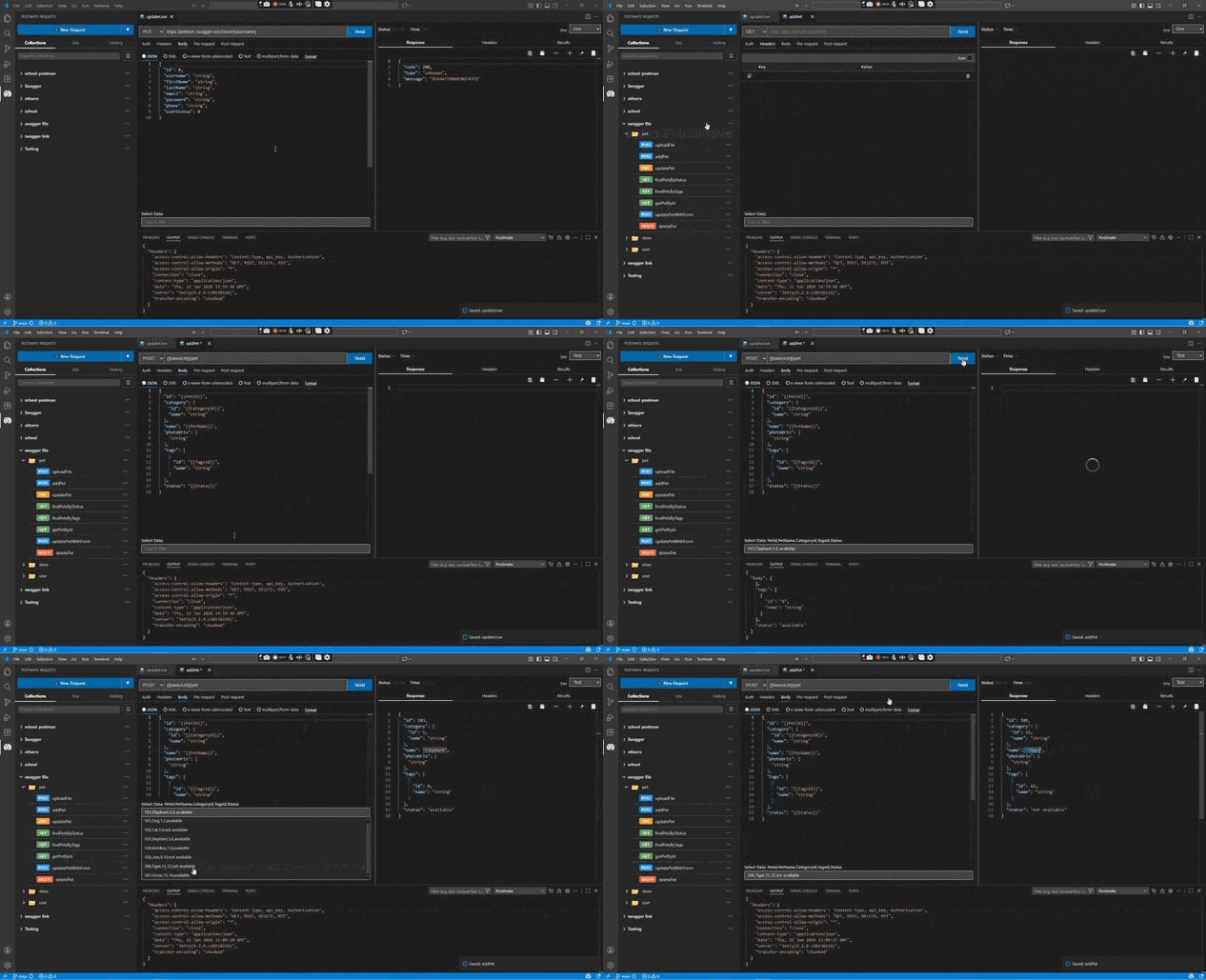
Why developers choose Postmate Client
- 🔒 Privacy-first by design. No cloud sync, no login, no telemetry. Your requests, tokens, and payloads never leave your machine.
- ⚡ Native to VS Code. No separate desktop app to install or switch to — instant startup, lives in the same editor you write code in.
- 📂 Your data stays yours. Collections are plain JSON on your own disk, and nothing checks a license before opening them.
- 🤖 AI that sees your actual response. Copilot reads your live request panel through a local MCP server and generates tests against the real payload — and can run your saved requests when you let it. Credentials are redacted first, and Postmate itself still sends nothing anywhere.
Free, and not in a way that can be taken back
There are no tiers, no trial period, and no account. There is also no cap on collections, requests, or environments — there are no counts to hit.
More importantly, your work does not live inside this extension:
- Collections are plain JSON you can open in any editor — no proprietary format, nothing encrypted against you.
- No license check. There is no code path where the extension validates a subscription before deciding whether to open your collections.
- Keep them in Git if you want. Turn on
Use Workspace As Project Dir and Postmate offers to move your existing data into your workspace, where it can be versioned and reviewed alongside the code it tests.
- The CLI is a separate npm package. Your pipelines keep running whether or not you use the editor extension.
If paid functionality is ever added, it would be for team capabilities that do not exist today — never a retroactive limit on collections you have already built.
Read the full data ownership statement →
Features
REST, GraphQL, and WebSocket — one editor
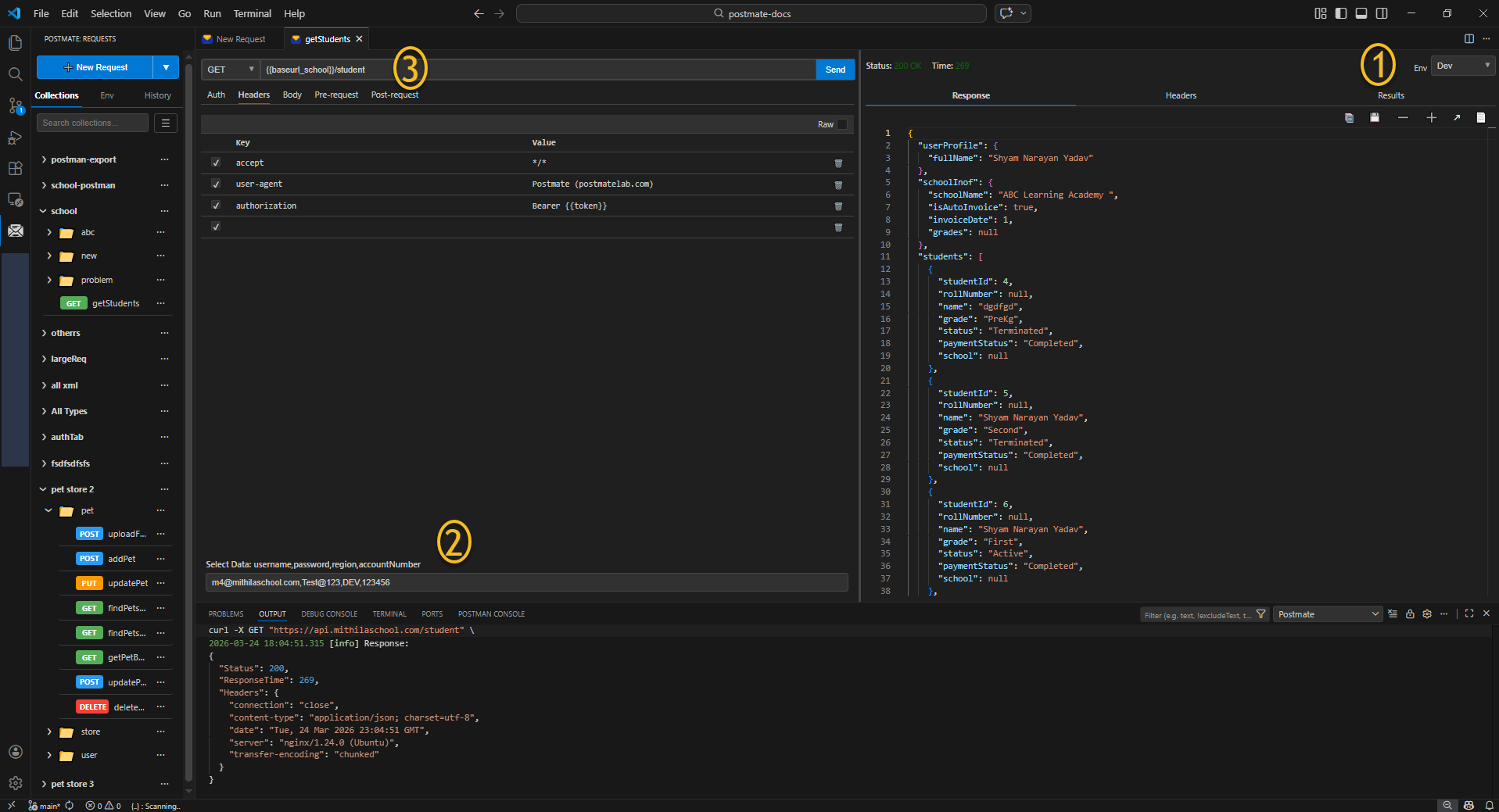
A complete visual request builder with tabs for params, headers, body, auth, tests, and pre/post-request scripts. Authentication covers Basic, Bearer, API Key, AWS Signature, and OAuth 2.0 (with automatic token fetching). Build REST and GraphQL calls without writing boilerplate. Stream WebSocket connections in the same UI.
Side-by-side response comparison
Fire two requests in parallel against different environments and instantly see every difference highlighted in clean JSONPath notation. Run single comparisons or bulk comparisons across CSV data tables — perfect for staging-vs-prod regression checks.
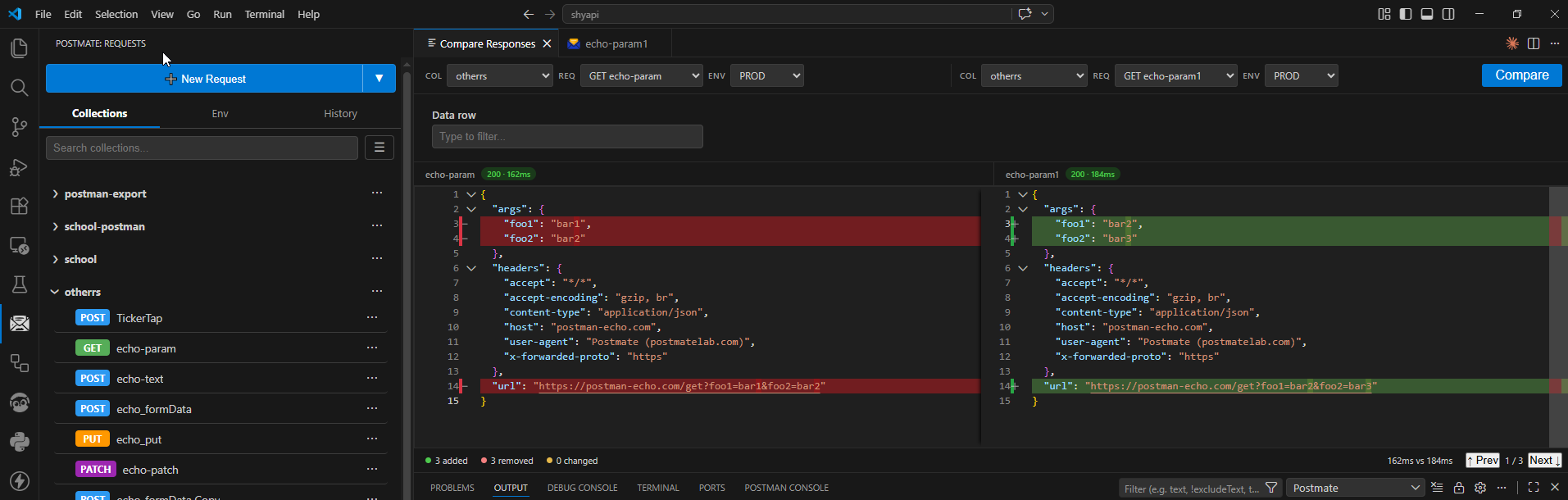
Single-row compare guide → · Bulk CSV compare guide →
Data tables and per-request tagging
Attach a CSV data table to any environment — automatically active across every request. Tag rows with a _dtag column to filter which rows run per request. Unique to Postmate Client.
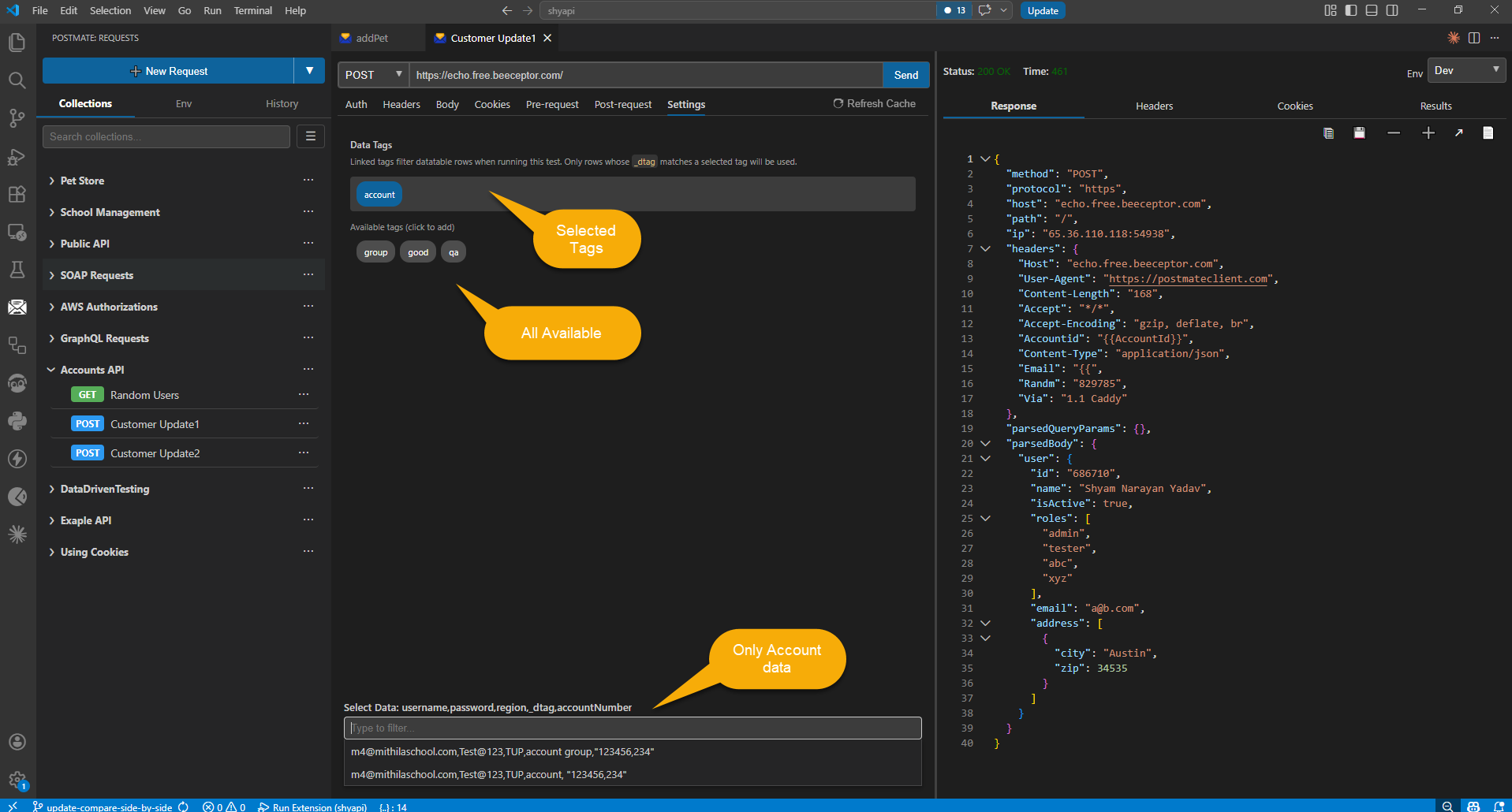
AI test generation with GitHub Copilot (beta)
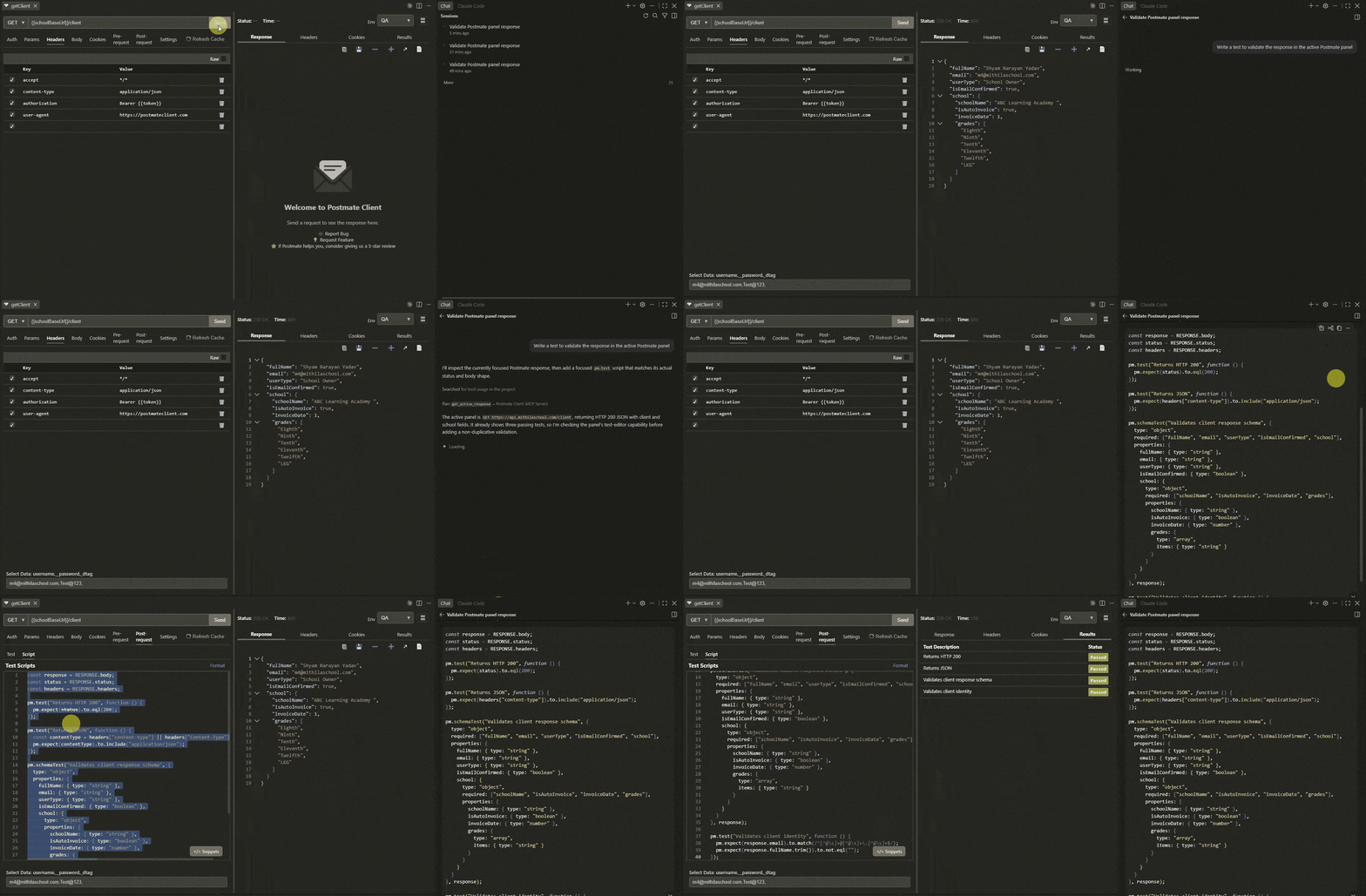
Postmate runs a local MCP server that lets AI agents in your editor read the request panel you're actually looking at. Ask Copilot:
"Write a test to validate the response in the active Postmate panel"
and it reads the live status, headers, body, and test results, then writes Postmate pm assertions against the real data — including pm.schemaTest schemas generated from the actual response shape.
Postmate can also run requests for you. With postmate.mcp.allowSend turned on, Copilot can send a request you've already saved — "send the getClient request and tell me why it's failing" — and read the response back. It can only run requests that already exist in your collections; it cannot invent a URL. Non-GET sends ask for confirmation first.
- Reads live runtime state, not files — the resolved URL, the response that just came back, the proxy and TLS path, the test results
- Knows Postmate's scripting API, so generated tests use
RESPONSE.body and pm.schemaTest and run as-is
- JSONPath querying — for large responses the agent requests just the part it needs instead of pulling megabytes
- Secrets redacted before anything leaves —
Authorization headers, tokens, passwords, JWTs, and __-prefixed data-table columns are replaced with [redacted by Postmate]
- Server binds to
127.0.0.1 only, with a per-session token
- Optional send access — off by default; when enabled the agent can run your saved requests, never arbitrary URLs
Postmate itself still sends nothing anywhere. Anything the agent reads is handled by your agent's own model provider under their data policy — so check theirs, and turn this off if it doesn't fit:
"postmate.mcp.enabled": false
Zero-config with GitHub Copilot. Other MCP clients aren't supported yet.
Tests, assertions, and pm scripting
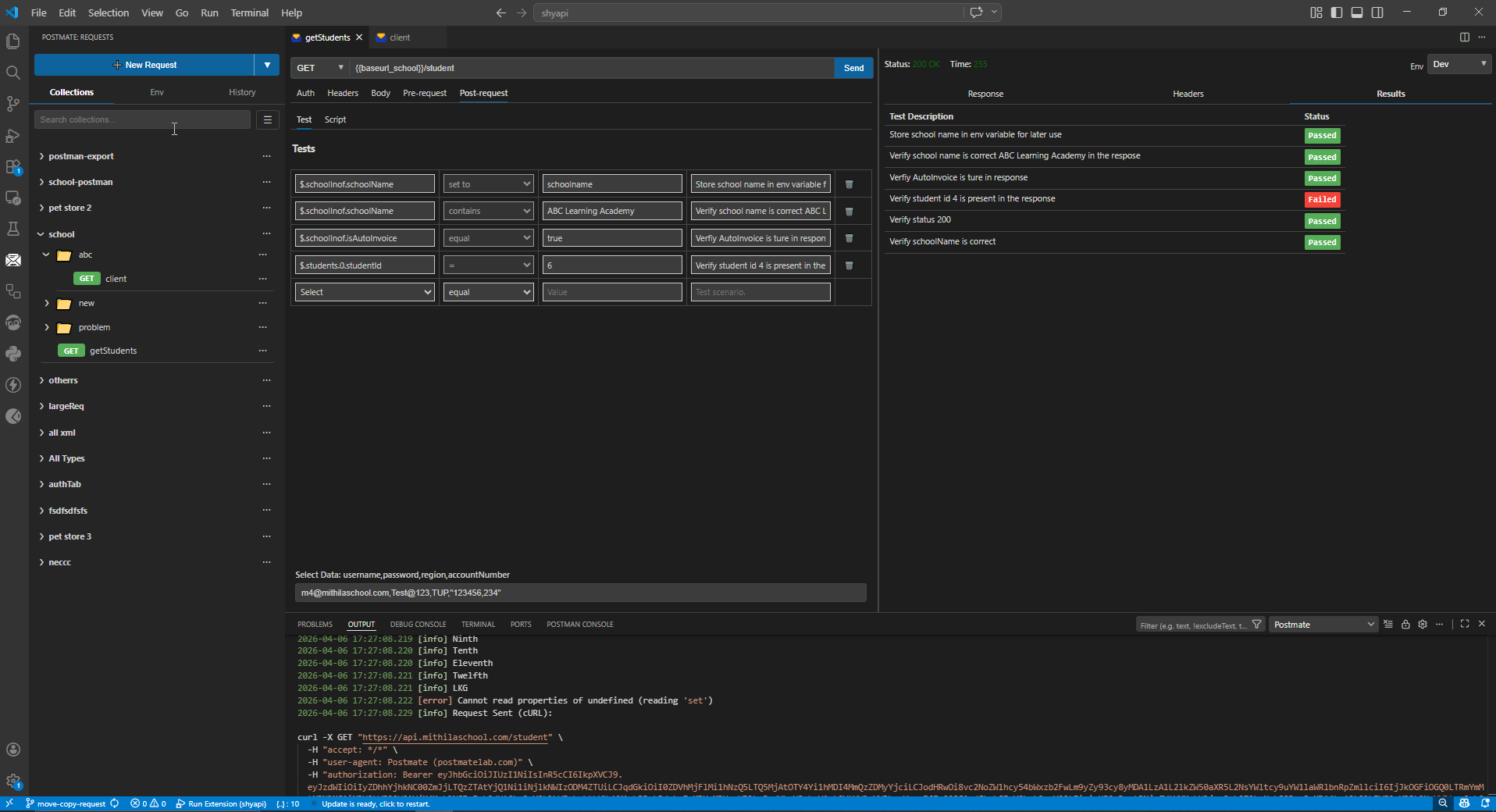
Write tests in plain English with the tabular test editor, or use the full pm scripting library for advanced assertions and chained workflows.
pm.test("Status is 200", () => {
  pm.expect(RESPONSE.status).to.equal(200);
});

pm.setVariable("token", RESPONSE.body.token);
pm.schemaTest("Validate response schema", userSchema, sampleData);
Available pm methods include pm.assert, pm.expect, pm.test, pm.getRequest, pm.getVariable, pm.setVariable, pm.clearVariable, pm.listVariables, pm.log, pm.schemaTest, and pm.base64Decode.
For data manipulation, the response body is exposed directly:
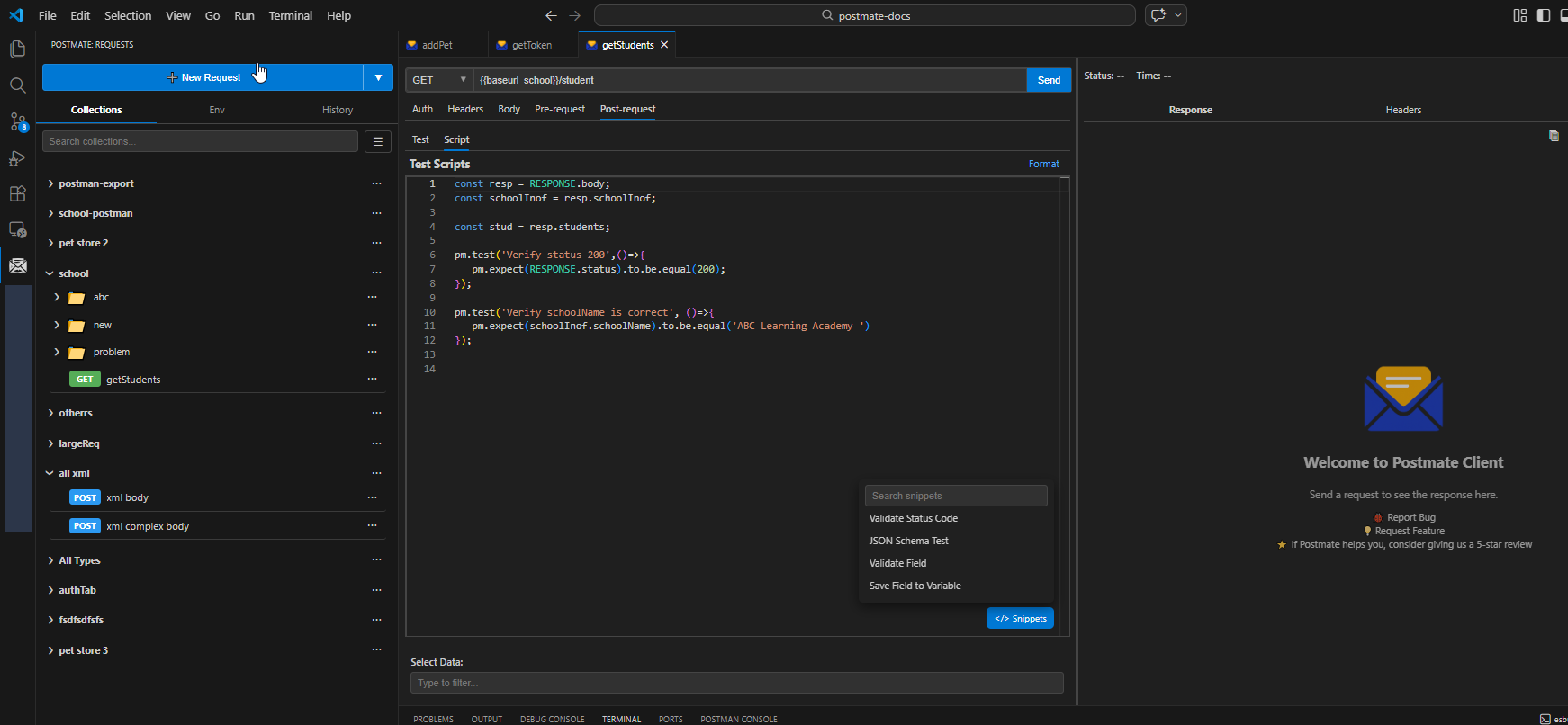
const resp = RESPONSE.body;
resp.students.forEach((s) => console.log(s.name));
Import from anywhere
Bring your existing work in one click:
- Postman v2.1 collections
- OpenAPI 3.0 and Swagger 2.0 specs
- cURL commands — paste any cURL and it parses into a full request (demo video)
Environments, variables, and request chaining
Manage dev, staging, and production with named environments. Reference values anywhere with {{variableName}} syntax. Chain requests visually to pass tokens, IDs, and computed values between calls.
Collection Runner with drag-and-drop sequencing
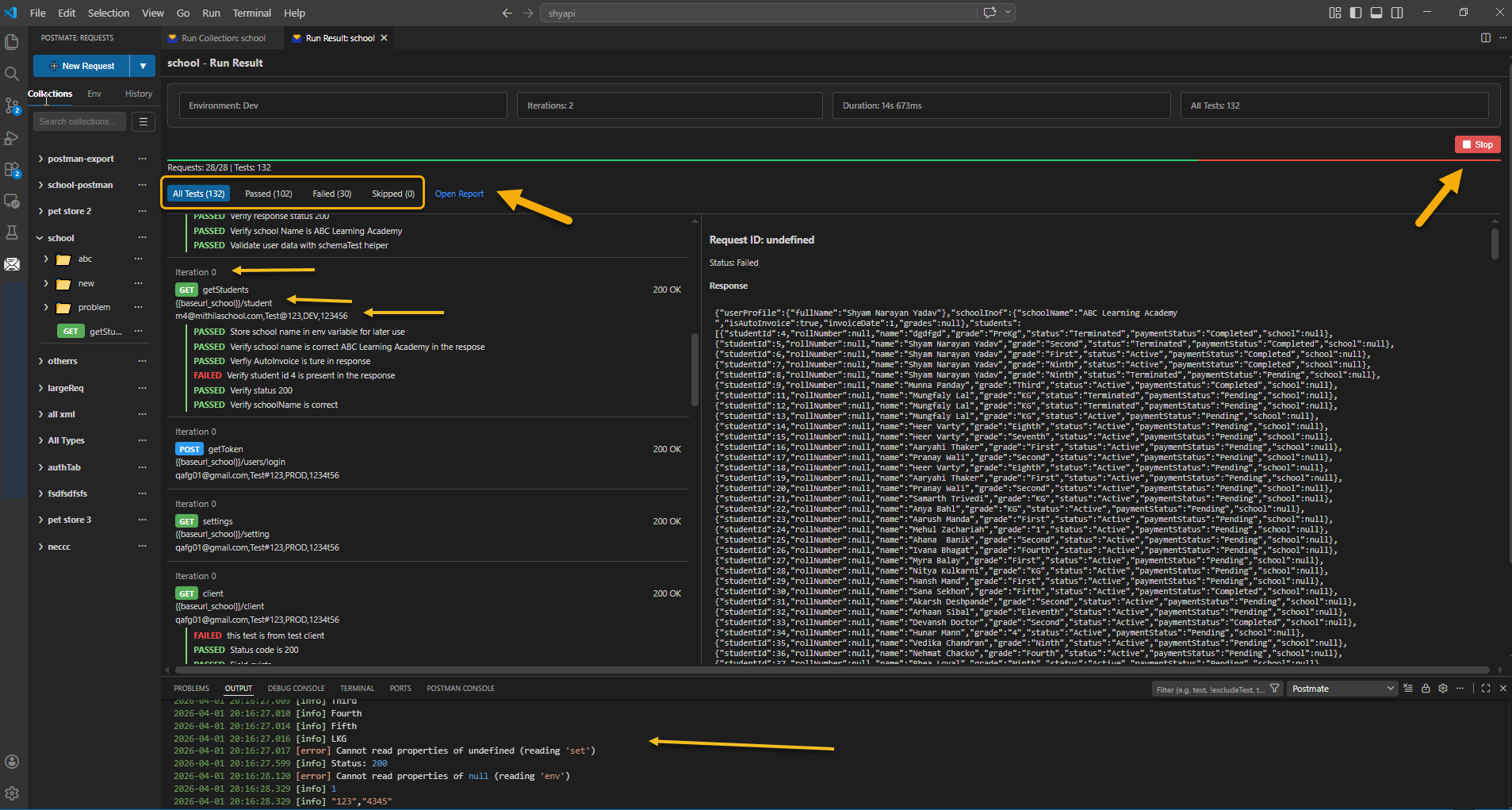
Run any folder or collection in sequence with a single click. Drag to reorder. Filter rows by tag. WebSocket requests are skipped automatically so they don't block your stateless HTTP run.
CLI for CI/CD
Run collections from the command line. Automate API tests in any pipeline. Generate HTML reports for stakeholders. The CLI is free — no paid tier, no Newman equivalent to license.
CLI reference →
- Log as cURL — log any outgoing request as a cURL command instead of plain text
- Pre-request and post-request scripts — full JS environment per request
- Built-in JSON Schema generator — one click to generate a schema from any response
- JSON path helper — autocomplete JSONPath expressions inside test editors
- Variable autocomplete — every
{{...}} input suggests available variables
Recently added
OAuth 2.0 authentication
Postmate Client speaks OAuth 2.0 natively — no more copy-pasting tokens from another tool:
- Client Credentials and Password grants
- Leave the token field empty and Postmate fetches a token automatically on Send — cached and reused until it's about to expire
- Get New Access Token button for fetching and inspecting tokens manually
- Client authentication via Basic Auth header or in the request body
{{variables}} and secrets work in every field — keep client secrets in your environment, not in the request- Works in the request panel, collection runner, pre-requests, and the CLI
- Access tokens are never saved to disk
WebSocket and WSS testing
A first-class request type — connect, stream, and save ws:// requests alongside REST and GraphQL. Full WebSocket guide →
How Postmate Client compares
Other tools are good tools, and this table is not an argument that they are bad ones. It is here so you can see quickly whether Postmate Client covers what you need before you install anything.
| Feature |
Postmate Client |
Postman |
Thunder Client |
| Works offline |
✅ Always |
⚠️ Limited |
✅ Yes |
| Usable without an account |
✅ Always |
⚠️ Account-centric |
⚠️ Free tier limited |
| Collections stored locally |
✅ Always |
⚠️ Cloud by default |
✅ Local |
| Collections can live in your repo |
✅ Optional |
❌ Export only |
⚠️ Paid tier |
| Telemetry |
✅ None |
⚠️ Yes |
⚠️ Yes |
| WebSocket / WSS support |
✅ Included |
✅ Yes |
💠 Paid tier |
| Pre/post-request scripts |
✅ Included |
✅ Yes |
💠 Paid tier |
pm scripting library |
✅ Included |
✅ Native |
❌ Not supported |
| Side-by-side response compare |
✅ Included |
❌ Manual |
❌ Not available |
| Bulk response comparison (CSV-driven) |
✅ Included |
❌ Scripting required |
❌ Not available |
| Data tables linked to environments |
✅ Included |
❌ Not available |
❌ Not available |
| Per-request data tag filtering |
✅ Included |
❌ Not available |
❌ Not available |
| CLI for CI/CD |
✅ Included |
⚠️ Separate tool (Newman) |
💠 Paid tier |
| AI reads your live response panel |
✅ Built in |
⚠️ Manages cloud resources |
⚠️ Copy-paste prompt |
| AI access without an account/API key |
✅ Yes |
❌ Account required |
⚠️ N/A |
| AI can run your saved requests |
✅ Opt-in, local |
⚠️ Cloud agent |
❌ Not available |
| Secrets redacted before reaching AI |
✅ Automatic |
❌ Not applicable |
⚠️ Your responsibility |
Something out of date here? Tell me and I will correct it.
Quick start
- Install Postmate Client from the VS Code Marketplace.
- Click the Postmate Client icon in the VS Code Activity Bar.
- Click New Request, paste a URL, hit Send — your first API call without leaving the editor.
For WebSocket testing, click the dropdown next to New Request and choose WebSocket. Paste wss://echo.websocket.org, hit Connect, and send a JSON message to see it stream back in real time.
Read the Getting Started guide →
Resources
Feedback
Postmate Client is built by a developer who got tired of sending API tokens to someone else's cloud. If something doesn't work the way you'd expect, or you want a feature, open an issue on GitHub or post in the discussion forum. Every suggestion gets read.
License & dependencies
Copyright © 2026 Shyam Narayan Yadav. All rights reserved.
Postmate Client is licensed under a proprietary license. You are free to use it, but you may not redistribute, modify, or sell it without explicit permission.
Third-party libraries used: chai, mocha, node-fetch, jsonpath-plus, monaco-editor, uuid, @modelcontextprotocol/sdk, esbuild, rimraf, typescript, vscode-test, and @types/* packages...

