Loose Ends: TODO tree without ripgrep
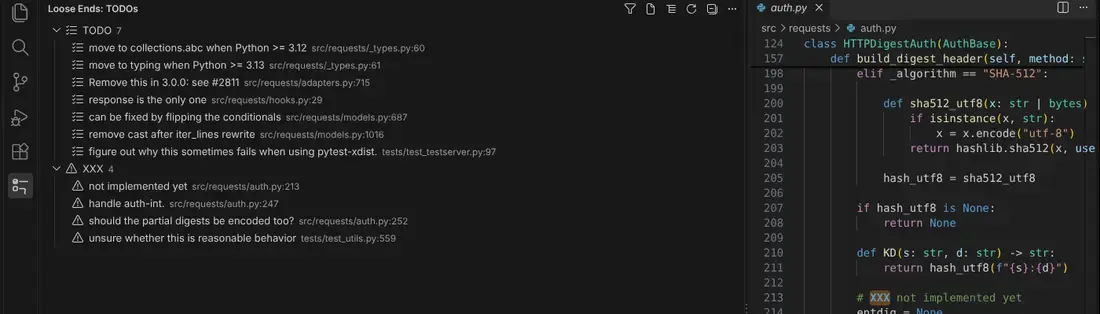
Every TODO, FIXME, HACK, BUG and XXX comment in your workspace in one list, highlighted in the editor and counted in the status bar.
Why another TODO list? Todo Tree finds comments by running the ripgrep binary bundled inside VS Code. When VS Code 1.122 moved that binary (May 2026), Todo Tree showed an empty list and "Failed to find vscode-ripgrep", and people are still reporting it months later. Loose Ends doesn't run ripgrep or any other binary. It reads files only through the file APIs VS Code gives every extension (locally, over Remote SSH and WSL, in dev containers and in forks), so there is no bundled path to break. Tested end to end in VS Code 1.142 on Linux.
Free
- One list for the whole workspace. Group by tag or by file; click an item to jump to the line.
- Highlights the tag in the editor (or the rest of the line), with a mark in the scroll bar.
- Filter by text, tag, file or owner, or show only the current file.
- Updates as you type, including unsaved changes and files created or deleted outside VS Code.
- Status bar count (
8 TODO, 3 FIXME… on hover).
- Switching from Todo Tree? If you set
todo-tree.general.tags, Loose Ends uses those tags until you set looseEnds.tags.
- Owners and due dates written in the comment are shown in the list:
TODO(@sam 2026-11-01): … or TODO rotate keys @lee due:2026-11-01.
Matching rule: a tag counts when it starts a comment (//, #, /*, *, <!--, --, ;, %) or a line, optionally after a Markdown list item or checkbox. Tags are matched as whole words and case-sensitively by default, so TODOS, todo_list and a bare 'TODO' inside a string are ignored. A string that itself looks like a comment ("# TODO …", '// TODO …') is listed, as in Todo Tree, and ; and -- count as comment markers in any file type.
Pro ($9 once, no subscription)
For when the list gets long and you need to decide what to do first:
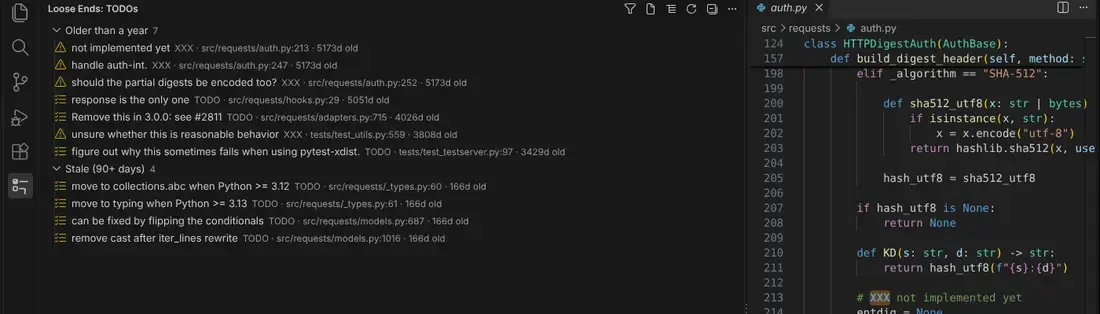
- Age and author of every item from local
git blame (trusted workspaces only; nothing leaves your machine). Items older than looseEnds.staleDays (90) are marked.
- Group by owner, age or due date, with overdue items first.
- Overdue items in the Problems panel:
TODO overdue by 16 days (due 2026-10-01): …
- Export a report as Markdown (a table to paste into a PR, issue or sprint doc) or CSV.
Get a key at https://plainworkdigital.com/d20261017a25/, then run Loose Ends: Enter Pro key. The same key unlocks Pro in every build of Loose Ends, whether you installed it from the Marketplace or from the VSIX download on that page. The key is kept in VS Code's secret storage.
Settings
| Setting |
Default |
What it does |
looseEnds.tags |
[] |
Words to look for. Empty means your Todo Tree tags, else TODO FIXME HACK BUG XXX. |
looseEnds.caseSensitive |
true |
Match TODO but not todo. |
looseEnds.include |
**/* |
Glob of files to scan in each workspace folder. With a custom pattern, files created after the last full scan appear only after Loose Ends: Scan again. |
looseEnds.exclude |
node_modules, .git, dist, build, out, coverage, vendor, venvs, target, minified files, lockfiles |
Added to your files.exclude and search.exclude. |
looseEnds.maxFiles |
5000 |
Files per scan; the view says when it stops early. |
looseEnds.maxFileSizeKB |
1024 |
Larger files are skipped, as are binary files. |
looseEnds.highlight |
tag |
tag, line or none. |
looseEnds.colors |
{} |
Per-tag colour, e.g. { "TODO": "#ffcc0055" }. |
looseEnds.statusBar |
true |
Show the count. |
looseEnds.blame |
true |
(Pro) Age and author from git. |
looseEnds.staleDays |
90 |
(Pro) When an item counts as stale. |
looseEnds.overdueWarnings |
true |
(Pro) Overdue items in the Problems panel. |
Speed
Measured in VS Code 1.142 on a shallow clone of facebook/react (7,260 files): a full scan takes about 2 seconds and finds 1,229 items. After that, only the file you edit is rescanned.
Privacy
No telemetry, no account. The free features make no network requests at all. With a Pro key, the extension sends only the key to Plainwork's licence server, at most once every 10 minutes. Git runs locally, without a shell, and only in trusted workspaces.
Fixing Todo Tree instead
If you'd rather keep Todo Tree, install ripgrep yourself and set todo-tree.ripgrep.ripgrep (not todo-tree.ripgrep, which the error message names) to its absolute path. A full guide, including Remote SSH: https://plainworkdigital.com/d20261017a25/todo-tree-failed-to-find-vscode-ripgrep
Made by Plainwork Digital · hello@plainworkdigital.com · MIT licence

