Quota: AI Usage Tracker
Track AI usage from the editor you already have open. Quota adds a compact status bar button and a resize-friendly quota panel for GitHub Copilot, Codex, Claude Code, Antigravity, Kiro, and Grok.
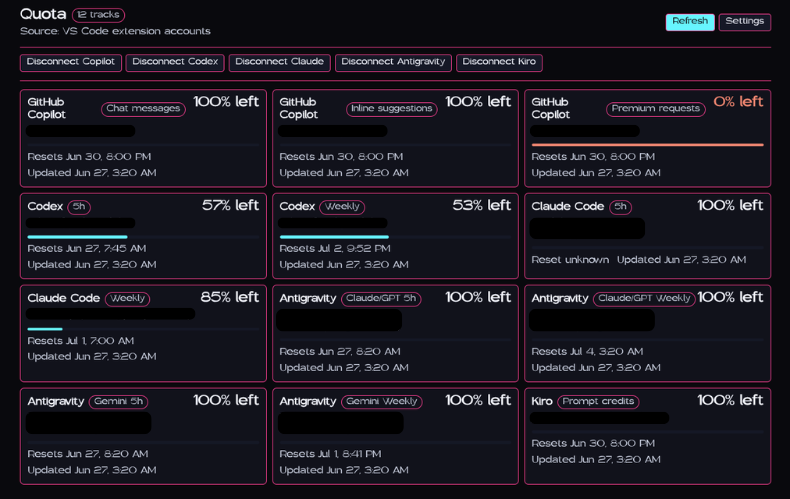
See your AI quota at a glance
Quota is built for developers who use more than one AI coding tool and want one place to check usage before a limit surprises them. Connect the providers you use, pin the tracks you care about, and open the panel whenever you want the full picture.
What Quota does
- Tracks multiple providers: GitHub Copilot, Codex, Claude Code, Antigravity, Kiro, and Grok
- Shows a permanent status bar button: open Quota without leaving your editor
- Pins quota tracks to the status bar: choose the exact limits you want visible while coding
- Opens a compact quota panel: scan percent used or remaining, reset timing, and last update time
- Refreshes extension-owned accounts: use manual refresh or the built-in refresh interval
- Explains expired authorization: get a clear error and Reauthenticate action instead of an opaque token-refresh response
- Keeps provider tokens in SecretStorage: raw credentials stay in VS Code's secret store
- Works with VS Code-style editors: designed for VS Code and OpenVSX-compatible IDEs
Supported providers
Quota currently supports direct extension-owned auth for:
| Provider |
Tracks |
| GitHub Copilot |
Premium requests, chat messages, inline suggestions |
| Codex |
5h usage, weekly usage |
| Claude Code |
5h usage, weekly usage, weekly Sonnet, extra usage |
| Antigravity |
Gemini 5h, Gemini weekly, Claude/GPT 5h, Claude/GPT weekly, AI credits when available |
| Kiro |
Prompt credits |
| Grok |
Credit window, monthly spend, on-demand spend |
Cursor is not included in the extension because modern Cursor is its own standalone app. The Quota desktop app can still track Cursor.
Status bar
Keep Quota visible without crowding your editor. The main Quota button opens the panel, and optional pinned tracks can show specific quotas beside it.

Pinned percentage tracks use a small usage indicator:
- 🟢 More than 30% remaining
- 🟡 11–30% remaining
- 🔴 10% remaining or less
- ⚪ No percentage data available
Example pinned tracks:
codex.primaryclaude.fiveHourgithubCopilot.premiumantigravity.geminikiro.promptCreditsgrok.credits
Quota panel
Click the status bar button or run Quota: Open Quota Panel to open the in-editor panel. The panel uses a single column in narrow layouts and multiple columns in wider layouts, so it stays readable whether you keep it slim or stretch it across the editor.
Each track shows:
- Provider and quota name
- Connected account label
- Percent used or percent remaining
- Reset time when available
- Last updated time
- Provider connect, disconnect, refresh, and settings actions
- A Reauthenticate action for connected Codex or Claude Code accounts whose authorization expired
Connect accounts
Run the matching connect command from the Command Palette:
Quota: Connect GitHub CopilotQuota: Connect CodexQuota: Connect Claude CodeQuota: Connect AntigravityQuota: Connect KiroQuota: Connect Grok
Each provider uses its own auth flow. Quota stores raw provider tokens only in VS Code SecretStorage and stores display-safe account metadata in extension state.
Grok can also be connected without a browser round trip by running Quota: Import Local Grok CLI Account, which reads the credentials the Grok CLI already stored in ~/.grok/auth.json.
When a Codex, Claude Code, or Grok refresh token is rejected, Quota keeps the cached account visible, identifies that reauthentication is required, and offers the existing secure connection flow again. It does not delete the saved account before the new authorization succeeds.
Open Quota: Open Settings or edit your VS Code settings:
{
  "quota.dataSource": "extensionAccounts",
  "quota.refresh.intervalSeconds": 120,
  "quota.providers.enabled": [
    "githubCopilot",
    "codex",
    "claude",
    "antigravity",
    "kiro",
    "grok"
  ],
  "quota.statusBar.enabled": true,
  "quota.statusBar.items": ["codex.primary"],
  "quota.statusBar.display": "percentUsed",
  "quota.statusBar.maxItems": 3
}
Available commands
| Command |
Description |
Quota: Open Quota Panel |
Open the compact quota panel |
Quota: Refresh Summary |
Refresh connected provider data |
Quota: Open Settings |
Open Quota settings |
Quota: Connect GitHub Copilot |
Connect a GitHub Copilot account |
Quota: Refresh GitHub Copilot |
Refresh GitHub Copilot quota data |
Quota: Disconnect GitHub Copilot |
Remove extension-stored GitHub Copilot credentials |
Quota: Connect Codex |
Connect a Codex account |
Quota: Refresh Codex |
Refresh Codex quota data |
Quota: Disconnect Codex |
Remove extension-stored Codex credentials |
Quota: Connect Claude Code |
Connect a Claude Code account |
Quota: Refresh Claude Code |
Refresh Claude Code quota data |
Quota: Disconnect Claude Code |
Remove extension-stored Claude Code credentials |
Quota: Connect Antigravity |
Connect an Antigravity account |
Quota: Refresh Antigravity |
Refresh Antigravity quota data |
Quota: Disconnect Antigravity |
Remove extension-stored Antigravity credentials |
Quota: Connect Kiro |
Connect a Kiro account |
Quota: Refresh Kiro |
Refresh Kiro quota data |
Quota: Disconnect Kiro |
Remove extension-stored Kiro credentials |
Quota: Connect Grok |
Connect a Grok account with the xAI device-code flow |
Quota: Import Local Grok CLI Account |
Import accounts from the local Grok CLI auth file |
Quota: Refresh Grok |
Refresh Grok quota data |
Quota: Disconnect Grok |
Remove extension-stored Grok credentials |
Status bar track IDs
Use these IDs in quota.statusBar.items:
Codex keeps the stable codex.primary track ID for the five-hour window. The restored weekly window uses codex.weekly.
[
  "githubCopilot.premium",
  "githubCopilot.chat",
  "githubCopilot.inline",
  "codex.primary",
  "codex.weekly",
  "claude.fiveHour",
  "claude.weekly",
  "claude.weeklySonnet",
  "claude.extraUsage",
  "antigravity.gemini",
  "antigravity.geminiWeekly",
  "antigravity.claude",
  "antigravity.claudeWeekly",
  "kiro.promptCredits",
  "grok.credits",
  "grok.monthlySpend",
  "grok.onDemand"
]
Privacy and storage
Quota is local-first. Direct auth makes the extension a token-holding app, so it keeps the storage boundary tight:
- Raw provider tokens stay in VS Code SecretStorage
- Display-safe account metadata and quota cache live in extension global state
- Disconnect commands delete extension-owned credentials and cached quota data
- The extension does not use remote sponsor, ad, announcement, or relay services
Desktop app
Quota also has a desktop app for a broader account dashboard and provider management. Download it from the Quota GitHub releases page.
Publisher
Made by Pink Pixel.

