Use DeepSeek/MiMo in Copilot
English | 简体中文
直接在 GitHub Copilot Chat 中使用 MiMo 与 DeepSeek 模型,并在状态栏实时查看令牌用量、费用估算和账户余额。
功能特性
- 原生集成:以 Copilot Chat 语言模型提供方接入,支持流式输出与工具调用。
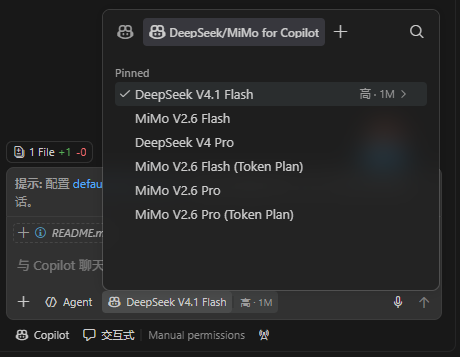
- 多种模型:提供 MiMo 按量、MiMo Token Plan 和 DeepSeek V4.1 Flash(API ID:
deepseek-flash);DeepSeek Flash 支持 JPEG、PNG、GIF、WebP 图片输入(单张内联图片最多 32 MiB、每请求最多 600 张、请求体最多 48 MiB);Token Plan 与按量 Key 独立保存、互不干扰。
- DeepSeek 思考层级:默认使用高思考层级;在 Copilot Chat 模型选择器中打开 DeepSeek 模型配置,即可为该模型切换无、低、高或最大思考层级。
- 安全存储:API Key、Cookie 和 DeepSeek 用户 Token 均保存在 VS Code SecretStorage,不出现在用量图表中。
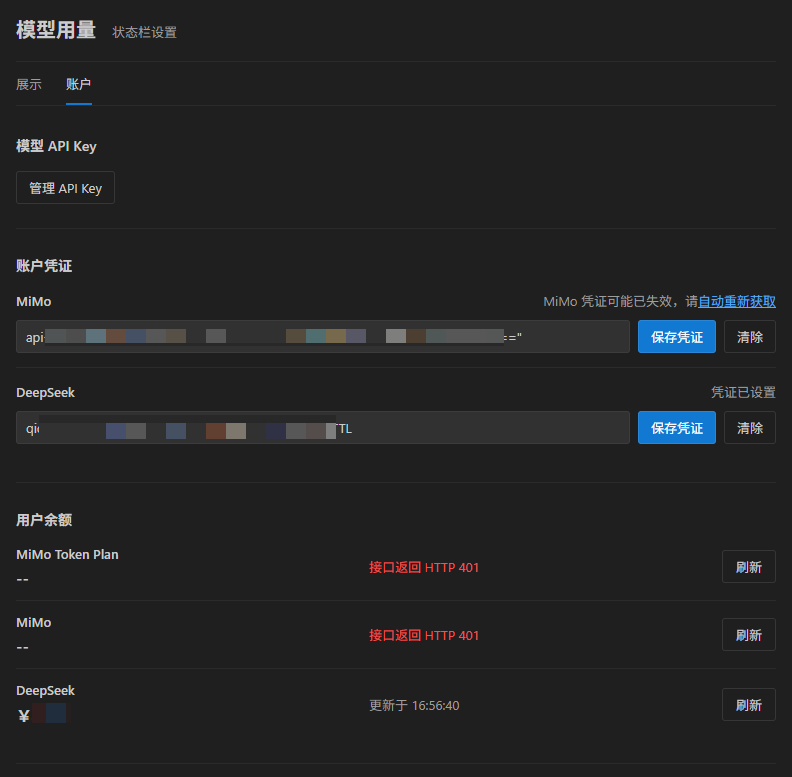
- 一键登录取余额:自动拉起独立的 Chrome/Edge 窗口完成平台登录,通过 CDP 提取余额凭据,无需手动复制 Cookie 或 Token。
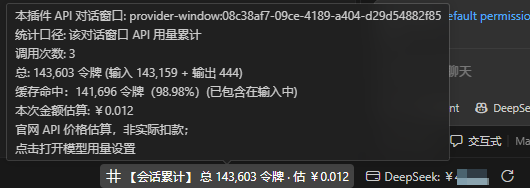
- 状态栏实时显示:按当前模型展示令牌用量与账户余额;缓存命中用量同时显示占输入令牌的百分比,使用 MiMo Token Plan 时直观显示剩余额度百分比。
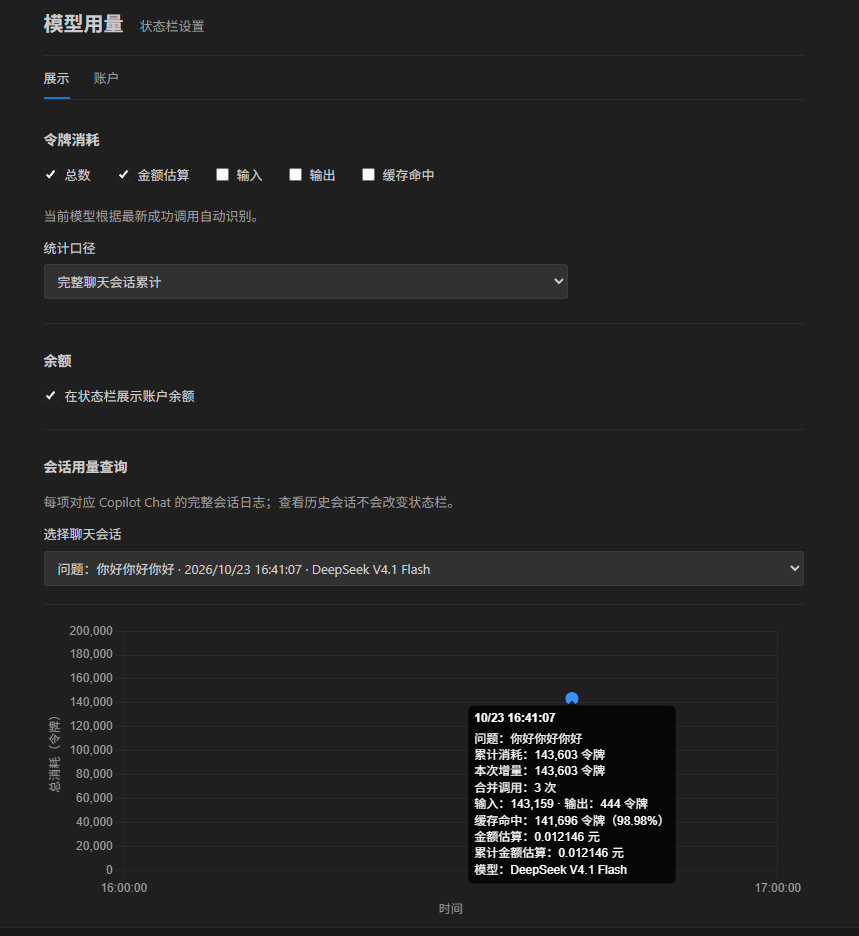
- 可视化管理:设置页提供会话用量图表、账户余额、手动刷新和凭据管理。
功能截图
快速开始
- 选择模型:在 Copilot Chat 的模型选择器中选择本插件提供的 MiMo 或 DeepSeek 模型;DeepSeek 思考层级可在模型配置中切换,默认是高。
- 配置密钥:首次发送请求时按提示输入对应服务的 API Key,也可稍后通过“模型用量: 管理 API Key”命令修改。
- 查询余额:在命令面板运行“模型用量: 打开设置”,切换到账户页后点击“自动获取”。
- 完成登录:在弹出的 Chrome 或 Edge 窗口中登录对应平台,插件会自动保存凭据并查询余额。
余额凭据可在账户页清除或重新获取。清除凭据时会同时删除插件专用浏览器配置中的登录状态,不影响日常浏览器的登录信息。
用量统计
- 数据来源:Copilot Chat 自带模型的用量读取
workspaceStorage/<工作区>/GitHub.copilot-chat/debug-logs/<会话>/main.jsonl,以及 VS Code agentSessionData/<会话>/session.db(turn_usage 表);Agent Host JSONL 用于补充逐轮提问、时间和模型类型。插件加入的 DeepSeek/MiMo 模型用量以本地 provider-window usage 记录为准;Agent Host 对这些 BYOK 模型上报的零值占位不会作为实际用量显示。扩展目录匹配不区分大小写,也会检查全局存储目录。
- 环境与采集条件:插件会从当前扩展宿主的 VS Code 存储目录向上查找 Copilot、Agent Host 日志,兼容常见用户配置目录和 Profile 布局。在 Agent Host BYOK 场景中,建议启用
chat.agentHost.agentDebugLog.enabled 和 chat.agentHost.ahpJsonlLoggingEnabled,以便将 Host 调用与本地 Provider usage 关联;Copilot Chat 文件调试日志可通过 github.copilot.chat.agentDebugLog.fileLogging.enabled 启用。远程/WSL/SSH 窗口只能读取扩展宿主可访问的日志;如果模型服务端不返回 usage、且本地没有对应 Provider 记录,插件无法还原精确的令牌消耗,可能显示为 0 或缺少会话。
- 统计口径:设置页可在“完整聊天会话”和“最近一次提问”之间切换;最近一次提问口径会累计该问题关联的全部模型调用,而不是只取最后一条请求;状态栏使用相同口径。开启费用显示且当前会话中的模型均有定价时,DeepSeek/MiMo 图表提示会在单次金额估算下显示累计金额估算,累计范围与当前统计口径一致,并计算至悬浮点为止。DeepSeek 图片由服务端换算为输入 token;费用估算直接使用响应
usage.prompt_tokens(包含图片 token)和缓存命中字段,按模型输入/输出费率计算,不在本地按图片尺寸猜算 token。图表横轴和数据提示显示到秒,内部调用时间保留毫秒;时间坐标距数据边缘整点不足十分钟时额外扩展一小时;令牌轴上限在最大累计用量基础上增加两格并向上取整。Agent Host 调试日志可提供每轮问题文本和提问时间,并按回合 ID 关联到会话数据库记录;图表按回合 ID 合并该轮多次模型调用,相同文本再次提问仍会显示为独立点,悬停可查看问题内容。缺少逐轮时间日志时,多个点可能共用会话更新时间。
- 会话识别:
provider-window 选项以该窗口的第一个问题作为标题,不借用 Agent Host 会话名;列表隐藏 Agent Host/API 对话窗口类型和对应内部 ID。Copilot 自带模型保留 Agent Host/原生日志会话,插件加入的模型用量仍从 provider-window 读取。短上下文的请求级调用会并入附近同模型的有效会话,相邻重复问题也会合并;当前最新会话会跟随新问答更新,手动切换到历史会话后则保持选中。
- 多窗口同步:同一 VS Code 用户配置下的多个窗口会同步插件 API 用量,并汇总各工作区的 Copilot Chat 调试日志。
- 费用说明:费用为按官网价格计算的估算值,不代表实际扣款。实际用量、余额和账单请以 MiMo 或 DeepSeek 平台为准。
隐私说明
- 调试日志仅在本机读取;API Key、Cookie 和 DeepSeek 用户 Token 保存在 VS Code SecretStorage,不会显示在用量图表中。
- 使用本插件提供的模型时,聊天消息、工具调用及其结果会发送至所选模型对应的官方服务。
- 查询余额时,凭据仅发送至对应平台的余额接口。
- 自动登录使用独立的 Chrome/Edge 配置,通过 CDP 读取对应平台余额请求中的凭据,不会读取或修改日常浏览器配置;清除账户凭据时会一并清理此登录配置。
问题反馈
遇到用量数据缺失、统计异常或其他问题,请在 GitHub Issues 提交反馈,并附上 VS Code 版本及相关模型信息;请勿粘贴 API Key 或其他凭据。
English
Use MiMo and DeepSeek models directly in GitHub Copilot Chat, with token usage, cost estimates, and account balance shown live in the status bar.
Features
- Native integration: Works as a Copilot Chat language model provider with streaming output and tool calling.
- Multiple models: Offers MiMo pay-as-you-go, MiMo Token Plan, and DeepSeek V4.1 Flash (API ID:
deepseek-flash); DeepSeek Flash accepts JPEG, PNG, GIF, and WebP image input (up to 32 MiB per inline image, 600 images per request, and 48 MiB per request body). Token Plan and pay-as-you-go keys are stored independently and never interfere with each other.
- DeepSeek reasoning effort: Uses high reasoning effort by default. Open the DeepSeek model's configuration in the Copilot Chat model picker to choose None, Low, High, or Max.
- Secure storage: API keys, cookies, and DeepSeek user tokens are stored in VS Code SecretStorage and never appear in usage charts.
- One-click login for balance: Launches a standalone Chrome/Edge window for platform login and extracts balance credentials via CDP—no manual copying of cookies or tokens required.
- Live status bar: Shows token usage and account balance for the current model; cache-hit tokens include their percentage of input tokens, and the remaining quota percentage is shown when using MiMo Token Plan.
- Visual management: The settings page provides session usage charts, account balance, manual refresh, and credential management.
Screenshots
Getting started
- Select a model: Choose the MiMo or DeepSeek model provided by this extension in the Copilot Chat model picker. Change DeepSeek reasoning effort in its model configuration; High is the default.
- Configure keys: Enter the API key for the corresponding service when prompted on your first request, or change it later via the "Model Usage: Manage API Keys" command.
- Check balance: Run "Model Usage: Open Settings" from the command palette, switch to the Account tab, and click "Auto Fetch".
- Complete login: Log in to the corresponding platform in the Chrome or Edge window that opens; the extension will save the credentials and query the balance automatically.
Balance credentials can be cleared or re-fetched from the Account tab. Clearing credentials also removes the login state from the extension's dedicated browser profile, without affecting your everyday browser.
Usage statistics
- Data sources: Usage for the extension's built-in models is read from
workspaceStorage/<workspace>/GitHub.copilot-chat/debug-logs/<session>/main.jsonl and VS Code agentSessionData/<session>/session.db (the turn_usage table); Agent Host JSONL files supplement per-turn prompts, timestamps, and model types. Usage of DeepSeek/MiMo models added by this extension is based on local provider-window usage records; zero-value placeholders reported by Agent Host for these BYOK models are not displayed as actual usage. Extension directory matching is case-insensitive and also checks the global storage directory.
- Environment and collection conditions: The extension searches upward from the current extension host's VS Code storage directory for Copilot and Agent Host logs, supporting common user configuration directories and profile layouts. In Agent Host BYOK scenarios, enabling
chat.agentHost.agentDebugLog.enabled and chat.agentHost.ahpJsonlLoggingEnabled is recommended so Host calls can be correlated with local provider usage; Copilot Chat file debug logs can be enabled via github.copilot.chat.agentDebugLog.fileLogging.enabled. Remote/WSL/SSH windows can only read logs accessible to the extension host; if the model server does not return usage and there is no matching local provider record, the extension cannot reconstruct precise token consumption, which may show as 0 or be missing from sessions.
- Accounting scope: The settings page allows switching between "full chat session" and "last question". The last-question scope accumulates all model calls associated with that question rather than taking only the final request; the status bar uses the same scope. When cost display is enabled and all models in the current session have pricing, the DeepSeek/MiMo chart tooltip shows a cumulative cost estimate beneath the per-request estimate, matching the current accounting scope and computed up to the hover point. DeepSeek converts images into input tokens server-side; cost estimates use the returned
usage.prompt_tokens (including image tokens) and cache-hit fields with the model's input/output rates, rather than estimating image tokens locally. Chart axes and tooltips display time down to seconds; internal call times retain milliseconds. When the time axis is less than ten minutes from a round hour at the data edge, it is extended by one hour; the token axis limit adds two grid intervals above the maximum cumulative usage and rounds up. Agent Host debug logs can provide each prompt's text and start time, which are linked to database records by turn ID; chart points group model calls by turn ID, so identical prompt text from separate turns remains separate and its text is available on hover. Without per-turn timestamp logs, multiple points may share the session update time.
- DeepSeek image billing: Image tokens are included in the API's returned input usage and charged at the normal DeepSeek Flash input rate. Estimates use the response usage and cache-hit fields; image tokens are not guessed locally from image dimensions.
- Session identification: The
provider-window option uses the window's first question as the title and does not borrow Agent Host session names; the list hides Agent Host/API dialog window types and their internal IDs. Copilot built-in models keep Agent Host/native log sessions, while usage of models added by this extension is still read from provider-window. Request-level calls with short contexts are merged into nearby valid sessions of the same model, and adjacent duplicate questions are merged as well. The latest session follows new prompts and answers; after manually switching to a historical session, the selection stays fixed.
- Multi-window sync: Multiple windows under the same VS Code user profile sync extension API usage and aggregate Copilot Chat debug logs across workspaces.
- Cost disclaimer: Costs are estimates calculated from official prices and do not represent actual charges. For actual usage, balance, and billing, refer to the MiMo or DeepSeek platform.
Privacy
- Debug logs are read locally only; API keys, cookies, and DeepSeek user tokens are stored in VS Code SecretStorage and never shown in usage charts.
- When using models provided by this extension, chat messages, tool calls, and their results are sent to the official service of the selected model.
- When querying balance, credentials are sent only to the corresponding platform's balance endpoint.
- Automatic login uses a dedicated Chrome/Edge profile and reads credentials from the platform's balance requests via CDP; it does not read or modify your everyday browser profile. Clearing account credentials also removes this login profile.
Feedback
If you encounter missing usage data, statistical anomalies, or other issues, please open an issue on GitHub Issues and include your VS Code version and the relevant model information. Please do not paste API keys or other credentials.
| |

