Markdown Link Assistant
The ultimate link manager for Visual Studio Code. Effortlessly transform raw URLs into beautiful, structured link previews and Notion-like cards with instant previews and AI summaries.
Overview
Markdown Link Assistant makes managing web links in your documentation seamless. No more manually searching for page titles or switching to a browser to verify content. Assistant handles everything inside VS Code.
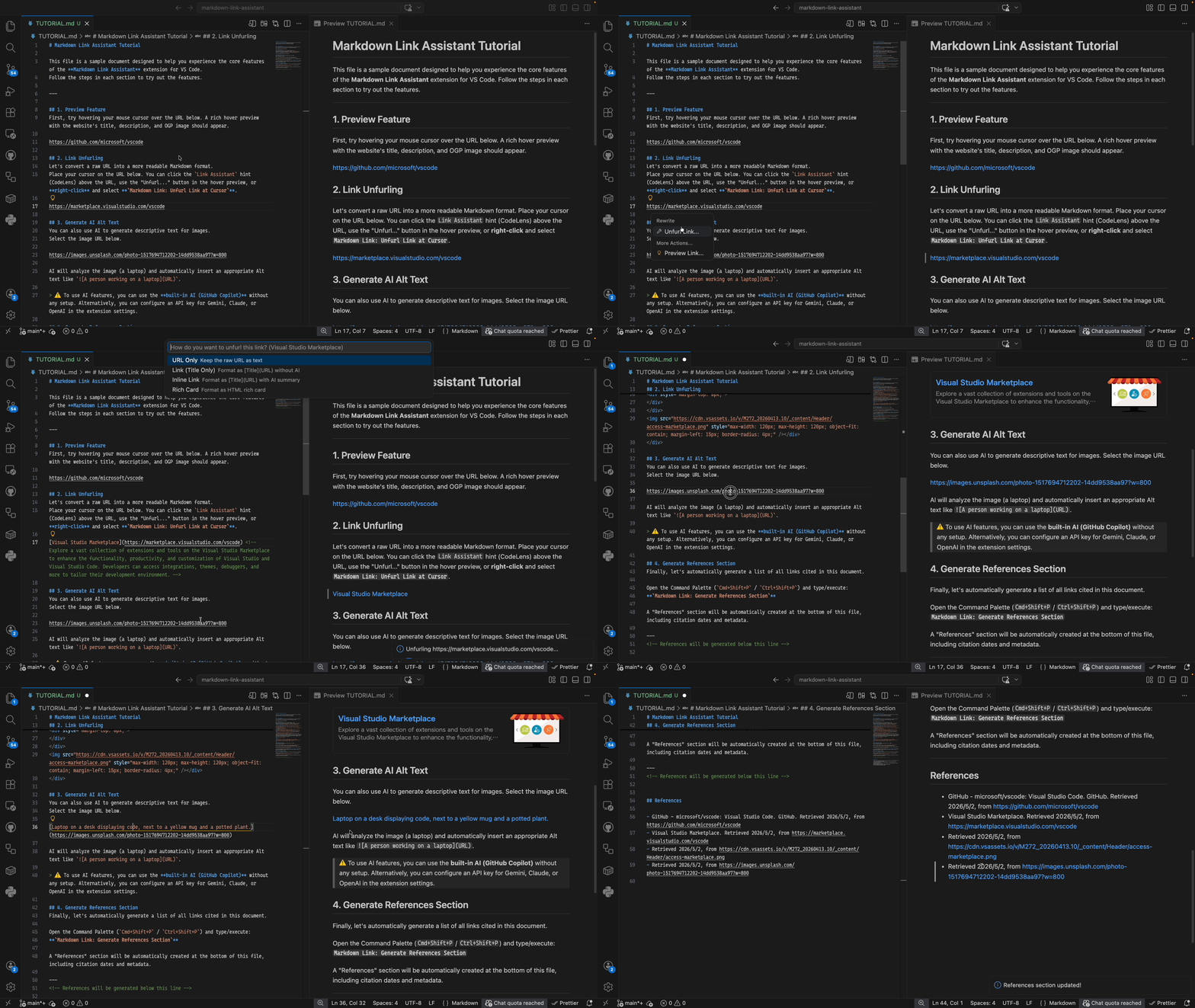
Key Features
- Smart Unfurling: Convert URLs into titled Markdown links or rich preview cards upon pasting.
- Notion-like Link Cards: Visual bookmarks with titles, descriptions, and site images that adapt to any theme.
- Instant Preview: Peek at any link's content directly inside VS Code without switching apps.
- Refresh & Update: Keep your links up to date with a single click to refresh metadata and descriptions.
- Native Integration: Works natively with VS Code's "Paste As" menu and right-click context menus.
- Context Hints (CodeLens): Displays subtle "Unfurl Link" and "Preview Link" hints above raw URLs.
- AI-Powered Descriptions: Generates concise page summaries using GitHub Copilot (default) or your preferred provider.
- Clean Source Code: Summaries are stored as Markdown comments (
<!-- summary -->), keeping your output clean.
How to Use
1. Paste and Choose
Paste a URL into a Markdown file and use the "Paste As" widget or Ctrl+. to select:
- Markdown Link Assistant: Inline Link
- Markdown Link Assistant: Rich Card
2. Preview and Refresh
Hover over any link or URL and select Preview Link... to see the site in a side window. Use Refresh Link Info to update titles and summaries.
Use the command palette for:
Assistant: Generate References Section: Create a bibliography at the end of your file.
AI Configuration
Assistant uses GitHub Copilot by default—no API keys required. Most VS Code users can use this out of the box.
To use other providers (Gemini, Claude, or OpenAI):
- Set the provider:
markdown-link-assistant.aiProvider in Settings.
- Set your API key securely via the command palette:
Assistant: Set API Key — Select a provider and enter your key. Keys are stored encrypted using your OS keychain (macOS Keychain, Windows Credential Manager, Linux libsecret).Assistant: Check API Key Status — See which providers have keys configured.Assistant: Clear API Key — Remove a stored key.
Note: API keys are never stored in settings.json. They are encrypted at rest using VS Code's SecretStorage API.
Extension Settings
markdown-link-assistant.aiProvider: Select the AI provider (builtin, Gemini, Claude, or OpenAI).markdown-link-assistant.enableCodeLens: Toggle hints above raw URLs.markdown-link-assistant.autoUnfurl: Enable/disable paste options.
Localization
Markdown Link Assistant is fully localized and supports the following languages:
- English (Default)
- Japanese (日本語)
- Simplified Chinese (简体中文)
The extension automatically adapts to your VS Code display language.
Contributing
Contributions are welcome! Please see CONTRIBUTING.md for development setup and testing guidelines.
Crafted with ❤️ by phine-apps

