PgDeck — PostgreSQL, MySQL & MongoDB for VS Code
A fast, focused database client, right inside your editor. Browse schemas and collections, edit rows and documents safely, run SQL or aggregations, and export data — without leaving VS Code.
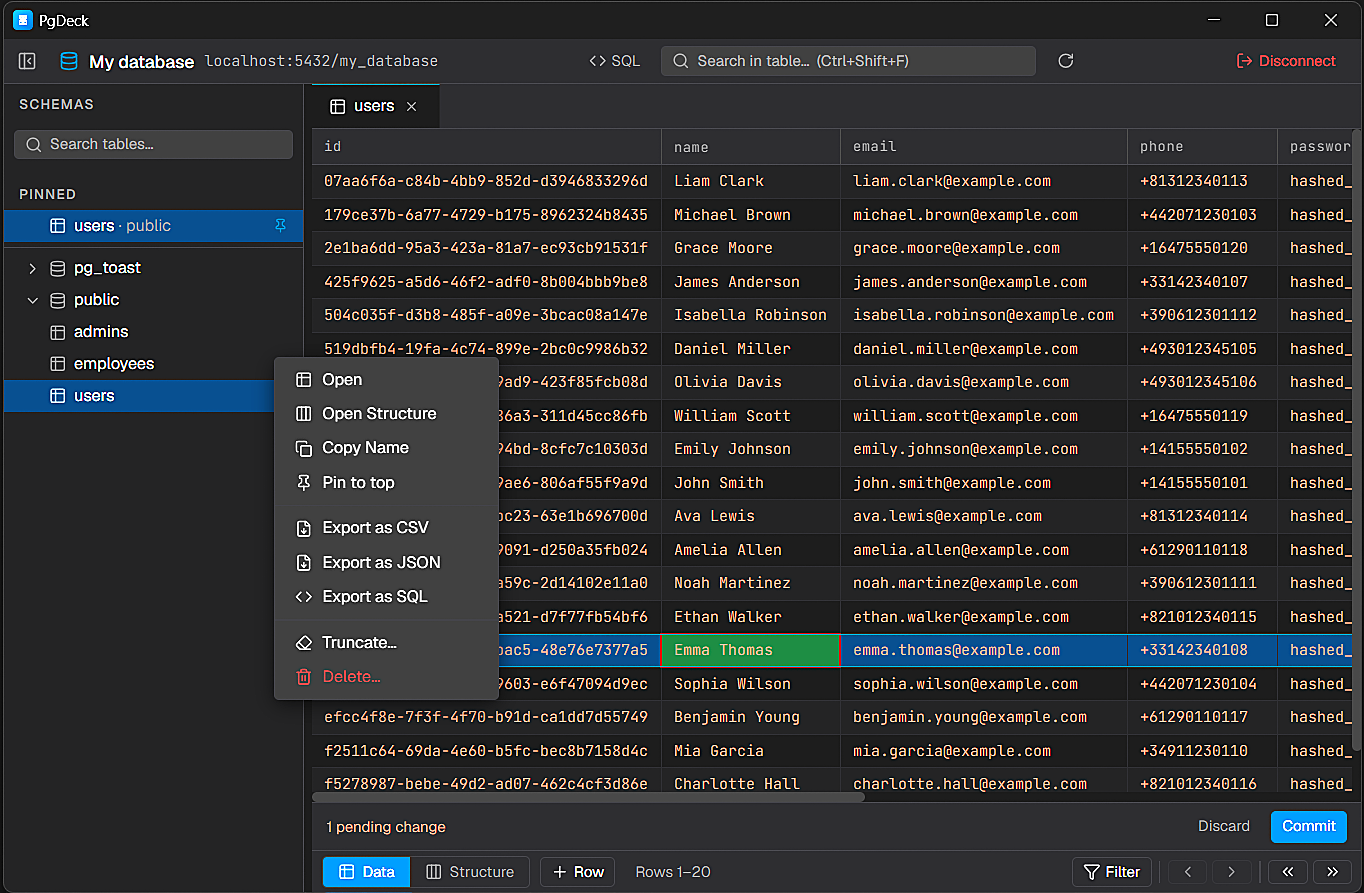
PgDeck brings the full PgDeck desktop experience into VS Code. Connect to PostgreSQL, MySQL, or MongoDB, work with your data in a clean grid, write SQL with real tooling, and manage your schema — all in one panel next to your code. (MySQL and MongoDB are in beta.)
✨ Everything you need for day-to-day database work
🔐 Secure connection management — Save connections with host, port, database, user, and SSL. Passwords are encrypted with your OS keychain (via VS Code Secret Storage) and never stored in plain text. Paste a postgres:// / mysql:// / mongodb:// URL to auto-fill, test before you connect, and organize connections into groups.
🗂️ Schema explorer built for navigation — Browse schemas, tables, and collections; search across everything; pin favorites; and jump straight to the data or structure you need.
⚡ Advanced data grid — Sort columns, combine type-aware filters, search visible columns, paginate, resize, and multi-select rows. Fast even on wide tables.
✏️ Staged, transaction-safe editing — Double-click to edit; pick boolean/enum values from dropdowns; set NULL or DEFAULT; add, duplicate, or delete rows. Every staged change commits in one transaction with rollback on failure — nothing is written until you say so.
🧱 Structure management — Inspect columns, indexes, triggers, nullability, defaults, and types. Add, rename, retype, or drop columns and create tables — with a SQL preview before anything runs.
🖥️ Real SQL editor — Multi-tab SQL with syntax highlighting, run-selection, EXPLAIN a query plan, cancel a runaway query, per-tab history, and saved queries. Results render in an interactive grid.
🔗 Relationship diagram (ERD) — See how your tables connect, generated automatically from foreign keys.
🔍 Global search & find/replace — Search every table in a database at once (streamed live), and find & replace text across a table or the whole database.
🧹 Safe cascade delete — Remove a row and its foreign-key dependents in one transaction — with a full preview of exactly what will be deleted, first.
🍃 First-class MongoDB — Browse collections as rows, an inferred Schema tab, a colour-coded document viewer/editor (Extended JSON supported), and an aggregation console for find filters and pipelines.
📤 Copy & export — Copy cells, copy rows as JSON, export to CSV / JSON / SQL INSERTs, or export the ERD as SVG — straight to a file via a native Save dialog.
🎨 Matches your theme — PgDeck follows your VS Code light/dark theme so it feels native in your editor.
🗄️ Supported databases
| Engine |
Browse & edit |
SQL editor |
Structure |
ERD |
Documents |
| PostgreSQL |
✓ |
✓ |
✓ |
✓ |
— |
| MySQL (beta) |
✓ |
✓ |
✓ |
✓ |
— |
| MongoDB (beta) |
✓ |
— |
Schema |
— |
✓ |
Features an engine doesn't have are simply hidden — the UI adapts to each database.
🚀 Get started
- Install PgDeck from the Marketplace.
- Click the PgDeck icon in the Activity Bar, or run “PgDeck: Open Database Manager” from the Command Palette (
Ctrl/Cmd + Shift + P).
- Add a connection (or paste a connection URL), connect, and start browsing.
💎 Free trial & Pro
Start with a 30-day free trial of everything — no card. After that, keep the Pro features with a subscription or a one-time purchase:
- $6 / month, $59 / year, or $99 once (lifetime) — ₹99 / ₹999 / ₹1,999 in India
- One license works across the extension and the desktop app.
See full details on pgdeck.com/pricing.
💻 Prefer a standalone app? PgDeck is also on the desktop
PgDeck ships as a native desktop application for Windows, macOS, and Linux — same engine, same workflow, in its own window.
→ Download at pgdeck.com/download
🔒 Your data stays yours
PgDeck connects directly to your databases from your machine. Credentials are encrypted with your operating system's keychain and never leave your computer in plain text. No database data is sent anywhere else.
⌨️ Handy shortcuts
| Shortcut |
Action |
Ctrl + F |
Toggle the filter bar |
Ctrl + Shift + F |
Focus table search |
Enter / F2 |
Edit the selected cell |
Ctrl + S |
Commit staged changes |
Ctrl + Enter |
Run query |
Ctrl + D |
Duplicate the selected row |
🔗 Links
PgDeck — a lighter, faster database client. A modern alternative to DBeaver, pgAdmin, and TablePlus.
| |

