Cairn Comments: Hide AI CommentsPreviewStash the slop, keep the context. Keeps AI-written comments out of your committed code without losing them: agents still read them inline, and you see them as a toggleable overlay. Installation Launch VS Code Quick Open ( Ctrl+P), paste the following command, and press enter.Copied to clipboard |

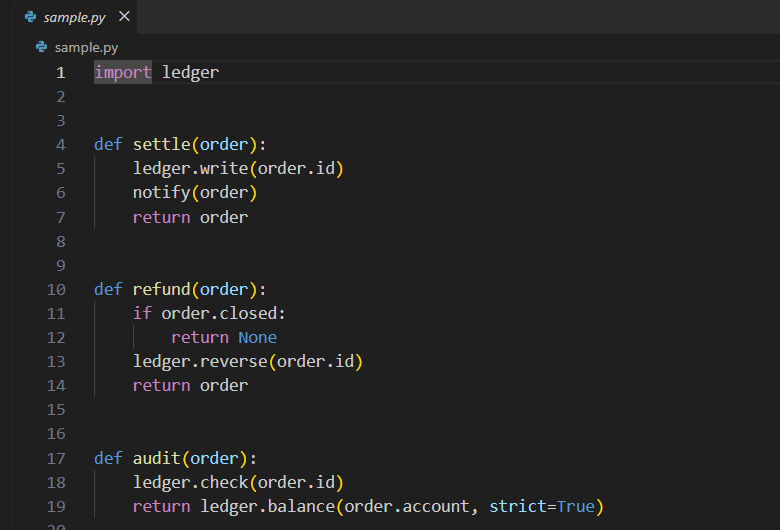
Cairn Comments: Hide AI CommentsStash the slop, keep the context. Keep AI-written comments out of your code without deleting them, and see them again whenever you want. Cairn Comments's git filter moves each AI comment into a tracked markdown file, with a record of the code it belongs to, and leaves no trace of it in the committed code. This extension draws the comments back over your plain code. Overlay off: the editor shows the plain code.
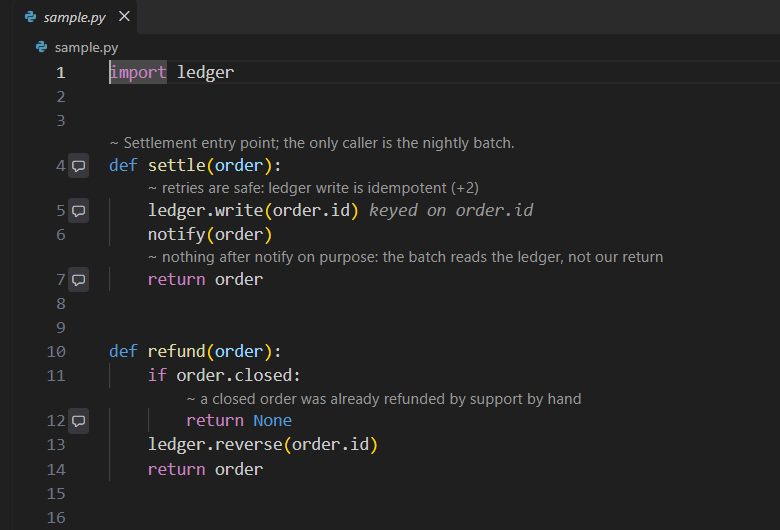
Overlay on: each comment shows above the line it describes, and trailing ones at the end of their line.
RequirementsGit and Node 22 or later. The extension carries the Tested on Windows and Linux (WSL Ubuntu included). macOS support is experimental: the test suite passed there in CI, but nobody has used it by hand yet. Please report what you find. Open the repository and the AI Comments view in the Activity Bar. In a repository that
is not set up yet, it offers Set Up Cairn Comments in This Repository, lists every
change it will make, and makes them when you confirm. Commit the The overlay works on any checkout with sidecars. Agent setup, worktrees, and the CLI reference are in the project README. Languages: Python, TypeScript, TSX, JavaScript, C#, Java, and Kotlin. Settings
|