TypeGraph for VS Code
See how your notes and code connect. Typed backlinks and a graph view for the markdown and source in your workspace, with no Obsidian required.
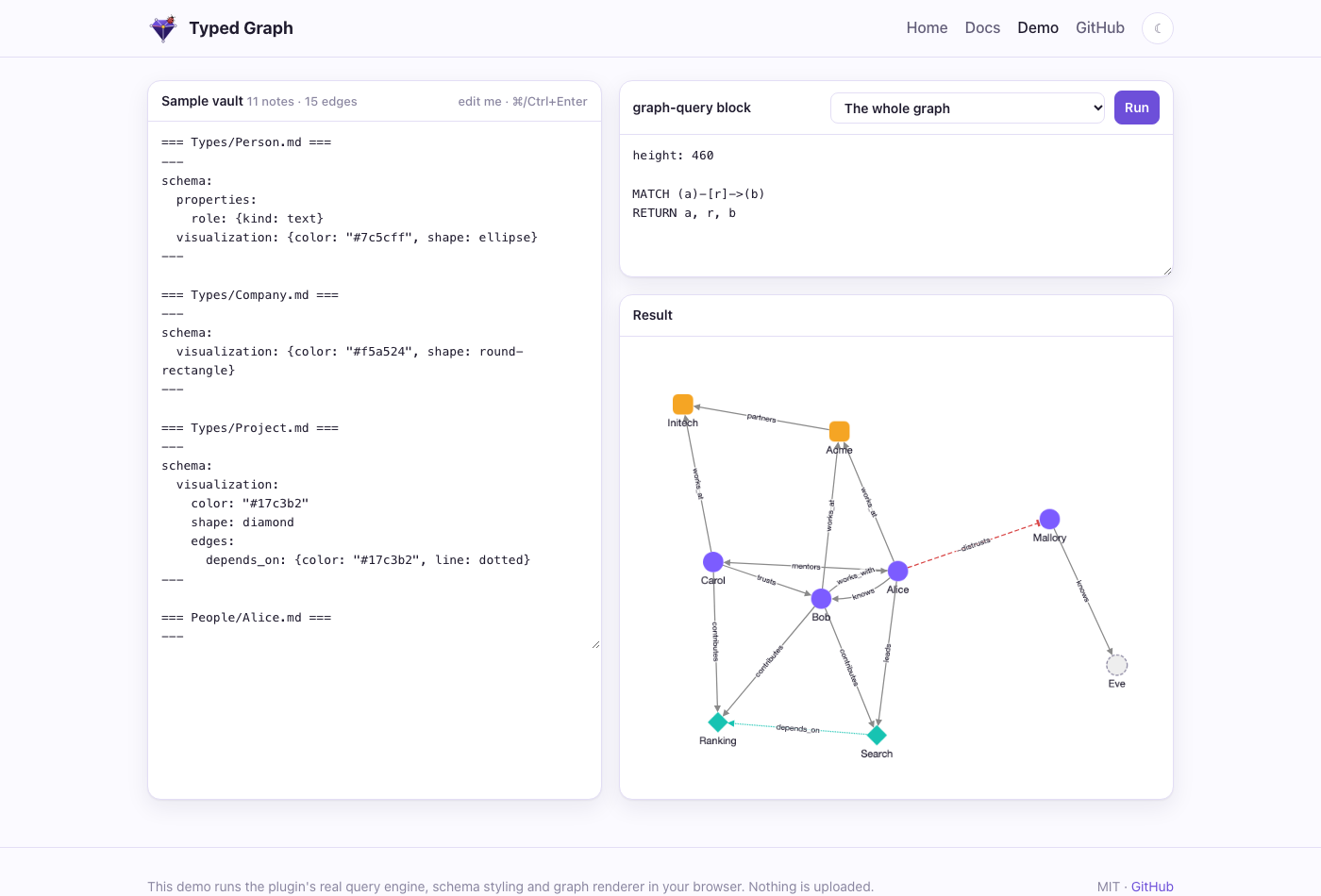
The graph renderer shared with the Typed Graph Obsidian plugin, shown here in Obsidian. The extension's graph view uses the same renderer with VS Code's colors.
Why
A plain backlink says that two files are related. It does not say how. And VS Code's "Find All References" cannot tell you which design section describes the function you are editing.
TypeGraph reads typed links in your markdown, such as knows:: [[Bob]] or -blocks:: [[Release]], and @lat / @tg annotations in your code, then shows what points at the file you have open, grouped by kind of relationship.
---
type: Person
---
knows:: [[Bob]] {since: 2020}
works_at:: [[Acme]]
-distrusts:: [[Mallory]]
// @lat: [[architecture#Monorepo layout]]
export function loadWorkspace() { /* ... */ }
Features
Backlinks panel
Open the TypeGraph view in the Activity Bar. For the active file it shows:
- In a markdown note: every note that links to it, grouped by edge type (
knows, blocks, implements, ...), with the edge's properties (since: 2020) and a minus sign for negative edges. Click an item to jump to the exact line.
- In a source file: the design sections its annotations point at, shown with the link as you wrote it (
architecture#Monorepo layout). Click to open the section.
- In a design section: the source files that reference it, in a separate referenced from code group, so you can see which code implements a section.
The panel updates when you save a file. Files with no edges, or outside your configured folders, show a short message rather than an error.
Graph view
Run TypeGraph: Open Graph to see the active file's neighborhood as a labeled graph: typed edges, negative edges drawn dashed with a tee arrow, stub nodes for links that point nowhere yet. Right-click or long-press a node to expand its neighbors, double-click to open it. Expanded nodes stay put when the graph refreshes. The view follows the active editor and uses your VS Code theme colors.
Set up TypeGraph
If your project has no lat.md/ folder or no agent setup, the panel adds a Set up TypeGraph… row at the bottom. Click it and it:
- Lists the files that will be created or changed (
lat.md/lat.md, CLAUDE.md, .claude/settings.json, .mcp.json and two skills).
- Asks you to confirm.
- Runs
tg init --write in a visible terminal, using the tg on your PATH if you have it, or npx @typedgraph/cli init --write otherwise.
The extension never writes those files itself. The tg CLI does, and you watch it happen. Backlinks work without any of this, so setup is optional.
Getting started
- Install the extension and open a folder that contains markdown.
- Add a typed link to a note, for example
knows:: [[Bob]].
- Open
Bob.md, then open the TypeGraph view in the Activity Bar. Alice appears under knows.
- For code: add
// @lat: [[some-section]] above a function, with lat.md/some-section.md in your project. Open the source file to see the section listed, and open the section to see the file.
Edge syntax is simple: type:: [[Target]] {optional: properties}. A leading - makes the edge negative. The lines live in your own notes, and the extension only reads them.
Settings
| Setting |
Default |
What it does |
typegraph.roots |
["."] |
Folders, relative to the workspace folder, that form the graph. Use this to index only docs/ or a vault nested in a repo. |
typegraph.ignore |
["node_modules"] |
Folder names skipped at any depth. Folders starting with a dot are always skipped. |
Changing either setting reloads the index.
Commands
| Command |
What it does |
TypeGraph: Open Graph |
Open the graph view beside the editor. |
TypeGraph: Set Up TypeGraph |
Run the setup flow described above. |
TypeGraph: Refresh Index |
Rebuild the index from disk. |
Supported files
Markdown notes, and source files with annotations in TypeScript, JavaScript, Python, Rust, Go and C (including .mts, .cts, .mjs and .cjs). Annotations are comments of the form // @lat: [[section]] or // @tg: implements:: [[section]] {props}.
Privacy
- The extension reads files in your workspace and never writes to them.
- It collects no telemetry and makes no network requests. Everything runs inside VS Code, and it works offline.
- The one outward step is the setup button, and only after you confirm:
npx may download the CLI.
Limits to know about
- Only the first folder of a multi-root workspace is indexed.
- Backlinks work at whole-file level. Tracking the symbol under your cursor is not built yet.
- Very large workspaces are indexed on first use; narrow
typegraph.roots if the first load feels slow.
- The graph view shows one file's neighborhood at a time. It is not a whole-workspace map.
Troubleshooting
The panel says "Open a markdown or source file." Open a file inside one of your typegraph.roots. Files in dot folders and node_modules are ignored on purpose.
A note has links but the panel is empty. The panel lists incoming edges, so open the note that is linked to. Links must be written as typed edges (type:: [[Target]]) or annotations; a plain [[Target]] in prose is not a typed edge.
The setup row does not appear. It only shows when the workspace lacks lat.md/ or a tg instruction block in CLAUDE.md or AGENTS.md, so it stays hidden once you are set up. You can always run TypeGraph: Set Up TypeGraph from the Command Palette.
Setup says npx is not found. Install Node 20 or newer, or install the CLI yourself with npm install -g @typedgraph/cli.
Part of Typed Graph
tg CLI: check links and code references, run read-only openCypher queries over docs and code, and serve them to coding agents over MCP. A drop-in replacement for lat.md.- Obsidian plugin: typed edges, queries and the same graph renderer inside Obsidian, with a live demo.
- Source and issues: github.com/Volland/obsigraph.
License
MIT

