DevKit for Strapi
Accurate, project-aware editor support for Strapi magic strings — UIDs like
api::article.article, service/controller refs, policies, middlewares, and components.
Where Copilot guesses, DevKit for Strapi knows: it reads your real schema.json.
Works in VS Code and its forks (Cursor, Windsurf, Google Antigravity). Same engine powers
a bundled MCP server, so your AI agent answers from the same truth — one deterministic lookup
instead of grepping your project.
📖 Full docs & guides → devkit-for-strapi.paulrichez.fr
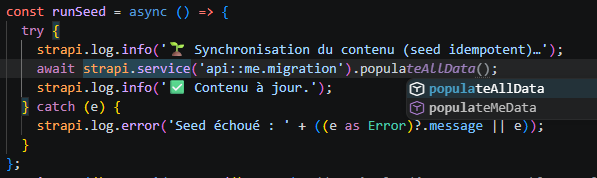
In your editor — free
- Autocomplete of real references, in the right context.
- Diagnostics for invalid/unknown references (with quick fixes), plus warnings when
Strapi v4 patterns (
entityService) appear inside a v5 project.
- Go-to-definition that resolves the correct target by context:
- services → service file, controllers → controller file
documents() / entityService / db.query() → schema.json- route
handler: 'api::x.x.find' → the find method
- policies / middlewares → their file, components → their JSON
strapi.plugin('a').service('b') → the plugin service
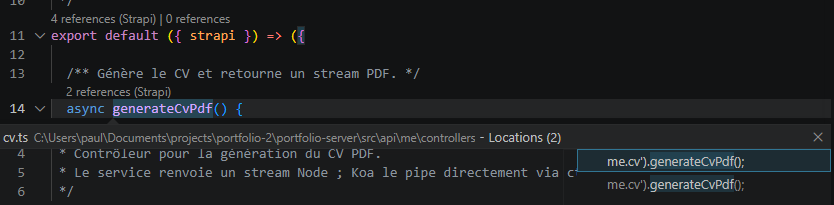
- Find All References + CodeLens — see everywhere an entity or a single method
is used, with a "N references (Strapi)" lens above each definition — including
strapi.service('x').find() calls and route handlers the TypeScript server can't
resolve (because strapi.service(...) is any).
- Hover describing what a string resolves to, with service-method signatures and
usage insights (incoming relations, route handlers, data usages).

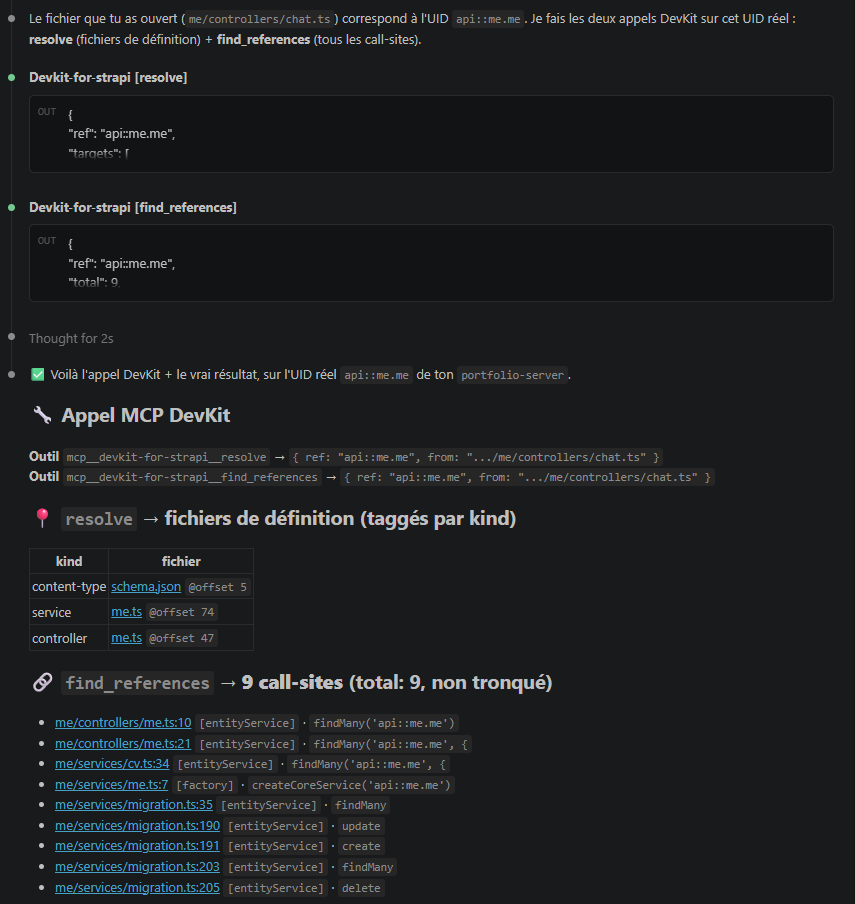
For your AI agent (MCP) — free
The extension bundles an MCP server and auto-registers it (no config) in VS Code,
Cursor, Windsurf and Antigravity. Your agent queries the project's real values
instead of guessing them — read & analyse tools cover content-types, components,
schemas, references, routes, dead code, broken refs and the dependency graph.
Use it — no setup
In VS Code, Cursor, Windsurf, Antigravity: nothing to configure. Open your agent
(Copilot Chat in Agent mode, or your editor's agent) — DevKit's tools are already
there. Try:
- "Which content types exist in this project?"
- "What uses
api::article.article?"
- "Is
api::article.artcle a valid reference?"
The agent answers from your real schema.json — not from a guess.
In Claude Code / Claude Desktop (or any standalone MCP client), point it at the server:
{
  "mcpServers": {
    "devkit-for-strapi": {
      "command": "npx",
      "args": ["-y", "devkit-for-strapi-mcp@latest", "/absolute/path/to/your/strapi-project"]
    }
  }
}
→ See For your AI agent (MCP) and the
tool reference.
Pro — the refactoring engine
One licence unlocks safe, propagated refactors in both surfaces:
- Rename (F2) — rename a content-type, service, controller, policy,
middleware, component or a method and propagate it to every call-site, route
handler and the underlying file/folder — no grep-and-pray. (Content-types also
rename their folder + coupled service/controller.)
- For your AI agent —
plan_* refactors (rename, move / extract-to-plugin, schema
edits) returned as a reviewable plan, plus a verified, root-confined, transactional
apply. Both the plan and its apply are licensed.
€39.99 one-time — a perpetual licence plus one year of updates, per developer.
One key unlocks both the editor and the MCP refactor tools. Validated once on
activation, then works offline (no telemetry, no code leaving your machine).
14-day money-back.
→ Get Pro & activation guide.
Activate in-editor with DevKit for Strapi: Enter License Key (stored in the OS
keychain, never settings.json); the key is forwarded to the bundled MCP server too.
Built right from the start
- Multi-project by content. Strapi projects are discovered by scanning
package.json
for @strapi/strapi — never by assuming workspace root = Strapi root. Every reference
resolves against the project that owns the edited file.
- Strapi v4 and v5, detected per project.
- JavaScript and TypeScript, identical behavior for ESM and CommonJS.
Commands
- DevKit for Strapi: Show Detected Projects
- DevKit for Strapi: Rescan Workspace — re-discover projects and rebuild the index
- DevKit for Strapi: Enter License Key — activate Pro
- DevKit for Strapi: Clear License Key — remove the stored key
Settings
strapiDevkit.enable — master switch (reload to apply)strapiDevkit.diagnostics.enablestrapiDevkit.diagnostics.unknownReferenceSeverity — error (default) · warning · information · hintstrapiDevkit.completion.enablestrapiDevkit.hover.enablestrapiDevkit.referencesCodeLens.enablestrapiDevkit.referencesCodeLens.methods — also show the per-method lensstrapiDevkit.exclude — glob patterns of paths to skip during project discovery
Privacy
DevKit reads your project files locally and answers from them. No telemetry, no
network call to a backend — your code never leaves your machine. (A Pro licence key is
validated once with the payment provider on activation, then cached offline.)
Trademark
This is an independent, community-built tool. It is not affiliated with, endorsed by, or
sponsored by Strapi SAS. "Strapi" is a trademark of Strapi SAS — used here only to describe
compatibility.
License
The editor features above (everything except the Pro refactoring engine) and the MCP
read tools are free to use. The Pro refactors require a licence key. The bundled
LICENSE file (shown on the Marketplace License tab) covers both: MIT for the free
parts, PolyForm Shield for Pro.

