Paneherd
A multi-agent console for Claude Code. Run several Claude Code sessions side by side in split panes in your editor, answer all their permission prompts in one place, see your plan's usage limits, and catch agents that loop or step on each other's files.
Paneherd opens each session as a real terminal in the editor area and lays them out as a grid. A sidebar lists your open panes with live status and every saved Claude Code conversation, so you can resume any of them in one click.
Website: paneherd.com. It has a guide to running several Claude Code sessions at once and a comparison with Claude Code's own tools.
Features
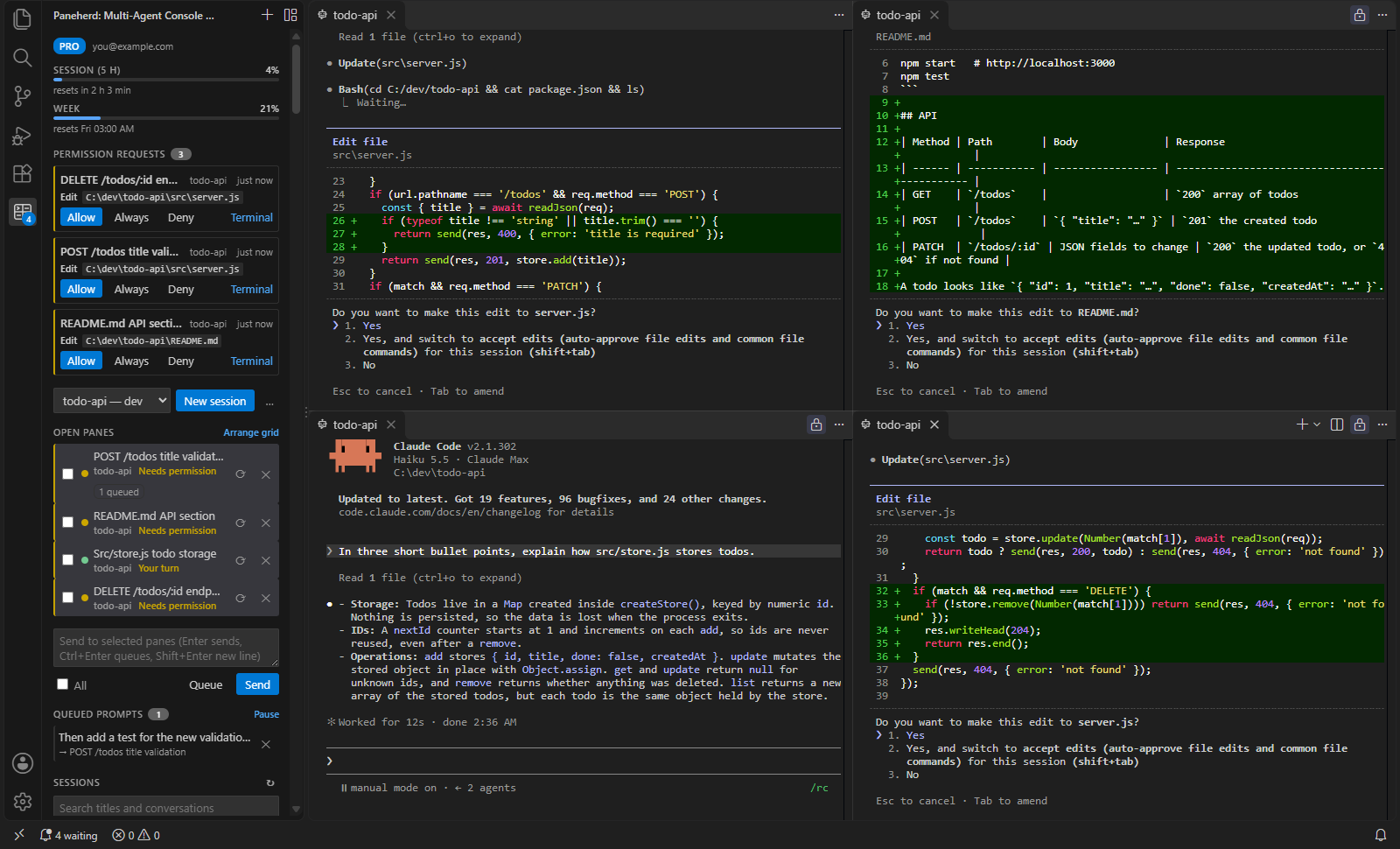
- Grid of sessions: new sessions and resumed conversations open as editor-area terminals arranged in 1–4 columns. Arrange Panes in a Grid tidies them up at any time.
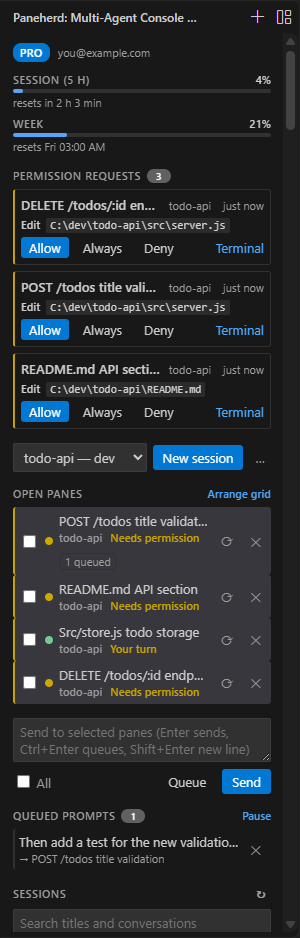
- Live status from Claude Code itself: each pane shows Working, Needs permission, Has a question, Your turn or Ended. The status comes from Claude Code hook events, not from guessing at terminal output.
- Know who is waiting: panes that need you are highlighted, counted on the sidebar badge and in the status bar. Go to Next Pane That Needs You jumps straight to them.
- Every saved conversation: the sidebar lists your Claude Code sessions with their titles and last prompts, searchable by title, prompt or folder, and by what was said in the conversation. Matching messages appear under each session. It warns before you open a session that may still be running in another window.
- Usage limits at the top: the sidebar shows how much of your Claude plan's current session (5 hours) and week you have used, and when each resets. Claude Code reports these to the status line on Pro and Max plans, after a pane's first reply.
- Permission inbox (Pro): every pane's permission prompts collect in the sidebar, with the command, file or URL. Allow, Always (saves the "don't ask again" rule Claude offers, where Claude's own dialog would: usually the project's
.claude/settings.local.json), Deny, or answer in the pane. Claude's dialog stays open in the pane, and whichever answers first wins. A notification offers Allow and Deny too.
- Conflict guard (Pro): before a pane edits a file that another open pane changed in the last 10 minutes, Claude asks you first and says which pane changed it.
- Loop and stall alarms: a pane that repeats the same tool call, fails several tool calls in a row, or shows no activity for 10 minutes while working is flagged in the sidebar (and notified on Pro).
- Broadcast: type once and send it to any set of panes. Multi-line text arrives as a single paste. A pane that is still starting gets the text once its prompt is up.
- Task queue (Pro): queue a prompt instead of sending it (Queue, or Ctrl+Enter). The first selected pane to end its turn takes it, so prompts queued for one pane run one after another without interrupting the current task, and prompts queued for several panes are shared out among them. The queue can be paused, and a prompt that has not started can be removed.
- Notifications (Pro): a notification appears when a pane needs you and you are looking at something else.
- Pick up after a reload: the panes you had open are offered for reopening with
--resume.
Free and Pro
|
Free |
Pro |
| Sessions open at once |
4 |
Unlimited |
| Live status, sidebar, session browser |
✓ |
✓ |
| Broadcast to several panes |
✓ |
✓ |
| Usage limits, loop and stall alarms |
✓ |
✓ |
| Permission inbox |
|
✓ |
| Conflict guard |
|
✓ |
| Task queue |
|
✓ |
| Notifications when a pane needs you |
|
✓ |
Pro licenses are not on sale yet. If you have a key, enter it with Paneherd: Enter License Key…. Keys are checked offline on your machine.
Requirements
- The Claude Code CLI, signed in. Paneherd finds
claude on PATH, in the standard install locations, or inside the Claude Code editor extension. You can also set paneherd.claudePath.
curl, which ships with Windows 10 and later, macOS, and most Linux distributions. Without it panes still work, but they cannot show status.- A trusted workspace.
How it works
Each pane runs claude with an extra --settings file that Paneherd writes for that pane. The file adds hooks for session start, prompt submit, tool use, permission requests, notifications, stop and session end. Your own hooks and settings stay in effect. The hooks run curl directly, without a shell, and post the event to a server inside the editor. That server listens only on 127.0.0.1 and checks a random per-window token.
Two hooks wait for the server's answer: the permission request hook (so the sidebar can decide while Claude's own dialog is up; with no decision within an hour it steps aside) and the pre-tool-use hook (so the conflict guard can ask first). The pane's status line, when Paneherd adds one, posts Claude's status line input, which carries the usage limits. Paneherd adds it only when neither you nor the project set a statusLine, so yours is never replaced; with your own status line the limits are not shown.
Nothing leaves your machine. Paneherd has no telemetry, and the license check needs no network access.
Settings
| Setting |
Default |
|
paneherd.claudePath |
"" |
Path to claude. When empty, Paneherd looks for it automatically. |
paneherd.extraArgs |
[] |
Extra arguments for every new session, for example ["--model", "opus"]. |
paneherd.gridColumns |
auto |
Columns in the grid (auto, 1–4). |
paneherd.notifications |
true |
Notify when a pane needs you (Pro). |
paneherd.usageLimits |
true |
Show the plan usage limits; adds a status line to panes that have none. |
paneherd.permissionInbox |
true |
Collect permission prompts in the sidebar (Pro). |
paneherd.conflictGuard |
true |
Ask before editing a file another pane just changed (Pro). |
paneherd.stallMinutes |
10 |
Flag a working pane silent this long; 0 turns it off. |
Known limitations
- Panes do not survive a window reload. Claude Code saves the conversation, and Paneherd offers to reopen the panes with
--resume.
- Opening the same conversation in two places at once mixes up its history. Paneherd warns when a session was active in the last two minutes.
- If your organization's managed settings allow only managed hooks, status is unavailable.
- The conflict guard sees edits made with Claude's file tools, not files changed by shell commands.
- A stall alarm means silence, not a fault: a long build or test run looks the same.
- A queued prompt goes in as soon as its pane's turn ends, even when Claude ended it with a question. Pause the queue to answer first.
- Queued prompts do not survive a window reload.
- Usage limits appear only on Claude Pro and Max plans, and only when Paneherd can add its status line.
Paneherd is an independent product and is not affiliated with or endorsed by Anthropic. Claude and Claude Code are trademarks of Anthropic, PBC.
| |

