ReleaseScribe — AI Changelog & Release Notes Generator
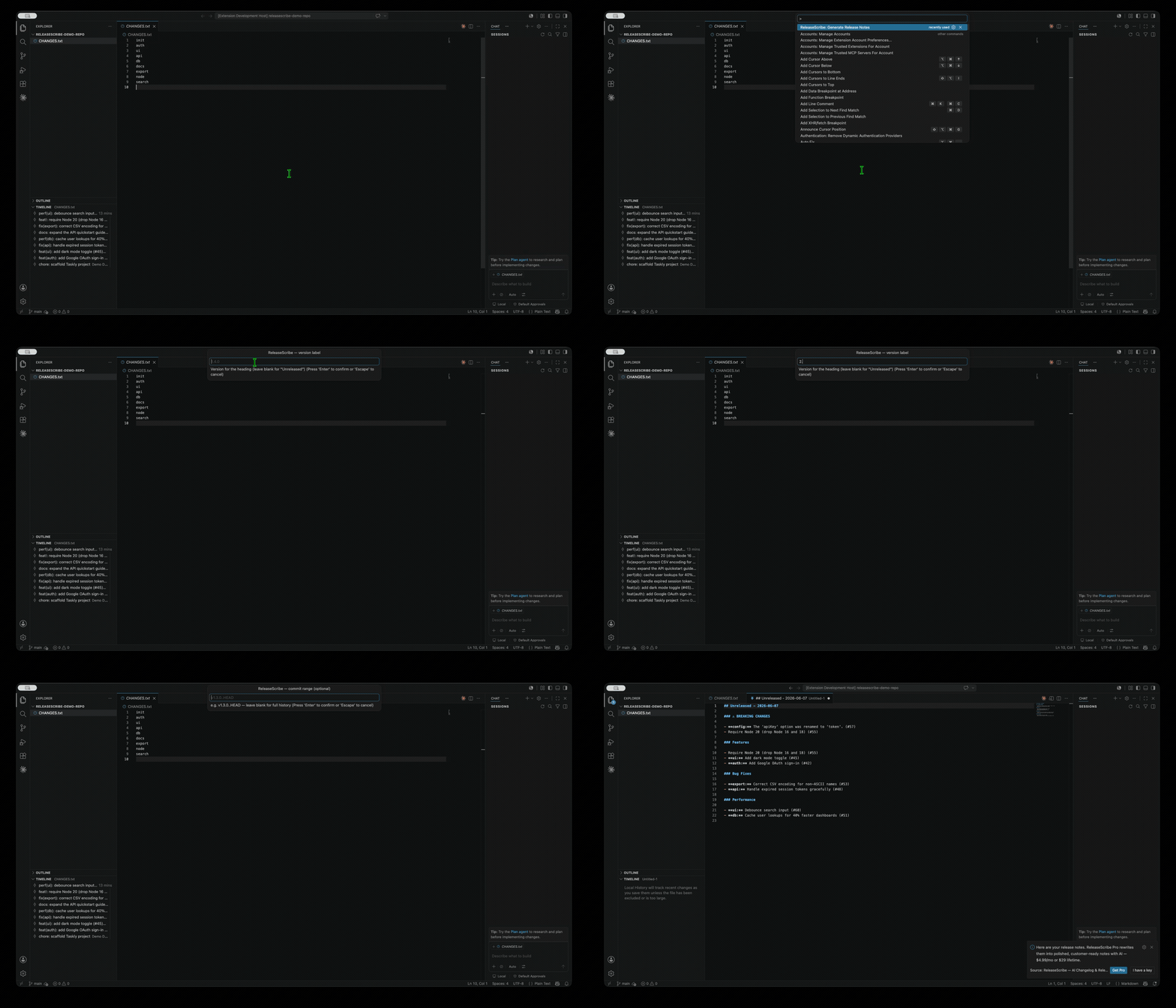
Stop hand-writing changelogs. ReleaseScribe turns your git history and
Conventional Commits into clean,
categorized release notes in seconds — right inside VS Code. Optional AI polish
rewrites terse commit messages into release notes your customers will actually
read.
Generate a beautiful CHANGELOG.md from feat: / fix: commits, grouped by
Features, Bug Fixes, Performance, and ⚠ Breaking Changes — with PR links.
Why ReleaseScribe
- One command.
ReleaseScribe: Generate Release Notes → pick a version and
range → done.
- Smart grouping. Understands
feat, fix, perf, refactor, scopes
(feat(api):), breaking changes (feat!: and BREAKING CHANGE: footers), and
PR references (#123).
- Keep a Changelog format. Sensible Markdown you can paste into
CHANGELOG.md, a GitHub Release, or a blog post.
- No account, no backend, no telemetry. It reads your local git log and
writes Markdown. That's it.
Free vs Pro
| Feature |
Free |
Pro |
| Categorized release notes from git history |
✅ |
✅ |
| Breaking-change detection, scopes, PR links |
✅ |
✅ |
| Keep-a-Changelog Markdown output |
✅ |
✅ |
| AI polish → customer-facing prose |
— |
✅ |
| Audience voice (customer / technical) |
— |
✅ |
| Custom section configuration & templates |
— |
✅ |
Pro uses your own LLM key (BYOK). Point it at OpenAI, OpenRouter, Together,
Groq, or a local server. Your key and your commits never touch our servers —
because we don't have any.
Quick start
- Install the extension and open a folder containing a git repository.
- Run ReleaseScribe: Generate Release Notes from the Command Palette
(
Cmd/Ctrl+Shift+P).
- Enter a version (e.g.
1.4.0) and an optional range (e.g. v1.3.0..HEAD).
- A polished Markdown document opens, ready to copy into your release.
Enable AI polish (Pro)
- Run ReleaseScribe: Activate License and paste your key.
- In Settings, set
releasescribe.apiKey, releasescribe.baseUrl, and
releasescribe.model, then turn on releasescribe.aiPolish.
Settings
| Setting |
Default |
Purpose |
releasescribe.prUrlBase |
"" |
Base URL to turn (#123) into links |
releasescribe.includeOther |
false |
Surface non-conventional commits |
releasescribe.aiPolish |
false |
Pro: AI rewrite |
releasescribe.audience |
customer |
Pro: writing voice |
releasescribe.apiKey / baseUrl / model |
— |
Your BYOK LLM config |
Privacy
ReleaseScribe runs entirely on your machine. Without AI polish, nothing leaves
your computer. With AI polish, your draft notes are sent only to the LLM endpoint
you configure, using your key.
Keywords: changelog generator, release notes, conventional commits, semantic
release, git changelog, AI changelog, VS Code changelog.
| |

