Skip to content
| Marketplace
Sign in
Visual Studio Code>Other>Luna Crop - Ship images inside the IDENew to Visual Studio Code? Get it now.
Luna Crop - Ship images inside the IDE

Luna Crop - Ship images inside the IDE

Andreas Express

| (0) | Free
Paste, crop, and remove image backgrounds inside VS Code — insert directly into the editor in the format you need.
Installation
Launch VS Code Quick Open (Ctrl+P), paste the following command, and press enter.
Copied to clipboard
More Info

Luna Crop

Last-mile image editor inside your IDE.

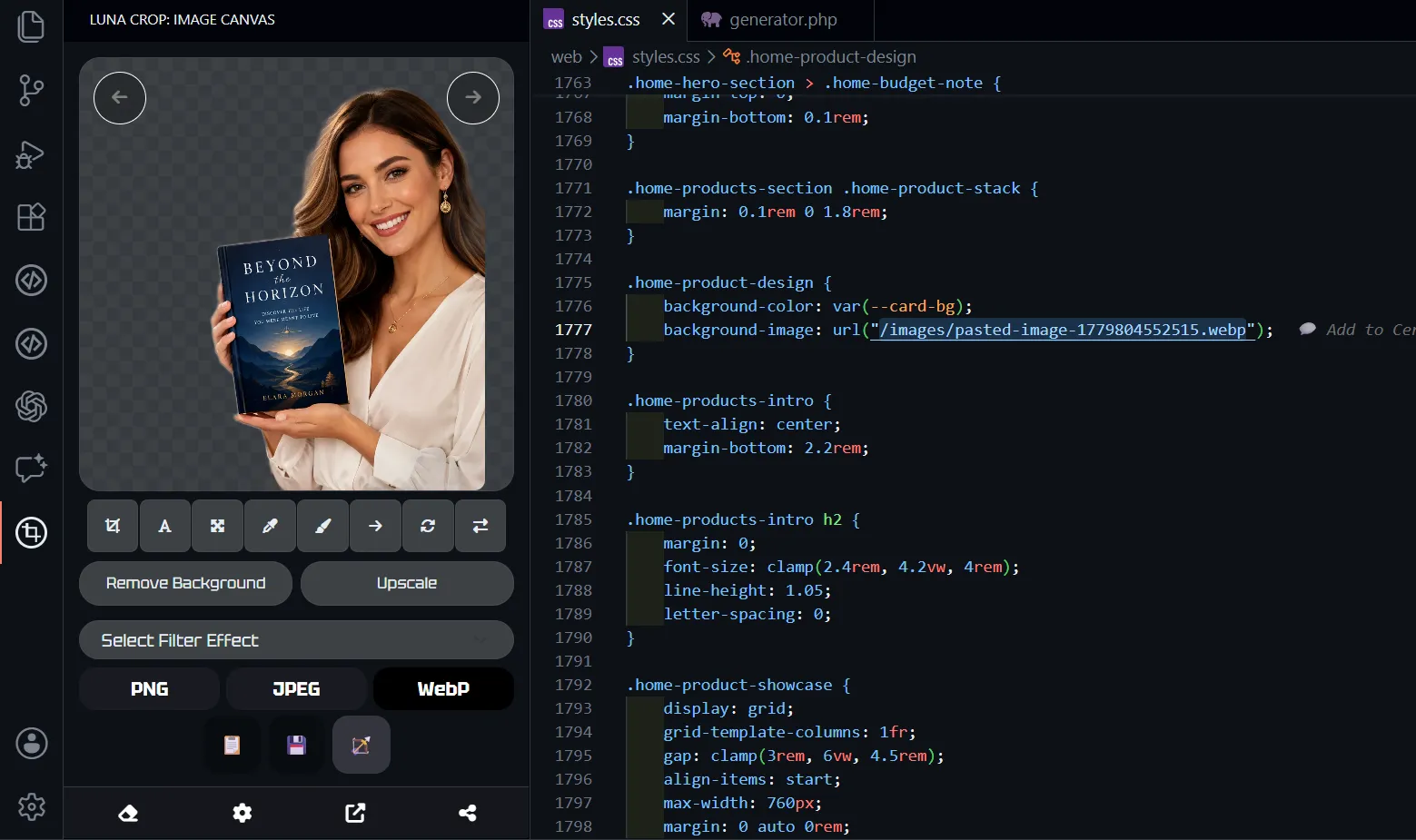
Luna Crop helps you to finish and place images directly inside the source code - crop screenshots, resize assets, remove backgrounds, add overlays, merge visual parts, and convert formats. It is perfect for preparing images for HTML pages, UI components, logos, favicons, README files, documentation, and project assets without leaving the editor.

Luna Crop inside VS Code

Luna Crop is a lightweight image editor for the IDE.

Use it when you need to prepare:

  • Images for HTML pages and <img> tags
  • Visuals for React, Vue, Svelte, Astro, or other UI components
  • Logos, favicons, extension icons, and frontend illustrations
  • README screenshots, documentation images, and pull request visuals
  • Product cards, landing page sections, Open Graph images, and social previews
  • App assets, UI previews, thumbnails, placeholders, and generated image outputs

Features

  • Crop in place: Trim the image to the exact area you need.
  • Resize assets: Prepare images for code, docs, icons, previews, app screens, and uploads.
  • Background removal: Remove the background locally when supported.
  • Overlay and merge: Combine visual parts or place one element over another.
  • Format conversion: Export images as PNG, JPEG, or WebP.
  • Full undo session: Try crops, resizes, background changes, overlays, and format choices with undo available during the editing session.
  • Direct image-to-code workflow: Prepare images where they are needed: HTML, components, CSS assets, docs, and project folders.

IDE Workflow

Luna Crop fits the kind of image work developers already do:

  1. Open or add an image from your project.
  2. Adjust the crop, size, background, format, or composition.
  3. Experiment during the session and undo changes when you need to refine the result.
  4. Export the result in the format you need.
  5. Use it directly in your HTML, component, README, docs, UI, extension, website, or asset folder.

Common Use Cases

Embed Images In HTML And Components

Prepare images for <img> tags, component imports, cards, hero sections, galleries, avatars, thumbnails, and preview blocks.

Prepare Logos And Project Assets

Trim whitespace, isolate a logo, remove a background, resize an icon, and export the image in the format your project needs.

Finish README, Docs, And Pull Request Images

Crop screenshots, remove unnecessary borders, resize large captures, and save clean visuals beside your documentation, issue notes, or pull request.

Clean Up Generated And Downloaded Images

AI-generated images are often close but not quite ready. Luna Crop helps with the final pass: crop, remove background, convert, or combine.

Prepare Marketing And Product Visuals

Crop product images, landing page graphics, Open Graph previews, marketplace screenshots, and quick UI visuals.

Best For

Luna Crop is a good fit for:

  • Developers preparing visual assets inside VS Code
  • Extension authors working with icons and screenshots
  • Documentation-heavy projects
  • Teams that need quick README and UI images
  • People using generated images in real projects
  • Frontend developers adding images to HTML and components
  • Product builders preparing landing page and marketplace visuals
  • Anyone who wants image finishing close to their code and project files

Requirements

  • VS Code 1.80.0 or newer
  • Image files in a supported IDE-readable format

Privacy And Usage

Luna Crop runs on your computer. Image editing happens locally in your IDE workflow.

Review the output before replacing or publishing project assets.

  • Contact us
  • Jobs
  • Privacy
  • Manage cookies
  • Terms of use
  • Trademarks
© 2026 Microsoft