Local Change Guard

VS Code Marketplace
·
erdemozkara.com
[!WARNING]
Beta / Preview: This extension is under active development. Review the staged diff before every commit and read the current limitations. Local Change Guard is an additional safety layer, not yet a Git-level enforcement mechanism.
A tracked file contains both machine-local and committable hunks. Keep them apart without hiding either from Git.
The one problem
Git remembers changed and staged. It does not remember:
“Keep this hunk on my machine, but commit the other hunk in the same file.”
For example, tracked settings.json contains both edits:
| Edit |
Must happen |
| Production endpoint → developer's test endpoint |
Stay on this machine |
Request timeout 30 → 60 |
Go into the next commit |
.gitignore, skip-worktree and assume-unchanged cannot safely express that distinction at hunk level.
The solution
Classify the first hunk as Local and leave the second under Changes. Local Change Guard then:
- keeps both edits visible;
- excludes Local hunks from its staging commands;
- reports Risk if a Local hunk reaches the index or can no longer be matched safely;
- changes only its metadata when classifying a hunk—never the file or Git index.
Do you need this extension?
- Use VS Code's built-in partial staging if you only need to select lines once.
- Use a general changelist extension if you only need named groups of work.
- Use Local Change Guard when a hunk must retain the explicit, protected intent “local to this worktree; do not commit”, including after refreshes and safe line movement.
Worktree shortcuts, formatting review and search support this workflow; they are not the reason the extension exists.
See Alternatives and scope for the duplication check and the behaviors intentionally adopted or rejected.
Project status: Local Change Guard is available from the VS Code Marketplace as a safety-first beta/preview under active development. See Current limitations before relying on it as a commit policy.
Oxara extensions
Local Change Guard is an Oxara product. All current and future VS Code extensions from the same publisher can be found in the Marketplace with @publisher:oxara.
Oxara VS Code source repositories follow the Oxara.VsCode.<Product> naming convention; this repository is Oxara.VsCode.LocalChangeGuard. Marketplace extension identifiers remain stable, lowercase technical IDs such as oxara.local-change-guard.
The mental model
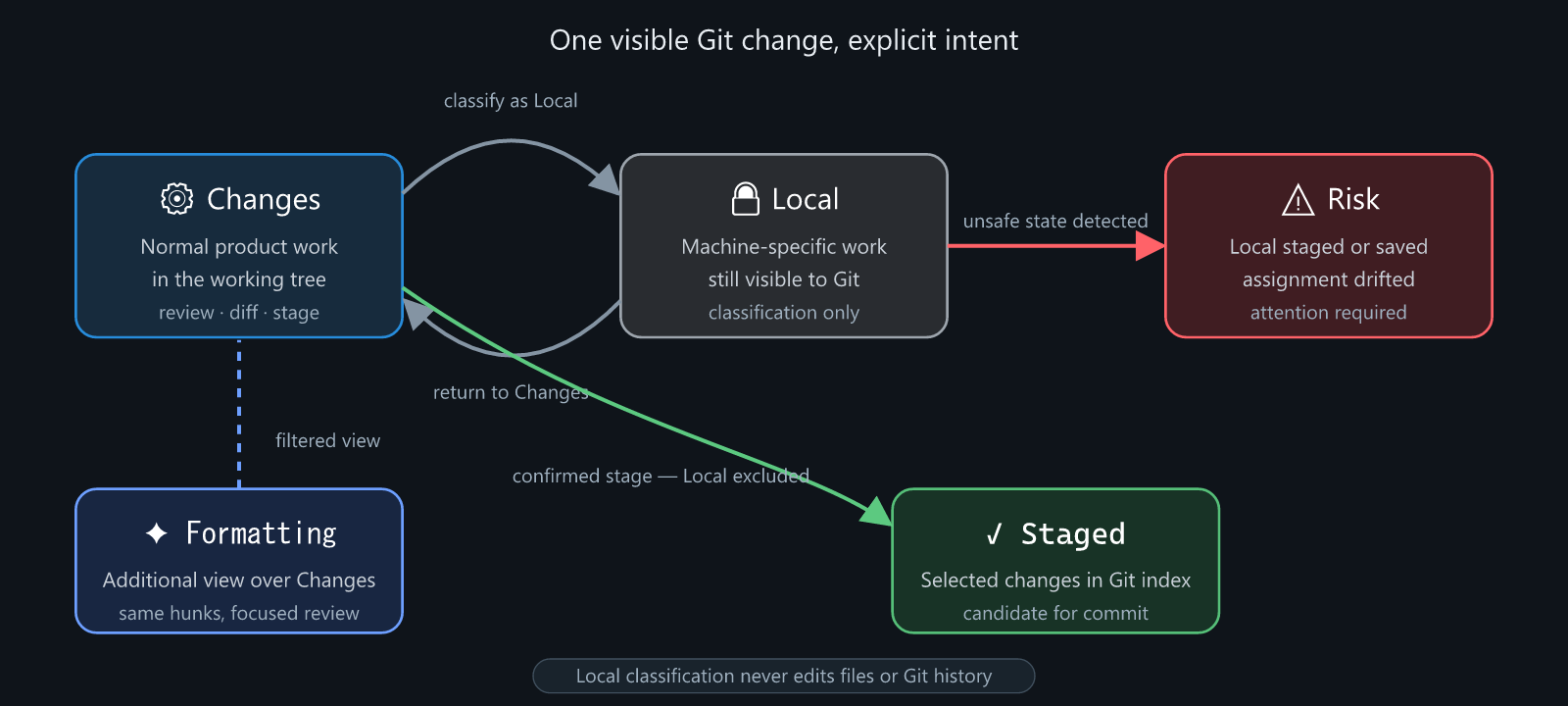
| Group |
Meaning |
Git state |
| Staged |
Included in the next commit |
In the Git index |
| Changes |
Normal, reviewable work |
In the working tree |
| Formatting |
A filtered view of high-confidence cosmetic hunks |
Still belongs to Changes |
| Local |
Developer- or machine-specific work that should not be committed |
Still belongs to the working tree |
| Risk |
A Local hunk reached the index, or a saved Local assignment no longer matches safely |
Requires attention |
Formatting is an additional view, not a fifth ownership state. A formatting hunk remains under Changes and may also appear under Formatting. This is why the Activity Bar count does not add Formatting twice.
Local classification is metadata-only. Moving a hunk between Changes and Local does not edit the file, stage it, restore it or modify Git history.
What the interface shows
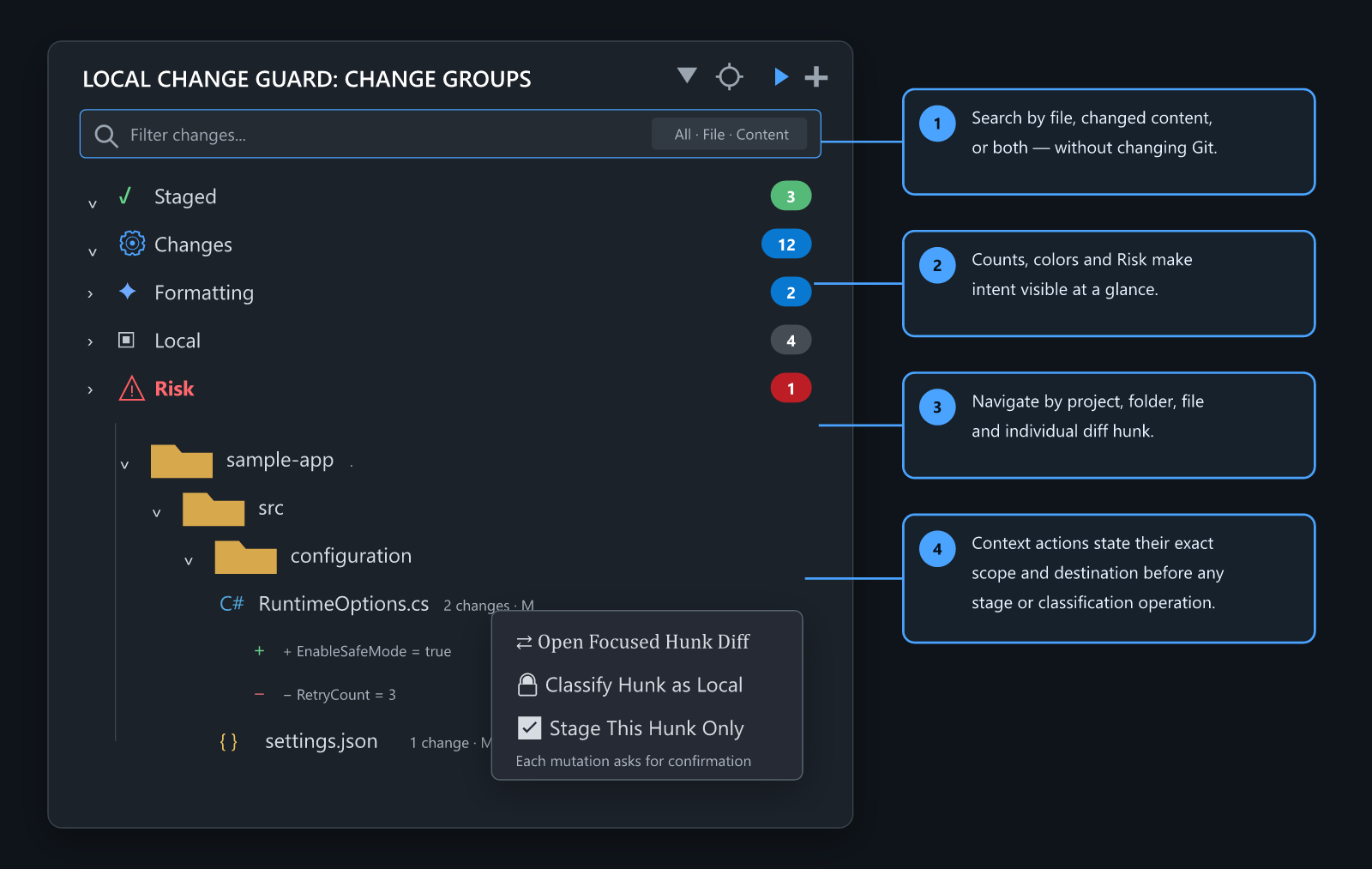
The Activity Bar shield opens a repository-local view:
- Category badges show hunk counts. Risk turns red when attention is required.
- Tree view groups
project → folder → file → hunk; List view provides a flatter review.
- File rows use familiar file-type icons and open the complete side-by-side file diff.
- Hunk rows open a focused before/after comparison containing only that hunk.
- Context menus expose classification and Git actions with destination-oriented icons:
✅ stage destination⚙️ Changes destination🔒 Local destination⇄ read-only full diff
- Search can scan file paths, changed content or both. Multiple words use AND semantics.
Ctrl+F focuses the filter. Escape clears it. Filtering is presentation-only: it never changes classifications, the working tree, the index or the Activity Bar badge.
Scope-safe actions
Actions are available at hunk, file and group level. Their labels and confirmation dialogs state the exact scope before anything reaches the Git index.
- Stage or unstage one hunk.
- Stage or unstage a complete file.
- Stage all normal Changes while excluding Local hunks.
- Stage one file's formatting hunks only.
- Stage all detected formatting hunks only.
- Classify one hunk, one file or all formatting hunks as Local.
- Return Local assignments to Changes without changing Git.
Formatting menus never silently include semantic changes. Risk menus expose no mutating shortcuts. Every stage or unstage operation requires confirmation, including single-hunk operations.
Untracked text files are represented as one whole-file hunk. Binary files and files larger than 1 MiB are classified as whole files.
Safe branch workspaces
An urgent branch switch should not force unfinished work into a stash or let it leak into another branch. Open Branch Safely creates or reuses an isolated Git worktree and opens it in a new VS Code window.
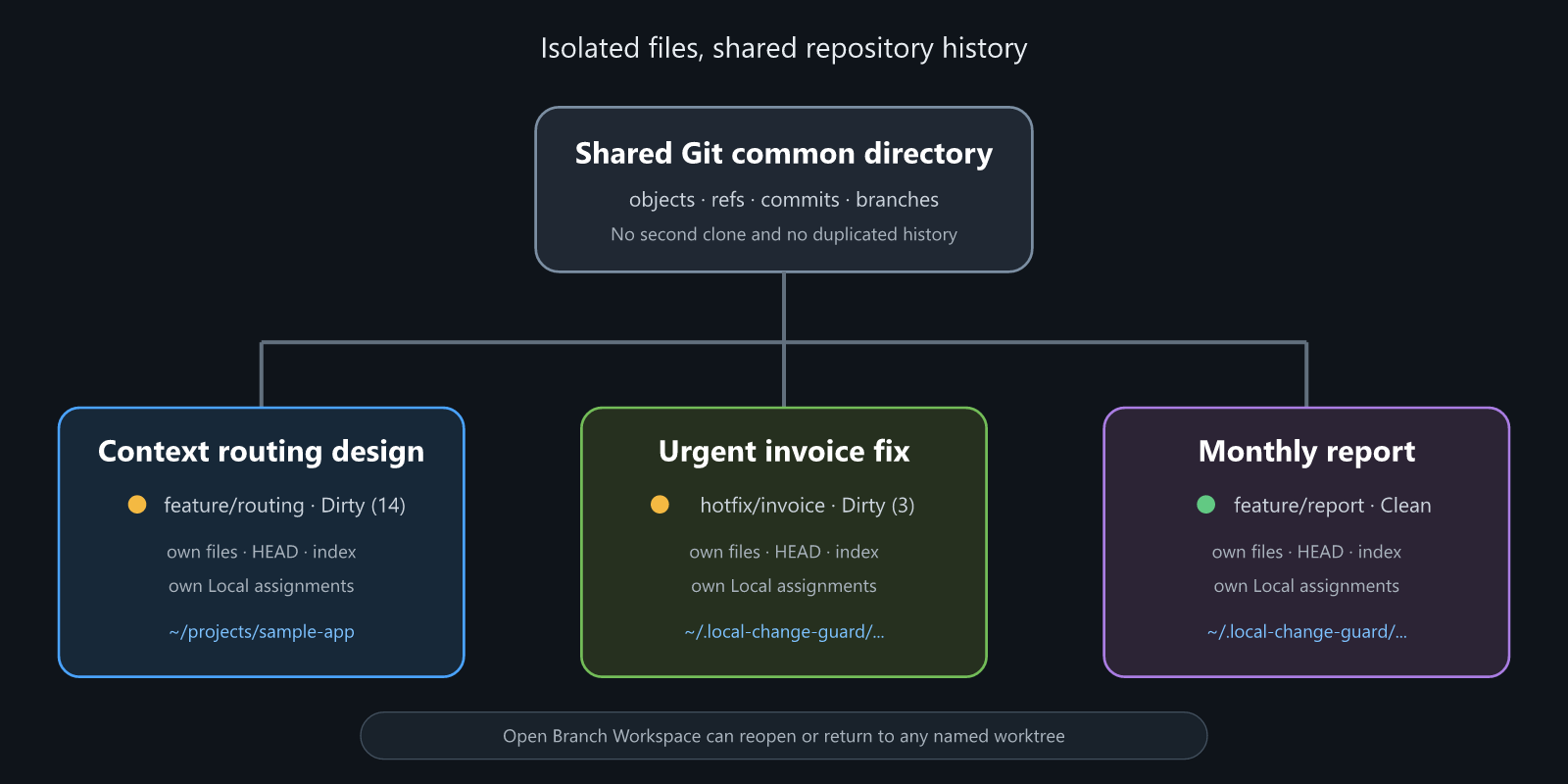
The repository is not cloned again. Linked worktrees share Git objects and refs, while each worktree has its own:
- checked-out files;
HEAD and active branch;- Git index and staged changes;
- working-tree changes;
- Local Change Guard assignments.
Before switching, each workspace receives a memorable user-defined name such as “Context routing design” or “Urgent invoice fix”. The name is the primary identity; branch, path and Dirty/Clean state remain supporting facts. Legacy unnamed worktrees must be named before the extension opens them.
Before and after creation, the extension fingerprints the source HEAD, branch, tracked diff and non-ignored untracked file contents. A mismatch is reported as a safety failure; the newly created worktree is preserved for inspection rather than silently removed.
Manage Branch Workspaces reads Git's own worktree registry and lists every available workspace with name, branch, path and a staged/working/untracked state summary. Select a row to open it. Use the edit and delete buttons on that same row to manage it without navigating through another workspace picker. Protected rows explain why deletion is unavailable. There is no duplicate session database to lose sync. Multiple unfinished branches remain on disk when VS Code closes and can be reopened from any linked worktree.
Rename changes only the local display-name metadata. Delete is always explicit and always requires a modal confirmation. The primary worktree, the currently open workspace, locked worktrees and detached worktrees cannot be deleted through the extension. Deleting a clean linked worktree removes only that checkout and its display-name metadata; the Git branch is preserved. Deleting a dirty worktree additionally requires typing its exact workspace name or branch and permanently removes that worktree's staged, working-tree and untracked changes.
By default, managed worktrees are created under:
~/.local-change-guard/worktrees/<repository-id>/<branch>-<ref-hash>
The location can be changed with localChangeGuard.worktreeRoot. The extension never automatically deletes or cleans up a worktree.
Safety model
Local Change Guard follows four rules:
- Visibility over hiding. It does not use
skip-worktree or assume-unchanged.
- Classification is not mutation. Local/Changes actions only update extension metadata.
- Git mutations are explicit. Stage/unstage actions name their complete scope and require confirmation.
- Branch isolation over in-place switching. Safe branch actions never checkout, stash or rewrite the current worktree.
Local assignments are stored per worktree under Git metadata:
<worktree-git-dir>/local-change-guard/assignments.v1.json
Workspace display names are shared by the repository's linked worktrees and stored under the Git common directory:
<git-common-dir>/local-change-guard/workspaces.v1/<worktree-id>.json
Nothing is added to the project repository for either feature.
Privacy and workspace trust
Local Change Guard has no telemetry, analytics, advertising, account system, or application-level network client. Repository paths, diffs, classifications, and worktree names remain on the machine where the extension runs. See Privacy for the exact data and storage boundaries.
The extension executes the local git command and writes classification metadata under Git's metadata directory. It therefore runs only in trusted, file-system-backed workspaces. Virtual and Restricted Mode workspaces are intentionally unsupported.
Current limitations
The view is advisory in the current preview release:
- VS Code's built-in Source Control view, another IDE or direct Git commands can still stage a Local hunk.
- The extension detects a Local hunk in the index and raises Risk, but does not yet install a Git-level pre-commit guard.
- Formatting detection intentionally covers only high-confidence line-ending, trailing-whitespace and final-newline changes. It does not claim to replace a formatter.
- Worktrees are never cleaned up automatically. Explicit deletion is available only for eligible linked worktrees and uses additional confirmation for dirty state.
- Marketplace releases are available, but the extension remains a preview while the Git-level commit guard and metadata format mature.
See Architecture for invariants and trust boundaries, and Roadmap for planned hardening.
Install for development
Requirements:
- Git available on
PATH;
- Node.js for tests and development;
- VS Code
1.85.0 or newer.
Clone the repository, install the pinned development toolchain, and open it in VS Code:
pnpm install --frozen-lockfile
pnpm check
pnpm test:extension
Press F5 to launch an Extension Development Host. The runtime has no production npm dependencies.
For a local installation during development, package or link the extension directory into VS Code's extensions directory, then run Developer: Reload Window.
Settings
| Setting |
Default |
Purpose |
localChangeGuard.autoRefreshSeconds |
5 |
Refresh interval while the view is visible; 0 disables polling |
localChangeGuard.showFormattingGroup |
true |
Shows the additional Formatting category |
localChangeGuard.worktreeRoot |
empty |
Overrides the managed worktree root |
Development
Normal work and pull requests target development. Release-ready changes reach production only through review. A matching vMAJOR.MINOR.PATCH tag on production is the sole trigger for VS Code Marketplace publication. See Release process.
Run the complete Node test suite and release validation:
pnpm check
Run the real VS Code Extension Development Host smoke test separately:
pnpm test:extension
Tests cover diff parsing, classification, formatting detection, hunk identity, scoped context actions, staging behavior, filtering, activity badges, Local metadata, isolated worktree behavior, extension activation, and command registration. CI repeats the portable test suite on Windows, Linux, and macOS.
A checksum manifest can bootstrap known Local changes without guessing. Only files whose current SHA-256 matches the manifest are imported:
node scripts/import-checksum-manifest.js `
  --repository C:\path\to\repo `
  --manifest C:\path\to\manifest.json
Support, security and contributing
The API, metadata schema, and UX may change before 1.0.0.
Design changes should preserve the invariants in docs/ARCHITECTURE.md, especially exact action scope, non-destructive Local classification and untouched source worktrees.
License and trademarks
The source code and documentation are licensed under Apache License 2.0. Oxara, the Oxara OX mark, Local Change Guard, and associated visual identity are not licensed for third-party branding; see TRADEMARKS.md. Third-party attribution is preserved in THIRD_PARTY_NOTICES.txt.
Copyright © 2026 Erdem ÖZKARA. Contact: oxara.dev@gmail.com · erdemozkara.com

