ryl for Visual Studio Code
Visual Studio Code support for ryl, a fast
Rust-based YAML linter (a drop-in replacement for yamllint with extra rules and
fixes). The extension is a thin client that runs ryl server, ryl's built-in
language server, so all linting, fixing, and formatting is done by ryl itself.
A platform-specific build of ryl is bundled with the extension, so it works with
no separate install. If you already have ryl on your PATH or in a project
environment, the extension uses that instead (see How ryl is located).
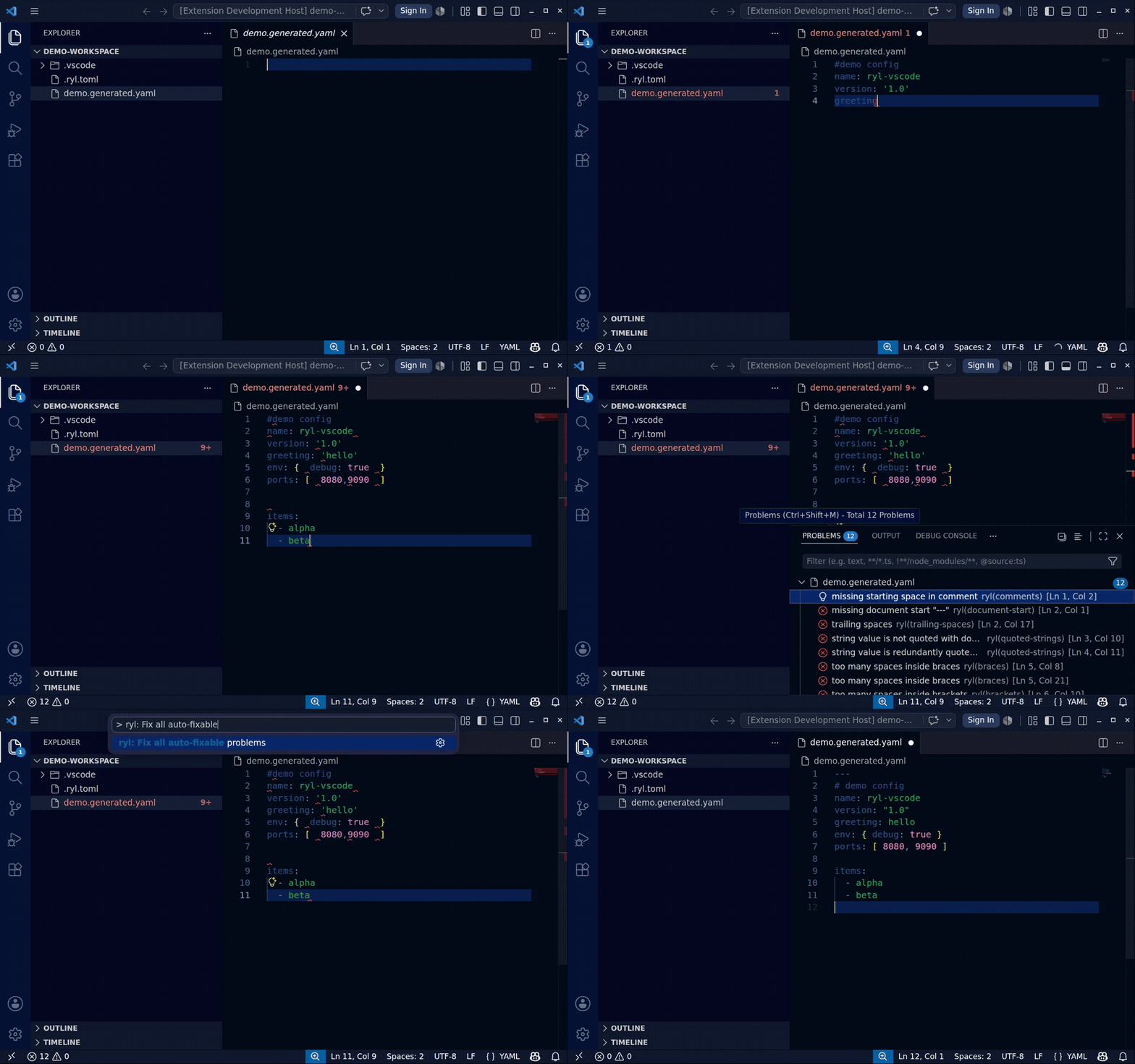
Lint and auto-fix YAML as you type:
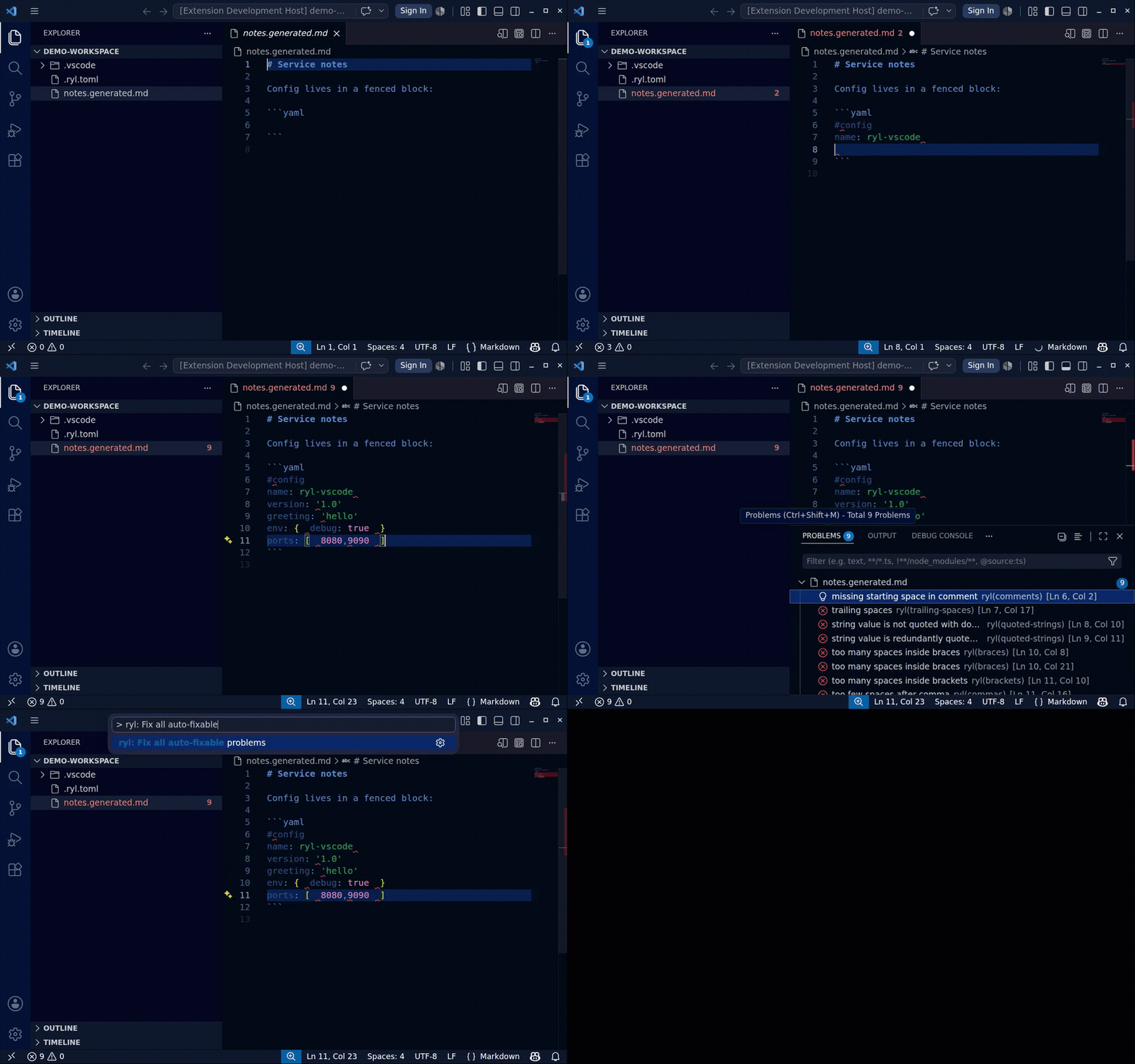
...including YAML embedded in Markdown front matter and fenced blocks:
Features
- Live diagnostics. YAML files are linted as you type, with squiggles that
clear as you fix them.
- YAML in Markdown. When your ryl config opts in (
[files].markdown), front
matter and fenced ```yaml blocks in Markdown files are linted too, with
diagnostics mapped back to the Markdown file. Markdown supports live
diagnostics, hover, and fix-all (per-line disable and rename stay YAML-only).
- Fix all. Apply every safe ryl fix to a document via the
ryl.fixAll
command, the source.fixAll.ryl code action, or on save.
- Formatting. ryl advertises a document formatter, so you can set it as the
default formatter for YAML and format on save (see Setup).
- Quick fixes. Insert
# ryl disable-line / # ryl disable-file directives
to silence a rule for a line or file.
- Hover. Hover a diagnostic to see the rule, message, and a link to its docs.
- Rename. Rename a YAML anchor and its aliases together.
Requirements
None. The extension bundles the matching ryl binary for your platform. Optionally
install ryl yourself (for example uv tool install ryl, pip install ryl,
cargo install ryl, npm install ryl, or pixi global install ryl) and the
extension will prefer it.
Recommended setup
Add this to your settings to make ryl your YAML formatter and to apply fixes on
save:
{
  "[yaml]": {
    "editor.defaultFormatter": "owenlamont.ryl",
    "editor.formatOnSave": true,
    "editor.codeActionsOnSave": {
      "source.fixAll.ryl": "explicit"
    }
  }
}
ryl.fixOnSave is a convenience equivalent to the codeActionsOnSave entry
above; pick whichever you prefer.
Settings
| Setting |
Default |
Description |
ryl.enable |
true |
Enable the ryl language server. |
ryl.path |
"" |
Path to the ryl executable. Empty uses auto-detection (see below). |
ryl.importStrategy |
fromEnvironment |
fromEnvironment prefers a ryl in your environment; useBundled always uses the bundled binary. |
ryl.configPath |
"" |
Path to a ryl config file (ryl.toml, .ryl.toml, or a yamllint-style config). Empty uses normal config discovery. |
ryl.fixOnSave |
false |
Apply all safe fixes when saving a YAML file. |
ryl.trace.server |
off |
Trace the LSP traffic between VS Code and ryl. |
Commands
All commands are available from the Command Palette under the ryl category:
- ryl: Fix all auto-fixable problems (
ryl.fixAll)
- ryl: Restart Server (
ryl.restart)
- ryl: Show client logs (
ryl.showClientLogs)
- ryl: Show server logs (
ryl.showServerLogs)
How ryl is located
When ryl.path is empty, the extension resolves the executable in this order:
- The
ryl.path setting, if set.
- The bundled binary, if
ryl.importStrategy is useBundled.
- A workspace virtual environment (
.venv/venv).
- The system
PATH.
- The binary bundled with the extension.
In an untrusted workspace the bundled binary is always used, and ryl.path /
ryl.configPath are ignored.
Configuration
ryl discovers its configuration (ryl.toml, .ryl.toml, [tool.ryl] in
pyproject.toml, or a yamllint config) exactly as it does on the command line.
Set ryl.configPath to point at a specific file. See the
ryl configuration docs for the rules and
options.
Coexistence with the Red Hat YAML extension
ryl is a linter and formatter, so it sits alongside the
Red Hat YAML extension
rather than replacing it: ryl owns lint and fix, Red Hat owns schema validation,
completion, and hover for schema-backed keys.
Contributing
npm install            # install dependencies
npm run compile        # bundle the extension with esbuild
npm run download-ryl   # download the ryl binary into bundled/ for local runs
npm test               # run the end-to-end suite in a real VS Code instance
Press F5 in VS Code to launch the extension in an Extension Development Host.
Linting and formatting are managed by prek and
Biome; run prek run --all-files.
License
MIT

