Hygge Kyst Dark
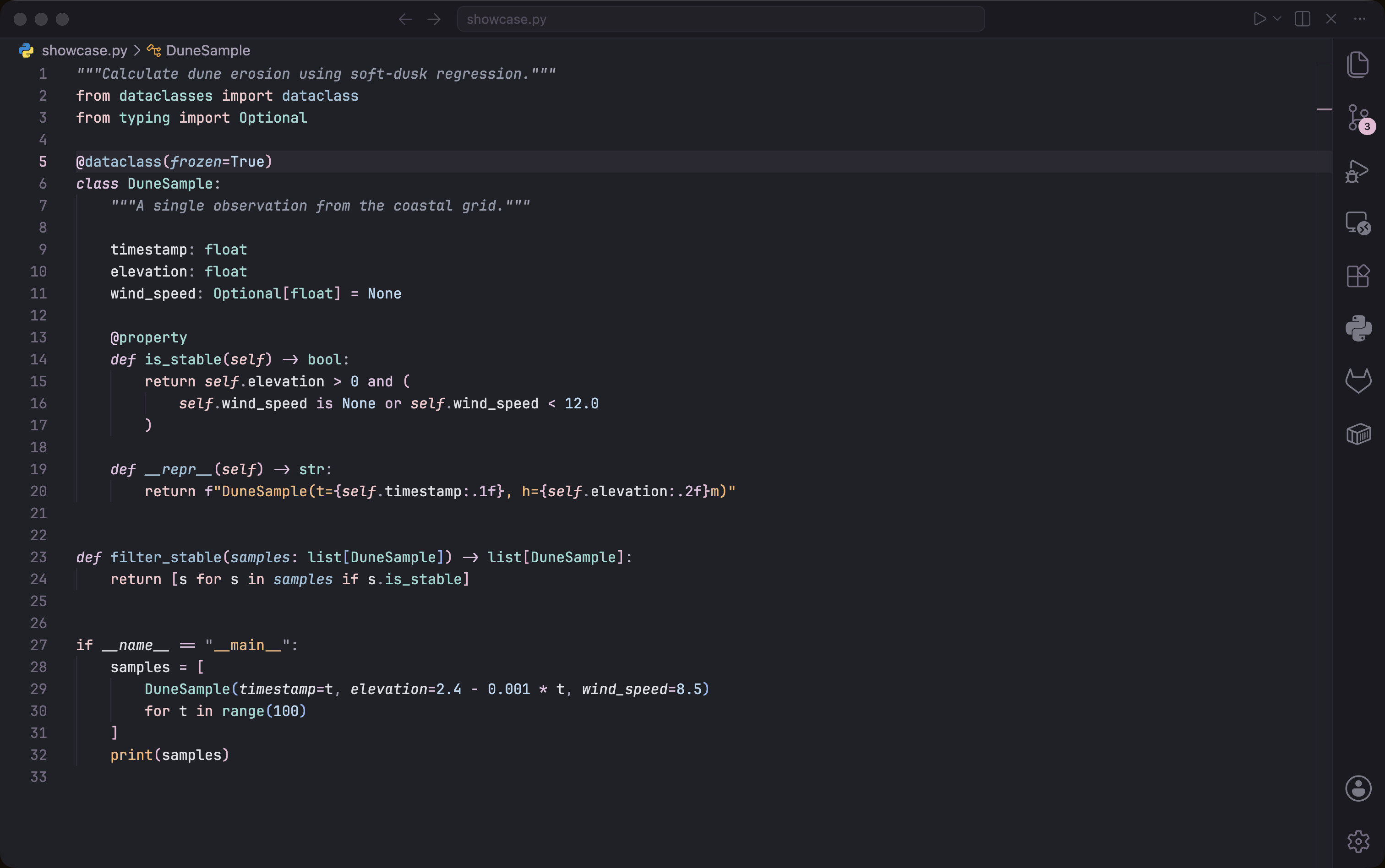
A soft dusk coastal VS Code theme — pastel pinks and sky blues over deep mauve charcoals, inspired by twilight skies above grass-roofed Danish dune cabins.
Inspiration
The theme captures the moment the dunes go quiet at dusk: a wide pastel sky drifting from rose to powder blue, dark wooden cabins anchored in silvery-green grass, and the sea cooling toward night. Low saturation, generous breathing space between hues — calm, airy, slightly cinematic.
Color Philosophy
Editor & UI
- Editor background
#202028 — deep dusk charcoal with a faint blue tint, never pure black
- Chrome
#16161D / activity bar #1A1A22 — a shade deeper, like cabins against the sky
- Sidebar
#262630 — soft twilight slate
- Panel
#2A2632 — dusty mauve-grey for terminal and panels
- Status bar
#3A3048 — warm mauve tint, the lit horizon
- Selection
#90B4EC at 32% — pastel sky blue, translucent
- Focus / cursor / accents — pink
#E8B8D4 and mauve #D8B4D8 carry the dusk-horizon glow
Palette · 10 base swatches
| Token |
Hex |
Role |
| Pink |
#E8B8D4 |
Keywords · cursor · active tab/panel underline · badges |
| Mauve |
#D8B4D8 |
Operators · focus border · italic emphasis |
| Powder blue |
#B4D0EC |
Strings · markdown code · terminal accent |
| Mist lilac |
#CCCCEB |
Function names · parameters · link text |
| Sky blue |
#90B4EC |
Types · classes · properties · selection (32%) |
| Periwinkle |
#B0B0EC |
Numbers · constants · CSS units |
| Comment |
#5E5A6E |
Comments (italic) |
| Moss |
#8A8A60 |
Regex |
| Wood |
#A07878 |
Decorative warm accent |
| Charcoal |
#606070 |
Muted neutrals |
Syntax Highlighting
| Element |
Color |
Inspiration |
| Keywords / control flow |
#E8B8D4 |
Pink dusk sky |
| Operators |
#D8B4D8 |
Soft mauve |
| Strings |
#B4D0EC |
Powder-blue horizon |
| Functions |
#CCCCEB |
Mist lilac |
| Classes / Types / Properties |
#90B4EC |
Sky blue |
| Numbers / Constants |
#B0B0EC |
Pale periwinkle |
| Comments |
#5E5A6E |
Twilight charcoal (italic) |
| Docstrings |
#736A82 |
Muted dune grass (italic) |
| Regex |
#8A8A60 |
Moss |
| Errors |
#C89090 |
Soft rust |
Python Optimized
Special highlighting for Python-specific syntax:
- Self/cls — italic pink for clear visibility
- Decorators — pink accent
- F-string braces — mauve, distinguished from the powder-blue string body
- Docstrings — gentle italic, distinct from regular strings
- Type hints — sky blue
- Magic methods — italic powder blue for dunder methods
- Built-in functions — powder blue, differentiated from user functions in mist lilac
Python Optimized
This theme includes special highlighting for Python-specific syntax:
- Self/cls: Italic pink for clear visibility
- Decorators: Soft rose-purple accent
- F-string braces: Distinguished from regular strings
- Docstrings: Gentle green italic, distinct from regular strings
- Type hints: Cyan ocean tones
- Magic methods: Italic purple for dunder methods
- Built-in functions: Teal differentiation from user functions
Installation
From VS Code Marketplace
- Open VS Code
- Go to Extensions (Ctrl+Shift+X)
- Search for "Hygge Kyst Dark"
- Click Install
- Select the theme: Ctrl+K Ctrl+T → "Hygge Kyst Dark"
Manual Installation
- Copy the theme folder to your VS Code extensions directory:
- Windows:
%USERPROFILE%\.vscode\extensions\
- macOS:
~/.vscode/extensions/
- Linux:
~/.vscode/extensions/
- Restart VS Code
- Select the theme: Ctrl+K Ctrl+T → "Hygge Kyst Dark"
Recommended Settings
For the best experience, consider these VS Code settings:
{
  "editor.fontFamily": "'JetBrains Mono', 'Fira Code', Consolas, monospace",
  "editor.fontLigatures": true,
  "editor.fontSize": 14,
  "editor.lineHeight": 1.6,
  "editor.cursorBlinking": "smooth",
  "editor.cursorSmoothCaretAnimation": "on",
  "editor.renderWhitespace": "selection",
  "workbench.colorTheme": "Hygge Kyst Dark"
}
License
MIT License - Feel free to use, modify, and share!
Inspired by the peaceful dunes of Denmark 🇩🇰

