OpenAny HAR
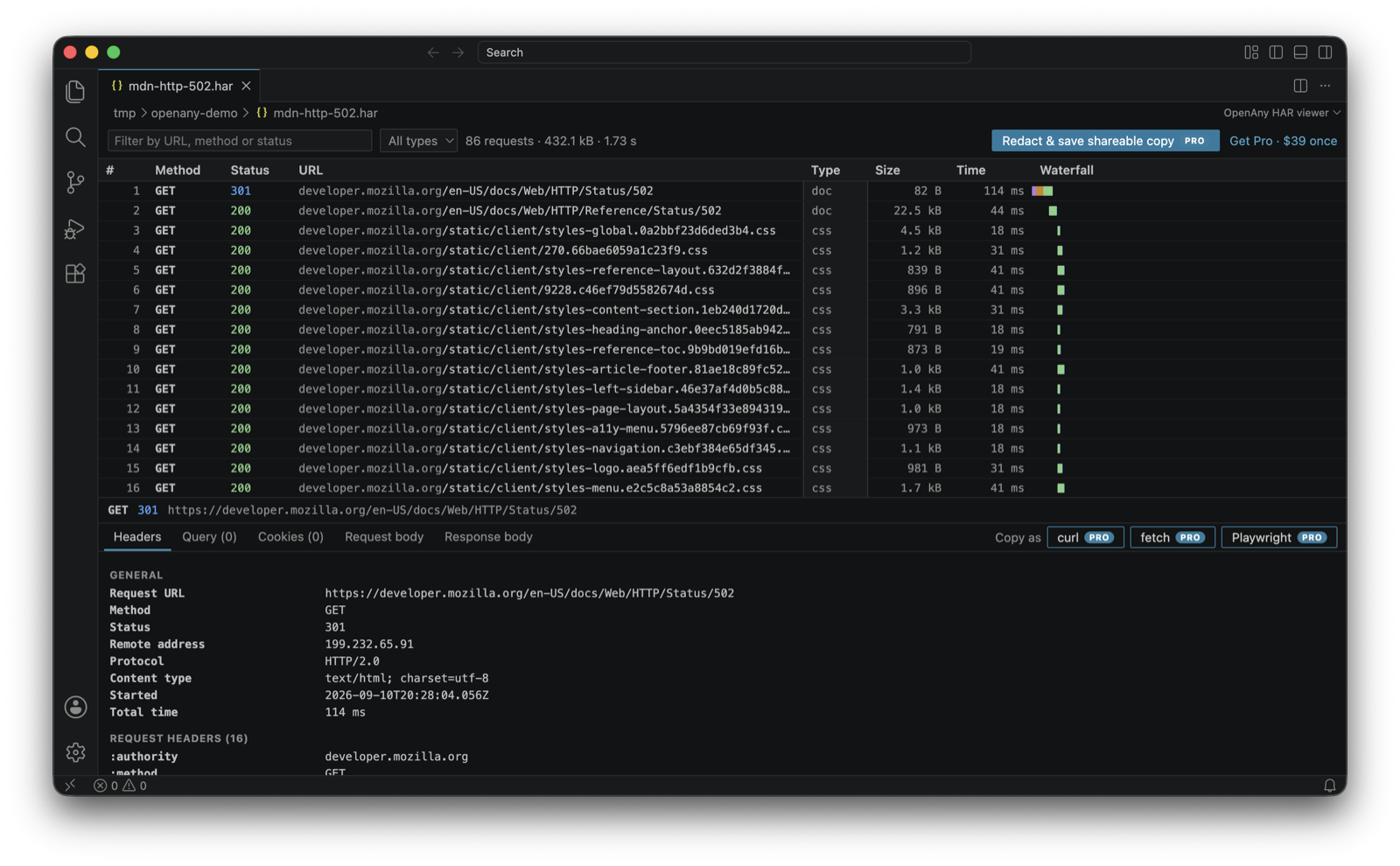
Open .har network captures inside VS Code, Cursor, Windsurf or VSCodium. Click any .har file and you get a request list, a waterfall, and a details panel with headers, query string, cookies, and pretty-printed request and response bodies. No account, no upload, no telemetry: the file never leaves your machine.
Free, forever
- Request list with method, status, URL, type, size and time; filter by URL, method or status; filter by type.
- Waterfall with per-phase colouring (blocked, DNS, connect, send, wait, receive).
- Follows the file. Rewrite the capture, or repoint a symlink at a new one, and the viewer reloads by itself, keeping your filter and the request you had open.
- Headers, query parameters, cookies (with HttpOnly and Secure flags), request body and response body, JSON pretty-printed, base64 text bodies decoded.
- Works on captures from Chrome, Edge, Firefox, Safari, Charles, Proxyman, Fiddler and Playwright.
Pro, $39 one-time
HAR files carry live session cookies and bearer tokens, which is why you cannot just email one to a vendor. Pro turns a capture into something you can share:
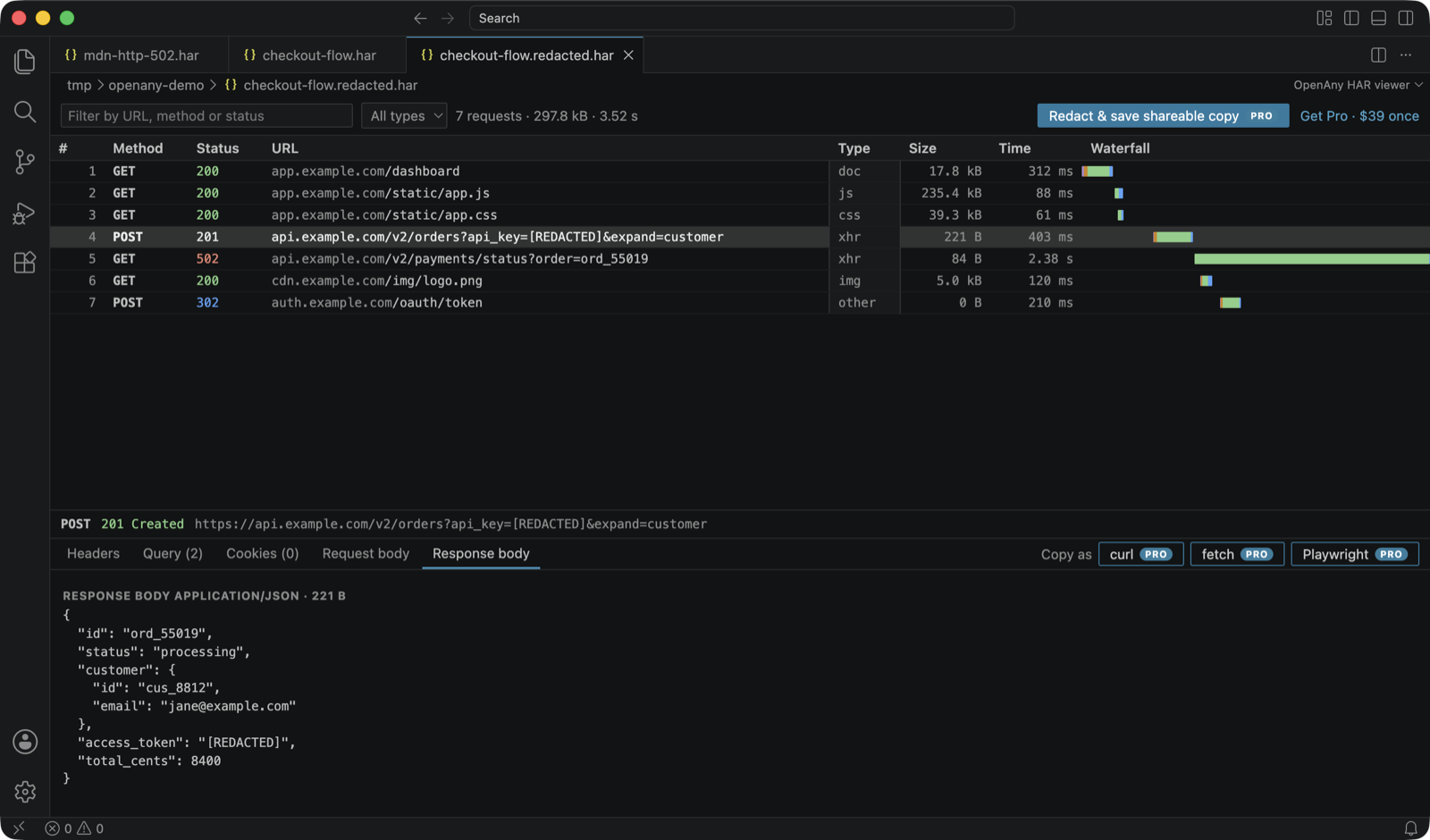
- Redact & save shareable copy. One click writes
name.redacted.har next to the original with cookies, Authorization, Set-Cookie and API-key headers, tokens in query strings, secret fields in JSON, form, XML and SOAP bodies, and payment card numbers replaced by [REDACTED]; binary bodies (images, fonts, protobuf) are dropped because they cannot be scrubbed. Everything else stays, so the file still opens anywhere and still tells the story.
- What it does not remove: personal data. Names, email addresses, phone numbers, postal addresses, IDs inside URL paths and server IP addresses are left exactly as captured, because that is usually the part the person debugging needs. Redaction makes a capture safe to share on the secrets; read it before you send it outside your company.
- Known limits of the pattern scrubs (each one is pinned by a test, so a change shows). Version 1.0.5 listed five; the next release closes four of them and narrows the rest to these. Still ships: on a line that is already comma-separated before the secret (
ts=1,password=hun,ter=2) a secret that itself contains ,word= is cut at that comma and ter=2 stays, because taking the rest of the token would take ,user=jane off every structured log line (a secret that starts its own group, login password=hun,ter=2, is now hidden whole, unless more than 64 characters follow that comma: in minified code such a run is the rest of the script); inside a login region of a page (<div id="auth">) a secret that is shaped like an ordinary word (swordfish: letters only) reads exactly like Email or Submit and is left, while anything with a digit, a symbol, mixed-up capitals or more than thirty letters is hidden; a text/csv body with a one-column header over ragged rows, or whose first two lines include one with no comma in it, and any ragged table served as text/plain, is not read as a table, because a title over two sentences has the same shape; key names written in full-width letters (password:) and |-separated tables are not recognised; a bare = value still takes a closing bracket with it ((token=abc) comes back as (token=[REDACTED]), which hides nothing secret and is left as it was. Round 13 tried a rule for each shape a three-way fuzz (1.0.5, the current code, the candidate) still found, measured every one on ten real browser files, and kept none, so these ship as well, each pinned: a = value that runs through a bracket or a backslash into the next pair's key (s= (x)session= hunter2x9, which 1.0.5 ships too; giving the key back hid 390 more characters of ordinary code); a backtick is not a quote (session:`hunter2x9`; as one it hid 2.7 KB more and leaked far more often); and three shapes where a quote can be read two ways (a quoted value that runs through the next pair's opening quote, a stray closing quote answered by the next pair's, a raw U+2028 inside a value), where 1.0.5 took the reading that happened to be safe on those inputs and the unsafe one on their mirror images; when no quote ever closes such a value it ends at the U+2028 it crossed, because reading past it once hid a whole script behind one stray quote. Hidden although it is not a secret (the safe direction): an element whose attribute names a secret word other than a page region (<div id="password-reset">, <section id="cookie-consent">) loses its whole contents; in a login region an e-mail address, a date, a price or a one-time code goes with the password; token=abc,ttl=3600 loses ,ttl=3600; text after an apostrophe that looks like an unclosed quote (secret: 'tis the season) is hidden to the end of its line; a notice served as text/csv whose lines all have a comma in them loses every line under its first; in a text/csv table a cell among the first five lines that reads as a secret column name (token in a scope column) hides that column from there down; a value still URL-encoded after three decodes is hidden whole; a quoted secret whose closing quote has a letter or digit right behind it (password='a'b) is hidden up to the next quote that closes, or to the end of its line when there is none; in a script, a string that ends in a secret-looking name and a colon ("session-resume:") hides the code behind it up to the next closing quote.
- Copy as curl, fetch or Playwright. Reproduce any request from the capture with one copy.
One key works on 3 machines and in every current and future OpenAny extension. Team keys ($149) cover 10 machines. Full refund within 14 days, no questions.
Buy Pro ($39 one-time) · then run OpenAny: Enter license key from the Command Palette and paste the key from your receipt.
Commands
| Command |
What it does |
OpenAny: Enter license key |
Activate Pro on this machine. |
OpenAny: Show license status |
Which key is active, and re-check it with Polar. |
OpenAny: Remove license key from this machine |
Free one of your activations. |
OpenAny: Buy Pro ($39 one-time) |
Opens the checkout page. |
Privacy
Files are parsed inside VS Code and never uploaded. The only network request the extension makes is to Polar (api.polar.sh) to check a license key you enter, at most once a day; it never sends file contents. That request carries the key, your computer's name (so you can tell your machines apart when freeing an activation at Polar), and the extension name, version and operating system. Pro keeps working offline for 14 days between checks. Privacy policy.
Support
support@openany.dev · openany.dev · Refund policy
| |

