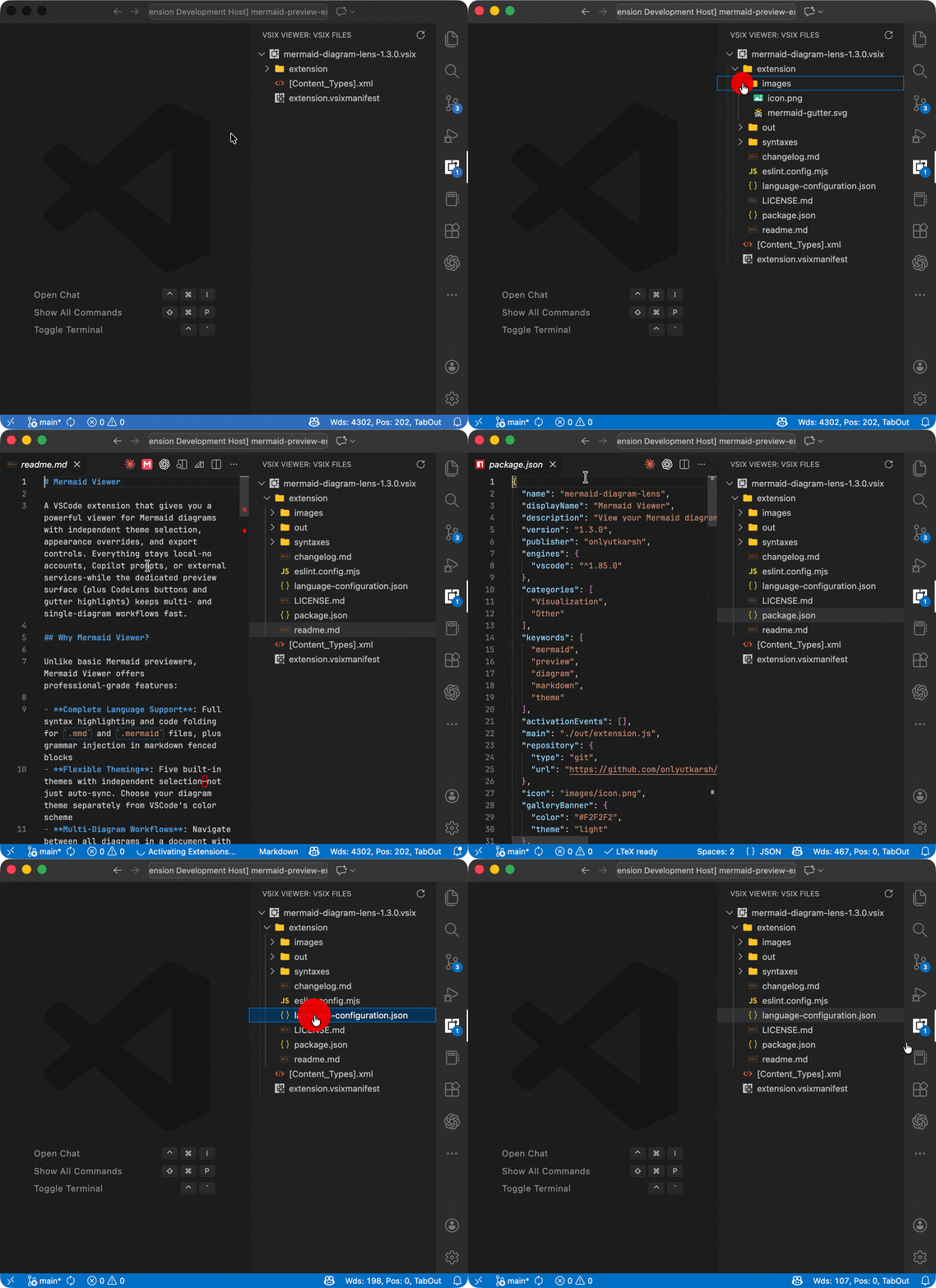
A simple viewer for VSIX files, which lets you see the contents of VSIX files within Visual Studio Code.
Features
Dedicated Activity Bar Panel: Access VSIX Viewer from its own panel in the Activity Bar
Automatic Workspace Scanning: Automatically detects and displays all VSIX files in your workspace
File Tree Exploration: Browse the contents of VSIX files in an intuitive tree view
File Preview: Click on any file in the tree to preview its contents
Real-time Updates: Automatically detects when VSIX files are added or removed from your workspace
File Count Badge: Shows the number of VSIX files found in your workspace (configurable)
Custom File Icons: Rich icon support for various file types within VSIX files
Multiple VSIX Support: View multiple VSIX files simultaneously in the same workspace
Refresh Command: Manually refresh the list of VSIX files when needed
Usage
VSIX files are automatically detected when you open a workspace containing them. The VSIX Viewer panel will appear in the Activity Bar, showing all VSIX files found in your workspace.
Click on any file in the tree to preview its contents
Use the refresh button in the panel toolbar to rescan for VSIX files
Run Refresh VSIX Files from the Command Palette to manually refresh
Configuration
Badge Display
You can control whether the file count badge is displayed in the VSIX Viewer panel: