Ortho for SysML v2
See the architecture while you write the model. Ortho draws six
architectural views of a SysML v2 model, in SysML v2's own graphical
notation: use case, logical, implementation, physical, deployment and
process. It shows them beside the text and draws them again every time you
save.
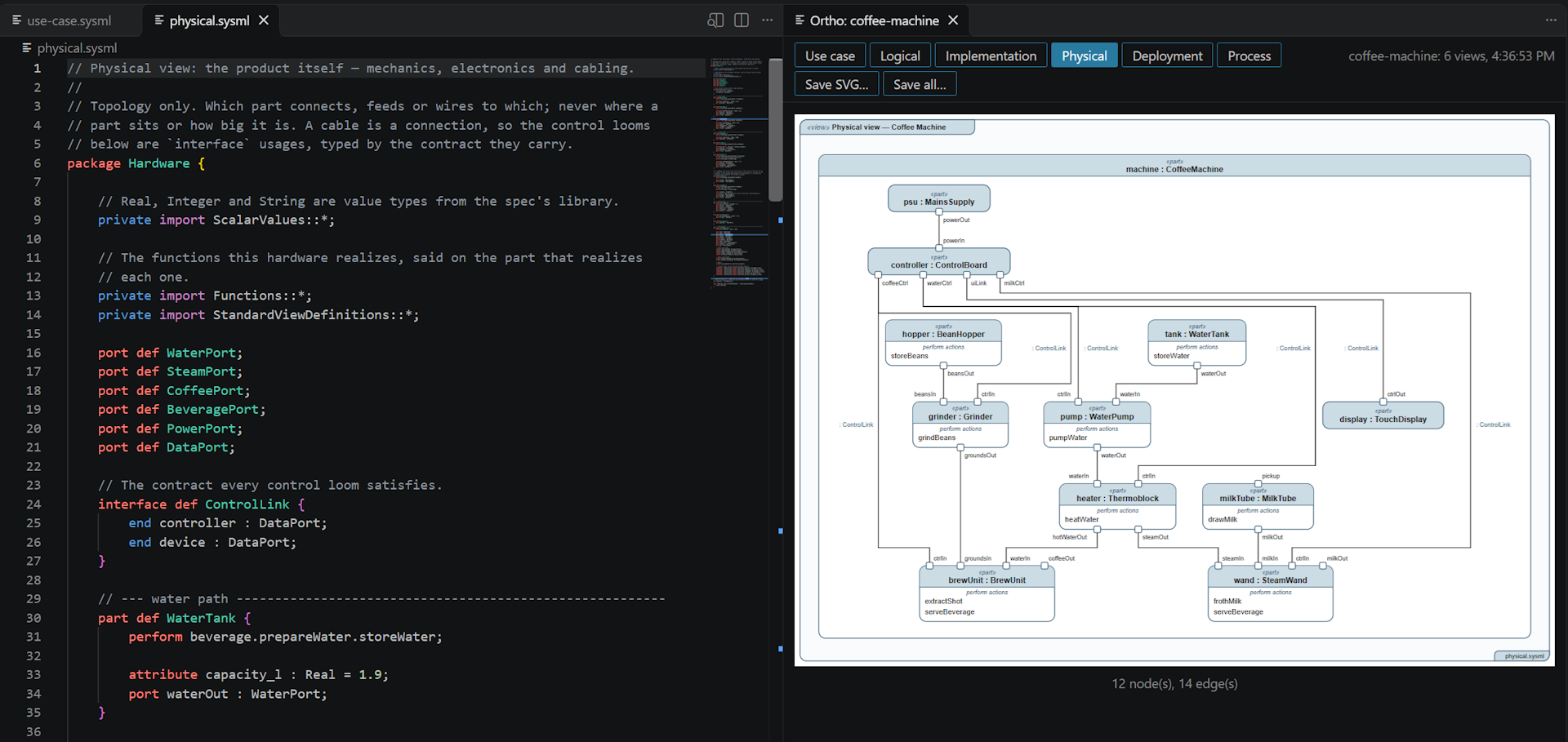
It is made for models that AI agents write and people review. ortho's checks
land in the Problems panel, and an agent working in VS Code's terminal checks
its work with the same ortho as the preview.
Getting started
- Run Ortho: Open Example from the Command Palette (Ctrl+Shift+P, or
Cmd+Shift+P on a Mac) and pick the coffee machine. It is copied into a
folder you choose and opens with the preview beside it.
- Change the model and save. The diagrams follow.
- For a model of your own, open a
.sysml file and click the preview button
at the top right of the editor, or press Ctrl+K V (Cmd+K V on a Mac).
There is nothing else to install: the extension carries ortho, built for your
system.
Features
- The diagrams beside the model. The preview has a tab for each view the
model declares. Click a box to open the line that declares it. Click
anywhere else in a diagram to switch between fitting the panel and actual
size.
- Save the diagrams as SVG, for a document, a slide or your repository.
Save SVG… at the top of the preview saves the view shown, and Save all…
every view into a folder you pick. The files are exactly what
ortho render writes, with the same names, so saving again replaces them.
- Problems where you write. A name that does not resolve, a syntax error,
or two views that disagree, such as a function nothing performs, is
underlined in the file and listed in the Problems panel. While the model
does not load, the last diagrams stay in the preview, faded.
- SysML v2 colouring: keywords, the names that definitions and packages
declare, comments, strings, quoted names, numbers and metadata such as
#Safety. The keywords are exactly the ones ortho reads. Ctrl+/ comments a
line.
- AI instructions. Ortho: Add AI Instructions writes a skill for Claude
Code and instructions for GitHub Copilot into your workspace. They carry the
SysML v2 that ortho reads, and tell the agent to render the model after
every change and fix what ortho reports, rather than delete the line it
points at.
- Two examples, a coffee machine and a survey drone, each with all six
views, copied into a folder you pick by Ortho: Open Example.
Your model
A model is every .sysml file in the folder of the file you preview, read
together. Each view is declared in the model with SysML v2's standard view
definitions, and every view is optional: a model draws only the views it
declares. LANGUAGE.md
says what to write for each view, and
VIEWS.md what each
view shows.
Commands
| Command |
What it does |
| Ortho: Open Preview to the Side |
Opens the preview of the model the file belongs to. Ctrl+K V. |
| Ortho: Render Again |
Draws the views again without a save. |
| Ortho: Save Diagram as SVG... |
Saves the view shown in the preview. |
| Ortho: Save All Diagrams as SVG... |
Saves every view into a folder. |
| Ortho: Add AI Instructions |
Writes the Claude Code skill and the Copilot instructions into the workspace. It asks before replacing files that are already there. |
| Ortho: Open Example |
Copies an example into a folder you pick and opens it. |
Settings
| Setting |
Default |
What it does |
ortho.path |
empty |
The ortho to run, as a command or a path. Empty runs the one the extension carries. |
ortho.theme |
light |
light for documents, or dark-glass for slides. |
The extension puts the ortho it runs first on the PATH of VS Code's
terminals, so ortho render there is the same ortho as the preview's. In a
folder you have not told VS Code to trust, the folder's own ortho.path is
ignored, so a repository you cloned cannot choose a program for the extension
to run.
Your data stays on your machine
The extension collects no telemetry and makes no network calls, and neither
does ortho. The preview's diagrams are kept in VS Code's storage for the
extension, never in your workspace, until you save them.
Beside other extensions
It reads SysML v2 only, not SysML v1. It uses the language id sysml, so it
works beside other SysML v2 extensions, such as SysIDE, which give completion
and other help with typing a model.
More
ortho is also a command-line program, for rendering the diagrams in CI so they
never drift from the model: see
ortho on GitHub, where
issues are welcome.

