

Rhizome MCP
A shared, durable local task tracker for AI coding agents. Rhizome bundles the rhizome-mcp server as a VS Code MCP provider for Copilot and other MCP-compatible clients — no setup, no accounts, no network calls, everything stays local.
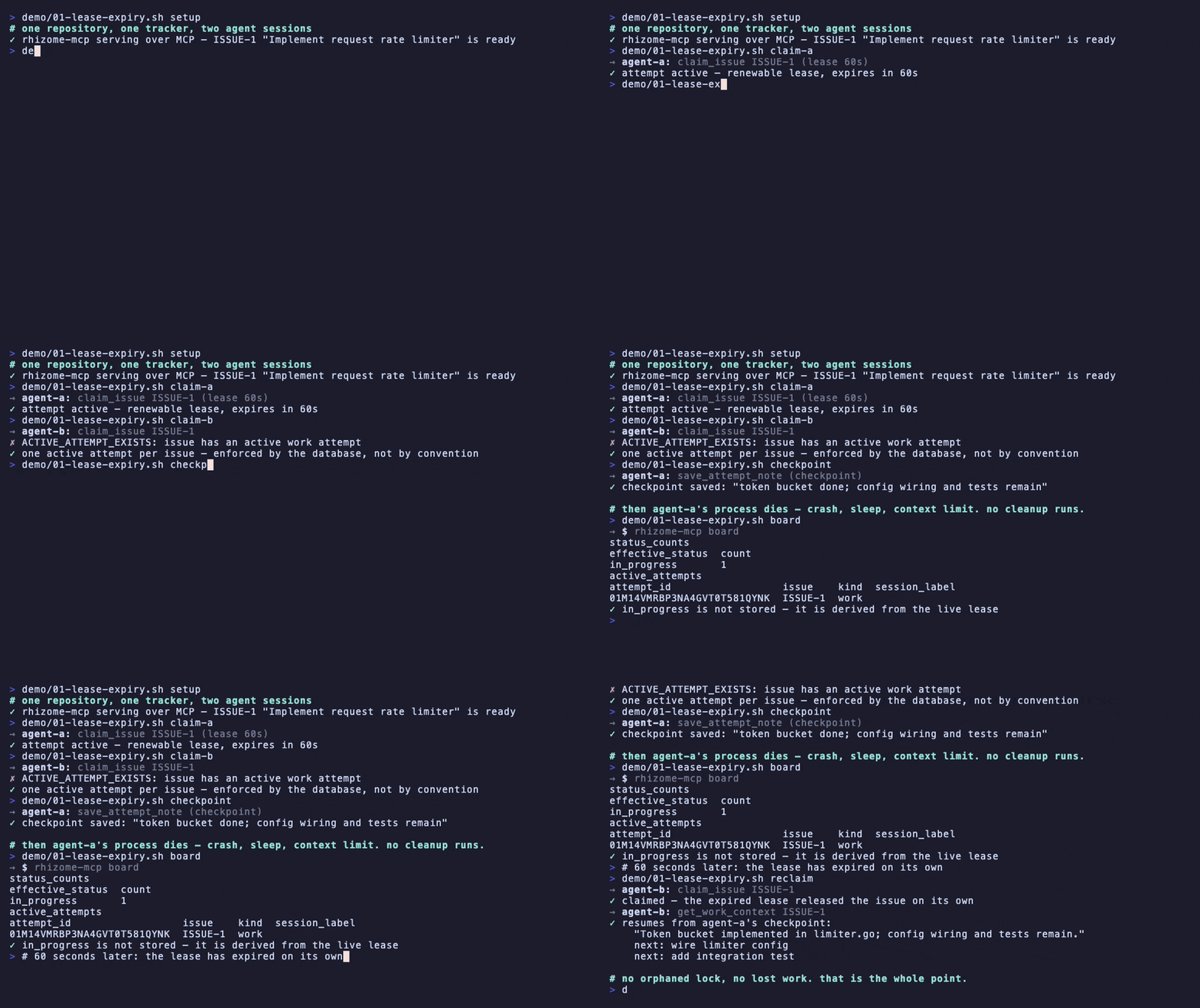
Recorded from real server output by the repository's scripted demo harness — nothing staged.
What it is
AI coding agents are concurrent, context-limited, and interruptible. A checklist or single chat context doesn't survive that. Rhizome gives multiple agent sessions — Claude Code, Copilot, Codex, or any other MCP client — a shared, durable view of project work. It's built around agent failure modes:
- Crash-safe work claiming. Issues are claimed with renewable leases. When a lease expires (agent disappears mid-task), the issue becomes claimable again automatically. Multiple agents never deadlock on the same issue.
- Durable memory across sessions. Checkpoints, decisions, and full event history live in a local SQLite database outside your repo. A fresh session resumes from the last checkpoint instead of re-deriving state.
- Built for handoff. One agent can pick up exactly where another left off — checkpoint notes, issue state, blockers, review status, all intact. Lease transfer is safe: the database enforces at most one active lease per issue.
Quick start
- Install the extension from the VS Code Marketplace.
- Initialize a project: run
Rhizome: Initialize Project from the Command Palette. This creates a .agent-tracker.json file at your workspace root.
- Use it in Copilot's agent mode. Start with
open_project, retain its project_ref, and pass that reference to later rhizome MCP tools (get_project, list_issues, claim_issue, etc.).
That's it. The database lives outside your repo, in your OS's standard application-data directory (e.g. ~/Library/Application Support/rhizome-mcp on macOS, ~/.local/share/rhizome-mcp on Linux, %LOCALAPPDATA%\rhizome-mcp on Windows), and all data stays local.
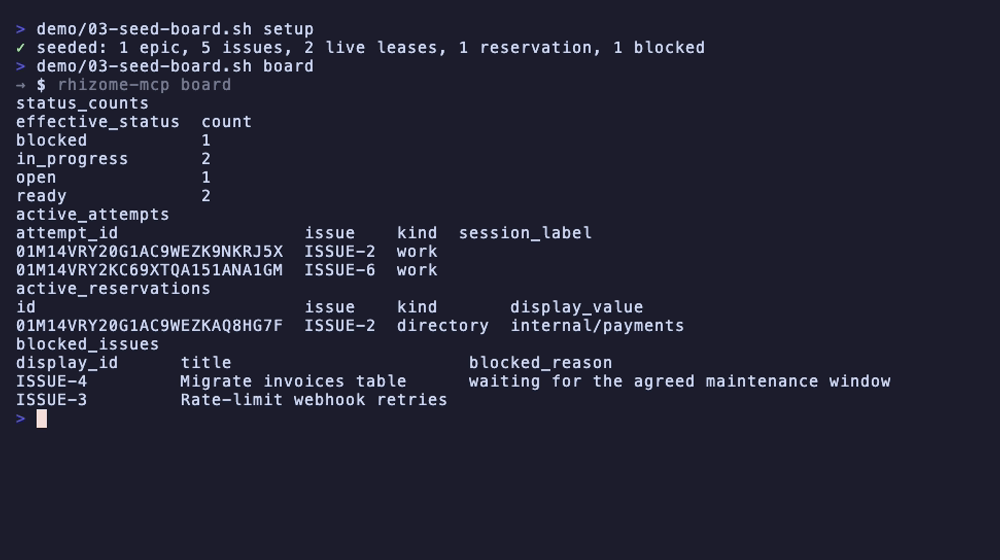
To see what your agents are doing, run rhizome-mcp board in a terminal — live leases, blockers, reservations, and the review queue, no server or login:
Settings
rhizome.serverPath (string, optional)
Absolute path to a custom rhizome-mcp binary. Leave empty to use the binary bundled with this extension, or to search PATH. Use this only if you need a different version or build than what ships with the extension.
How detection works
The extension looks for a .agent-tracker.json file at each workspace folder's root. That file is what Rhizome: Initialize Project creates, and its presence is what makes the MCP server appear for that folder. No reload needed — the extension watches for the file and updates immediately. When you want a workspace-specific server instance to target one project root, it uses serve --project-root <absolute-root>; the canonical routing behavior is described in docs/11-project-routing.md.
Existing setups
If you already set up rhizome via rhizome-mcp connect vscode (the CLI command that writes to .vscode/mcp.json), this extension detects that and doesn't contribute a duplicate server. Both can coexist safely.
Using another editor or MCP client
This extension is the zero-config path for VS Code specifically. For Claude Code, Claude Desktop, Cursor, or any other MCP client, use the rhizome-mcp npm package instead — no VS Code, no separate binary download:
{
  "mcpServers": {
    "rhizome": {
      "command": "npx",
      "args": ["-y", "rhizome-mcp", "serve"]
    }
  }
}
Privacy and local-first
Everything runs locally. The SQLite database lives outside your repository, and the extension makes no network calls. No accounts, no authentication, no telemetry. Rhizome is self-contained and portable — you can move your database around, back it up, or share it between machines as-is.
For full documentation, planning graphs, and API reference, see the main repository.

