Skip to content
| Marketplace
Sign in
Visual Studio Code>Linters>RepoScope — Security Scanner & ComplianceNew to Visual Studio Code? Get it now.
RepoScope — Security Scanner & Compliance

RepoScope — Security Scanner & Compliance

NxGen Tech Solutions

|
6 installs
| (0) | Free
Security scanner + OWASP / SOC 2 / PCI-DSS / EU AI Act / ISO 42001 compliance mapper for VS Code, Cursor & Devin Desktop. Finds hardcoded secrets, SQL injection, XSS, weak crypto & more (44 detectors, 14 languages). Pro generates a full audit-ready evidence package — Control Matrix, Attestation Memo
Installation
Launch VS Code Quick Open (Ctrl+P), paste the following command, and press enter.
Copied to clipboard
More Info

RepoScope

Compliance intelligence for your codebase. find • fix • report.

Scan your code for security risks, map findings to 5 compliance frameworks, and generate audit-ready evidence — all from your IDE, with one command. Local-first: your code never leaves your machine.

👉 See a real sample report — the exact branded, audit-ready package RepoScope generates (from a demo repo). Or drive the interactive demo →

Cursor Marketplace Install in Cursor — one click Install in VS Code — one click OpenVSX — Devin Desktop / VS Code VS Marketplace rating GitHub stars License MIT

★ Using RepoScope? A quick review helps other developers find it — ⭐ star on GitHub (one click) · rate on VS Marketplace · rate on Open VSX.

RepoScope — Compliance Intelligence: Security Scanner, 5 Frameworks, Audit-Ready Templates, Repo Map, Cost Tracking


Why RepoScope

Enterprise compliance automation costs $10K–50K/year. RepoScope delivers compliance intelligence directly in your IDE for $14.99/month.

Free on every install: a 44-detector security scanner with file:line findings, a token-ranked repo map, and a Code Provenance Engine for EU AI Act Article 12 readiness. All three run locally — your source never leaves your machine.

Upgrade to Pro for the full compliance engine: Compliance (maps security findings to OWASP Top 10, SOC 2 Type II, PCI-DSS v4.0, ISO/IEC 42001, and EU AI Act Article 12 — posture score, per-control PASS/FAIL/PARTIAL, and 4 audit-ready templates with one command), Cost (model-agnostic token cost per file), Budget (Token Budget Intelligence — per-prompt context overhead, rules audit, subscription runway), Game Plan (AI-powered goal tracking), and Audit Prep (1-click evidence package). Code-level controls only, a development aid, not a certification tool.


Local-first: scans run on your machine via bundled ast-grep. Only anonymous funnel events leave your machine, and you can disable them with reposcope.telemetry.


Two Groups. One Sidebar.

Free: Security · Repo Map · Provenance  |  Pro: Cost · Budget · Compliance · Game Plan · Audit Prep

🔒 Security — Free

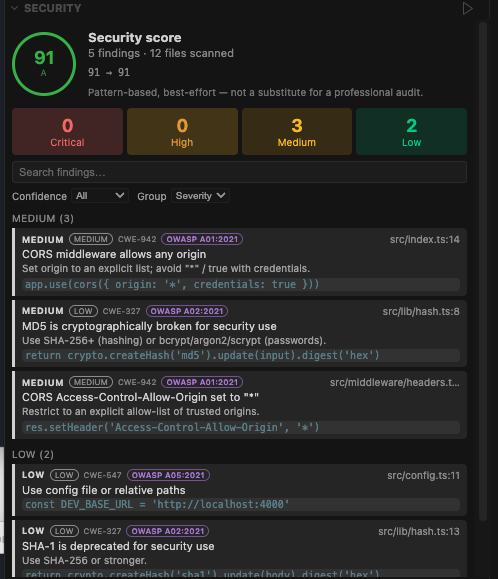
Proactive, local scanning before Cursor's AI agent touches your code. 44 detectors across 14 languages surface committed secrets and API/cloud keys (GitHub, Slack, Google, Stripe, JWTs, private keys, DB connection strings, .env values), unsafe execution (eval, os.system, subprocess, child_process, Runtime.exec), framework XSS (dangerouslySetInnerHTML, Vue v-html, Angular bypass), risky config (permissive CORS, disabled TLS verification), weak crypto (MD5/SHA-1), and known-vulnerable npm/pip dependencies.

Every finding carries a confidence level and CWE ID, and the scan produces a 0–100 security score with a letter grade and per-workspace trend. Filter, search, and group findings; suppress noise with .reposcope-ignore or inline // reposcope-ignore comments; and export the full report to JSON. Best-effort and pattern-based — complementary to, not a replacement for, a professional audit.

Security Scanner — 44 detectors with severity, confidence, and CWE IDs

🗺️ Repo Map — Free

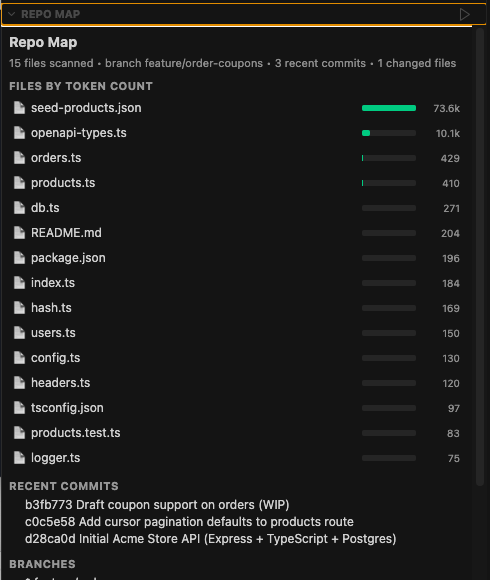
Your whole repo at a glance: every source file ranked by estimated token cost with a color-coded cost bar, alongside the current branch, your last commits, and the files changed in the most recent commit. Click any file to open it instantly.

Orient in an unfamiliar codebase in seconds, and see at a glance what changed before a PR review. Refreshes automatically on save.

Repo Map — files ranked by token cost with branch and recent-commit context

🔗 Provenance — Free

Tracks the origin of AI-generated code in your repo for EU AI Act Article 12 readiness — entirely locally, without sending your code anywhere.

A heuristic AI detector identifies AI-generated files using workspace tooling signals (.cursorrules, Copilot configs), Git commit message patterns, and diff analysis (no LLM calls required). Every flagged file is recorded in an append-only, SHA-256 hash-chained ledger (.reposcope/provenance.jsonl) that tamper-evidences every entry. The ledger is auto-populated on commit scans, agent output completions, and AI-detected file saves.

The Provenance tab shows:

  • Article 12 Readiness Score — a 0–100 posture score across four EU AI Act controls
  • AI-generated file inventory — files detected as AI-generated with confidence level
  • Chain integrity status — whether the hash chain is intact and unmodified
  • Control breakdown — which Article 12 requirements are met, partial, or missing

Run RepoScope: Scan Provenance from the Command Palette for an on-demand scan. Run RepoScope: Export Provenance Report to write a structured JSON report (.reposcope-provenance-report.json) for compliance documentation.

Code-level controls only — a development aid, not a legal certification or audit substitute. EU AI Act compliance involves legal, organisational, and technical obligations beyond what any code-level tool can assess.

💰 Cost — Pro

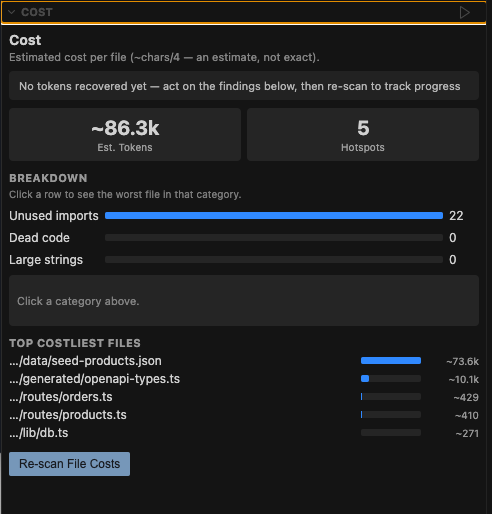
Model-agnostic token cost per file, ranked — works across GPT, Claude, and Gemini without locking you into a single provider's tokenizer. Every source file ranked by token cost with a color-coded cost bar, a breakdown of unused imports / dead code / oversized strings (click a category to see the worst file), and cumulative recovered-token tracking via the built-in Tokens Recovered tracker (optional status-bar total, and a RepoScope: Copy Recovered-Tokens Summary command). Click any file to open it and trim the cost.

In a typical 40K-line TypeScript repo, 4 files often account for 60–70% of the total estimated token budget — usually auto-generated code or config blobs.

Cost — model-agnostic token cost per file, ranked, with a recovered-tokens tracker

Token counts use the industry-standard chars/4 heuristic — the same approximation referenced in OpenAI's tokenizer documentation. It gives model-agnostic estimates within ~10–15% of any specific model's BPE tokenizer, without bundling a heavyweight encoding library or locking you into a single provider. Every figure is prefixed with ~. For budget decisions — which files to exclude, whether your plan is on track, relative cost ranking — ±10% accuracy is more than sufficient: you're optimizing trends, not billing to the exact token.

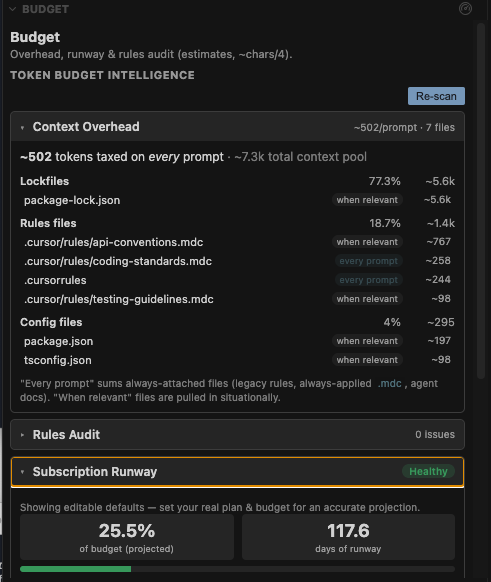
💸 Budget — Pro (Token Budget Intelligence)

See exactly what your IDE sends to AI on every prompt — and how fast you're burning through your subscription.

  • Context Overhead Scanner — estimates the per-prompt token tax your IDE/agent auto-attaches (.cursorrules, .cursor/rules/*.mdc, .windsurfrules, CLAUDE.md, AGENTS.md, copilot-instructions, lockfiles, configs), grouped by category. Counts only always-attached files.
  • Rules Audit — deep analysis of .cursorrules, .windsurfrules, and CLAUDE.md. Flags sections that belong in Game Plan instead of rules, duplicated content across files, redundant instructions, and oversized files. One-click Move to Game Plan / Remove / Apply All — each with a diff preview and undo.
  • Subscription Runway — configure your plan (Cursor Pro, Claude Pro, Windsurf Pro, or custom), monthly token budget, reset day, and prompts/day to project budget exhaustion at current pace, with healthy / caution / critical status. Plan presets prefill an editable budget; they don't assert a provider quota.
  • Optimization Recommendations — ranked by impact with estimated savings per prompt and per month. Apply individually or batch-apply all high-priority fixes.

All token figures are estimates (~chars/4 heuristic), prefixed with ~.

Budget (Token Budget Intelligence) — per-prompt context overhead, rules audit, and subscription runway

📋 Compliance — Pro

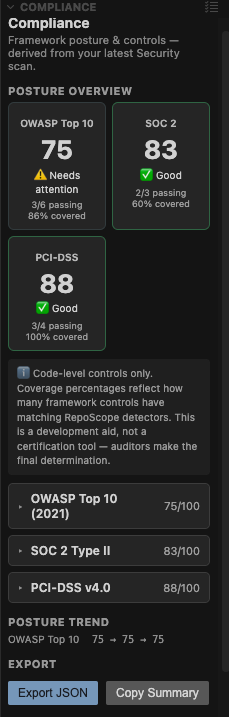
Maps your latest Security scan to framework controls — OWASP Top 10 (2021), SOC 2 Type II, PCI-DSS v4.0, ISO/IEC 42001:2023, and EU AI Act Article 12 — and shows a posture score per framework, per-control PASS / FAIL / PARTIAL / not-covered status, the findings behind each control, a posture trend over time, and JSON export + copy-summary. Click a control to jump to its findings in Security; Security findings carry an OWASP badge that jumps back here. Findings you've suppressed with // reposcope-ignore (plus justification) show as PASS (accepted risk).

Generate audit-ready templates per framework with one click: Control Matrix, Attestation Memo, Gap Plan, and Auditor Evidence Response. Run RepoScope: Prepare for Audit from the Command Palette to generate the full evidence package across all active frameworks.

It's derived from your existing security results — it never re-scans your code. Code-level controls only — a development aid, not a certification tool. Auditors make the final determination. Choose frameworks via reposcope.compliance.frameworks.

ISO/IEC 42001 note: ISO 42001 requires organizational policies, risk assessments, and process evidence beyond code scanning. This is a development aid for identifying code-level control gaps, not a certification tool.

Compliance — security findings mapped to OWASP Top 10, SOC 2, PCI-DSS, ISO 42001, and EU AI Act posture

📝 Game Plan — Pro

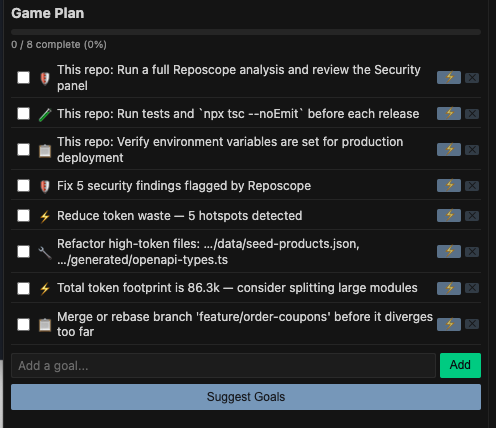
Persistent AI agent memory. Write .reposcope-gameplan.json once — architecture decisions, current focus, key files. Every AI agent reads it on startup. No more re-explaining your codebase at the start of every session. Commit the file to share context with your entire team.

AI Game Plan — persistent context across AI sessions

📦 Audit Prep — Pro

One-click evidence package. Run RepoScope: Prepare for Audit from the Command Palette to generate the full set of audit-ready templates — Control Matrix, Attestation Memo, Gap Plan, and Auditor Evidence Response — across all active compliance frameworks simultaneously. Output goes to .reposcope/audit/ with a branded index.html landing page that links every document. Backed by your latest Security scan; no re-scan required.

Browse a real sample package → (generated from a demo repo — the exact output you get).


Quick Install

RepoScope is available in the Cursor Marketplace as a native plugin, and as a VS Code extension on VS Marketplace + Open VSX. Same features everywhere.

Cursor

Recommended — Cursor Plugin Marketplace (native agent plugin): Open the Command Palette (Cmd+Shift+P), run Customize, search RepoScope, and click Install. Brings skills, rules, and commands directly into your Cursor agent.

Also available — VS Code Extension (Open VSX): Open Extensions (Cmd+Shift+X), search RepoScope by publisher nxgentech, and click Install — or one-click install →.

VS Code

  1. VS Marketplace: click the badge above, or search RepoScope (publisher nxgentech) in the Extensions panel (Cmd+Shift+X).

  2. Manual: from the Command Palette (Cmd+Shift+P) or terminal —

    ext install nxgentech.reposcope-ai
    code --install-extension nxgentech.reposcope-ai
    

Devin Desktop (formerly Windsurf)

  1. Open VSX (built-in): search RepoScope by publisher nxgentech in the Extensions panel (Ctrl+Shift+X).
  2. Manual: download the .vsix from Open VSX and use Install from VSIX….

Pricing

Plan Price What's Included
Free $0 Security · Repo Map · Provenance (EU AI Act Art. 12) · Unlimited scans · No credit card required
Pro $14.99/mo Everything in Free + Cost · Budget (Token Budget Intelligence) · Compliance (5 frameworks + 4 audit templates) · Game Plan · Audit Prep (1-click evidence package) · AI goal suggestions · Unlimited scans
Annual $129/yr Same as Pro · Unlimited scans · ~28% savings vs monthly

Try Pro free for 7 days — no credit card. Unlocks Cost (estimated token cost per file), Budget (context overhead, rules audit, subscription runway, recommendations), Compliance (OWASP/SOC 2/PCI-DSS/ISO 42001/EU AI Act posture + audit-ready templates), and the AI Game Plan — all locally. Run RepoScope: Start Free 7-Day Pro Trial from the Command Palette.

Upgrade, manage billing, or cancel anytime at reposcope.app.


Competitive Position

Feature RepoScope Devin Desktop Codemaps code-review-graph SonarQube GitLens
Model-agnostic token cost per file ✅ ❌ ⚠️ aggregate only ❌ ❌
Proactive cost intel (pre-prompt) ✅ ❌ ❌ ❌ ❌
Per-prompt context overhead scan ✅ ❌ ❌ ❌ ❌
Subscription budget tracking ✅ ❌ ❌ ❌ ❌
Rules file audit ✅ ❌ ❌ ❌ ❌
Repo map ranked by token cost ✅ ⚠️ structure only ⚠️ static HTML ❌ ❌
Security scanning ✅ ❌ ❌ ✅ ❌
Compliance posture tracking ✅ ❌ ❌ ❌ ❌

| Persistent agent context | ✅ | ⚠️ session only | ❌ | ❌ | ❌ | | Cursor + Devin Desktop + VS Code | ✅ | ❌ Devin Desktop only | ⚠️ | ✅ | ✅ |

RepoScope is the only tool in any IDE marketplace that combines security scanning with compliance posture tracking and model-agnostic token cost intelligence.

Security vs SonarQube: RepoScope catches risky patterns before you prompt — locally, in your editor, with file:line findings tied to AI cost context. SonarQube excels at CI/CD SAST and org-wide quality gates. They are complementary, not interchangeable.


Documentation

The user guide at reposcope.app covers:

  • Installation for Cursor, VS Code, and Devin Desktop
  • Reviewing other repos step-by-step
  • Sharing Game Plans with teammates
  • All commands and keyboard shortcuts
  • Settings reference
  • Pricing and FAQ

Contributing

RepoScope is in active development. Bug reports, feature requests, and pull requests are welcome.

  1. Fork the repo
  2. Create a feature branch (git checkout -b feature/my-feature)
  3. Commit your changes (git commit -m 'Add my feature')
  4. Push and open a Pull Request

Support

Questions, bugs, or feedback?

📧 support@reposcope.app

We typically respond within 24 hours on business days.


Built by NxGen Tech Solutions · support@reposcope.app

The first tool built for the AI era of software development — not just ported to it.

  • Contact us
  • Jobs
  • Privacy
  • Manage cookies
  • Terms of use
  • Trademarks
© 2026 Microsoft