🦥 Lazy Expander
Expand brace patterns into multiple values — directly in the editor.
Inspired by Tailwind CSS workflows where repeating a prefix for every class gets tedious.
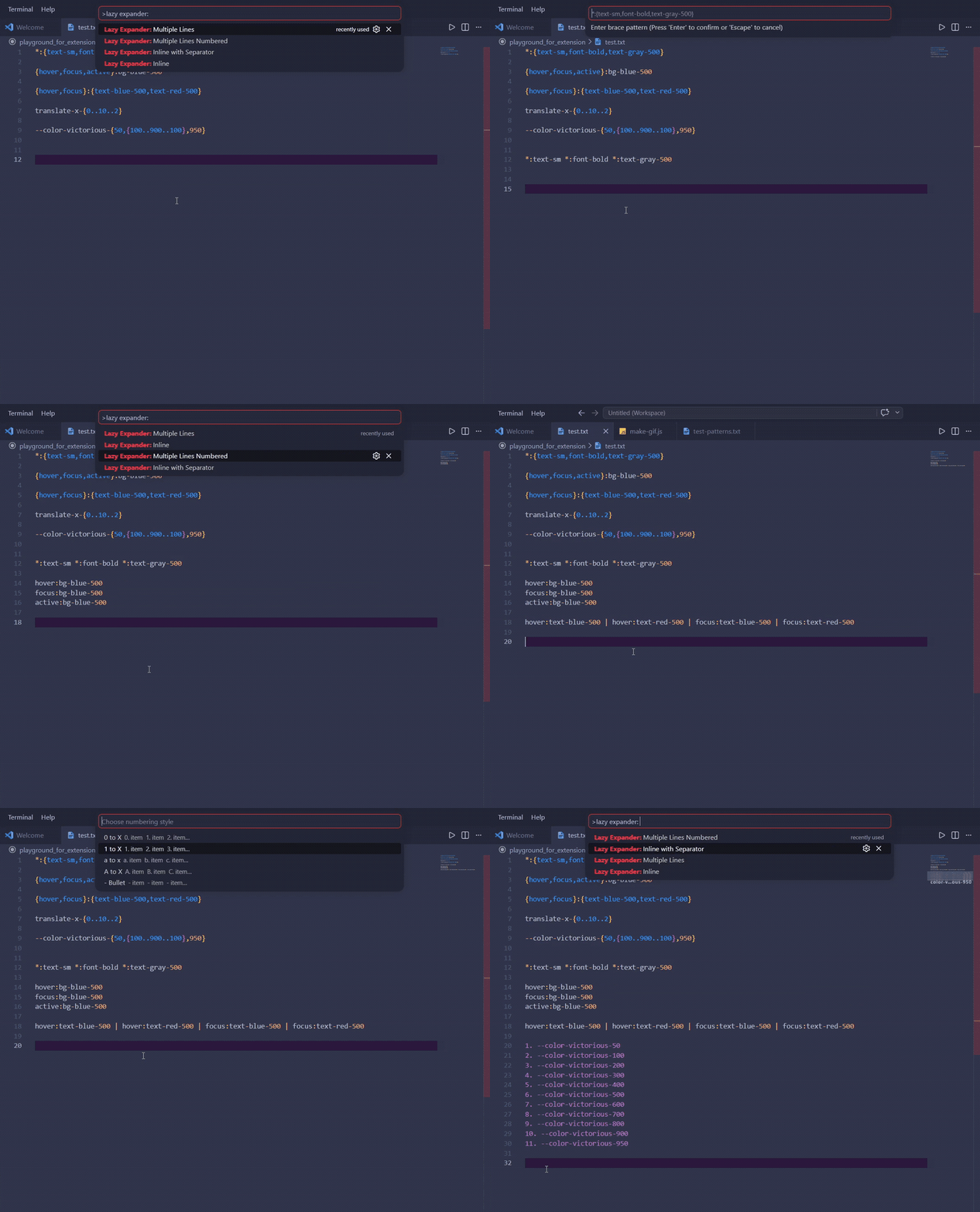
input:  *:{text-sm,font-bold,text-gray-500}
output: *:text-sm *:font-bold *:text-gray-500
⚡ Commands
Open the Command Palette (Ctrl+Shift+P) and type Lazy Expander:
| Command |
Output |
Lazy Expander: Inline |
item1 item2 item3 |
Lazy Expander: Inline with Separator |
item1, item2 / item1 \| item2 / custom |
Lazy Expander: Multiple Lines |
item1 item2 item3 (one per line) |
Lazy Expander: Multiple Lines Numbered |
1. item1 2. item2 / - item1 - item2 |
🖱️ Usage
Mode 1 — Selection
Select a brace pattern in the editor → run a command → result replaces the selection.
Mode 2 — No Selection
Run a command → type the pattern in the input box → result is inserted at the cursor ✍️.
💡 If no editor is open, result is copied to clipboard instead.
🧩 Patterns
Comma-separated values
*:{text-sm,font-bold,text-gray-500}
→  *:text-sm  *:font-bold  *:text-gray-500
Numeric range
col-{1..4}
→  col-1  col-2  col-3  col-4
Range with step
{0..10..2}
→  0  2  4  6  8  10
Cartesian product (multiple groups)
{hover,focus}:text-blue-500
→  hover:text-blue-500  focus:text-blue-500
✂️ Separator Options (Inline with Separator)
| Option |
Value |
| Comma |
, |
| Pipe |
\| |
| Semicolon |
; |
| Slash |
/ |
| Tab |
\t |
| ✏️ Custom... |
Type your own |
🔢 Numbering Options (Multiple Lines Numbered)
| Option |
Example output |
| 0 to X |
0. item 1. item 2. item |
| 1 to X |
1. item 2. item 3. item |
| a to x |
a. item b. item c. item |
| A to X |
A. item B. item C. item |
| - Bullet |
- item - item - item |
💡 Spaces around commas are trimmed automatically — *:{ text-sm , font-bold } works the same as *:{text-sm,font-bold}.
📦 Installation
From GitHub Releases
- Download the latest
.vsix from Releases
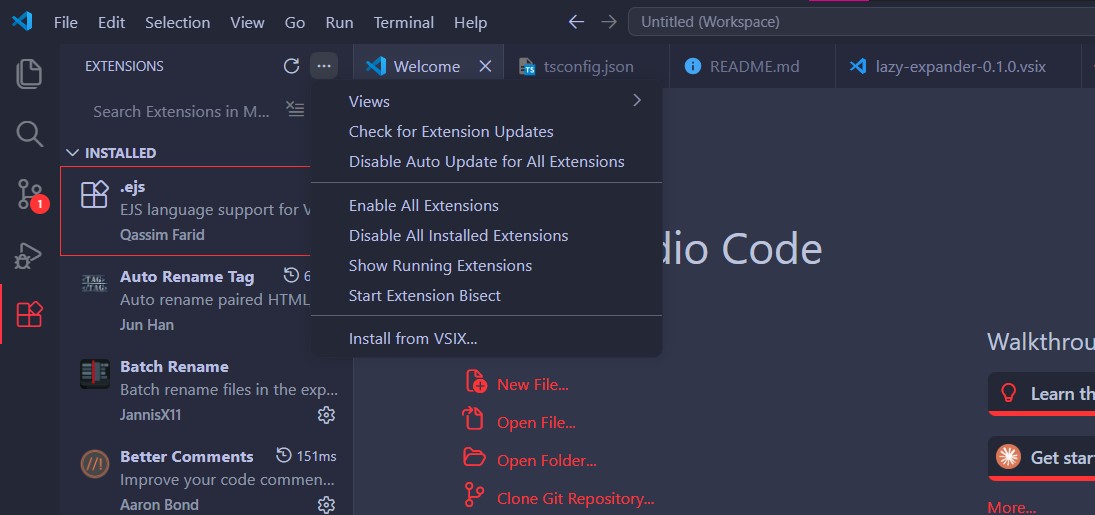
- Open VS Code → Extensions panel (
Ctrl+Shift+X)
- Click
··· (top right) → Install from VSIX...
- Select the downloaded
.vsix file
Or via terminal:
code --install-extension lazy-expander-0.1.1.vsix
📄 License
MIT

