CSS Bridge
Navigate, create, and rename CSS rules directly from your JSX/TSX — without leaving your editor.
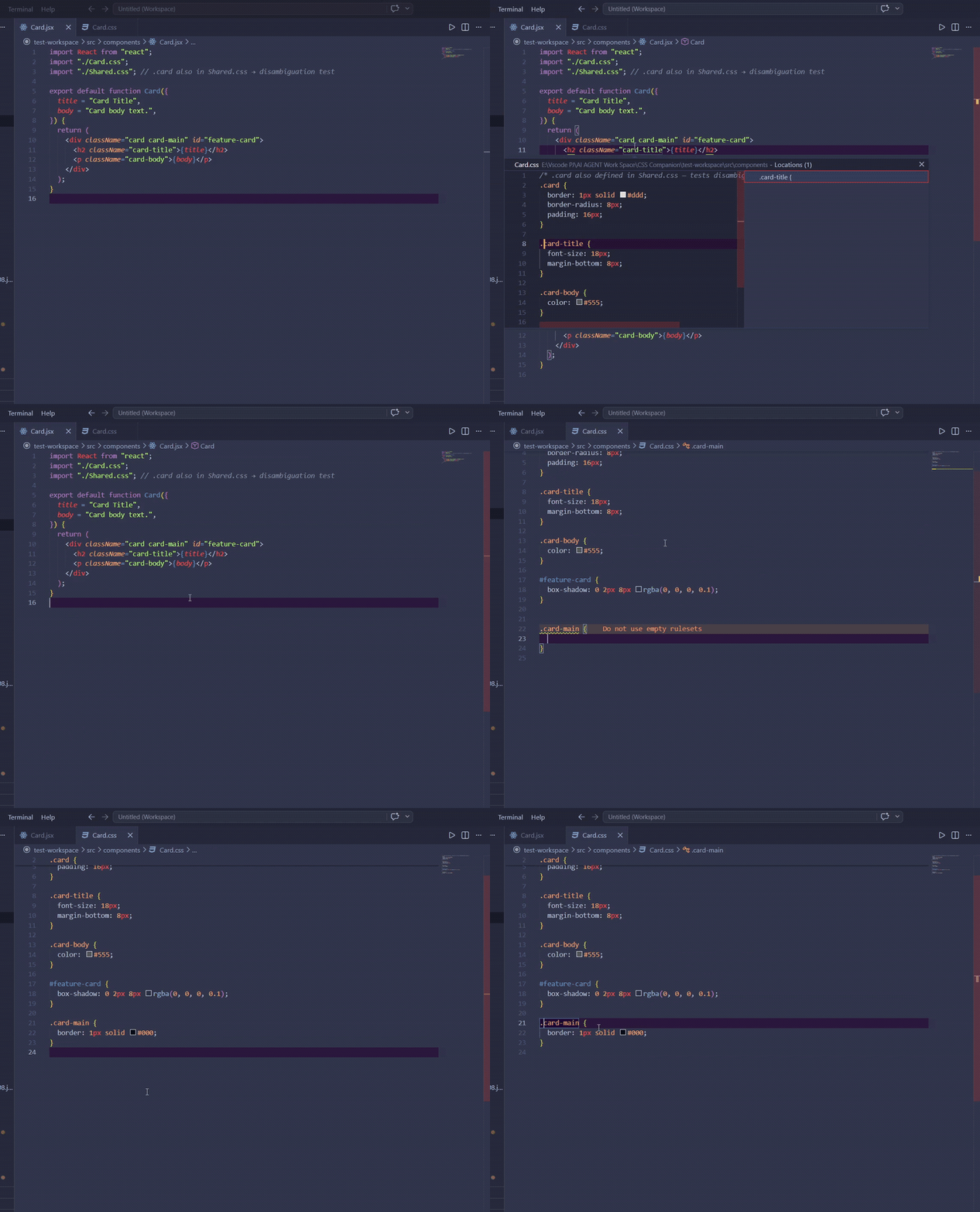
Features
Jump & Peek — F12 on any className or id to jump to the CSS rule. Split panel by default. Ctrl+K Ctrl+P to peek inline. If multiple CSS files match, a picker lets you choose.
Hover Preview — hover any className or id to see the matching CSS rule body in a tooltip. Multi-match shows every source.
Reverse Navigation — F12 on a .selector inside a CSS file to find every JSX/TSX file that uses it.
Auto-create — Ctrl+. on a missing class or id to create the rule (or the whole CSS file + import) and land your cursor inside the block.
Autocomplete — Type inside className="" for selector suggestions from your imported CSS. Type . at the start of a CSS line for class names from your JSX files.
Workspace CSS Union — child components see CSS imported by ancestors. App.tsx imports globals.css, your child component uses className="container" without re-importing — Jump / Peek / Hover / Autocomplete all work across the project.
Aliased imports — import '@/styles/globals.css' (or any path alias) resolves through your tsconfig.json / jsconfig.json compilerOptions.paths.
CSS variable jump — F12 on var(--primary) jumps to its --primary: definition. Reverse-nav from the definition lists every var() call. Multi-theme defs (e.g. :root + .theme-dark) trigger a QuickPick so you can pick the right one. Hover shows every definition with its value, or — on a definition — the usage count. Fallback (var(--primary, blue)) and nested (var(--a, var(--b))) forms both detected.
Project-wide Rename
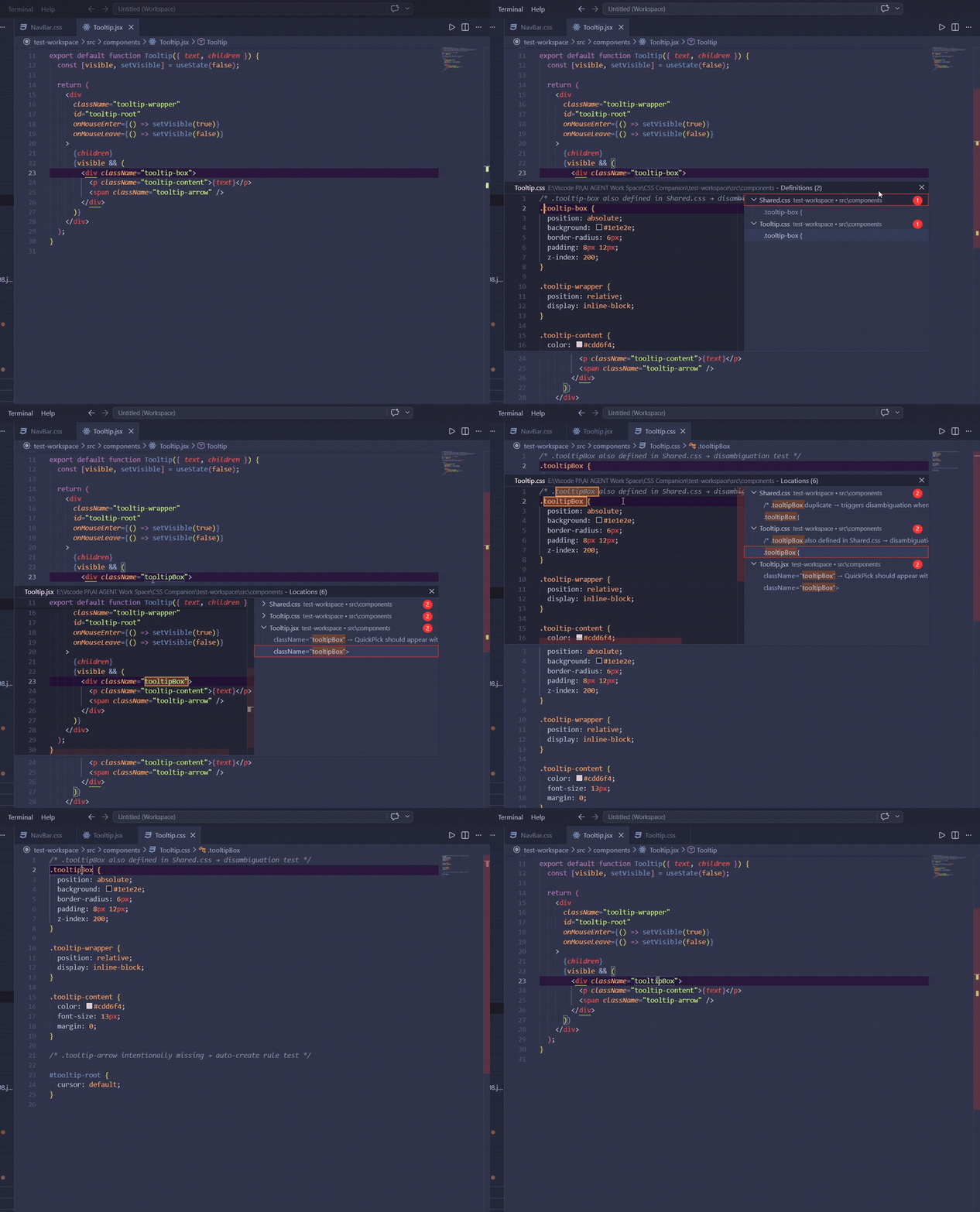
Alt+R or F2 on any class or id — renames across all CSS and JSX/TSX files at once. Scoped to the nearest package.json so sub-packages are never touched.
Keyboard Shortcuts
| Key |
Action |
F12 |
Jump to CSS rule |
Ctrl+K Ctrl+P |
Peek CSS rule |
Ctrl+. |
Quick Fix — create rule / create file |
Alt+R / F2 |
Rename project-wide |
Settings
| Setting |
Default |
Description |
cssBridge.openLocation |
beside |
beside = split panel, active = replace current tab |
cssBridge.autoCreateImport |
true |
Allow auto-creating CSS file and import |
cssBridge.includeWorkspaceCss |
true |
Include CSS imported anywhere in the project (not just the current file's direct imports) — enables the Workspace CSS Union feature |
cssBridge.verboseLogging |
false |
Log every provider call (Hover, Definition, Completion, Rename, CodeAction) to the output channel for live debugging |
cssBridge.autoDiagnoseOnEditorChange |
false |
On every JSX/TSX/CSS file you switch to, dump scope, resolved imports, and workspace CSS pool to the output channel |
cssBridge.classNameHelpers |
["clsx", "classnames", "cn", "cx", "twMerge"] |
Function names treated as className helpers — string-literal arguments and object keys inside calls to these are scanned alongside className="...". Add custom helpers (e.g. cva, tw) here |
Commands
Run from the Command Palette (Ctrl+Shift+P):
| Command |
Purpose |
CSS Bridge: Jump to CSS Rule |
Same as F12 — kept for explicit access |
CSS Bridge: Peek CSS Rule |
Same as Ctrl+K Ctrl+P |
CSS Bridge: Create CSS Rule / Create CSS File and Import |
Internal — invoked by Ctrl+. Quick Fix |
CSS Bridge: Show Output Log |
Open the extension's output channel |
CSS Bridge: Diagnose |
Dump scope detection, alias config, direct CSS imports, workspace CSS pool, and cursor context. Paste it when reporting bugs to skip the back-and-forth |
Known Limitations
- Runtime
${expression} parts of template literals are dropped — `btn-${size}` matches btn- (partial), not btn-lg. Static prefixes/suffixes still work
- Tagged template helpers (
tw`...`, styled`...`) and cva() config-object form are not detected — add the call name to cssBridge.classNameHelpers for plain-call helpers
- CSS Modules (
styles.btn) — not supported; needs separate import-resolver rewrite
Ctrl+Space required after # for id completion in CSS (VS Code color picker limitation)Ctrl+Click always opens in same group — use F12 instead
Release Notes
1.3.0
New feature — CSS variable jump:
- Forward jump —
F12 / Ctrl+Click on var(--primary) lands on its --primary: definition. If multiple themes define the same name (:root light + .theme-dark etc.), the QuickPick disambiguator lists all of them so you can pick.
- Reverse navigation —
F12 on a --primary: definition lists every var(--primary) call in the project.
- Hover preview on
var(--foo) — shows every definition: selector → value · file:line. Hover on a definition instead summarizes how many places consume it.
- Fallback & nested forms —
var(--primary, blue) and var(--a, var(--b)) resolve correctly (the regex captures --primary / --a / --b as separate detections).
- Diagnose now includes per-file
Var defs / Var uses counts plus the cursor-detected var with its forward/reverse target list.
Internals:
- New
parseVars(filePath) in the CSS parser — postcss walkDecls for --name: definitions, regex over comment-stripped content for var(--name) usages. Cached separately from parseSelectors (keeps v1.0–v1.2 selector path untouched).
- Block comments are stripped to same-length whitespace before the use regex runs, so
/* var(--ghost) */ is correctly ignored without breaking offset math.
- Scope-bounded via
globFiles(scope, ['.css']) — vars stay intra-CSS, no JSX index involvement.
1.2.0
New features:
- Dynamic
className expressions — Jump / Hover / Rename / Reverse-nav now work inside className={...}. Recognised shapes: template literals (`btn ${active ? 'is-active' : ''}`), ternaries, &&/||/?? short-circuits, string concatenation, and arrays/objects nested inside.
clsx / classnames / cn / cx / twMerge helpers — string-literal arguments (and object keys like { 'btn-active': flag }) are scanned alongside className="...". Custom helper names extend the list via the new setting.
Setting:
cssBridge.classNameHelpers — array of function names treated as className helpers. Default: ["clsx", "classnames", "cn", "cx", "twMerge"]. Add your own (e.g. cva, project-specific helpers).
Internals:
- New AST-based class index module — single
@babel/parser walk per file, mtime + document-version cached, replaces the per-feature regex scanners. Keystroke fast-path on plain className="..." preserved (no parse cost).
- Perf: Pre-warm parse on file open + 80 ms parse throttle so the first F12 inside
className={...} doesn't pay the inline parse cost; CodeAction's lightbulb skips the AST fallback to keep typing snappy on big files.
- Diagnose command now reports class-index counts (
attr-string / attr-expr / helper) and the source label of the cursor token, so you can verify dynamic detection without speculation.
1.1.1
- Polish: Toggling
cssBridge.verboseLogging on now surfaces the output channel automatically. Previously the channel was silently writing log entries but stayed hidden until you ran CSS Bridge: Show Output Log — confusing if you'd just flipped the setting expecting to see logs.
- Docs: README updated with the v1.1.0 features (Hover Preview, Workspace CSS Union, Aliased imports), new settings, and command reference.
1.1.0
New features:
- Workspace CSS Union — child components now see CSS imported by ancestors. Common case:
App.tsx imports globals.css, child component uses className="container" without re-importing. F12 / Hover / Autocomplete / Code Action all work across the project. Toggle via cssBridge.includeWorkspaceCss (default true).
- Aliased imports —
import '@/styles/globals.css' (or any path alias) now resolves through tsconfig.json / jsconfig.json compilerOptions.paths.
- Hover preview — hover any
className / id to see the matching CSS rule body without leaving the editor. Multi-match preview shows every source.
- Better project detection — recognizes Vite / Next / Remix / Rsbuild / Webpack monorepos where
react is hoisted by workspaces. Replaces the v1.0.x package.json-only boundary check.
Setting:
cssBridge.includeWorkspaceCss — true to include CSS imported anywhere in the project; false for strict per-file imports only.
New commands:
CSS Bridge: Show Output Log — open the extension's output channel.CSS Bridge: Diagnose — dump scope detection, resolved imports, alias config, workspace CSS pool, and cursor context to the output channel. Paste it when reporting bugs to short-circuit "F12 doesn't jump" speculation.
1.0.1
- Fix:
data-id, aria-id, and other *-id attributes are no longer falsely matched as id=. Same fix prevents myCustomClassName= from being treated as className=. Affects Jump, Peek, Autocomplete, and Rename.
- Fix: Reverse navigation (CSS → JSX, F12 on a
.selector) and Rename no longer match attribute-shaped text inside JS/JSX comments.
- Fix: CSS-side autocomplete on
# now returns id suggestions correctly. Items also keep their ./# prefix on accept (no more dropped or duplicated trigger char).
- Feat:
Ctrl+K Ctrl+P (Peek) now also works from a CSS file — peeks JSX usages of the selector under the cursor.
- Perf: Cache JSX/TSX import resolution by mtime — no more re-parsing with Babel on every cursor move.
1.0.0
Initial release.
| |

