HAR Viewer & Sanitizer — Remove Tokens Locally
Get HAR Viewer & Sanitizer Pro — EUR 15.83 + VAT where applicable · one payment, 5 machines, refund within 14 days
HAR file viewer for VS Code: open a .har file, see every request, and strip the cookies, Authorization headers and tokens before you send it to support. Nothing leaves your machine.
Support teams (Okta, Databricks, Cloudflare and most SaaS vendors) ask for a HAR file to debug your issue. A raw HAR holds your session cookies and bearer tokens: whoever reads it can act as you. The browser's sanitized export removes cookies and Authorization headers, but tokens in URLs, API keys in custom headers and request bodies stay in the file. Online sanitizers make you upload the file, secrets included. This extension does the job inside VS Code, offline.
Real-world use cases
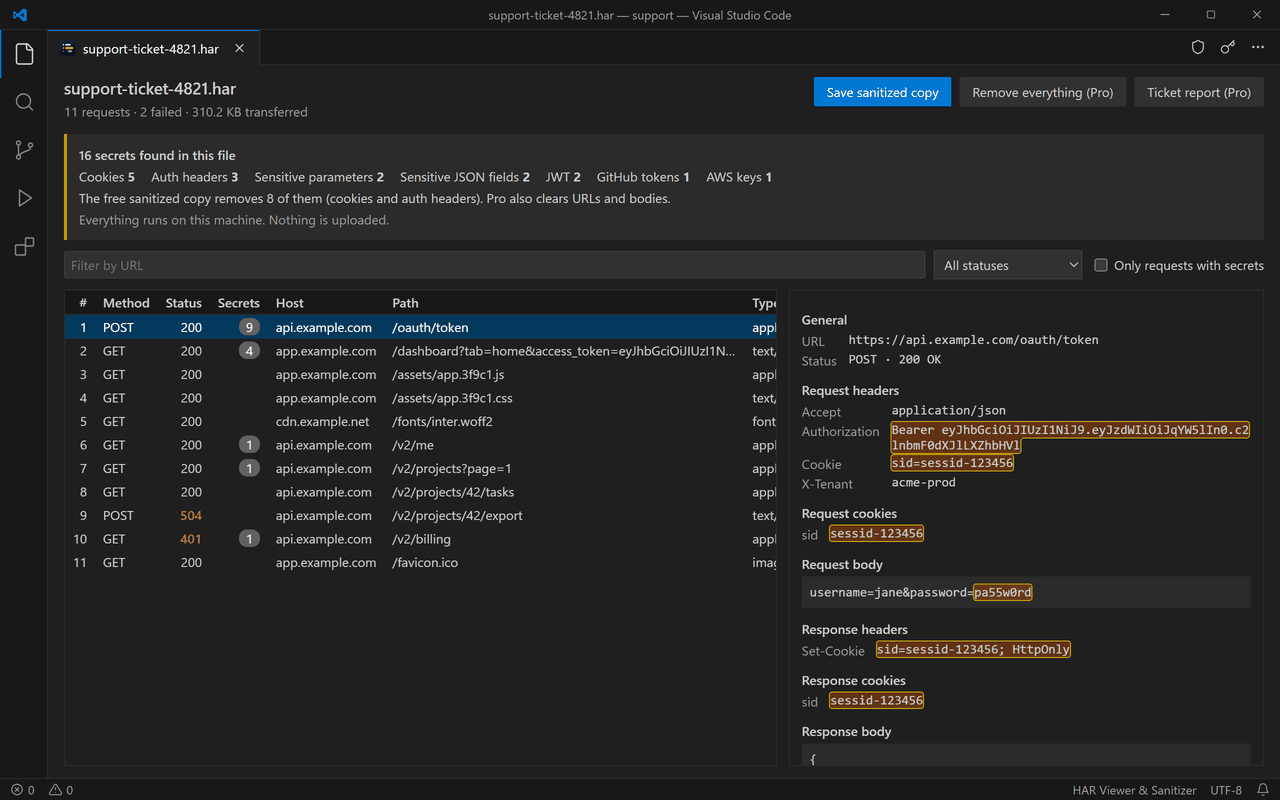
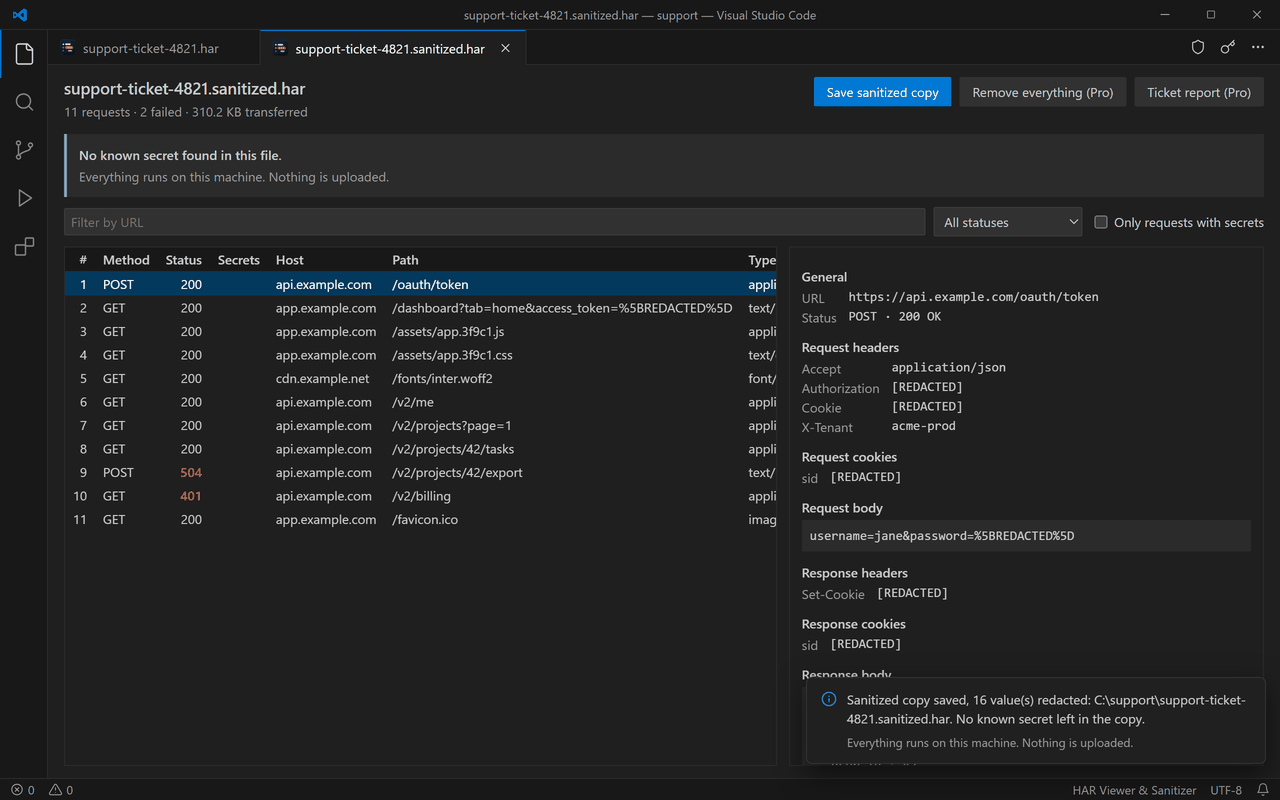
- Developer, a vendor asks for a HAR. Support wants "a HAR file of the failing login". You export it from Chrome DevTools, open it in VS Code and the header says how many secrets it holds, by kind. Save sanitized copy proposes
capture.sanitized.har next to the original, with cookies and Authorization headers replaced by [REDACTED], and tells you what is still inside: on our test file, 5 values redacted and 8 secrets left in URLs and bodies (an access_token in the query string, a password in the form body, tokens in the JSON response).
- Security-minded team lead, before anything goes into a ticket. Tick Only requests with secrets: the table keeps the requests that carry a JWT, a Bearer token, an AWS, GitHub, Slack, Stripe or Google key, a cookie or a sensitive parameter, each value highlighted in the detail panel. You see exactly what a raw export would have given away.
- Support engineer, the customer sent 12 HAR files. Right-click the folder, Sanitize every HAR in a folder (Pro): one
.sanitized.har per file, the originals untouched, and files that are not HAR are skipped and counted.
- Front-end developer, "it was faster yesterday". Record a HAR before and after a deploy and Compare two HAR files (Pro): requests only in one capture, a different status, or a time gap of 500 ms or more.
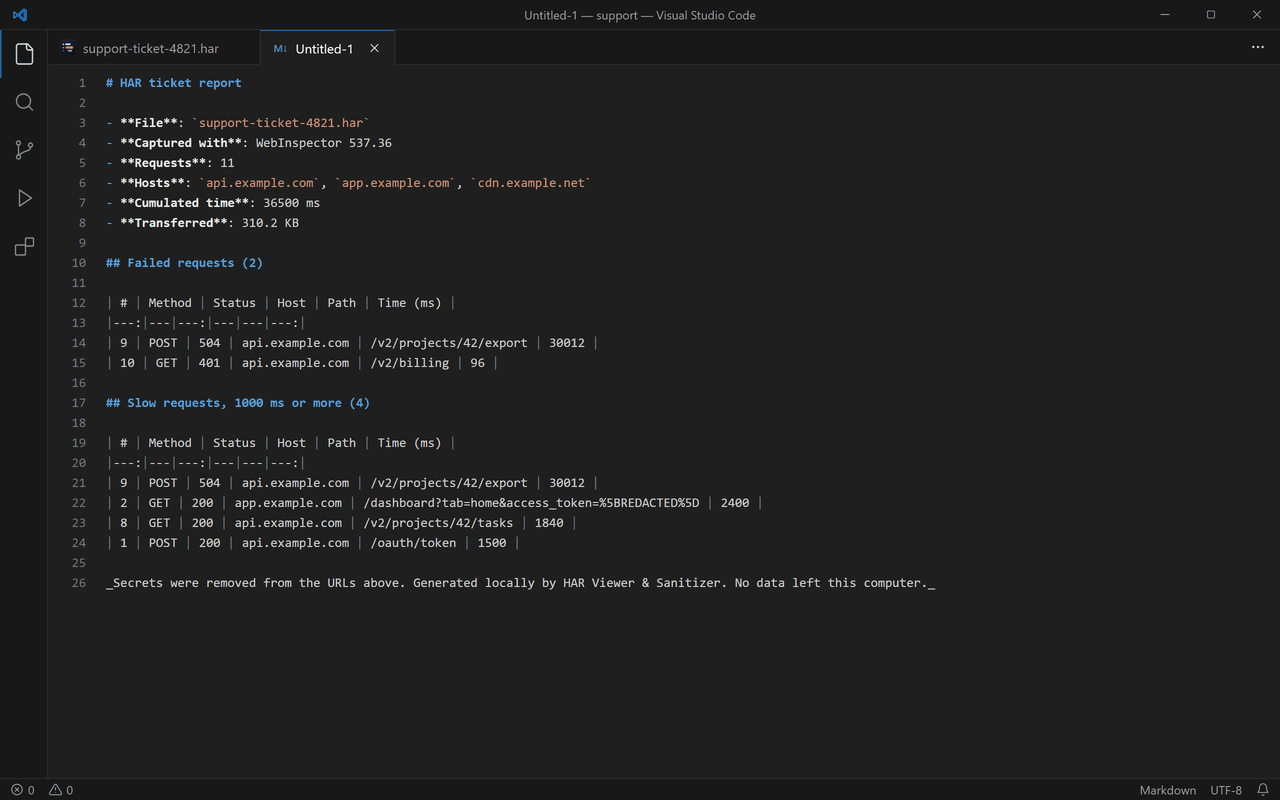
- Anyone filing a bug. Ticket report (Pro) turns the capture into Markdown ready to paste: failed requests and requests slower than
harViewer.slowRequestMs (1000 ms by default), with secrets removed from the URLs. Or every request as CSV for a spreadsheet.
Free
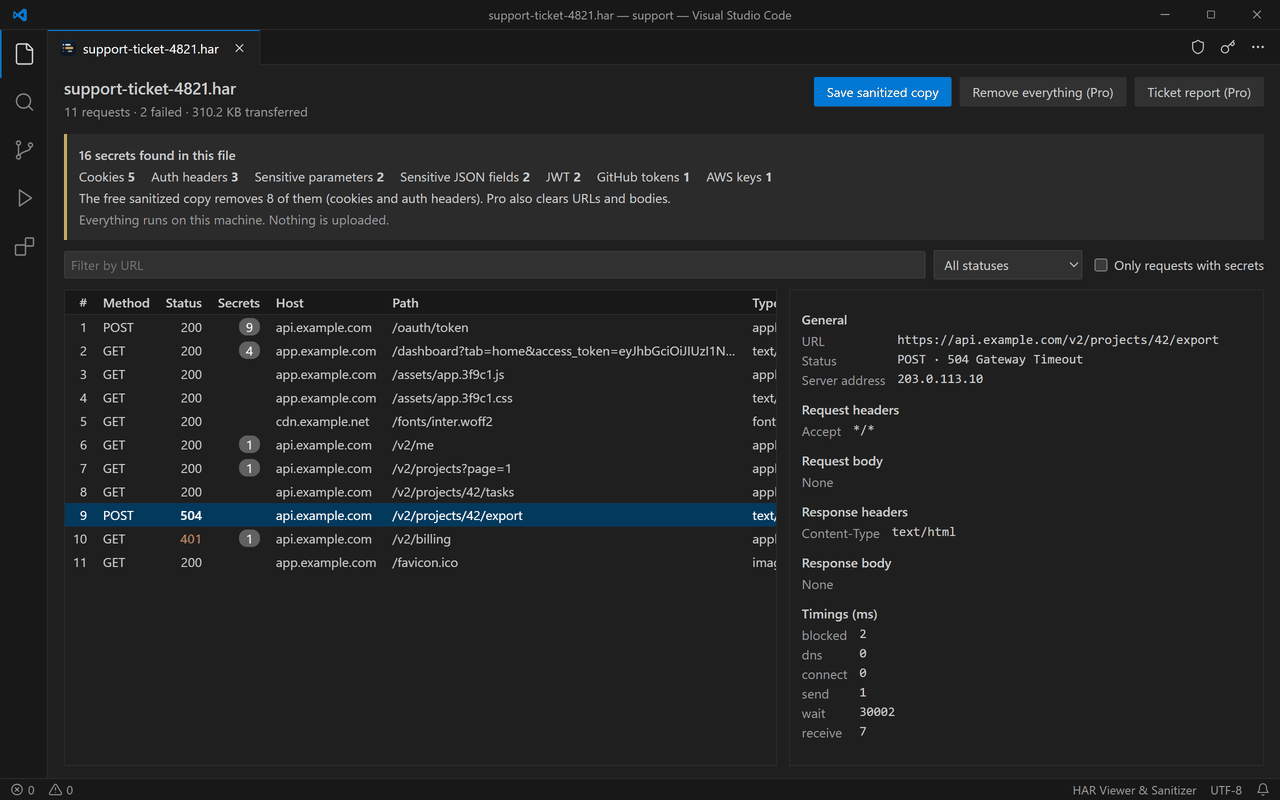
- Request table: method, status, host, path, type, size and time for every request, with filters by URL, by status (2xx to 5xx, failed) and "only requests with secrets".
- Detail panel: headers, query parameters, cookies, request and response bodies, JSON pretty-printed.
- Secret detection: Authorization and API key headers, cookies, sensitive parameters and JSON fields, JWT, Bearer tokens, AWS, GitHub, Slack, Stripe and Google keys are counted and highlighted.
- One-click sanitized copy: cookies and authentication headers replaced by
[REDACTED] in capture.sanitized.har. Your original file is never modified.
Pro — EUR 15.83 + VAT where applicable, one-off purchase, licence key
- Full sanitizing: tokens in URLs, query strings, form fields, request and response bodies, and e-mail addresses.
- Your own rules: header names, parameters, JSON keys or regular expressions in the
harViewer.customRules setting.
- Whole folders: every HAR of a folder sanitized in one command.
- Compare two captures: requests added, removed, with a different status or a slower time.
- Ticket report: failed and slow requests in Markdown, ready to paste into a support ticket, or every request as CSV. Secrets are removed from the report too.
One payment, no subscription, up to 5 machines, no expiry, refund within 14 days. Gumroad e-mails your licence key right after payment; run HAR: Enter a Pro licence key and paste it.
Sample files
A HAR file is JSON: log.entries holds one object per request, with its request, response and timings. This is the first request of the test file shipped with the extension's tests (synthetic data, tokens shortened here), exported by Chrome ("creator": {"name": "WebInspector"}):
{
  "startedDateTime": "2026-09-12T10:00:00.000Z",
  "time": 1500,
  "request": {
    "method": "POST",
    "url": "https://api.example.com/oauth/token",
    "headers": [
      { "name": "Accept", "value": "application/json" },
      { "name": "Authorization", "value": "Bearer eyJhbGciOiJIUzI1NiJ9.eyJzdWIi…" },
      { "name": "Cookie", "value": "sid=sessid-123456" },
      { "name": "X-Tenant", "value": "acme-prod" }
    ],
    "postData": { "mimeType": "application/x-www-form-urlencoded", "text": "username=jane&password=pa55w0rd" }
  },
  "response": {
    "status": 200,
    "content": { "mimeType": "application/json", "text": "{\"access_token\":\"eyJhbGciOi…\",\"refresh_token\":\"rt-secret-value\",\"token_type\":\"bearer\",\"user_id\":42}" }
  }
}
The whole test file has 4 requests and 13 secrets: 4 cookies, 1 Authorization header, 2 sensitive parameters, 2 sensitive JSON fields, 2 JWT, 1 GitHub token and 1 AWS key. What each copy keeps:
| Where |
Free sanitized copy |
Full sanitize (Pro) |
Authorization, Cookie, Set-Cookie |
[REDACTED] |
[REDACTED] |
Form body password=pa55w0rd |
kept |
password=%5BREDACTED%5D |
JSON response access_token, refresh_token |
kept |
"[REDACTED]" |
URL ?access_token=eyJ… |
kept |
?access_token=%5BREDACTED%5D |
Custom header X-Debug: token ghp_… |
kept |
token replaced |
| HTML body with an e-mail address and an AWS key |
kept |
both replaced |
| Result |
5 values redacted, 8 secrets left |
12 values redacted, "No known secret left in the copy." |
X-Tenant: acme-prod is not a known secret: a custom rule {"type": "header", "pattern": "X-Tenant"} in harViewer.customRules replaces it too.
Common errors and what they mean
These are the exact messages of the extension, reproduced on modified copies of the test file.
| Message |
What happened |
What to do |
| This file is not valid JSON, so it is not a HAR file. |
The export was cut off (closed tab, browser crash, file copied while still being written) or the file was edited by hand. |
Export the HAR again from DevTools; a truncated HAR cannot be repaired reliably. |
| Valid JSON, but without log.entries: this is not a HAR file. |
The JSON has no log.entries array: often a Postman collection, a Lighthouse report or a .json renamed to .har. |
Export from the Network tab: Chrome and Edge "Export HAR", Firefox "Save All As HAR". |
| This HAR file contains no request. |
log.entries is empty: recording was off, or the page was loaded before DevTools was opened. |
Open DevTools first, tick "Preserve log", reproduce the problem, then export. |
| This file is empty. |
Zero bytes, or only spaces. |
Export again. |
| This file is larger than 256 MB. Open it with a text editor instead. |
The capture is above the viewer's 256 MB limit, usually because of large response bodies. |
Record a shorter session, or filter the Network tab before exporting. |
| 8 secret(s) remain in URLs and bodies. Pro removes them too. |
The free copy only clears cookies and authentication headers; tokens in URLs, form fields and bodies are still there. |
Look at the copy before you share it, or run a full sanitize (Pro). |
| 3 custom rule(s) ignored (empty, unknown type or invalid regex). Check the harViewer.customRules setting. |
A rule has an empty pattern, a type other than header, param, jsonKey or regex, or a regular expression that does not compile (for example ([a-z). |
Fix the rule in your settings; the other rules still apply. |
| This key has already been activated on 5 machines. Write to support@novair.app. |
The licence is already in use on 5 machines. |
Write to support@novair.app from the e-mail address of your purchase. |
Detection covers the secret formats listed above. Always look at the copy before you share it; add a custom rule for any in-house token format.
Commands
| Command |
Plan |
| HAR: Open a HAR file in the viewer |
Free |
| HAR: Save a sanitized copy (cookies and auth headers) |
Free |
| HAR: Save a fully sanitized copy |
Pro |
| HAR: Sanitize every HAR in a folder |
Pro |
| HAR: Compare two HAR files |
Pro |
| HAR: Ticket report: failed and slow requests |
Pro |
| HAR: Enter a Pro licence key |
— |
.har files open in the viewer by default. Right-click a .har file or a folder in the Explorer for the sanitize commands.
How it compares
The most installed HAR extension on the Marketplace, HAR Viewer by unclebeast (33,784 installs on 13 November 2026, last version 0.0.2 from September 2022), previews a HAR like the browser's Network tab, with search. HAR Analyzer by MattFoulks (23,575 installs) opens and analyzes HAR files; its README notes that it only works with files under 5 MB. If you only need to look at requests, both are free and do that. Neither describes finding or removing secrets: that is what this extension is for, and the free version already counts every secret and writes a copy without cookies and authentication headers.
Privacy
The extension reads the file you open and writes the copy you ask for. It sends nothing anywhere: no telemetry, no upload. The only network call is the licence check to Gumroad when you enter a Pro key, and it carries the key only, never file content. Details: har-viewer.novair.app/privacy/
Support
har-viewer.novair.app/support/ · support@novair.app
Get HAR Viewer & Sanitizer Pro — EUR 15.83 + VAT where applicable · one payment, 5 machines, refund within 14 days
En français
Ouvrez un fichier .har, voyez chaque requête, et retirez-en cookies, en-têtes Authorization et jetons avant de l'envoyer au support. Rien ne quitte votre machine.
Les équipes support (Okta, Databricks, Cloudflare et la plupart des éditeurs SaaS) demandent un fichier HAR pour analyser un problème. Un HAR brut contient vos cookies de session et vos jetons : qui le lit peut agir en votre nom. L'export nettoyé du navigateur retire les cookies et les en-têtes d'autorisation, mais les jetons dans les URL, les clés d'API dans des en-têtes personnalisés et les corps de requête restent dans le fichier. Les nettoyeurs en ligne obligent à téléverser le fichier, secrets compris. Cette extension fait le travail dans VS Code, hors ligne.


Gratuit
- Tableau des requêtes : méthode, statut, hôte, chemin, type, taille et durée, avec filtres par URL, par statut (2xx à 5xx, échec) et « seulement les requêtes avec secrets ».
- Panneau de détail : en-têtes, paramètres, cookies, corps de requête et de réponse, JSON indenté.
- Détection des secrets : en-têtes Authorization et clés d'API, cookies, paramètres et champs JSON sensibles, JWT, jetons Bearer, clés AWS, GitHub, Slack, Stripe et Google sont comptés et surlignés.
- Copie nettoyée en un clic : cookies et en-têtes d'authentification remplacés par
[REDACTED] dans capture.sanitized.har. Le fichier d'origine n'est jamais modifié.
Pro — achat unique, clé de licence
- Nettoyage complet : jetons dans les URL, paramètres, champs de formulaire, corps de requête et de réponse, adresses e-mail.
- Vos propres règles : noms d'en-têtes, paramètres, clés JSON ou expressions régulières dans le réglage
harViewer.customRules.
- Dossiers entiers : tous les HAR d'un dossier nettoyés en une commande.
- Comparaison de deux captures : requêtes ajoutées, disparues, au statut différent ou plus lentes.
- Rapport ticket : requêtes en échec et lentes en Markdown, à coller dans un ticket, ou toutes les requêtes en CSV. Les secrets sont retirés du rapport aussi.
Obtenir Pro : har-viewer.novair.app/fr/
Confidentialité
L'extension lit le fichier que vous ouvrez et écrit la copie que vous demandez. Elle n'envoie rien : ni télémétrie, ni téléversement. Le seul appel réseau est la vérification de licence auprès de Gumroad quand vous saisissez une clé Pro ; il ne transmet que la clé, jamais le contenu d'un fichier.
La détection couvre les formats de secrets listés ci-dessus. Relisez toujours la copie avant de la partager ; ajoutez une règle personnalisée pour tout format de jeton interne.
Support
har-viewer.novair.app/fr/support/ · support@novair.app
| |