Skip to content
| Marketplace
Sign in
Visual Studio Code>Visualization>ARXML Compare — AUTOSAR viewer & diff (signals, PDUs)New to Visual Studio Code? Get it now.
ARXML Compare — AUTOSAR viewer & diff (signals, PDUs)

ARXML Compare — AUTOSAR viewer & diff (signals, PDUs)

novair

| (0) | Free
Compare two AUTOSAR versions locally: signals, PDUs, frames, ports
Installation
Launch VS Code Quick Open (Ctrl+P), paste the following command, and press enter.
Copied to clipboard
More Info

ARXML Compare

AUTOSAR ARXML viewer and compare for VS Code: browse signals, PDUs, frames and ports, and see how many changed between two ECU extracts. Pro lists each change with its before and after values and exports the report to Excel. No AUTOSAR tool licence needed, and your files stay on your machine.

Your ARXML files never leave the computer that reads them: no file content, name or path is sent. The only network call is the licence check: activation needs one connection to api.gumroad.com from that computer (in a Remote-SSH, WSL or dev container window, the remote computer), through your VS Code proxy settings; after that, Pro works offline. Without a licence key, the extension makes no network call.

Get ARXML Compare Pro — EUR 129 + VAT where applicable

One payment, no subscription. All 1.x updates included. Refund within 14 days.

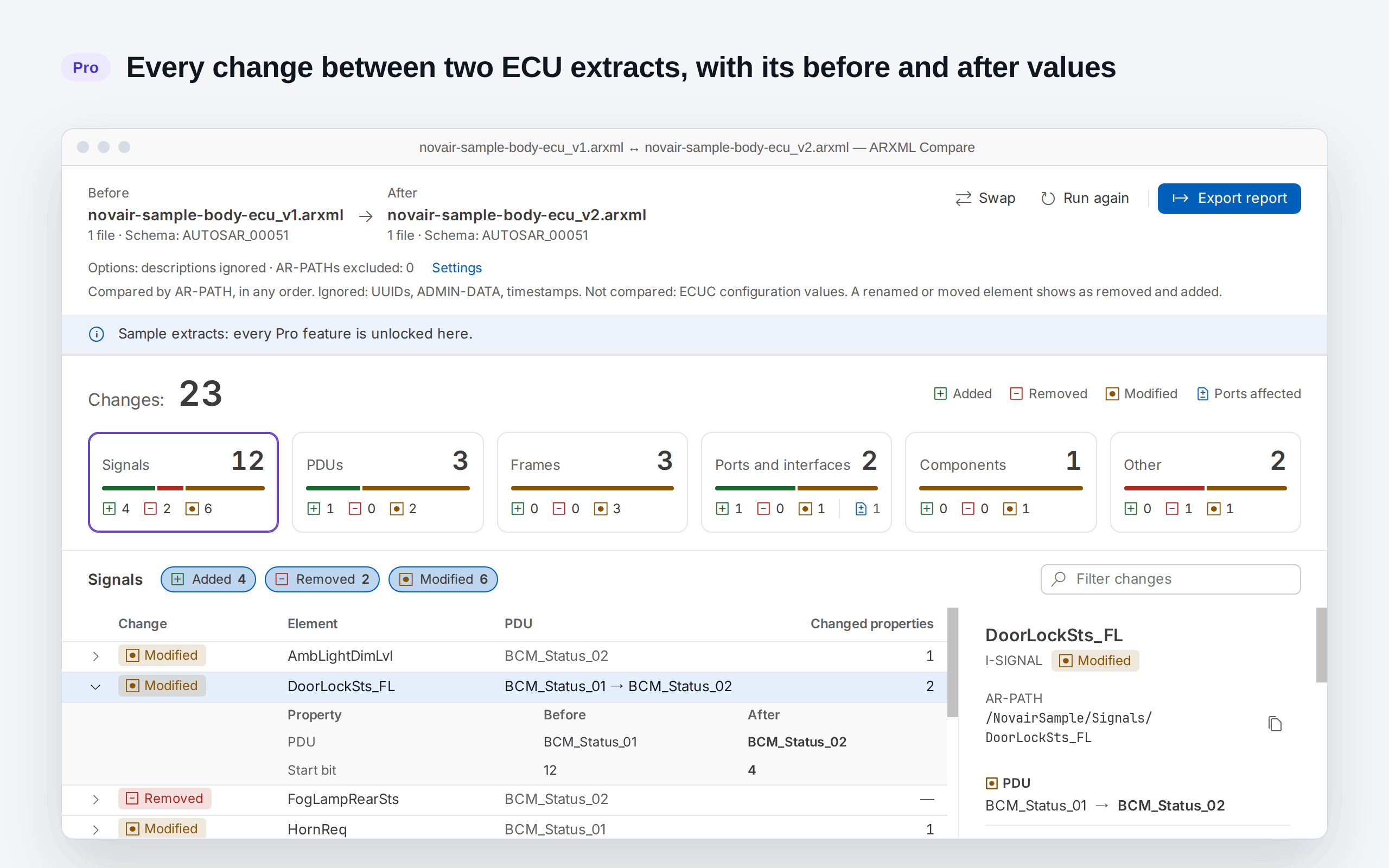
ARXML Compare Pro: every change between two ECU extracts, with its before and after values (sample extracts written by Novair)

Free

  • Open an ARXML file, or a folder of ARXML files as one model, read in a stream from disk, including files over 50 MB
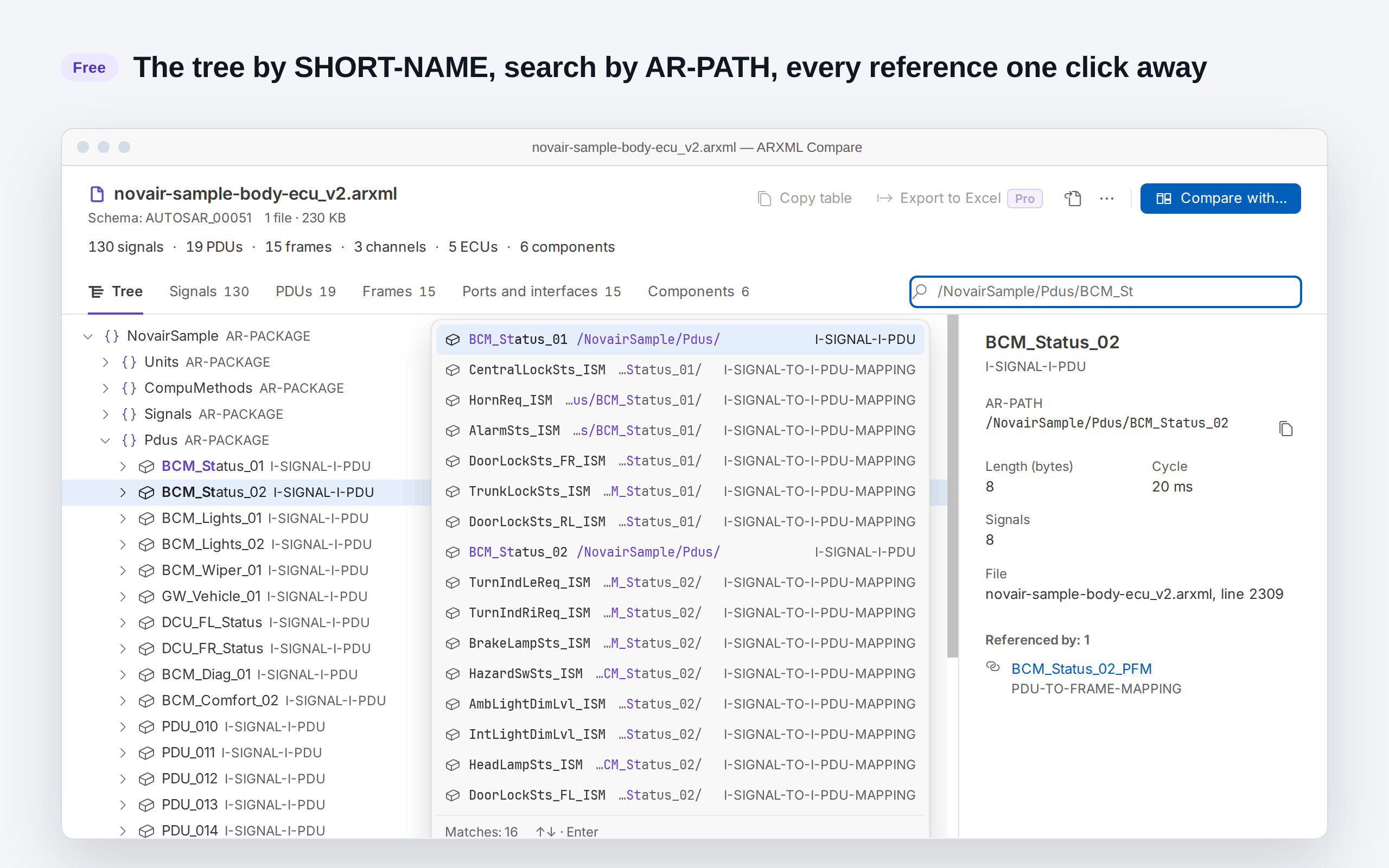
  • Tree of packages and elements by SHORT-NAME; search by name or AR-PATH; go to any reference and see what refers to an element
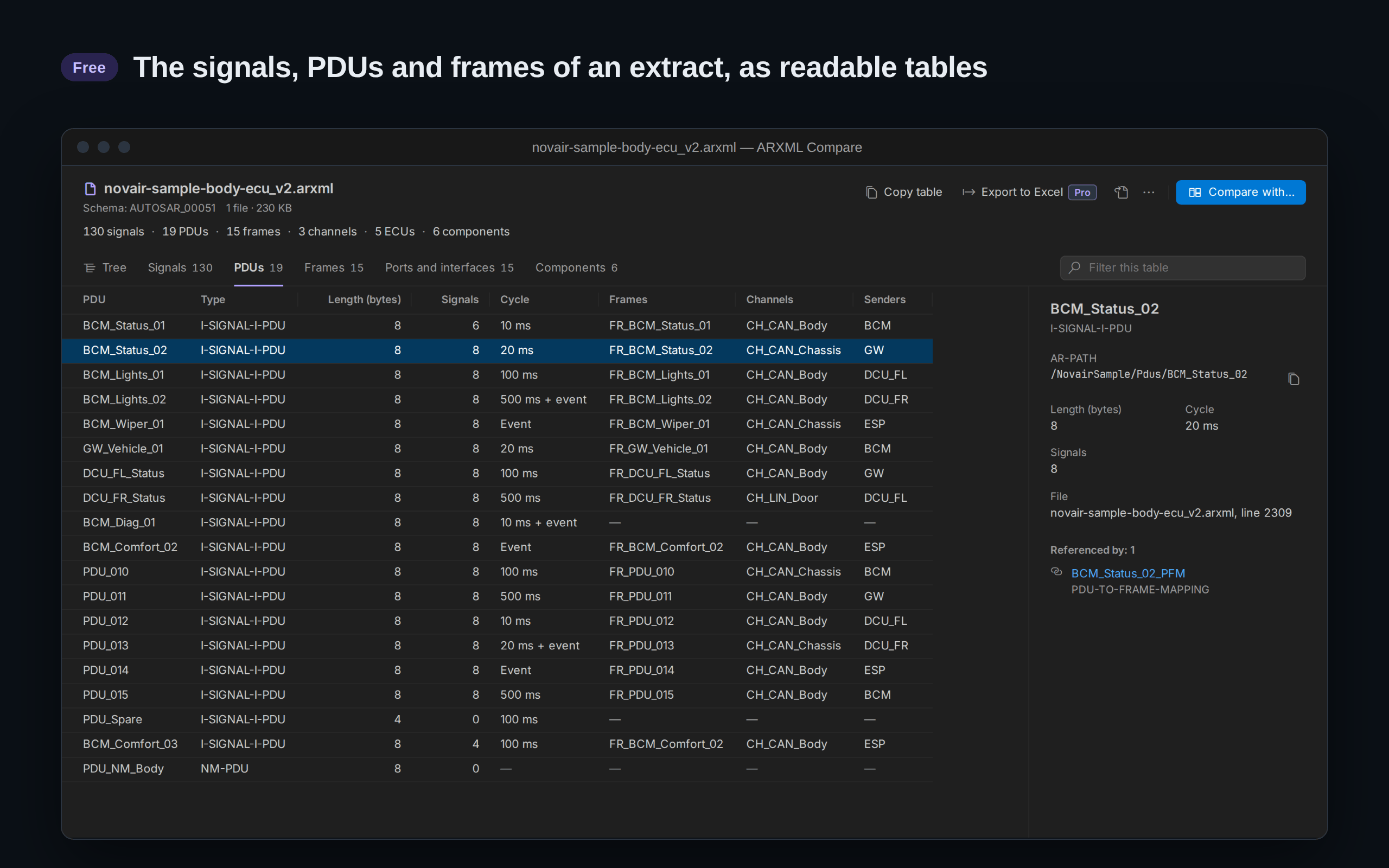
  • Readable tables of a model: signals (PDU, frame, ID, start bit, length, byte order, initial value, factor, offset, unit, senders), PDUs (length, cycle), frames (CAN, CAN FD, LIN, FlexRay: ID, length, senders, receivers), ports and interfaces, software components
  • Copy any table as tab-separated text, ready to paste into a spreadsheet
  • Compare two versions and see how many signals, PDUs, frames, ports and components changed, or that nothing did
  • Sample extracts to try every Pro feature before buying
  • No element cap, no account, no ads, no banner
  • Light, dark and high contrast themes; English and French

The PDUs table of an ECU extract, with the details of one PDU; signals, frames, ports and components in the other tabs (free; sample extract written by Novair)

The tree by SHORT-NAME, search by AR-PATH and references (free; sample extract written by Novair)

Pro

  • The full table of changes between two ECU or system extracts, element by element (matched by AR-PATH in any order; UUIDs, ADMIN-DATA and timestamps ignored; numbers compared by value, 0x10 = 16)
  • Every change with its before and after values: signals (PDU, start bit, length, byte order, initial value, factor, offset), PDUs (length, cycle, signals), frames (ID, length, PDUs, senders, receivers), ports and interfaces, components, and every other element
  • Open any change at its line in the before or after file
  • Ports affected by a changed interface, listed even when the port itself did not change
  • Compare one folder of ARXML files with another, for extracts split into several files
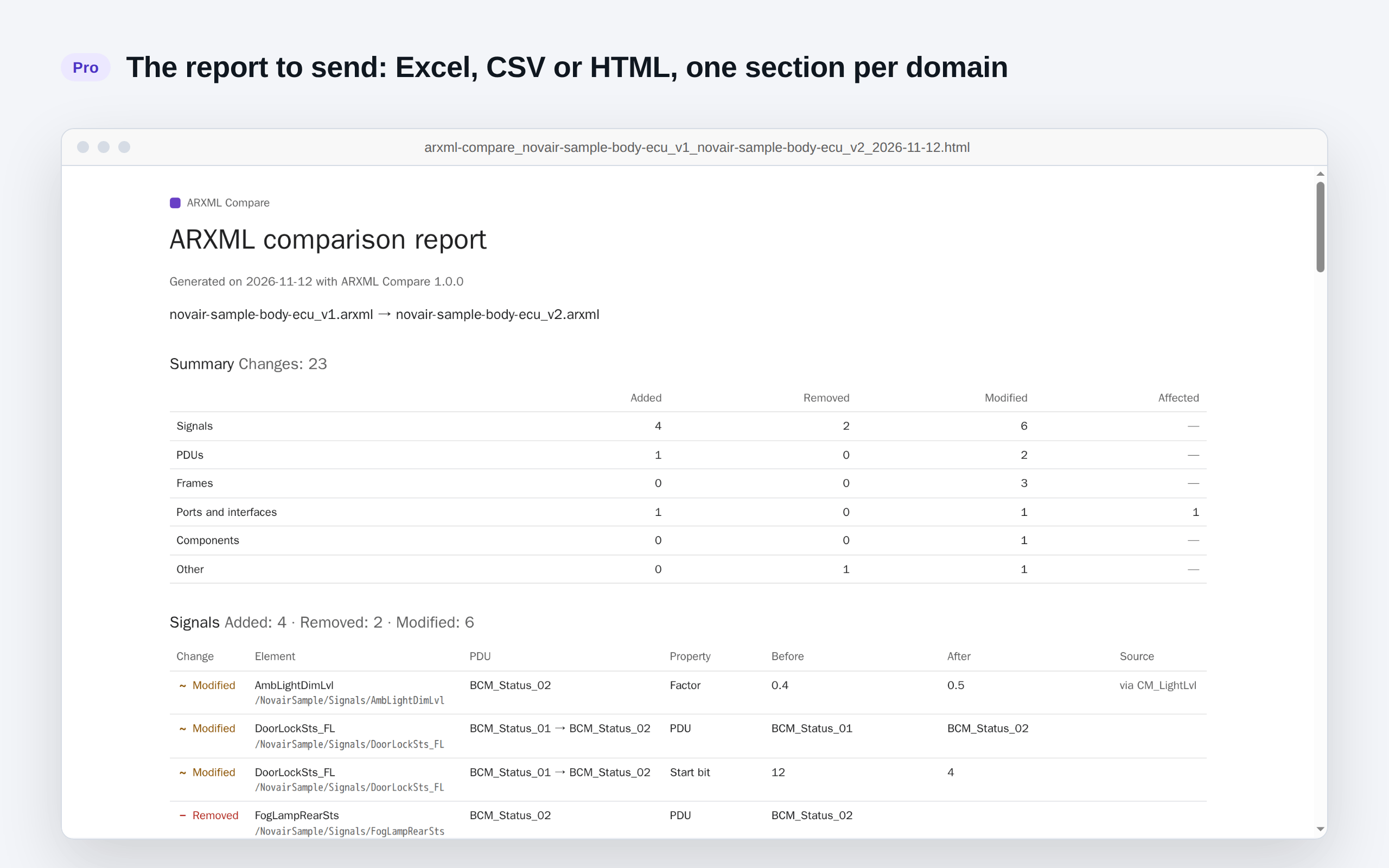
  • Report to Excel (.xlsx), CSV or HTML, one sheet per domain, ready to filter and send
  • Export the tables of a model to Excel (.xlsx)

A new ECU extract arrives: see which signals, PDUs, frames and ports changed, and send the list as an Excel file.

The comparison report written by ARXML Compare Pro, here in HTML (sample extracts written by Novair)

Try every Pro feature first on the sample extracts: run “ARXML Compare: Try Pro on the Sample Extracts” from the Command Palette.

How to use it

No VS Code at hand? Compare two ARXML files online, free, in your browser: it counts the changes by domain.

  • Open an .arxml file with the Open in ARXML Compare button in the editor title, or right-click it in the Explorer.
  • Select two .arxml files in the Explorer, right-click, Compare Selected ARXML Files (the first one selected is the before).
  • Open by default: run “ARXML Compare: Always Open ARXML Files in ARXML Compare”. “ARXML Compare: Open ARXML Files in the Text Editor Again” undoes it.

What is compared

Compared: signals, PDUs, frames (CAN, CAN FD, LIN, FlexRay), ports and interfaces, software components, and every other element that has a SHORT-NAME, by AR-PATH and in any order. Ignored: UUIDs, ADMIN-DATA, timestamps and, by default, descriptions. Not compared: ECUC configuration values. A renamed or moved element shows as removed and added. Variants are compared as written, not resolved. Tables read AUTOSAR 4 files (schema r4.0); AUTOSAR 3 files open in the tree only. Ethernet: PDUs only, with no table for sockets or SOME/IP services (their changes appear under Other).

Licence

One key for one person, on up to 5 machines. A machine is counted the first time the key is activated in a VS Code installation: a new computer, VS Code reinstalled with its data erased, or a non-persistent virtual desktop whose identifier changes. Entering the key again, trying again after a network error, removing and re-entering it on the same installation, or updating the extension uses nothing. New computer or VS Code reinstalled? Write to support@novair.app with your purchase e-mail and we reset the count.

All 1.x updates are included and come through the VS Code Marketplace. A later version never takes away what your key unlocks.

Refund within 14 days, no questions asked: write to support@novair.app.

Need an invoice? Use the “Generate” link at the bottom of your Gumroad receipt: enter your name and business address, add what your accounts need under “Additional notes”, and download the PDF. An EU business that paid VAT can enter its VAT number there: Gumroad refunds the VAT and the invoice shows no VAT. Gumroad cannot change an invoice afterwards.

To activate: press Ctrl+Shift+P (Cmd+Shift+P on Mac), run “ARXML Compare: Enter my Pro Licence Key” and paste the key from your Gumroad e-mail.

Feedback and support: support@novair.app · Send feedback

Get ARXML Compare Pro — EUR 129 + VAT where applicable

One payment, no subscription. All 1.x updates included. Refund within 14 days.

  • Contact us
  • Jobs
  • Privacy
  • Manage cookies
  • Terms of use
  • Trademarks
  • Your Privacy Choices
  • Consumer Health Privacy
© 2026 Microsoft