AI Cost per Client — Claude Code & Codex
Know what AI costs you for each client, and bill it.
Get AI Cost per Client Pro — EUR 15.83 + VAT where applicable · one payment, 5 machines, refund within 14 days. The free version is complete for the cost per project, day and model.

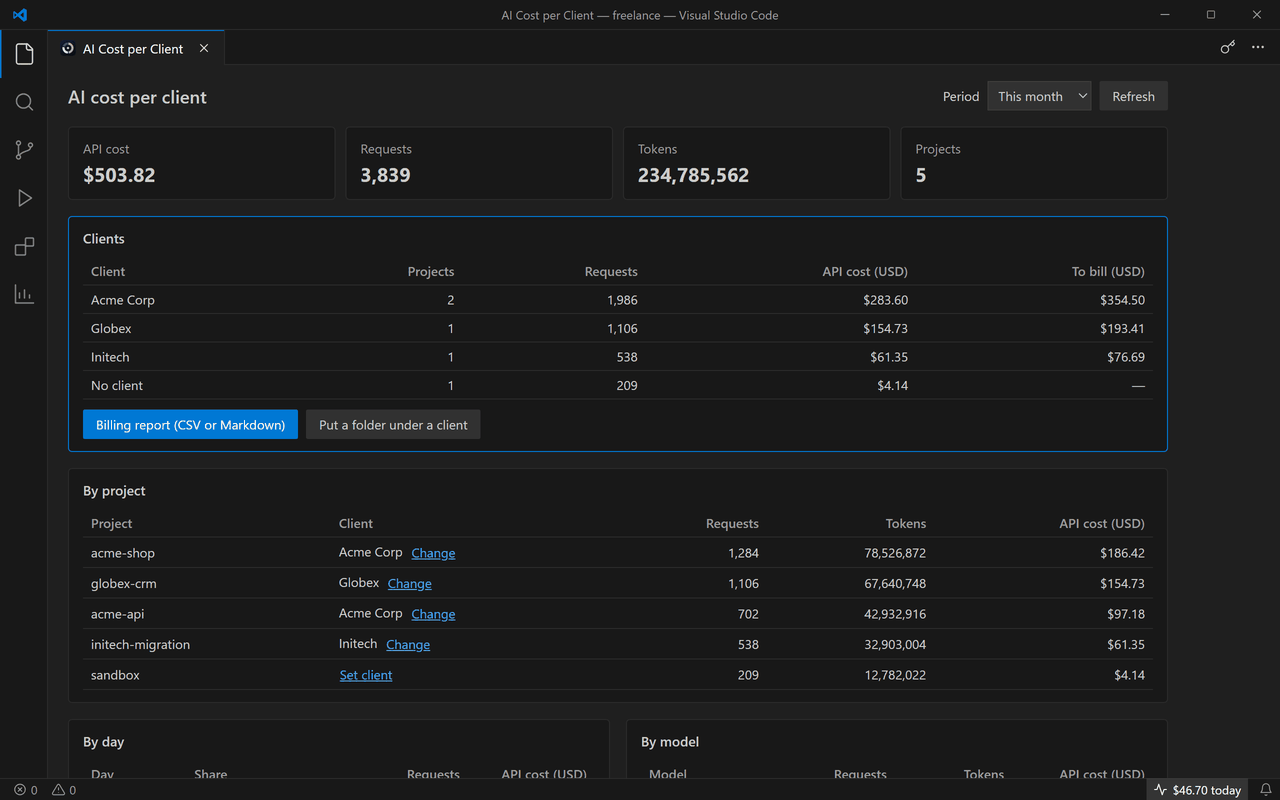
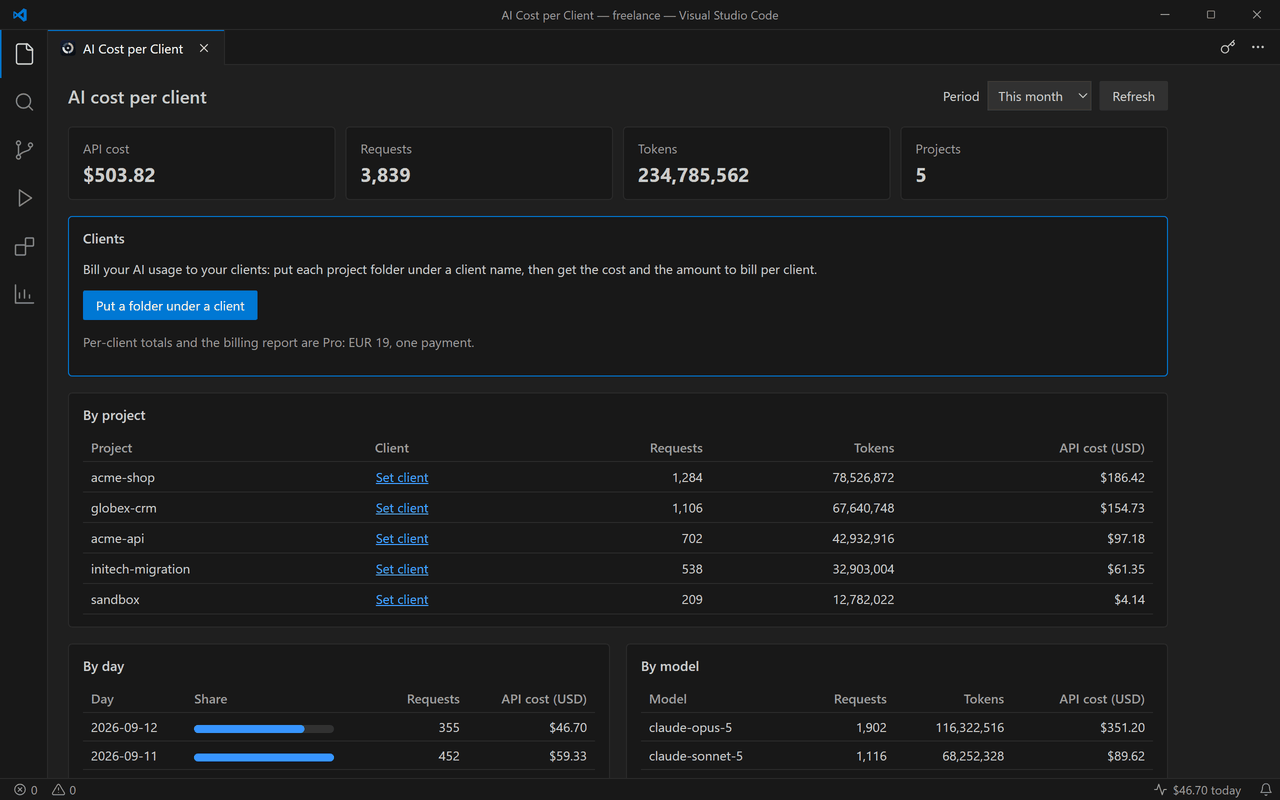
You run Claude Code or Codex on several client projects. The provider sends one bill, or none at all on a subscription. AI Cost per Client reads the logs your agents already write on your machine and tells you what each project, each day, each model and each client cost, in API-equivalent dollars.
Free
- Today's cost in the status bar, always visible. It shows a warning sign and says why when no log is found or a model has no price.
- Cost per project, day and model, over any period: today, 7 days, 30 days, this month, last month, all time.
- Claude Code and Codex.
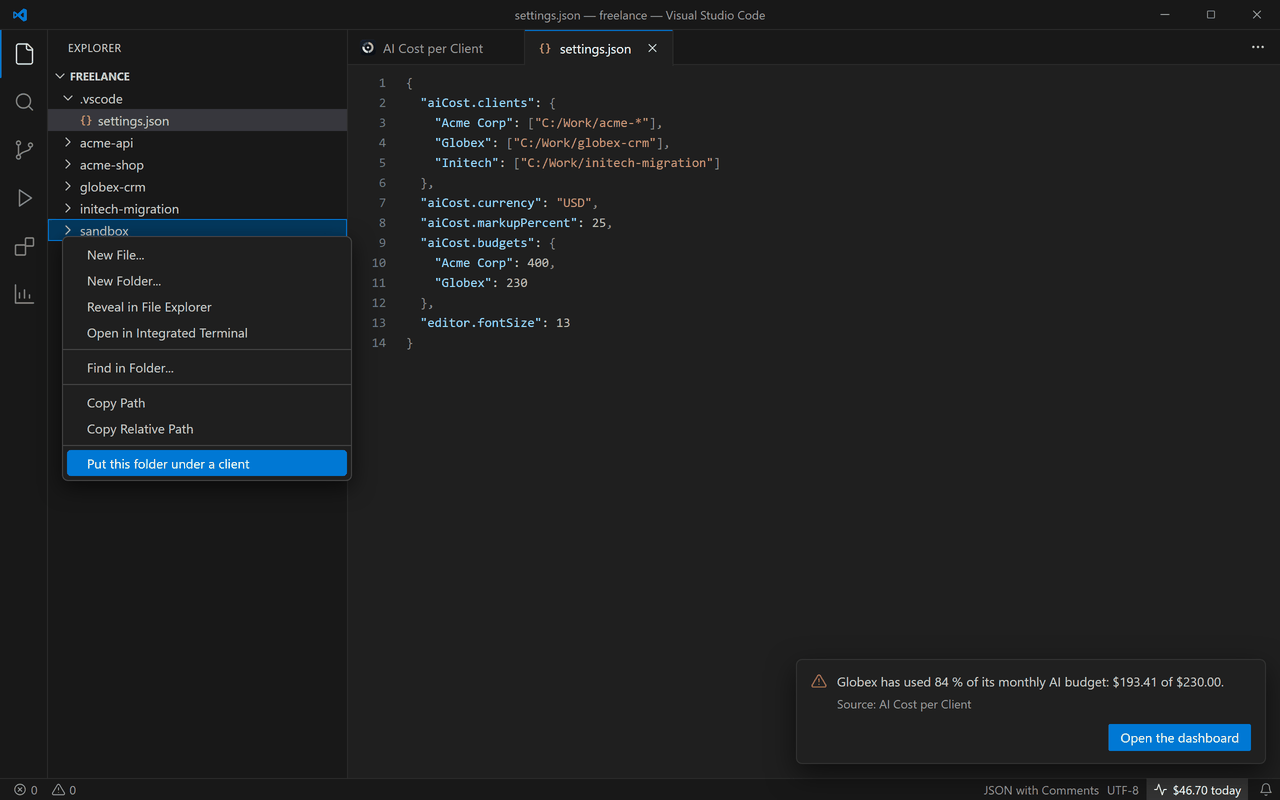
- Folders grouped by client: right-click a folder, Put this folder under a client. Globs work too (
acme-*). The dashboard shows the client of each project and the requests per client.
- Your own price per model in the setting
aiCost.customPrices, for a model with no public price or a negotiated rate.
- 100 % local. Nothing is uploaded: no account, no telemetry, no server. The only network call is the Pro licence check.
Pro — EUR 15.83 + VAT where applicable, one payment
- Cost and amount to bill per client, with your markup, your currency and your exchange rate.
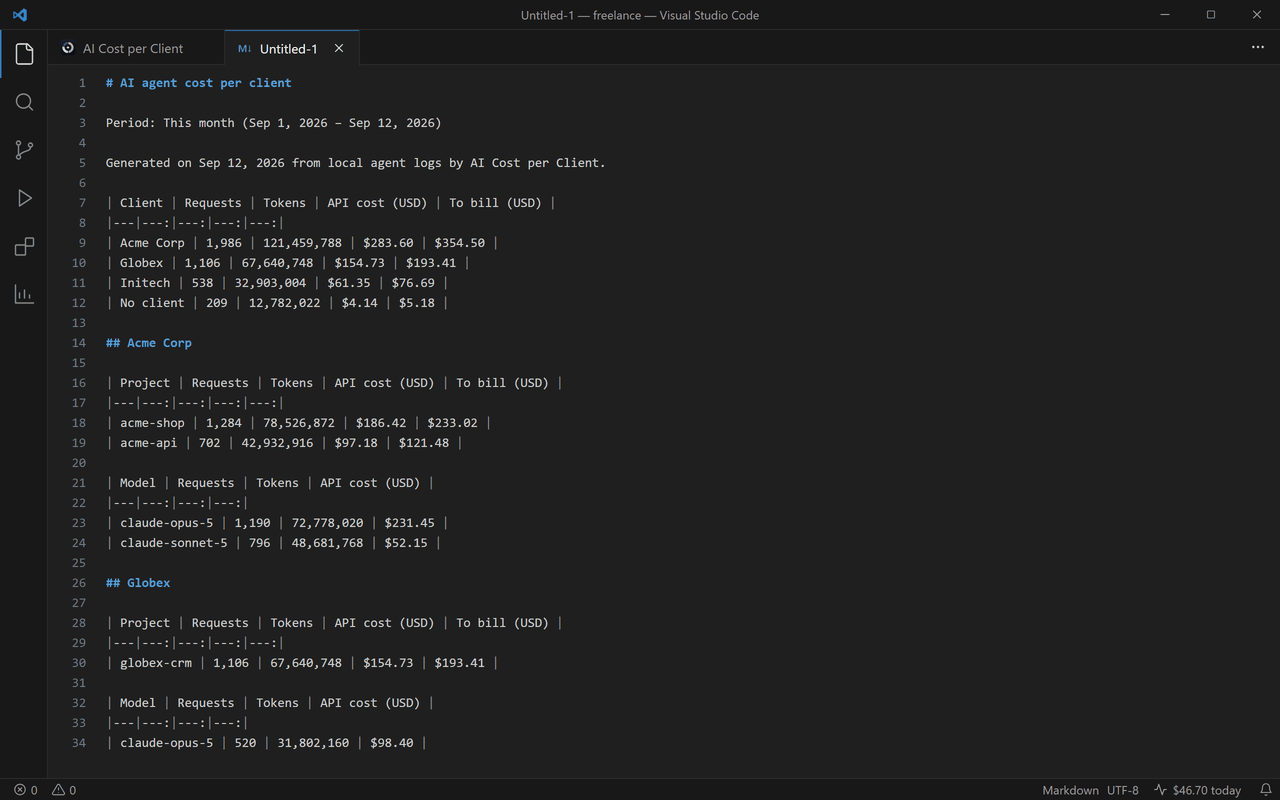
- Billing report in Markdown or CSV, per client and per project. The Markdown report lists the models without an exact price.
- Any period: this month, last month, 30 days, all time.
- Monthly budget per client, alerts at 80 % and 100 %.
No subscription, 5 machines, no expiry. Refund within 14 days, no questions asked. Buy from the dashboard or the command AI Cost: Get AI Cost per Client Pro; the key arrives by e-mail from Gumroad, then run AI Cost: Enter a Pro licence key.


How it works
| Agent |
Logs read |
| Claude Code |
~/.claude/projects/**/*.jsonl and ~/.config/claude/projects (or CLAUDE_CONFIG_DIR) |
| Codex CLI |
~/.codex/sessions/**/*.jsonl (or CODEX_HOME) |
Each request is priced with the public API list price of its model, cache writes and cache reads included, long-context rates included. The price table ships with each version; its date is in the status bar tooltip. Streamed duplicates are counted once. On a subscription plan (Claude Pro or Max, ChatGPT Plus or Pro) the figure is the API-equivalent value, which is what you bill when you resell AI time, not what you paid.
It shows $0.00
- No log found: the status bar says AI cost: no log found. The extension reads ~/.claude/projects and ~/.codex/sessions on the machine where it runs (in a Remote, WSL or container window, that machine). Add your folder in aiCost.extraLogFolders.
- A model has no price: the status bar shows a warning sign and the dashboard names the model. Enter its price in aiCost.customPrices (USD per million tokens).
Settings
| Setting |
What it does |
aiCost.clients |
Folders of each client: {"Acme": ["C:/Work/acme-shop", "acme-*"]} |
aiCost.currency |
Currency of the amounts to bill, for example EUR |
aiCost.exchangeRate |
Units of that currency for 1 USD, for example 0.92 |
aiCost.markupPercent |
Markup added to the API cost, in percent |
aiCost.budgets |
Pro: monthly budget per client, for example {"Acme": 50} |
aiCost.extraLogFolders |
Extra folders of Claude Code logs |
aiCost.customPrices |
Your prices in USD per million tokens: {"model-name": {"input": 3, "output": 15}}; cacheWrite and cacheRead are optional |
aiCost.statusBar |
Show or hide today's cost in the status bar |
aiCost.experience |
enhanced (warnings and price notes) or classic (the 1.0 display) |
aiCost.askForReview |
Ask once for a rating after a few days of use |
Go back to the 1.0 display: Settings › AI Cost per Client › Experience: classic.
Invoice: generate it yourself from the Gumroad receipt (link at the bottom of the receipt). An EU business that enters its VAT number there gets the VAT refunded and an invoice without VAT.
Support: https://ai-cost.novair.app/support/
Get AI Cost per Client Pro — EUR 15.83 + VAT where applicable · one payment, 5 machines, refund within 14 days. The free version is complete for the cost per project, day and model.
En français
Obtenir Coût IA par client Pro — 19 € TTC · 19 € TTC (TVA française ; le montant de votre pays s'affiche au paiement), en une fois, 5 postes, remboursé sous 14 jours.
Sachez ce que l'IA vous coûte pour chaque client, et refacturez-le.
Vous faites tourner Claude Code ou Codex sur plusieurs projets clients. Le fournisseur vous envoie une seule facture, voire aucune avec un abonnement. Coût IA par client lit les journaux que vos agents écrivent déjà sur votre machine et vous dit ce qu'ont coûté chaque projet, chaque jour, chaque modèle et chaque client, en équivalent dollars API.
Gratuit
- Le coût du jour dans la barre d'état, toujours sous les yeux. Elle affiche un signe d'alerte et dit pourquoi quand aucun journal n'est trouvé ou qu'un modèle n'a pas de prix.
- Le coût par projet, par jour et par modèle, sur la période de votre choix : aujourd'hui, 7 jours, 30 jours, ce mois-ci, le mois dernier, depuis le début.
- Claude Code et Codex.
- Les dossiers rangés par client : clic droit sur un dossier, Rattacher ce dossier à un client. Les motifs marchent aussi (
acme-*). Le tableau de bord montre le client de chaque projet et les requêtes par client.
- Votre propre prix par modèle dans le réglage
aiCost.customPrices, pour un modèle sans prix public ou un tarif négocié.
- 100 % local. Rien n'est envoyé : ni compte, ni télémétrie, ni serveur. Le seul appel réseau est la vérification de la licence Pro.
Pro — 19 € TTC, en une fois
19 € TTC (TVA française ; le montant de votre pays s'affiche au paiement).
- Coût et montant à facturer par client, avec votre marge, votre devise et votre taux de change.
- Rapport de facturation en Markdown ou CSV, par client et par projet. Le rapport Markdown signale les modèles sans prix exact.
- Toute période : ce mois-ci, le mois dernier, 30 jours, depuis le début.
- Budget mensuel par client, alertes à 80 % et 100 %.
Sans abonnement, 5 postes, sans limite de durée. Remboursé sous 14 jours, sans justification. Achat depuis le tableau de bord ou la commande Coût IA: Obtenir Coût IA par client Pro ; la clé arrive par e-mail depuis Gumroad, puis lancez Coût IA: Saisir une clé de licence Pro.
Fonctionnement
Chaque requête est valorisée au prix public de son modèle, écritures et lectures de cache comprises, tarif long contexte compris. La table de prix est livrée avec chaque version ; sa date figure dans l'infobulle de la barre d'état. Les doublons du streaming ne comptent qu'une fois. Avec un abonnement (Claude Pro ou Max, ChatGPT Plus ou Pro), le chiffre est la valeur équivalente en API : c'est ce que vous facturez quand vous revendez du temps d'IA, pas ce que vous avez payé.
Il affiche 0,00 $
- Aucun journal trouvé : la barre d'état indique Coût IA : aucun journal. L'extension lit ~/.claude/projects et ~/.codex/sessions sur la machine où elle tourne (dans une fenêtre Remote, WSL ou conteneur, cette machine-là). Ajoutez votre dossier dans aiCost.extraLogFolders.
- Un modèle n'a pas de prix : la barre d'état affiche un signe d'alerte et le tableau de bord nomme le modèle. Saisissez son prix dans aiCost.customPrices (USD par million de jetons).
Réglages : aiCost.clients (dossiers de chaque client), aiCost.currency (devise de facturation), aiCost.exchangeRate (unités de cette devise pour 1 USD, par exemple 0,92), aiCost.markupPercent (marge en %), aiCost.budgets (Pro, budget mensuel par client), aiCost.extraLogFolders, aiCost.customPrices (vos prix en USD par million de jetons), aiCost.statusBar, aiCost.experience (enhanced ou classic), aiCost.askForReview (une seule demande de note).
Retrouver l'affichage 1.0 : Paramètres › AI Cost per Client › Experience : classic.
Facture : générez-la vous-même depuis le reçu Gumroad (lien en bas du reçu). Une entreprise de l'UE qui y saisit son numéro de TVA est remboursée de la TVA et reçoit une facture sans TVA.
Assistance : https://ai-cost.novair.app/fr/support/