CodeDeltaReview AI-generated code and your team's commits in one place: a dedicated read-only diff panel for every AI edit (Codex, Claude Code, or any tool that writes to disk) with per-block Keep/Undo, plus shareable, server-less commit reviews with line-by-line diffs and inline comments across multiple rep Installation Launch VS Code Quick Open ( Ctrl+P), paste the following command, and press enter.Copied to clipboard |

CodeDeltaReview every AI edit in a dedicated read-only panel — then share commits for fast, comment-driven code review. English · 简体中文 · 日本語 · 한국어 · Español
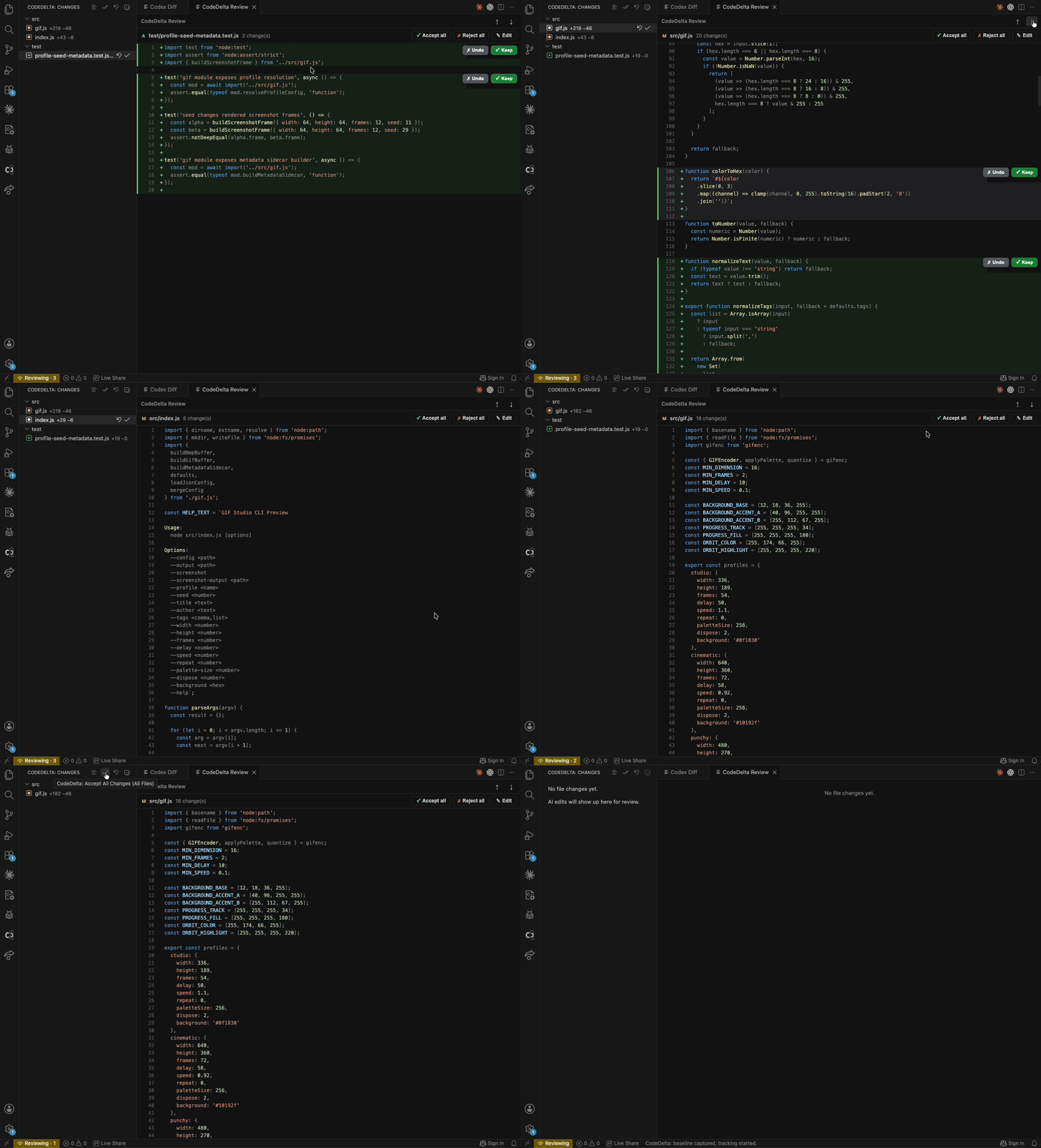
Review every AI edit in a dedicated panel — Keep or Undo, one block at a time.
Share commits for review — read-only, line-by-line diffs with inline comments, across repositories. (demo coming soon) EnglishWhether code is right still comes down to a human reading itIt doesn't matter if the code was written by AI or by a teammate — before it lands on the main branch and ships to production, only one thing truly has your back: someone actually read it and caught the problems. CodeDelta nails that one thing across the two situations where it matters most — reviewing AI edits, and reviewing your teammates' code. Situation 1: AI is fast, but the diff it hands you is roughCodex and Claude Code rewrite half a file in seconds — but the way they show you the changes just isn't good enough. Which lines changed, why, whether a key guard clause got quietly dropped or a condition flipped — it's often a blur. The thing that actually catches this is human review, yet you can't realistically read line by line once the agent has smeared edits across the whole project. CodeDelta gives every AI edit its own review bench. Instead of painting changes onto the file you're editing, it opens a clean, read-only Review panel that shows each change in full context, so all you have to do is make one call: Keep or Undo.
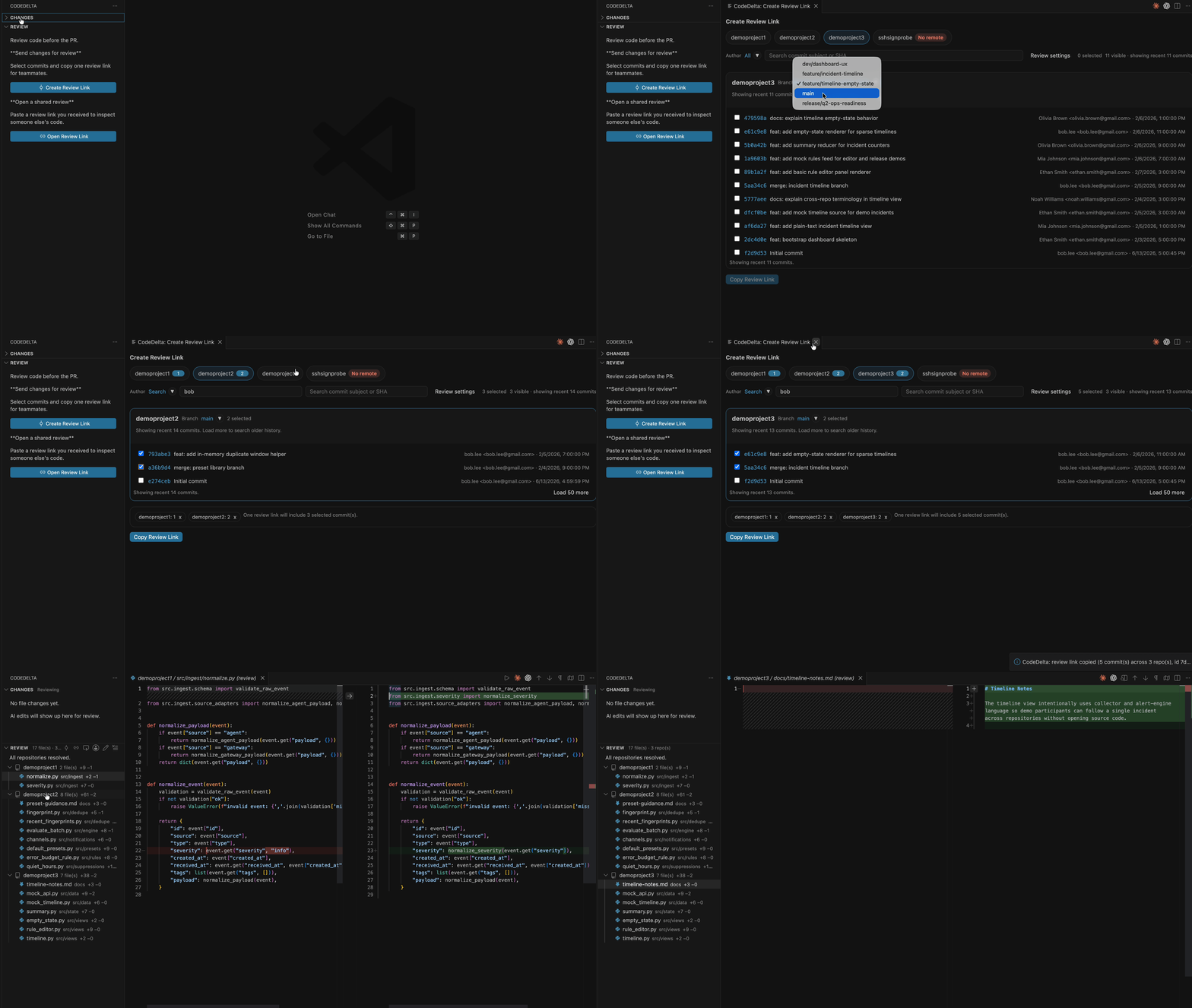
Situation 2: turn "watching a screen share" into "hunting for problems yourself"Team review often goes like this: hop on a video call, the author shares their screen and reads the code out loud, and you just passively follow along. Want to stop and chew on one section, jump elsewhere to cross-check, or pin a question to a specific line? You can't — and that's exactly how bugs slip past everyone. CodeDelta puts review back on your own terms. Pick the commits you want reviewed, generate one share link, and send it to a teammate. They open it right inside VS Code and review actively — grouped by repository, file by file, line by line — and leave a comment on any line, just like a pull request.
Get started
Telemetry & privacyCodeDelta collects anonymous, content-free usage data to understand which features are used and how many people use it day to day. This never compromises the core promise that your code stays on your machine.
简体中文代码到底对不对,最后还得人来看无论代码是 AI 写的,还是队友写的,在它合进主干、发到线上之前,真正能兜底的只有一件事:有人认真看过、挑得出问题。 CodeDelta 就把这件事做透,覆盖两个最常见的场景——审查 AI 的改动,和评审团队成员的代码。 场景一:AI 写得飞快,但它给你的 diff 太糙了Codex、Claude Code 几秒钟就改完一片文件,可它们呈现改动的方式实在不行。 改了哪些地方、为什么这么改、有没有顺手删掉一句关键判断、把某个条件写反——经常是一团模糊。能真正兜底的是人工 review,但你又不可能在 AI 把改动涂满整个工程时,硬着头皮逐行去翻。 CodeDelta 给每一处 AI 改动一块专属的审查台。 它不在你正在编辑的文件上乱涂,而是打开一个干净的只读 Review 面板,带完整上下文逐块呈现,你只需要做一个判断:保留(Keep),还是撤销(Undo)。
场景二:把「开会看代码」变成「自己动手找问题」团队 review 常常是这样的:拉个视频会议,作者共享屏幕一行行念,你只能被动地跟着看。 想停下来反复琢磨某一段、跳到别处对照、把疑问标在具体某一行——统统做不到,问题就这么从眼皮底下溜走了。 CodeDelta 让 review 回到你自己的节奏。 把需要 review 的提交挑出来,生成一条分享链接发给同事;对方在自己的 VS Code 里打开,按仓库分组、逐个文件、逐行地主动审阅,并能在任意一行留下评论,就像 Pull Request 一样。
快速上手
日本語コードが正しいかどうかは、結局「人が読む」ことで決まるそのコードが AI が書いたものでも、チームメイトが書いたものでも関係ありません。main ブランチに入り、本番へ出ていく前に、本当に頼れるのはただ一つ —— 誰かがちゃんと読み、問題を見つけたという事実です。 CodeDelta は、それが最も重要になる 2 つの場面でこの一点を磨き込みます —— AI の編集をレビューすることと、チームメイトのコードをレビューすることです。 場面 1:AI は速い。でも見せてくる diff が雑すぎるCodex も Claude Code も数秒でファイルを書き換えますが、その変更の見せ方がまるで足りていません。 どの行が、なぜ変わったのか、重要なガード節がこっそり消えていないか、条件が反転していないか —— たいていぼんやりしたままです。これを本当に食い止めるのは人のレビューですが、AI がプロジェクト全体に変更を塗り広げた後では、現実的に一行ずつ読むのは不可能です。 CodeDelta は、すべての AI 編集に専用のレビュー台を用意します。 編集中のファイルに塗り重ねるのではなく、クリーンな読み取り専用のレビューパネルを開いて各変更を完全な文脈で示すので、あなたがするのはたった一つの判断 —— Keep か Undo だけです。
場面 2:「画面共有を眺める」を「自分で問題を探す」に変えるチームのレビューはよくこうなります:ビデオ会議に入り、作者が画面を共有してコードを読み上げ、あなたはただ受け身でついていくだけ。 一か所を立ち止まってじっくり考えたい、別の場所へ飛んで照らし合わせたい、ある行に疑問をピン留めしたい —— どれもできず、バグはそうやって全員の目をすり抜けます。 CodeDelta はレビューをあなた自身のペースに取り戻します。 レビューしたいコミットを選んで1 本の共有リンクを生成し、チームメイトに送るだけ。相手は VS Code の中で開き、リポジトリごと・ファイルごと・行ごとに能動的にレビューし、どの行にもコメントを残せます。Pull Request と同じ感覚です。
使い方
한국어코드가 맞는지는 결국 사람이 읽어야 판가름 납니다코드를 AI가 작성했든 팀원이 작성했든 상관없습니다. main 브랜치에 들어가 프로덕션으로 나가기 전, 진짜로 당신을 지켜 주는 건 단 하나 —— 누군가 제대로 읽고 문제를 잡아냈다는 사실입니다. CodeDelta는 그 한 가지가 가장 중요한 두 상황에서 이를 확실히 해냅니다 —— AI 편집 검토, 그리고 팀원 코드 리뷰입니다. 상황 1: AI는 빠르지만, 보여 주는 diff는 너무 거칩니다Codex와 Claude Code는 몇 초 만에 파일 절반을 다시 쓰지만, 변경을 보여 주는 방식이 영 부족합니다. 어떤 줄이 왜 바뀌었는지, 핵심 가드 절이 슬그머니 사라졌는지, 조건이 뒤집혔는지 —— 대개 흐릿합니다. 이를 진짜로 잡아내는 건 사람의 리뷰지만, AI가 프로젝트 전체에 변경을 발라 놓은 뒤 한 줄씩 읽기란 현실적으로 불가능합니다. CodeDelta는 모든 AI 편집에 전용 검토대를 마련합니다. 작업 중인 파일에 덧칠하는 대신, 깨끗한 읽기 전용 검토 패널을 열어 각 변경을 완전한 맥락으로 보여 주므로, 당신은 단 하나만 결정하면 됩니다 —— Keep 또는 Undo.
상황 2: '화면 공유 지켜보기'를 '직접 문제 찾기'로팀 리뷰는 흔히 이렇습니다: 화상 회의에 들어가면 작성자가 화면을 공유하며 코드를 읽어 주고, 당신은 그저 수동적으로 따라갑니다. 한 부분에서 멈춰 곱씹고, 다른 곳으로 건너뛰어 대조하고, 특정 줄에 의문을 핀으로 꽂고 싶어도 —— 모두 불가능하고, 버그는 그렇게 모두의 눈을 빠져나갑니다. CodeDelta는 리뷰를 당신의 페이스로 되돌립니다. 리뷰할 커밋을 골라 하나의 공유 링크를 만들어 팀원에게 보내세요. 상대는 자신의 VS Code 안에서 열어 저장소별·파일별·줄별로 능동적으로 검토하고, 어떤 줄에든 코멘트를 남깁니다. Pull Request와 똑같습니다.
시작하기
EspañolQue el código sea correcto, al final, depende de que alguien lo leaNo importa si lo escribió la IA o un compañero: antes de que llegue a la rama principal y salga a producción, solo una cosa te respalda de verdad —— que alguien lo haya leído y haya encontrado los problemas. CodeDelta clava justo eso en las dos situaciones donde más importa —— revisar las ediciones de la IA y revisar el código de tu equipo. Situación 1: la IA es rápida, pero el diff que te entrega es toscoCodex y Claude Code reescriben medio archivo en segundos, pero la forma en que te muestran los cambios no da la talla. Qué líneas cambiaron, por qué, si se cayó sin querer una cláusula de guarda o se invirtió una condición —— suele ser un borrón. Lo que de verdad atrapa esto es la revisión humana, pero no puedes leer línea por línea cuando el agente ya untó cambios por todo el proyecto. CodeDelta le da a cada edición de la IA su propia mesa de revisión. En lugar de pintar sobre el archivo que editas, abre un panel de revisión de solo lectura y limpio que muestra cada cambio en contexto completo, así solo tienes que tomar una decisión: Keep o Undo.
Situación 2: convierte "mirar una pantalla compartida" en "buscar problemas tú mismo"La revisión en equipo suele ser así: entras a una videollamada, el autor comparte pantalla y lee el código en voz alta, y tú solo sigues pasivamente. ¿Quieres detenerte a rumiar una sección, saltar a otro sitio para contrastar o fijar una duda en una línea concreta? No puedes —— y así es exacto como los errores se les escapan a todos. CodeDelta devuelve la revisión a tu propio ritmo. Elige los commits que quieres revisar, genera un enlace para compartir y envíaselo a un compañero. Lo abre dentro de VS Code y revisa de forma activa —— agrupado por repositorio, archivo por archivo, línea por línea —— y deja un comentario en cualquier línea, igual que en un pull request.
Empezar
MIT © CodeDelta |