npm-dependency-manager
日本語
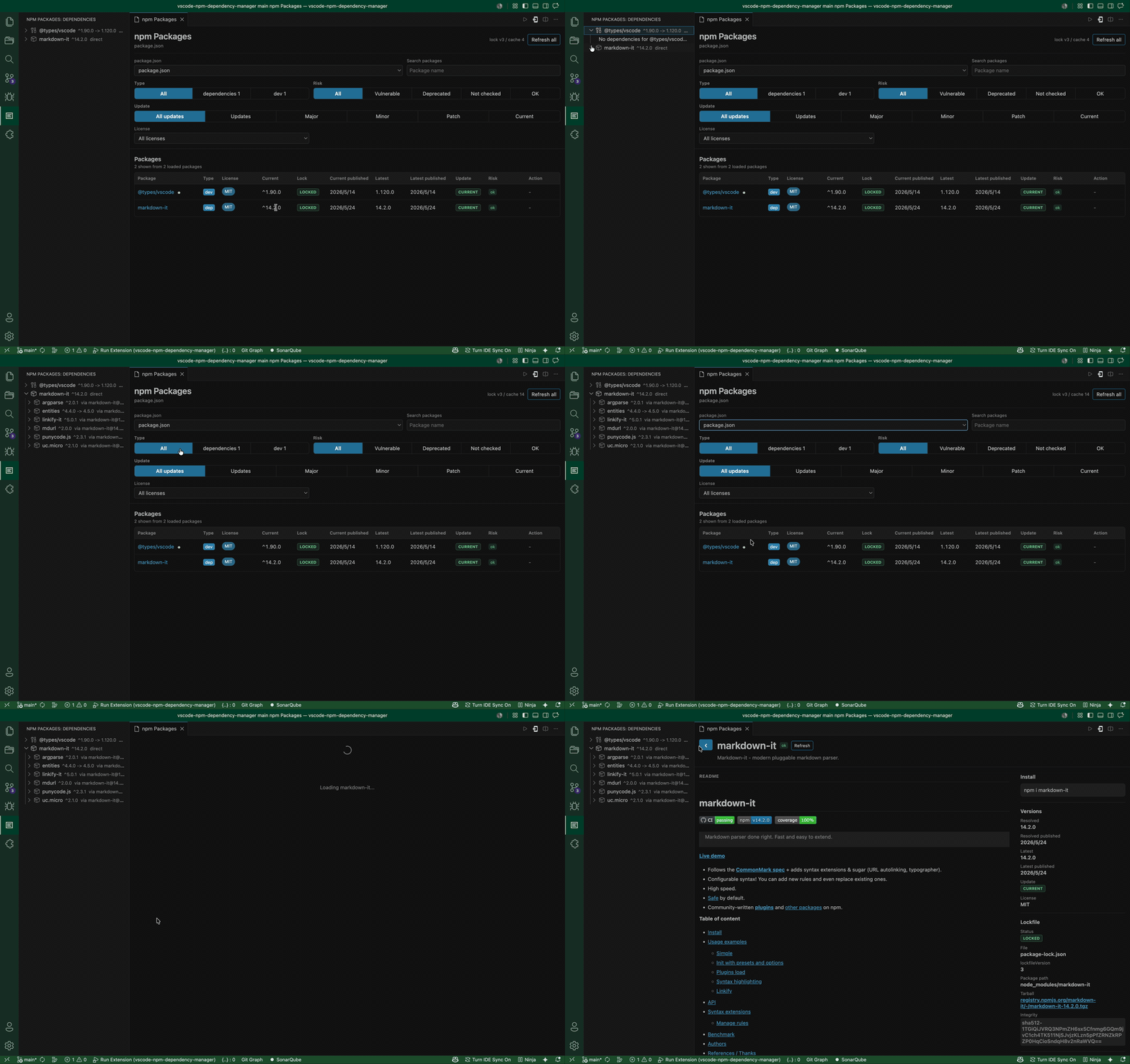
npm-dependency-manager helps you inspect npm dependencies without leaving VS Code. It finds package.json files in the current workspace, shows the selected package list in the activity bar, and opens a richer dashboard in the editor for updates, lockfile data, README content, downloads, and security signals.
Features
- Finds workspace
package.json files and prefers the workspace root package.json by default.
- Detects npm, pnpm, Yarn, or Bun from the
packageManager field first, then from package-lock.json, pnpm-lock.yaml, yarn.lock, bun.lock, or bun.lockb.
- Uses the detected package manager for update actions and package detail install commands.
- Shows only the selected
package.json dependencies in the sidebar.
- Expands packages in the sidebar to browse transitive dependencies from npm registry metadata.
- Searches package names and descriptions without refetching registry data.
- Filters by
dependencies, devDependencies, vulnerable packages, deprecated packages, unknown audit state, healthy packages, and update candidates.
- Remembers search and filter selections per workspace.
- Shows package licenses in the dependency list and filters by detected license.
- Compares the requested version, package-lock resolved version, latest version, and publish dates.
- Lets you show, hide, and resize dependency table columns, with column preferences remembered.
- Highlights major, minor, and patch update candidates.
- Lets you choose the latest version within the declared range, the registry latest release, or a specific published version (including prereleases and older versions) from the list or package detail page, then confirms the command before running it.
- Tracks updates as VS Code tasks, automatically reloads dependency and security information after completion, and displays the command outcome and before/after versions in the dashboard.
- Reads
package-lock.json for resolved versions, lock paths, and dependency tree context.
- Exports the selected project as a CycloneDX 1.5 JSON or SPDX 2.3 JSON SBOM. Both formats include the resolved npm dependency graph when
package-lock.json is available.
- Exports a CSV dependency report for all direct dependencies or the current search and filter results. It includes versions, license, update, lockfile, vulnerability information, and CISA KEV status, CVEs, dates, and ransomware-use signals.
- Checks npm audit bulk advisories for direct and transitive vulnerabilities when a resolved version is available.
- Adds OSV vulnerability results plus CVE-linked EPSS, CISA KEV, and CISA SSVC decision points when available.
- Shows deprecated package messages from npm registry metadata.
- Opens a polished package detail page with npm metadata, weekly downloads, links, security information, lockfile context, dependencies, and rendered README content.
- Falls back to GitHub README files when the npm registry does not publish useful README content, including when GitHub repositories use common HTTPS, SSH, or hosted shorthand URL formats.
- Opens README external links through VS Code.
- Includes cache controls and explicit refresh actions for registry, audit, README, dependency, and download data.
Updating a dependency
Select Update… in the list or Choose version… in package details. Choose an update target and review the project path, current version, target version, and any Node.js requirement or deprecation notice before selecting Run command. Copy command copies the command without running or tracking it.
The task terminal shows installation logs. When the command ends, the dashboard displays success, failure, or an unconfirmed outcome (for example, cancellation without an exit code), rereads the original project's files, and refreshes dependency and security information. Results are kept per project for the current extension session. Only one update runs at a time.
Version selection supports registry dependencies declared with a semantic version range. Save package.json first; file, Git, workspace, and alias dependencies are not supported. A version within the declared range does not guarantee compatibility. The package manager controls the saved version range. Resolved before/after versions are read from package-lock.json; for other lockfiles or a missing lockfile, the result explicitly shows the package.json declaration and marks the resolved version unavailable. A successful command and a failed information refresh are reported separately.
Requirements
The extension reads package metadata from the public npm registry and related npm APIs:
https://registry.npmjs.orghttps://api.npmjs.orghttps://api.osv.devhttps://api.first.orghttps://www.cisa.gov
Some README fallbacks are loaded from repository URLs such as https://raw.githubusercontent.com when the npm registry only exposes a README filename or placeholder text.
Vulnerability and dependency tree results are most accurate when a package-lock.json exists next to the selected package.json.
Privacy and network access
This extension does not include telemetry or analytics. It does not upload workspace source code, .npmrc files, environment variables, authentication tokens, or other credentials.
To provide current package and security information, it makes requests only to the public services listed above. Depending on the feature you use, these requests can include:
- Package names to the npm registry and npm downloads API.
- Package names and resolved versions from the selected project's
package.json and package-lock.json to npm audit and OSV vulnerability APIs. This can include direct and transitive dependencies.
- CVE identifiers returned by vulnerability services to the FIRST EPSS API, a request for CISA's public KEV catalog, and CISA's public Vulnrichment dataset on GitHub for SSVC decision points.
- A request for a public repository README from
raw.githubusercontent.com when the npm registry does not provide useful README content.
No account, API key, or sign-in is required. The extension does not send your workspace source files or credentials to these services.
Usage
- Open a Node.js workspace in VS Code.
- Select the
npm Packages activity bar view.
- Pick a
package.json from the dashboard dropdown when the workspace contains more than one.
- Use the sticky search and filters to narrow the list.
- Select a package to open the package detail page.
- Adjust visible columns or resize column widths when you want a denser or simpler table.
- Expand packages in the sidebar to inspect transitive dependencies.
- Select Export SBOM in the dashboard, or run the export command, then choose CycloneDX or SPDX JSON.
- Select Export CSV to save all direct dependencies or the current search and filter results as a spreadsheet-friendly report.
Commands
npm Packages: Show Dashboardnpm Packages: Refreshnpm Packages: Export SBOM (CycloneDX JSON or SPDX JSON)npm Packages: Export Dependency Report CSVnpm Packages: Open Package
Known Limitations
- npm audit and OSV checks require a resolved package version. Add or update
package-lock.json for packages that show Vulnerabilities not checked.
- Per-package lockfile parsing, resolved versions, and dependency tree context currently support
package-lock.json. pnpm, Yarn, and Bun lockfiles are detected and used for update-command selection.
- SBOM dependency-graph export currently parses
package-lock.json. Without it, the SBOM contains the direct dependencies from package.json as unresolved components.
- Transitive vulnerability attribution depends on the dependency graph recorded in
package-lock.json.
- EPSS and KEV signals are shown only for advisories that expose CVE identifiers.
- SSVC displays CISA's available decision points—exploitation, automatable, and technical impact—for each CVE. It does not create an organization-specific SSVC response decision such as Track, Attend, or Act.
- README rendering supports common npm/GitHub Markdown, but unusual HTML or repository asset layouts may not render exactly like npmjs.com.
| |

