DCTL Workbench
Pre-Release — This extension is currently in pre-release. Features and APIs may change. Bug reports and feedback are welcome on GitHub.
A Visual Studio Code extension for developing DaVinci Color Transform Language (DCTL) shaders with real-time EXR preview.



Features
DCTL Language Support
- Syntax Highlighting — Full TextMate grammar for DCTL keywords, types, macros, intrinsics, and preprocessor directives
- Real-time Diagnostics — Syntax errors and warnings as you type, powered by a native DCTL parser
- IntelliSense — Auto-completion for 60+ DCTL functions and keywords with documentation
- Hover Documentation — Function signatures, parameter types, return values, and code examples on hover
- 100+ Code Snippets — Transform entry points, UI controls, math operations, color space conversions, and more
EXR Viewer
Built-in custom editor for OpenEXR files with DCTL integration:
- DCTL Live Preview — Apply DCTL shaders to EXR images in real time
- Auto Preview — Automatically updates the preview when you edit a DCTL file
- ACES Color Pipeline — Working color spaces: ACES2065-1, ACEScg, ACEScc, ACEScct, Linear sRGB
- Reference Gamut Compression — ACES 2.0 RGC with configurable peak luminance
- GPU Accelerated — WebGPU rendering with WebGL2 and CPU fallbacks
- EXR Export — Export processed images with configurable compression (10 formats: lossless ZIP, PIZ, RLE, ZIPS and lossy PXR24, B44, B44A, DWAA, DWAB)
- UI Parameter Controls — Automatically generates sliders, checkboxes, and dropdowns from
DEFINE_UI_PARAMS
DaVinci Resolve Integration
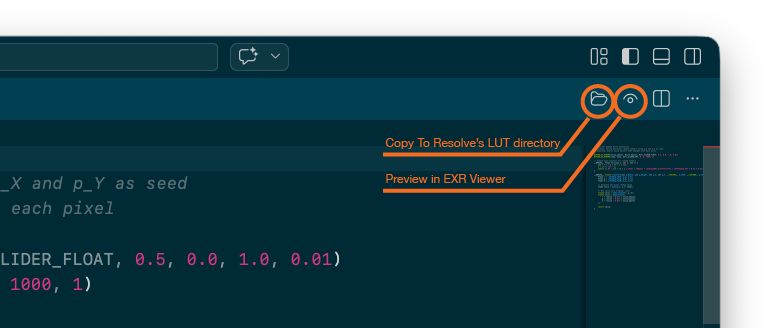
- Copy to Resolve — One-click copy of DCTL files to DaVinci Resolve's LUT/DCTL directory
- Cross-platform — Auto-detects Resolve's DCTL directory on macOS, Windows, and Linux
Snippets
Quickly scaffold common DCTL patterns:
| Prefix |
Description |
transform |
Transform entry point (float3/float4) |
ui-slider-float |
UI Slider Float parameter |
ui-combo |
UI Combo Box parameter |
ui-checkbox |
UI Checkbox parameter |
ui-color |
UI Color Picker (Resolve 19.1+) |
rgb-to-hsv |
RGB to HSV conversion |
logc3-to-linear |
ARRI LogC3 to Linear conversion |
lut |
LUT definition and application |
Type dctl in a .dctl file to see all available snippets.
Configuration
EXR Viewer (dctlWorkbench.exr_viewer.*)
| Setting |
Default |
Description |
defaultWorkingColorSpace |
ACEScct |
Default working color space (can be changed per viewer) |
defaultExportCompression |
PIZ |
Default EXR export compression method |
Editor (dctlWorkbench.editor.*)
| Setting |
Default |
Description |
diagnostics |
true |
Enable DCTL syntax checking and diagnostics |
diagnosticsDebounceMs |
500 |
Debounce time for diagnostics update (ms) |
nagaValidation |
true |
Enable Naga (WGSL) validation in addition to syntax checking |
resolveDctlDirectory |
(empty) |
Path to DaVinci Resolve DCTL directory |
Commands
Open the Command Palette (Cmd+Shift+P / Ctrl+Shift+P) and search for:
- DCTL Workbench: Preview in EXR Viewer — Load the current DCTL into an EXR viewer
- DCTL Workbench: Copy to DaVinci Resolve — Copy the current DCTL file to Resolve's DCTL directory
Both commands are also available as toolbar buttons when editing .dctl files.
Known Limitations
DCTL Workbench compiles DCTL to WGSL for browser-based rendering. Some DCTL features that work in DaVinci Resolve (CUDA/Metal/OpenCL) cannot be represented in WGSL.
Unsupported DCTL Syntax
| Feature |
Example |
| GCC statement expressions |
({ float t = 1.0f; t; }) |
| Double pointers |
float** ptr |
| Function pointers |
(*funcPtr)(args) |
| Pointer-returning functions |
float* getPtr() |
| Dynamic array sizes |
float arr[n] (non-constant n) |
Type Mappings
| DCTL Type |
WGSL Mapping |
Notes |
double |
f32 |
Precision reduced to 32-bit |
half |
f32 |
Promoted to 32-bit |
char |
i32 |
Promoted to 32-bit |
long / long long |
i32 / u32 |
64-bit not supported |
Preprocessor
#include "file.h" is supported (max depth: 32); #include <file.h> is not#if / #ifdef / #ifndef with full expression evaluation- Simulates DaVinci Resolve 18.0 (
DEVICE_IS_CUDA=0, DEVICE_IS_OPENCL=0, DEVICE_IS_METAL=0)
Other
- Multi-dimensional arrays are flattened to 1D with linearized indexing
- Large EXR files may be slow to load (WASM limitation)
- WebGL2 fallback is slower than WebGPU
For full details, see the project README.
Requirements
- VS Code 1.109 or later
- For GPU-accelerated preview: a browser engine with WebGPU support (falls back to WebGL2/CPU automatically)
License
MIT
| |

