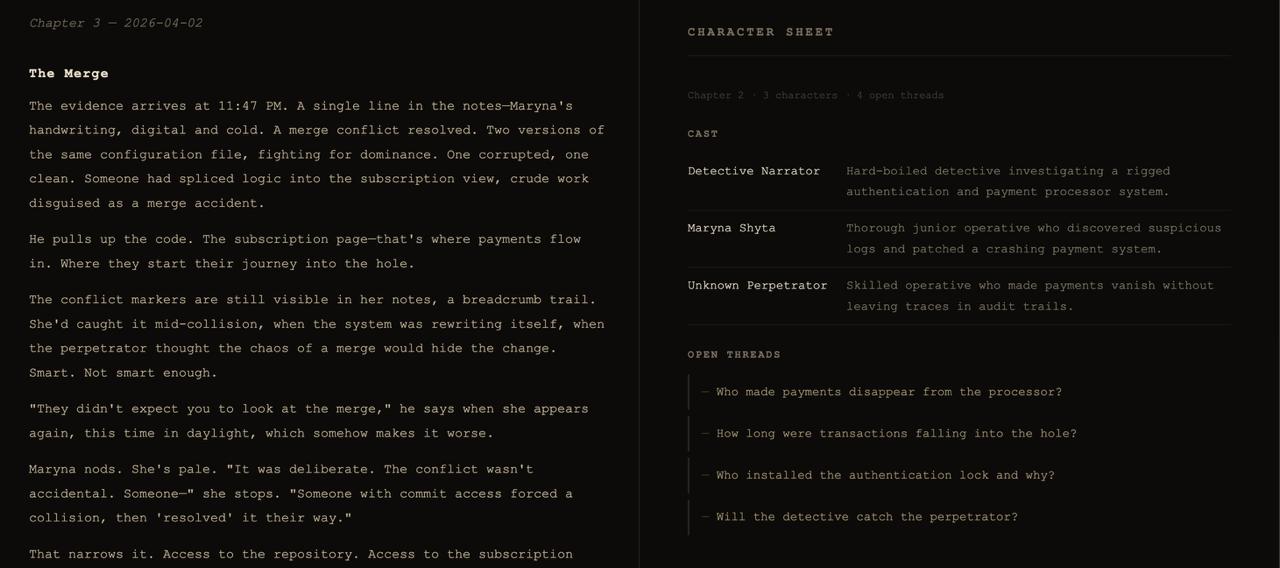
Every commit tells a story. This one wears a trench coat.
Noir Commits is a VS Code extension that reads your git commits and generates a living noir detective novel — chapter by chapter — powered by Claude AI.
Your developers become detectives. Your bugs become crimes. Your refactors become late-night re-examinations of cold case files.
Features
Generates a new noir story chapter from each git commit
Maintains narrative continuity — characters, open threads, and story arcs persist across chapters
Maps commit types to noir events: bugs are crimes, features are new leads, fixes close cases
Auto-trigger mode writes a chapter automatically after every commit
Story preview panel — dedicated dark-themed webview renders your story in noir style
Character sheet — tracks the full cast and open plot threads accumulated across chapters
Detective name — set your own alias; your real git author name is never sent to any AI provider
Requirements
An Anthropic API key. On first activation, the extension will walk you through setup.
Getting Started
Install the extension
A setup wizard runs automatically on first activation — choose your AI provider and set a detective alias
Open a git repository and run Noir Commits: Write Next Chapter
The chapter opens in the story preview panel and is also written to story.md in your workspace root.
Commands
Command
Description
Noir Commits: Write Next Chapter
Generate a chapter from the latest commit
Noir Commits: Skip Current Commit
Mark the latest commit as processed without writing a chapter
Noir Commits: Open Story Preview
Open the noir-themed story panel
Noir Commits: Show Character Sheet
View the full cast and open plot threads
Noir Commits: Toggle Auto-Generate After Commit
Enable or disable auto-generation after each commit
Noir Commits: Set Detective Name
Set or change your character alias in the story
Noir Commits: Set API Key
Store your Anthropic API key securely
Noir Commits: Remove API Key
Delete the stored API key
Settings
Setting
Default
Description
noirCommits.detectiveName
""
Your detective alias in the story — replaces your git author name
noirCommits.model
claude-haiku-4-5-20251001
Claude model — Haiku (fast, cheap) or Sonnet (richer prose)
noirCommits.autoTrigger
false
Automatically write a chapter after each commit
noirCommits.projectDescription
""
A short project description used as narrative backdrop
Privacy
Your git author name is never sent to any AI provider — use a detective alias instead
Commit messages, dates, and file-change summaries are sent to the selected AI provider to generate story text
Your API key is stored in VS Code SecretStorage (OS keychain) — never written to disk or sent anywhere except the Anthropic API. Uninstalling the extension does not remove the key — use Noir Commits: Remove API Key before uninstalling if you want it deleted
Story state is saved to .noir-commits-state.json in your workspace root — add it to .gitignore to keep it private
Generated story content is labeled as AI-generated in the preview panel and in story.md
To report an issue or unexpected output: open an issue
The city doesn't care about your sprint velocity. But it remembers every commit.