Ningk Dashboard
中文文档
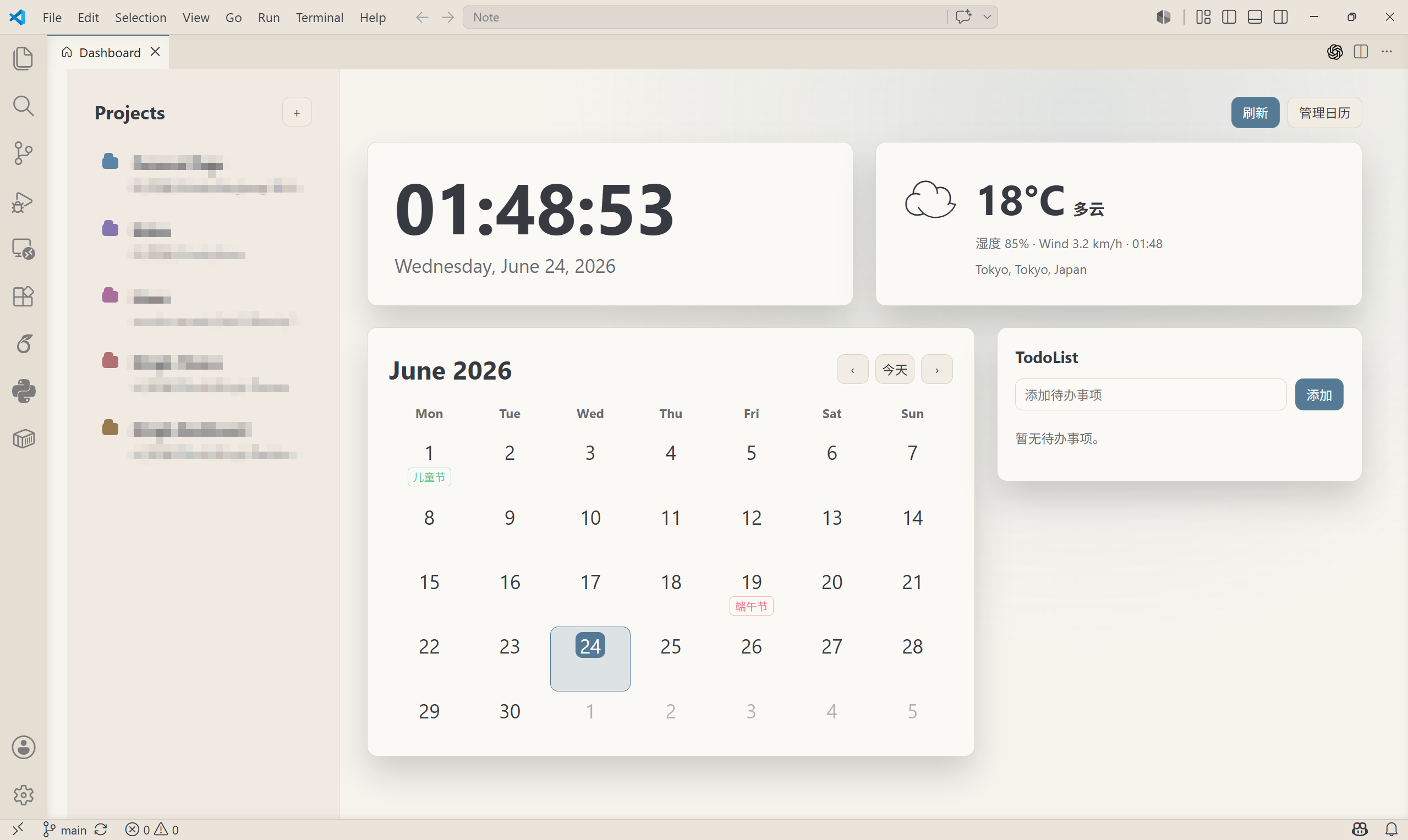
Ningk Dashboard is a personal startup dashboard for Visual Studio Code. It provides a project launcher, clock, weather, calendar subscriptions, built-in holiday support, and a simple TodoList in one VS Code webview. The background color follows the active VS Code theme.
Features
- Project launcher in the left sidebar.
- Add, edit, and remove projects from the dashboard UI without editing JSON by hand.
- Local clock and date based on the VS Code webview environment.
- Weather card powered by Open-Meteo, with automatic IP location and manual fallback coordinates.
- Monthly calendar with clickable dates.
- China mainland holiday support and custom calendar entries.
- Network iCalendar /
.ics subscriptions.
- Clickable calendar entries: open URLs when the event provides one, otherwise show details.
- Persistent TodoList stored in VS Code extension global state.
- Theme-aware UI using VS Code theme variables.
What changed
- Version 0.1.8: added an
Edit button beside the Projects + button so users without right-click access can edit paths or delete projects.
- Version 0.1.7: changed project right-click actions to an in-dashboard context menu that appears at the cursor, closer to the Windows context menu interaction.
- Version 0.1.6: replaced visible project edit/remove buttons with a right-click project action menu. Editing opens a folder picker, and deleting uses a VS Code confirmation prompt.
- Version 0.1.5: added project edit and remove support so broken or outdated paths can be fixed directly from the dashboard.
- Version 0.1.4: made auto open run only once per VS Code window session, so remote/Jupyter extension host reloads do not bring the dashboard back over the active editor.
- Version 0.1.3: reduced extension activation scope and restored existing dashboard webviews to prevent duplicate dashboards after VS Code restarts or extension host reloads, especially on Linux.
- Command and setting namespace is
ningkDashboard.*.
- Added
Ningk Dashboard: Add Project and a + button beside Projects.
- Removed placeholder-only cards and kept usable surfaces.
- Added selectable calendar dates and conditional day details.
- Added TodoList actions: add, complete, and delete.
- Cleaned release defaults: the published version does not include private local project paths.
Commands
Ningk Dashboard: OpenNingk Dashboard: RefreshNingk Dashboard: Manage CalendarsNingk Dashboard: Add Project
Manage projects
To add a project, use either method:
- Click the
+ button beside Projects.
- Run
Ningk Dashboard: Add Project from the command palette.
Click Edit beside Projects or right-click a project to edit its path or remove it. Editing opens a folder picker, and deleting asks for confirmation in VS Code. The extension writes entries to ningkDashboard.projects in VS Code settings.
Calendar
Use Ningk Dashboard: Manage Calendars to enable built-in China mainland holidays or add an iCalendar subscription.
Custom calendar item example:
{
  "ningkDashboard.calendarItems": [
    { "date": "2026-06-19", "title": "Release Day", "type": "event" }
  ]
}
Calendar subscription example:
{
  "ningkDashboard.calendarSubscriptions": [
    {
      "name": "Team Calendar",
      "url": "https://example.com/calendar.ics",
      "type": "event",
      "enabled": true
    }
  ]
}
Weather
Auto weather uses approximate IP location. If VPN or proxy affects the result, disconnect it and click Refresh, or use manual coordinates:
{
  "ningkDashboard.weatherLocation": "manual",
  "ningkDashboard.city": "Shanghai",
  "ningkDashboard.latitude": 31.2304,
  "ningkDashboard.longitude": 121.4737
}

