
Napper
API Testing, Supercharged.
Napper is a free, open-source API testing tool that runs from the command line and integrates natively with VS Code. Define HTTP requests as plain text .nap files, add declarative assertions, chain them into test suites, and run everything in CI/CD with JUnit output. As simple as curl for quick requests. As powerful as your own code — script in JavaScript, Python, F#, or C#.
Documentation | GitHub Repository | Releases
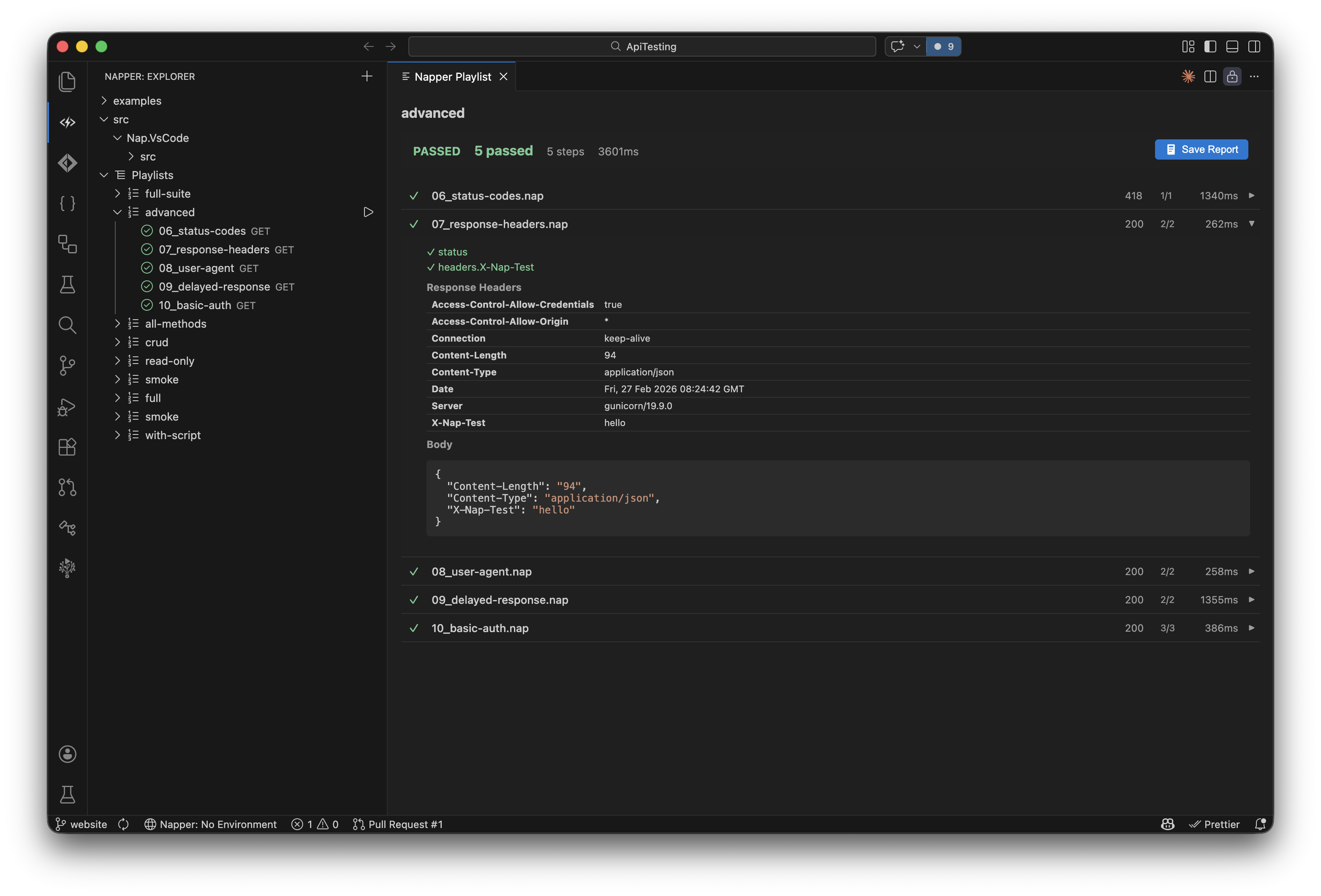
What can Napper do?
Everything you need for API testing. Nothing you don't.
- CLI First (
cli-run) -- The command line is the product. Run requests, execute test suites, and integrate with CI/CD pipelines from your terminal.
- VS Code Native (
vscode-extension) -- Full extension with syntax highlighting (vscode-syntax), request explorer (vscode-explorer), environment switching (vscode-env-switcher), and Test Explorer integration (vscode-test-explorer). Never leave your editor.
- Script in Any Language (
script-js, script-py, script-fsx, script-csx) -- Playlist steps and pre/post request hooks in JavaScript, Python, F#, or C#, on real runtimes (Node.js, Python 3, .NET) with full npm/PyPI/NuGet access — no sandbox. Scripts pass/fail by exit code; JavaScript and Python additionally get an injected ctx object (response, variables, ctx.set/ctx.fail/ctx.log).
- Declarative Assertions (
nap-assert) -- Assert on status codes (assert-status), JSON paths (assert-equals, assert-exists), headers (assert-contains), and response times (assert-lt) with a clean, readable syntax. No scripting required for simple checks.
- Composable Playlists (
naplist-file) -- Chain requests into test suites with .naplist files. Nest playlists (naplist-nested), reference folders (naplist-folder-step), pass variables between steps (naplist-var-scope).
- Plain Text, Git Friendly (
nap-file) -- Every request is a .nap file. Every environment is a .napenv file (env-file). Version control everything. No binary blobs, no lock-in.
Quick Start
Install the VS Code Extension
code --install-extension nimblesite.napper
Or grab the CLI binary
Download from the latest release.
How do you use Napper?
Minimal request
A .nap file can be as simple as one line:
GET https://httpbin.org/get
POST with body and assertions
[request]
method = POST
url = {{baseUrl}}/posts

[request.headers]
Content-Type = application/json
Accept = application/json

[request.body]
"""
{
  "title": "Nap Integration Test",
  "body": "This post was created by the Nap API testing tool",
  "userId": {{userId}}
}
"""

[assert]
status = 201
body.id exists
body.title = Nap Integration Test
body.userId = {{userId}}
[meta]
name = Get user by ID
description = Fetches a single user and asserts shape
tags = users, smoke

[vars]
userId = 42

[request]
method = GET
url = https://api.example.com/users/{{userId}}

[request.headers]
Authorization = Bearer {{token}}
Accept = application/json

[assert]
status = 200
body.id = {{userId}}
body.name exists
headers.Content-Type contains "json"
duration < 500ms

[script]
pre = ./scripts/auth.fsx
post = ./scripts/validate-user.fsx
Run from CLI
# Run a single request
napper run ./health.nap

# Run a full test suite
napper run ./smoke.naplist

# With environment + JUnit output
napper run ./tests/ --env staging --output junit
| Extension |
Purpose |
Example |
.nap |
Single HTTP request with optional assertions and scripts |
get-users.nap |
.naplist |
Ordered playlist of steps (requests, scripts, nested playlists) |
smoke.naplist |
.napenv |
Environment variables (base config, checked into git) |
.napenv |
.napenv.local |
Local secrets (gitignored) |
.napenv.local |
.napenv.<name> |
Named environment |
.napenv.staging |
.js / .py |
JavaScript / Python scripts — playlist steps and pre/post hooks, with an injected ctx |
setup.js |
.fsx / .csx |
F# / C# scripts — playlist steps and pre/post hooks (exit-code) |
setup.fsx |
Playlists
[meta]
name = JSONPlaceholder CRUD
description = Full create-read-update-delete lifecycle for posts

[steps]
../scripts/setup.fsx
./01_get-posts.nap
./02_get-post-by-id.nap
./03_create-post.nap
./04_update-post.nap
./05_patch-post.nap
./06_delete-post.nap
../scripts/teardown.fsx
Environments
.napenv (base, checked into git):
baseUrl = https://jsonplaceholder.typicode.com
userId = 1
postId = 1
.napenv.local (secrets, gitignored):
token = eyJhbGci...
apiKey = sk-secret-key
Select a named environment with --env:
napper run ./smoke.naplist --env staging
Variable priority (highest wins):
--var key=value CLI flags.napenv.local.napenv.<name> (named environment).napenv (base)[vars] in .nap/.naplist files
CLI Reference
Usage:
  napper run <file|folder>                              Run a .nap file, .naplist playlist, or folder (cli-run)
  napper check <file>                                   Validate a .nap or .naplist file (cli-check)
  napper generate openapi <spec> --output-dir <dir>     Generate .nap files from OpenAPI spec (cli-generate)
  napper help                                           Show this help

Options:
  --env <name>              Environment name (loads .napenv.<name>) (cli-env)
  --var <key=value>         Variable override (repeatable) (cli-var)
  --output <format>         Output: pretty, junit, json, ndjson (cli-output)
  --output-dir <dir>        Output directory for generate command (cli-output-dir)
  --verbose                 Enable debug-level logging (cli-verbose)
| Exit Code |
Meaning |
| 0 |
All assertions passed |
| 1 |
One or more assertions failed |
| 2 |
Runtime error (network, script error, parse error) |
| Feature |
Napper |
Postman |
Bruno |
.http files |
| CLI-first design |
Yes |
No |
GUI-first |
No CLI |
| VS Code integration |
Native |
Separate app |
Separate app |
Built-in |
| Git-friendly files |
Yes |
JSON blobs |
Yes |
Yes |
| Assertions |
Declarative + scripts |
JS scripts |
JS scripts |
None |
| Full scripting language |
JS, Python, F#, C# |
Sandboxed JS |
Sandboxed JS |
None |
| CI/CD output formats |
JUnit, JSON, NDJSON |
Via Newman |
Via CLI |
None |
| Test Explorer |
Native |
No |
No |
No |
| Free & open source |
Yes |
Freemium |
Yes |
Yes |
| No account required |
Yes |
Account needed |
Yes |
Yes |
Project Structure
my-api/
├── .napenv                    # Base variables (checked in)
├── .napenv.local              # Secrets (gitignored)
├── .napenv.staging            # Staging environment
├── auth/
│   ├── 01_login.nap
│   └── 02_refresh-token.nap
├── users/
│   ├── 01_get-user.nap
│   ├── 02_create-user.nap
│   └── 03_delete-user.nap
├── scripts/
│   ├── setup.fsx
│   ├── setup.csx
│   └── teardown.fsx
└── smoke.naplist
License
MIT

