Agentuino – Agentic coding for Arduino beginners
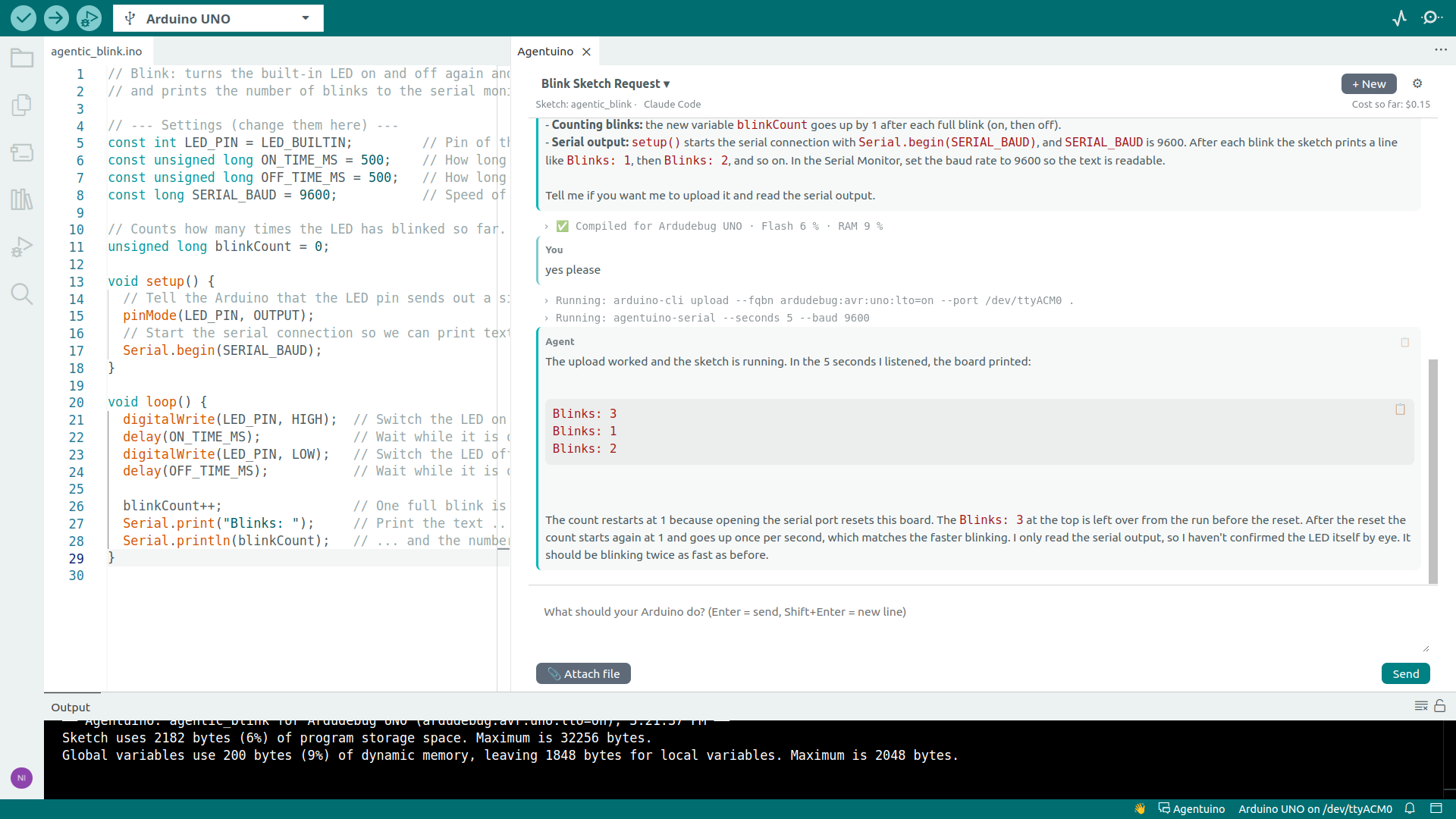
Agentuino brings agentic coding into the Arduino IDE 2.x and VS Code. You describe in a chat what your Arduino should do. An AI agent works directly in your sketch folder: it writes the code, compiles it, fixes its own errors and can even read what your board prints on the serial port. No copy and paste, no extra windows.
Agentuino drives the command line agents Claude Code, Mistral Vibe, Codex CLI (untested), Antigravity CLI (free with a Google account) and OpenCode (any provider, local models via Ollama included). It is the little sibling of AI.duino: no API keys, no feature menus, only the chat.
Englisch? Kein Problem: Agentuino spricht Deutsch, sobald deine Arduino IDE auf Deutsch eingestellt ist.
[!NOTE]
Agentuino is tested on Linux and Windows. macOS and Codex CLI are untested so far: please tell how it went in the issues, it works or not.
🆕 What's new?
- 25.11.2026 V1.3.0: see what changed after every task, a project list for your sketchbook, the agent reads the docs of your libraries, a settings menu and a calmer chat.
-- More news? Check the newsblog.
Features
Every sketch is a project
Like a project in Claude: several chats per sketch share your instructions, knowledge files and a project memory. The agent can look up earlier chats when you refer to them. Everything lives in a folder agentuino/ inside your sketch.
The agent compiles and fixes
After every task that changed code, Agentuino compiles the sketch itself and shows the result: ✅ with flash and RAM usage, or ❌ with the errors. On errors the agent gets the compiler output and fixes the code on its own, up to three runs per task. A failed check is repeated only when the code, the board or a library changed, not after every question. A missing library is never installed without your ok.
Undo with one click
Before every task Agentuino saves the code. ↶ next to your message brings back the state before that task, including files the agent created or deleted. The agent is told about the reset.
See what changed
After every task that changed code, a line lists the changed, new and deleted files. Click a file name and the IDE's diff editor shows it before the task and now, side by side.
Libraries the agent does not know
New or rare libraries are unknown to every agent. Agentuino lists the installed libraries your sketch includes, with their folders, so the agent reads their headers and examples instead of guessing functions.
All your projects at hand
📁 lists all Agentuino projects in your sketchbook, last used first. A click opens one in a new IDE window, @ mentions it in your message: "Do it like in project Schimpfolino." The agent may read other sketches when you refer to them, but changes files only in the current one.
Serial output for the agent
The agent can read what your board prints with Serial.println() for a few seconds and check whether the sketch really does what it should.
Debugging with ArduDebug
With ArduDebug installed, the agent can stop your sketch on the board at a line and look into the variables, without changing the code. It asks before it uploads a debug build and brings the normal sketch back when the bug is fixed.
Model and effort per chat
Below the input field every chat chooses its own model and effort. The model field suggests what the agent offers, the effort levels fit the model. A new chat starts with the choice of the last one.
Semantic anchors
Switch code rules on with a click, per sketch: beginner-friendly comments, no magic numbers, non-blocking code, save RAM, interrupt-safe and more. Create your own anchors for rules you need again and again. New sketches start with your default selection.
Safe by default
The agent never uploads on its own, because a board can drive motors or relays. Only if you switch on the semantic anchor Upload automatically for a sketch, it uploads after every change that compiles. It installs libraries and board packages only after asking.
More
- Attach files to a message, e.g. a photo of your breadboard or a datasheet
- Input history with ↑ / ↓
- Every IDE window has its own board: Agentuino takes board and port from the Arduino IDE itself
- Rename chats in the chat list
- The chat follows new entries only while you are at the end; ↓ brings you back. The agent's steps fold into one line, the running time shows that it is still at work
- Everything else in ⚙ → Settings, including the paths of the agents and arduino-cli
- German, English, French, Spanish and Italian, following the IDE language
- Agent options are kept up to date with a configuration file from this repository. Agentuino asks before it downloads a new one.
Screenshot

Requirements
- Arduino IDE 2.x or VS Code (Linux, Windows or macOS)
- One agent, installed and logged in:
| Agent |
Install |
Note |
| Claude Code |
curl -fsSL https://claude.ai/install.sh \| bash (Windows: irm https://claude.ai/install.ps1 \| iex) |
Claude subscription or API account |
| Mistral Vibe |
curl -LsSf https://mistral.ai/vibe/install.sh \| bash (Windows: uv tool install mistral-vibe) |
Version 3 or newer |
| Codex CLI |
npm install -g @openai/codex |
Experimental, ChatGPT account |
| Antigravity CLI |
curl -fsSL https://antigravity.google/cli/install.sh \| bash (Windows: irm https://antigravity.google/cli/install.ps1 \| iex) |
Free with a Google account (weekly limits) |
| OpenCode |
curl -fsSL https://opencode.ai/install \| bash (Windows: npm install -g opencode-ai) |
Version 1.18 or newer (not 2.x). Many providers, local models via Ollama |
If no agent is found, the chat shows these commands and checks again after you installed one.
[!NOTE]
Claude Code, Mistral Vibe and Codex CLI use your subscription or API account, Antigravity CLI is free with weekly limits, OpenCode costs whatever your provider charges (nothing for local models). The chat shows the cost of the current chat when the agent reports it.
Installation
Arduino IDE
- Download
agentuino-<version>.zip from the latest release and unpack it.
- Run the installer in it:
Linux
chmod +x install_agentuino_linux.sh
./install_agentuino_linux.sh
macOS (untested)
chmod +x install_agentuino_macos.sh
./install_agentuino_macos.sh
Windows
Run install_agentuino_windows.bat.
- Restart the Arduino IDE.
Agentuino checks for new versions at startup and shows a notice with a link to the release.
VS Code
Install Agentuino from the VS Code Marketplace. ArduDebug comes along and sets up its board package when you open the chat for the first time. You can remove ArduDebug on its own, Agentuino then works without debugging.
In VS Code, Agentuino needs arduino-cli in your PATH, or its path in the setting agentuino.arduinoCliPath.
Usage
- Click Agentuino in the status bar or press
Ctrl+Alt+A. The chat opens next to your code.
- Describe what your Arduino should do, e.g. "Let the LED blink faster when I press the button on pin 2."
- The chat title opens the list of all chats of this sketch, + New starts a new one.
- 📁 lists your Agentuino projects: click to open, @ to mention one in your message.
- ⚙ opens the project instructions, semantic anchors, knowledge files, project memory, agent selection, settings and the about page.
The project folder
MySketch/
├── MySketch.ino
└── agentuino/
├── AGENTS.md # your instructions + an automatic section (board, commands, rules)
├── memory.md # what the agent learned about this project
├── knowledge/ # datasheets, pinouts, notes the agent may read
├── chats/ # one .json and one readable .md per chat
├── attachments/ # files attached to messages
├── backups/ # the saved code for ↶
├── config.json # project settings
└── .gitignore # keeps the folder out of Git
The folder is created with the first chat message. Your sketch works without it. If your sketches live in a Git repository, the folder stays out of it; switch this off in ⚙ → Settings → Git to share chats and instructions.
Security
By default the agent runs with full permissions (agentuino.permissionMode = bypassPermissions): it can edit files and run commands in your user account without asking, which compiling needs. The rules in AGENTS.md let it change files only in the sketch folder and read only libraries and the sketches you refer to, but they are instructions, not a sandbox. See SECURITY.md.
Settings
All settings except the models can be changed in ⚙ → Settings.
| Setting |
Description |
agentuino.language |
UI language (auto, de, en, es, fr, it) |
agentuino.agent |
Agent for new chats: auto, claudecode, codex, vibe, antigravity, opencode |
agentuino.compileCheck |
Compile after every task that changed code (default on) |
agentuino.permissionMode |
bypassPermissions (default), acceptEdits or auto |
agentuino.gitignoreAll |
Keep the agentuino/ folder of a sketch out of Git (default on); off = only backups and attachments are ignored |
agentuino.claudePath / codexPath / vibePath / antigravityPath / opencodePath |
Agent path, empty = auto-detect |
agentuino.claudeModel / codexModel / vibeModel / antigravityModel / opencodeModel |
Model for new chats, empty = agent default. Each chat can choose its own model and effort below the input field. OpenCode takes provider/model, e.g. ollama/qwen2.5-coder |
agentuino.checkForUpdates |
Check for new versions and agent configurations at startup; nothing is stored without asking (default on) |
agentuino.arduinoCliPath |
Path to arduino-cli, empty = the one bundled with the IDE |
Uninstall
⚙ → Uninstall Agentuino removes the extension, its settings, your own semantic anchors, the downloaded agent configuration and the debug builds. The Extension Manager does the same through uninstall.json. The agentuino/ folders in your sketches are kept; delete them by hand if you don't need them anymore.
For maintainers
Before publishing a changed agentuino/extension/config/agentConfigs.json, check it against the installed agents. Every option must appear in their help text:
node .github/scripts/check-agent-configs.js [--codex=<path>] [--vibe=<path>] [--antigravity=<path>] [--opencode=<path>]
The workflow Check agent configs does the same on GitHub: it installs all agents with the commands from the file and runs the check, on every change of the file and every Monday. A red run means an agent changed its options or its install command.
The tests run the extension in a fake IDE with fake agents and a fake arduino-cli, so they need neither a board nor a login. Node 22 or newer, no dependencies:
node --test tests/*.test.js
The workflow Tests runs them on every push.
.github/scripts/package.sh builds the VSIX and the release zip into dist/, puts the VSIX into installer/ and writes installer/version.json. The update check reads only that file, so main may carry a newer version in package.json without announcing it.
Content
├── agentuino/ The extension (VSIX content)
├── installer/ Installer scripts and the VSIX of the current release
└── .github/ Funding, maintenance scripts
- AI.duino – the big sibling with many AI providers and features
- ArduDebug – breakpoint debugging for AVR boards in the Arduino IDE; Agentuino uses it for debugging by the agent
💙 Support Agentuino
Agentuino is free and open source. If you like it, a coffee keeps it going:

License
Apache License 2.0, © 2026 Monster Maker