Skip to content
| Marketplace
Sign in
Visual Studio Code>SCM Providers>Claude Code RedlineNew to Visual Studio Code? Get it now.
Claude Code Redline

Claude Code Redline

Oleksii Nikiforov

|
1 install
| (0) | Free
Review agent diffs in VS Code and send comments back to Claude Code.
Installation
Launch VS Code Quick Open (Ctrl+P), paste the following command, and press enter.
Copied to clipboard
More Info

Redline

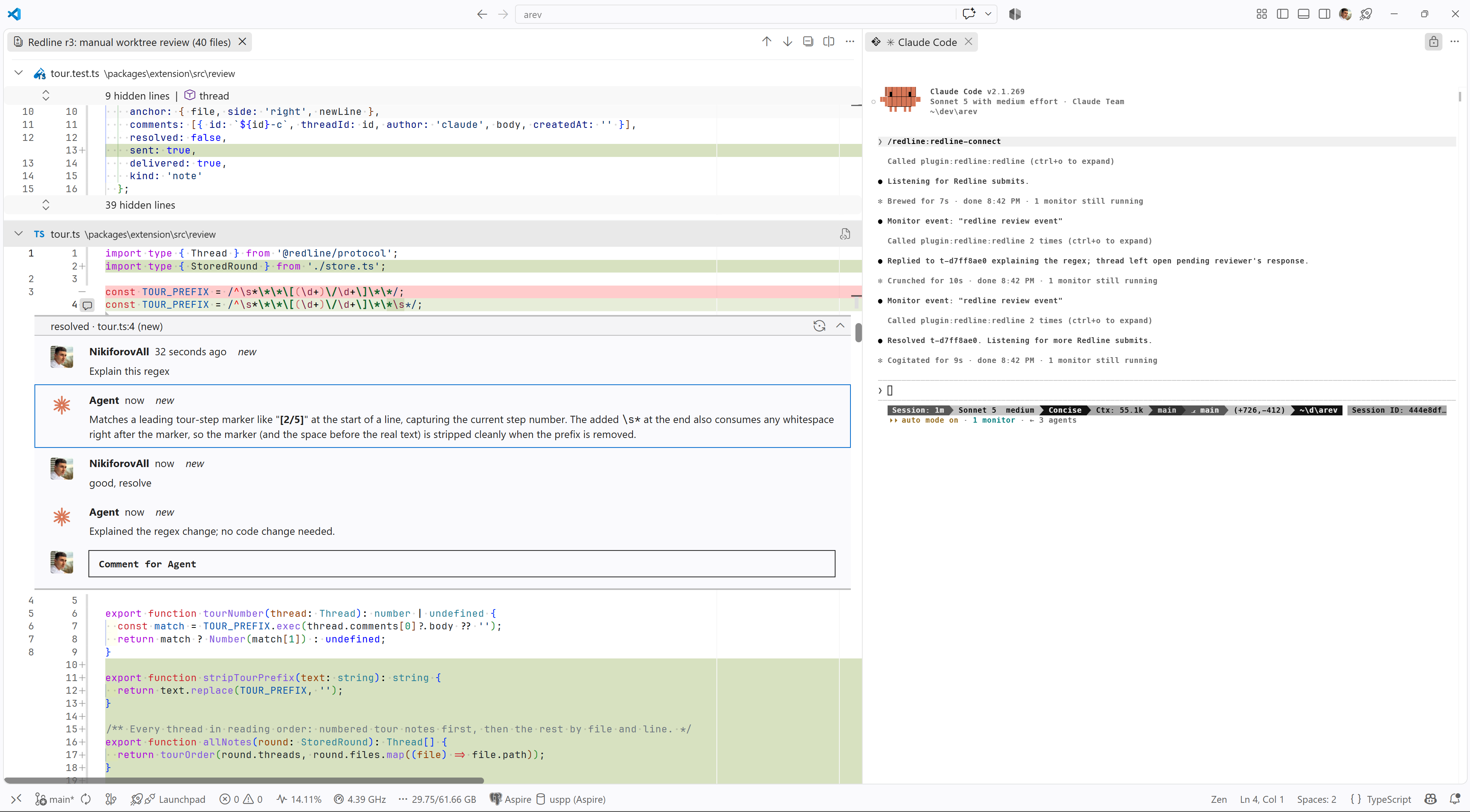
Code review with Claude Code, inside VS Code. Claude posts its review of a diff as comment threads on the lines. You answer, add threads of your own, and submit. Claude reads every thread, edits the code, and replies in place.

Docs, guide, and demo videos: nikiforovall.blog/redline.

A review round in VS Code: the diff with Claude's notes, a reviewer question with Claude's reply, and the Claude Code session that woke on submit

This extension is the VS Code half and does nothing on its own. On first activation it opens a Get started with Redline walkthrough whose first step installs the Claude Code plugin with one button. By hand, from Claude Code:

/plugin marketplace add nikiforovall/redline
/plugin install redline@redline

Then type /redline:redline-tour in Claude Code. It opens its current diff here with a numbered walkthrough and waits for your comments. To review a diff without Claude's notes, run Redline: Compare… in VS Code.

Commands

Every chord starts with Ctrl+Alt+R (Cmd+Alt+R on macOS). Press the leader, release, then the key.

Command Keys
Open latest round Ctrl+Alt+R O
Open a round from history Ctrl+Alt+R H
Submit review Ctrl+Alt+R S
Compare… Ctrl+Alt+R C
Next / previous note Ctrl+Alt+] / Ctrl+Alt+[
Send thread to agent Ctrl+Alt+R Enter
Resolve or reopen thread Ctrl+Alt+R R

Edit and delete your own comments from the comment's title bar.

Settings

redline.avatar: github (default) shows your GitHub login and avatar on comments, none shows the OS user name.

Privacy

Everything stays on your machine. The extension and the plugin talk over 127.0.0.1 with a token from a lock file under ~/.redline/. Rounds live in VS Code workspace storage. There is no telemetry. The one network request fetches your GitHub avatar, and redline.avatar: none stops it.

The guide walks one round end to end. The reference lists every command, setting, and MCP tool. Source is on GitHub.

  • Contact us
  • Jobs
  • Privacy
  • Manage cookies
  • Terms of use
  • Trademarks
  • Your Privacy Choices
  • Consumer Health Privacy
© 2026 Microsoft