TLog for Visual Studio Code
YAML-first test management for the tlog workflow.
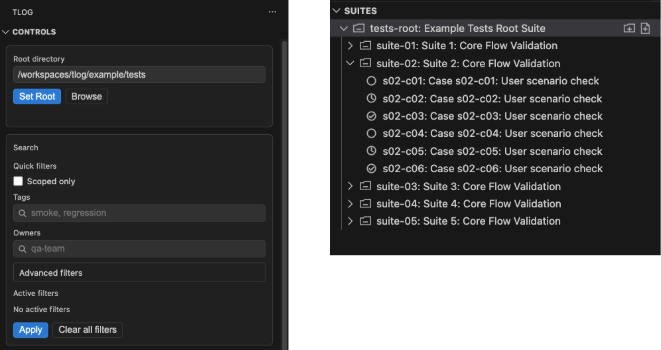
TLog adds a dedicated Activity Bar view for browsing suites/cases, filtering execution progress, editing YAML through a structured manager UI, and validating suite/case files in real time.
Why TLog
- Keep test management data in plain YAML files.
- Track progress with
todo / doing / done status and issue states.
- Navigate quickly between suites, cases, and related entities.
- Edit large case/suite payloads with form-style UI instead of manual YAML edits.
Requirements
- VS Code
^1.90.0
- A workspace containing TLog YAML files (
index.yaml and case *.yaml files)
Quick Start
- Open your project folder in VS Code.
- Open the
TLog view from the Activity Bar.
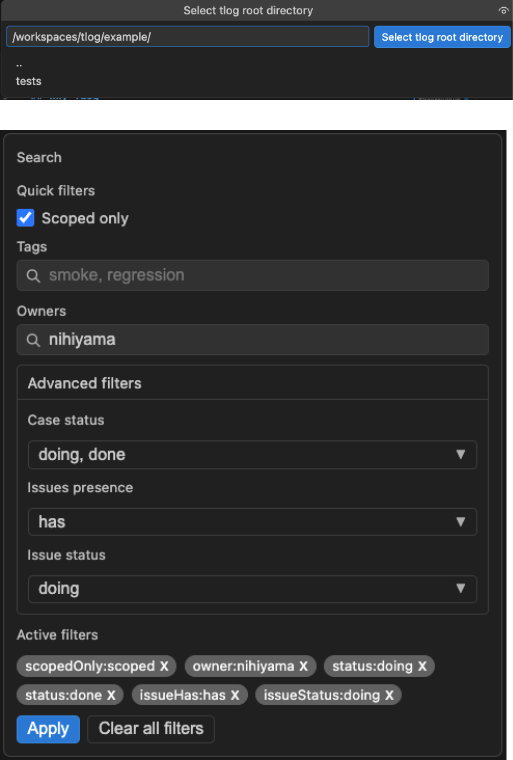
- Set a TLog root directory from
Controls:
Set Root with a typed path, orBrowse to pick a folder.
- Use the
Suites tree to open a suite/case in TLog Manager.
- Edit fields in the manager. Changes are auto-saved to YAML.
Core Features
The extension contributes a custom Activity Bar container named TLog with two views:
Controls (webview)
- Root directory selection
- Search/filter UI
- Active filter chips with one-click removal
Suites (tree view)
- Hierarchical suite/case browsing from filesystem
- Status-based icons
- Context menu actions for creation, opening YAML, deletion, etc.
Tree behavior highlights:
- Suite nodes are discovered from
index.yaml and *.suite.yaml.
- Case nodes are discovered from sibling
*.yaml files.
- Suite icon changes when all direct cases are
done.
- Clicking a suite/case opens
TLog Manager for that entity.
2) Powerful Filtering
Filters are applied from the Controls webview and stored in workspace state:
scopedOnlytags (comma-separated)owners (comma-separated; matched against suite owners)- Case status:
todo, doing, done
- Issue presence:
has, none
- Issue status:
open, doing, resolved, pending
Filter UX details:
- Advanced filters use multi-select dropdown panels.
- Active filters are shown as chips and removable individually.
Clear all filters resets everything to defaults.
3) TLog Manager (Webview Panel)
TLog Manager is a persistent editor panel (retainContextWhenHidden: true) with two editing modes.
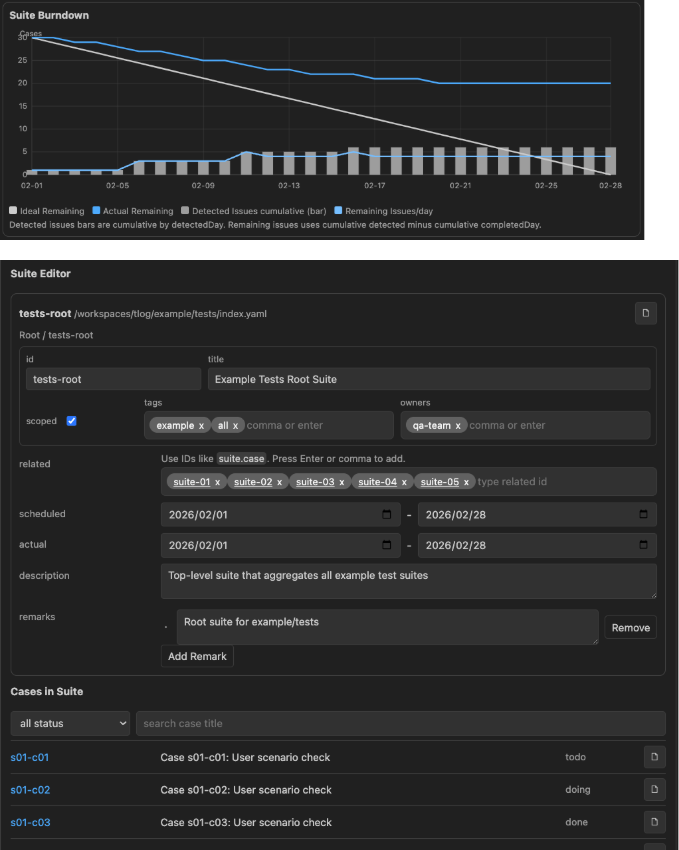
Suite editor
Editable fields include:
title, descriptiontags, owners, scopedduration.scheduled.start/endduration.actual.start/endrelatedremarks
Additional suite tools:
- YAML open button
- Suite burndown visualization
- Embedded list of cases in the suite with status filter + text search
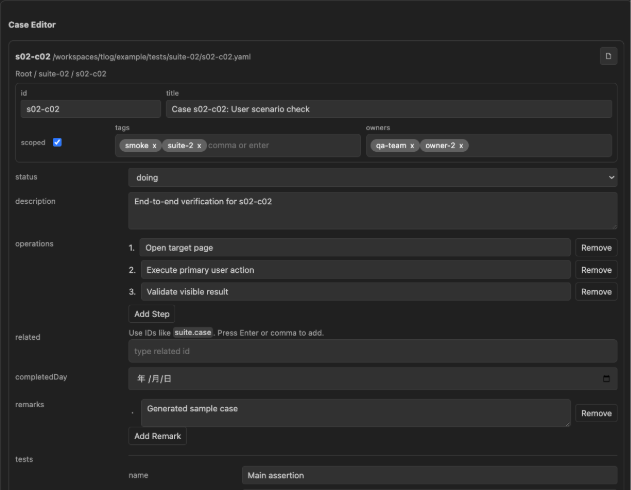
Case editor
Editable fields include:
title, description, scoped, statustagsoperations (ordered list)relatedcompletedDay (date input)remarkstests[]
name, expected, actual, trails[], status(pass|fail|skip|block|null)
issues[]
incident, owners[], causes[], solutions[], statusdetectedDay, completedDay, related[], remarks[]
Editor behavior:
- Save is auto-triggered on field changes (debounced).
- Save status is shown in panel header (
saving, saved, error).
- Related references are normalized against known IDs.
4) Diagnostics for YAML Files
The extension validates YAML on open/save/change:
- Suite files (
index.yaml or *.suite.yaml) are validated as Suite
- Other
.yaml files are validated as TestCase
- Errors are reported as VS Code diagnostics
From a suite/case node:
Open Related resolves related IDs from the workspace index- Choose a target from quick pick
- Open the related YAML directly
6) Safe Deletion
Delete from tree context menu:
- Case: deletes YAML file
- Suite: deletes whole suite directory recursively
- Uses Trash first, falls back to hard delete only if trash is unavailable
Commands
The extension registers these operational commands:
tlog.selectRoot (TLog: Set Root)tlog.searchTags (TLog: Search Tags)tlog.searchOwners (TLog: Search Owners)tlog.clearSearch (TLog: Clear Search)tlog.createSuite (Create Suite)tlog.createCase (Create Case)tlog.openManager (TLog: Open Manager)tlog.refreshTree (TLog: Refresh Tree)tlog.showSuiteStats (TLog: Show Suite Statistics)tlog.openRelated (TLog: Open Related)tlog.openRawYaml (Open YAML)tlog.deleteNode (Delete)
Context menu commands are available in the Suites tree for suite/case nodes.
Settings
tlog.scopeMode: recursive | currentOnly (default: recursive)
File Model Assumptions
- Root folder must contain suite files (
index.yaml and/or *.suite.yaml).
- Cases are YAML files in suite directories.
- Entity IDs must match
[A-Za-z0-9_-]+ when creating new suite/case.
- Duplicate IDs are rejected at creation time.
Development
From packages/vscode-extension:
npm run typecheck
npm run test
npm run build
Packaging and release helpers:
npm run package:vsix
npm run publish:precheck
npm run publish:marketplace
Known Gaps (Current Implementation)
tlog.filterCases is contributed in package.json but not currently registered in src/extension.ts.tlog.scopeMode is contributed as a setting but not currently consumed in runtime logic.
License
See LICENSE.

