Smart Commit Copilot
Review staged changes, generate or refine commit messages, review GitHub pull requests and GitLab merge requests, prepare PR/MR content, and commit with confidence using LLM-powered checks inside VS Code-compatible editors.
Smart Commit Copilot turns the Source Control view into a configurable Git workflow assistant. It reads the staged diff, can generate or refine the commit message, validates rules such as Conventional Commits, Semantic Commits, Gitmoji, ticket IDs, and custom patterns, reviews the changes with LLM-powered checks, then optionally creates the local commit and pushes the current branch after the review passes. You bring your own model service; Smart Commit Copilot stays provider-agnostic at the workflow layer.
Beyond the main review-and-commit flow, it also includes one-off review, commit-message-only generation, local pass history, AI work reports, Markdown PR summaries, GitHub pull request / GitLab merge request creation from the current branch, and URL-driven PR/MR review with inline comments, summary comments, optional approval, and guarded auto-merge.
Best fit for teams and developers who want:
- AI-assisted code review before each Git commit or push
- AI-assisted review for existing GitHub PRs and GitLab MRs without leaving the editor
- better commit messages directly in the Source Control view
- commit policy enforcement for Conventional Commits, Semantic Commits, Gitmoji, ticket IDs, and custom rules
- freedom to choose the LLM service—OpenAI-compatible providers and gateways, Anthropic Messages–compatible endpoints, or Cursor Agents—without locking the workflow to a single vendor
- repository-specific review and commit-message behavior without changing global editor settings
- local work history, AI-generated work reports, PR/MR preparation, and PR/MR follow-up actions in the same editor flow
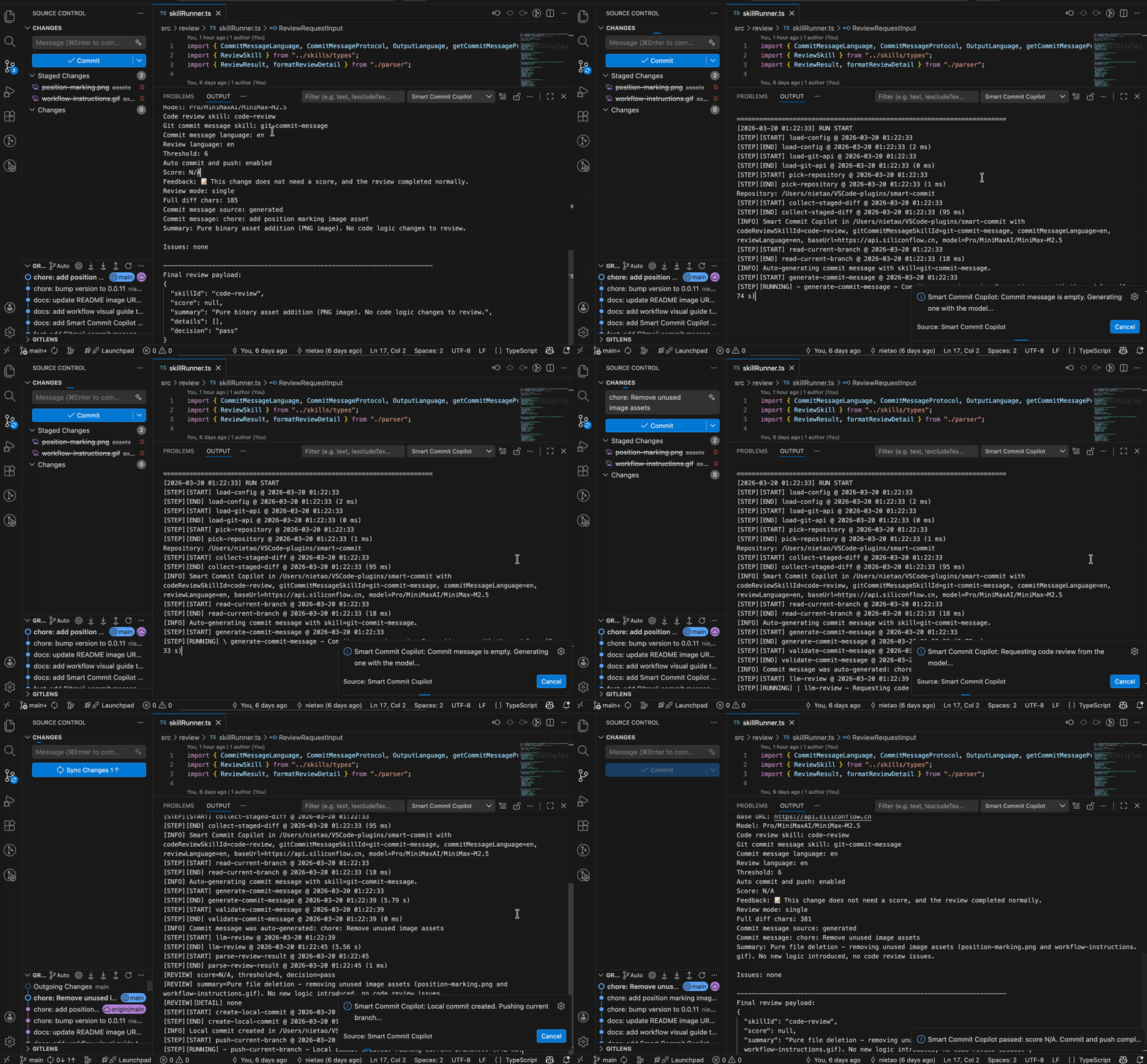
See the workflow in action:
Why Use Smart Commit Copilot
- Choose your LLM backend as a first-class product capability: switch
smartCommit.llmProvider among OpenAI-compatible chat completions (including gateways/proxies), Anthropic Messages API–compatible endpoints, and Cursor Agents—review, commit messages, PR/MR flows, and work reports keep the same behavior.
- Keep API keys and PR/MR tokens out of settings JSON and logs: store them in VS Code Secret Storage, redact them from errors, and never send PR/MR auth tokens to the LLM.
- Catch risky, unclear, or low-confidence edits before they become a local commit or remote push.
- Turn the staged diff into a useful commit message, or refine a rough draft while preserving typed prefixes and ticket-like IDs when configured.
- Keep team commit rules consistent across repositories with protocol validation, branch ticket injection, ticket requirements, and custom regular-expression checks.
- Use the same editor workflow for review-only checks, message-only generation, full review-and-commit runs, and optional push/PR follow-up.
- Review an existing GitHub PR or GitLab MR from its URL, publish severity-filtered summary and inline comments, and optionally approve or merge after the review passes.
- Reduce PR and work-report preparation time with generated Markdown summaries, local pass history, and AI reports built from successful Smart Commit runs.
- Customize review behavior with built-in language/domain skills, local
SKILL.md directories, prompt tuning, and repository-specific JSON config.
Features
Review gate and review output
- Scored gate: Reviews staged Git changes before commit. The final score is compared to a configurable threshold (0–10); when the score is less than or equal to that threshold, the flow stops before commit.
- Large-diff handling: Automatically switches to chunked review for large diffs and then condenses the result into a readable summary.
- Structured responses: If a model response does not match the expected review protocol, Smart Commit Copilot can request automatic correction retries. The default is three extra repair or regeneration attempts, and you can configure up to ten retries with
smartCommit.llmResponseCorrectionRetryCount. A mismatched review language can use the same correction flow.
- Review language: Generated review text can follow a chosen language (
zh-cn, zh-tw, en, de, fr, es, it, pt, tr, id, hi, ru, ko, ja), independent of commit-message language settings.
Commit messages and policy
- Commit message assistance: Generates a commit message automatically when none is provided, when auto-generation is enabled.
- Hybrid refinement: When hybrid generation is enabled, treats the SCM input as a draft and asks the commit-message skill for the final message using the configured structure; existing typed prefixes from Conventional Commits or Semantic Commits and ticket-like IDs in the draft can be preserved while the summary wording is refined.
- Built-in message styles: Choose between Conventional Commits, Semantic Commits, and Gitmoji via the bundled commit-message skills.
- Team policy enforcement: Validates messages against the selected skill protocol, optional global Conventional Commits requirements, optional ticket ID injection from the current branch, optional ticket-like ID format checks, and optional custom regular expressions.
- Commit-message language: Built-in commit-message skills can target a chosen language (
zh-cn, zh-tw, en, de, fr, es, it, pt, tr, id, hi, ru, ko, ja).
Skills and repository customization
- Independent skills: Separate selectable skills for code review and for commit message generation.
- Specialized review skills: Optional built-in domain skills (for example
frontend-code-review, mobile-code-review, python-code-review, golang-code-review, java-code-review, php-code-review, rust-code-review, c-code-review, cpp-code-review, and csharp-code-review) share a lightweight diff-classification step. When the staged diff does not match the skill’s target domain, the model falls back to generic review rules without changing your selected skill ID.
- Repository-specific customization: Built-in skills, local
SKILL.md directories that can override built-in IDs when configured, multiline prompt tuning on top of the selected skill, and an optional JSON config file layered on workspace and user settings.
- Multiple LLM providers: Bring your own model service. Switch via
smartCommit.llmProvider among OpenAI-compatible chat completions (including gateways/proxies), Anthropic Messages API–compatible endpoints, and Cursor Agents—same review-and-commit product surface either way; optional extraHeaders for provider-specific requirements.
- Timeouts: Configurable limits for LLM requests (
requestTimeoutMs) and for git push, including upstream retry (gitPushTimeoutMs).
- SCM integration: Toolbar and repository-row actions in the Source Control view when Git is the provider; run Smart Commit Copilot: Start Commit Workflow from the command palette as well.
- Run control and feedback: Smart Commit Copilot: Open Review Output for detailed logs; Smart Commit Copilot: Cancel Current Run to stop an in-flight run. Native progress and result notifications can be turned off (
showNativeNotifications) in favor of status bar and output-channel feedback.
- Optional auto-staging: When enabled, if you have local changes but nothing staged, Smart Commit Copilot runs
git add -A at the repository root before reading the staged diff. When disabled, stage changes manually before running the command.
- Optional commit and push: After a passing review, can create the local commit and optionally push the current branch.
- Optional local pass history: Can write pass-only history records to a local
pass-history.jsonl file for later review or work-log writing. This feature is disabled by default and never adds extra LLM requests.
- AI work reports from pass history: Can generate daily, yesterday, weekly, last-week, monthly, last-month, quarterly, last-quarter, yearly, last-year, and custom date-range Markdown reports from the shared
pass-history.jsonl file (all recorded repositories in that file, not one selected repo) and automatically open the generated file.
- Optional PR summaries: Can generate a Markdown pull request description from the reviewed staged diff after the Smart Commit flow passes. This feature is disabled by default and does not create or update remote pull requests.
- Optional PR/MR creation: Can create a GitHub pull request or GitLab merge request from the current branch to a configured target branch, either manually or after a successful Smart Commit push. This feature is disabled by default and failures never change the completed commit/push result.
- PR/MR list fetch: Can fetch open GitHub PRs or GitLab MRs related to the authenticated account (
account, default) or only from Git repositories in the current workspace (workspace). Both scopes return PRs/MRs for the authenticated account only, filtered by relationship kinds created, assigned, and reviewer. Results appear in the Smart Commit Copilot output channel with a QuickPick to open a selected URL.
- Existing PR/MR review: Can review a GitHub PR or GitLab MR from its URL, fetch the platform diff through the API, reuse the selected code-review skill and large-diff handling, publish severity-filtered inline comments and summary comments, skip clean-pass comment noise by default, and optionally approve or merge when configured gates pass.
- Transparent logs: Writes detailed execution logs to the output panel.
Use Cases
- Before opening a pull request: Review staged changes, improve the commit message, and optionally generate a Markdown PR description before reviewers see the branch.
- When your team enforces commit standards: Keep Conventional Commits, Semantic Commits, Gitmoji, ticket IDs, or custom validation patterns consistent across repositories.
- When commit messages are often rushed: Generate a clear message from the staged diff, or run
Smart Commit Copilot: Generate Commit Message Only to update the Source Control input without committing.
- When you want a review but not a commit: Run
Smart Commit Copilot: Review Only to review the staged diff without commit-message generation, commit-message validation, local commit, or remote push for that run.
- When diffs are large or mixed: Use chunked review to inspect staged changes that would otherwise be too large for a single request.
- When PR/MR creation is repetitive: Create a GitHub PR or GitLab MR from the current branch manually, or let Smart Commit Copilot try it after a successful push.
- When you need an open PR/MR inbox: Fetch open PRs/MRs related to your authenticated account (across the platform or limited to repositories in the current workspace), then open one from QuickPick.
- When existing PRs/MRs need a quick second pass: Paste a GitHub PR or GitLab MR URL to review the platform diff, post actionable comments only for selected severities, and optionally approve or merge after the review and merge-safety checks pass.
- When you need work logs: Save local pass-history records and generate daily, weekly, monthly, quarterly, or yearly Markdown reports from completed Smart Commit runs.
- When each repository has different rules: Load specialized review skills, local skills, prompt tuning, or repository-specific JSON config without changing global editor settings.
How It Works
Smart Commit Copilot follows this workflow:
- Collect the staged diff from
git diff --cached. If the index is empty, smartCommit.autoStageWhenNothingStaged (default true) can run git add -A at the selected repository root and collect the staged diff again.
- For the main workflow, prepare the commit message. Smart Commit Copilot can generate one when the input is empty, refine an existing draft when hybrid generation is enabled, or leave a manually typed message unchanged.
Review Only skips this step.
- For the main workflow, validate the final message before review. Validation can include the selected skill protocol, global Conventional/Semantic/Gitmoji rules, optional branch ticket injection, required ticket-like IDs, custom regex, and the configured message structure.
Review Only skips this step.
- Run code review with the selected review skill. Large diffs automatically switch to chunked review, then Smart Commit Copilot summarizes the chunk results without overriding the gate decision.
- Compare the final review score with
smartCommit.threshold. A blocked review stops before commit and keeps the commit message available for follow-up edits.
- For the main workflow, optionally create the local commit and optionally push the current branch.
Review Only always stops after the review result.
- If pass history is enabled, write or update a local
pass-history.jsonl record when the configured successful stage is reached.
- If staged-change summary generation is enabled, write a Markdown PR summary after the original successful action completes.
- If PR/MR auto-creation is enabled and the push succeeds, create a GitHub PR or GitLab MR from the current branch to the configured target branch. PR/MR failures are reported as warnings and do not change the completed commit/push result.
Quick Start
Use this checklist for the shortest path from install to first successful run:
Open a Git repository in the editor.
Open the Command Palette and run Smart Commit Copilot: Set API Key to store your provider API key in VS Code Secret Storage.
Open Preferences: Open User Settings (JSON) and add:
- Optionally set
smartCommit.llmProvider if you are not using the default openaiCompatible service.
smartCommit.baseUrlsmartCommit.model
Stage the files you want to review and commit, or rely on the default smartCommit.autoStageWhenNothingStaged setting (true) so Smart Commit Copilot stages all working tree changes when the index is empty.
Optionally type a commit message in the Git commit input box.
Run Smart Commit Copilot: Start Commit Workflow.
Use the highlighted button in the Source Control panel if you want to launch Smart Commit Copilot from the Git repository view:
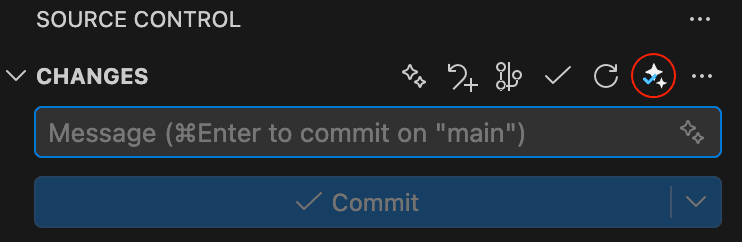
Open Smart Commit Copilot: Open Review Output if you want detailed logs.
Useful next steps:
- Run
Smart Commit Copilot: Review Only when you want code review without commit-message handling, commit creation, or push for just one run.
- Run
Smart Commit Copilot: Generate Commit Message Only when you only want to fill or refine the Source Control commit input.
- Enable
smartCommit.enablePassHistory and run Smart Commit Copilot: Generate Work Report when you want local work-log records and AI-generated Markdown reports.
- Enable
smartCommit.enableStagedChangeSummary when you want a Markdown PR description generated after a successful Smart Commit run.
- Configure
smartCommit.pullRequestCreationTargetBranch, then run Smart Commit Copilot: Set Pull Request / Merge Request Auth Token and Smart Commit Copilot: Create Pull Request / Merge Request when you want Smart Commit Copilot to create GitHub PRs or GitLab MRs.
- Run
Smart Commit Copilot: Set Pull Request / Merge Request Auth Token, then Smart Commit Copilot: Fetch My Pull Request / Merge Request List when you want to list open PRs/MRs for your account or current workspace.
- Run
Smart Commit Copilot: Set Pull Request / Merge Request Auth Token, then Smart Commit Copilot: Batch Review My Pull Requests / Merge Requests when you want to batch-review open PRs/MRs (default: assigned + reviewer; optionally include created).
- Run
Smart Commit Copilot: Set Pull Request / Merge Request Auth Token, then Smart Commit Copilot: Review Pull Request / Merge Request when you want to review an existing GitHub PR or GitLab MR from its URL (or several same-platform URLs separated by commas).
Important Defaults and Boundaries
smartCommit.autoStageWhenNothingStaged defaults to true.- When it is
true, an empty index with local changes triggers git add -A in the selected repository before review. When it is false, the index must already include the changes you intend to commit—stage them before running Smart Commit Copilot.
smartCommit.autoCommit defaults to true.smartCommit.autoPush defaults to true.- That means the main workflow creates the local commit after a passing review and then runs
git push.
- If the current branch has no upstream branch yet, Smart Commit Copilot automatically retries with
git push --set-upstream origin <current-branch>.
- Cancelling a running command also cancels an in-flight
git push or automatic upstream retry.
- If the local commit already succeeded before cancellation or push timeout, the commit stays in your local repository and you can run
git push manually later.
smartCommit.enablePassHistory defaults to false.smartCommit.enableStagedChangeSummary defaults to false.smartCommit.autoCreatePullRequestAfterPush defaults to false.- PR/MR creation uses GitHub/GitLab API tokens and remote compare APIs. It does not run
git fetch, rewrite local branches, roll back commits, or block an already completed commit/push result.
- Store provider API keys with
Smart Commit Copilot: Set API Key and PR/MR tokens with Smart Commit Copilot: Set Pull Request / Merge Request Auth Token when possible. LLM API keys configured in settings JSON or the main local config file still take precedence over Secret Storage; PR/MR auth tokens configured in editor settings take precedence over Secret Storage.
- Tokens are used for API authentication only. PR/MR auth tokens are not sent to the LLM and are redacted from logs and errors.
- Smart Commit Copilot only affects commits started through its review-and-commit command.
- It does not modify local Git hooks or intercept command-line
git commit.
- If you want to integrate with Git hooks or a terminal-based workflow, use
smart-commit-copilot-cli.
- It uses the LLM service selected by
smartCommit.llmProvider (default: openaiCompatible) and sends the request context needed for the run, which can include staged diffs, branch diff context for PR/MR content, commit-message context, and report facts derived from local pass history.
Configuration
Start with the minimal example if you only want a working review flow. The rest of this section covers commit policy, performance, local configuration files, and skill customization.
How to open configuration
You can configure Smart Commit Copilot in either of these ways:
- Open the Command Palette and run
Preferences: Open User Settings (JSON), then add the configuration JSON directly.
- Open Extensions, find
Smart Commit Copilot, click the gear icon, and open the extension settings page.
If you want the fastest setup path, use Preferences: Open User Settings (JSON) and paste one of the examples below.
Required connection settings
These settings must be configured before the command can run:
smartCommit.llmProvider
Default: openaiCompatible
Selects which LLM service to use. openaiCompatible uses OpenAI-compatible chat completions. anthropicCompatible uses Anthropic Messages API–compatible endpoints. cursorAgent uses Cursor Agents.smartCommit.baseUrl
Base URL for the selected LLM service.
For openaiCompatible: OpenAI-compatible API base URL, for example https://api.openai.com/v1 (or the base URL of your compatible gateway/proxy).
For anthropicCompatible: Anthropic Messages host, for example https://api.anthropic.com, or a full URL ending in /v1/messages.
For cursorAgent: Cursor API host, for example https://api.cursor.com.smartCommit.apiKey
API key for the selected LLM service.
Recommended: run Smart Commit Copilot: Set API Key to store the key in VS Code Secret Storage. This is more secure than writing the key into settings JSON.
Run Smart Commit Copilot: Clear API Key to remove the key stored in Secret Storage.
If smartCommit.apiKey is configured in editor settings or in the local config file, that configured value is used first. Secret Storage is used only when the configured value is empty.smartCommit.model
Model ID used with the selected LLM service.
If a required value is missing, Smart Commit Copilot stops immediately and shows an error.
Minimal working example
{
  "smartCommit.llmProvider": "openaiCompatible",
  "smartCommit.baseUrl": "https://your-provider.example.com/v1",
  "smartCommit.apiKey": "sk-xxxx",
  "smartCommit.model": "your-model-id"
}
Full example
{
  "smartCommit.llmProvider": "openaiCompatible",
  "smartCommit.baseUrl": "https://your-provider.example.com/v1",
  "smartCommit.apiKey": "sk-xxxx",
  "smartCommit.model": "your-model-id",
  "smartCommit.extraHeaders": {
    "X-Client": "smart-commit"
  },
  "smartCommit.threshold": 6,
  "smartCommit.autoCommit": true,
  "smartCommit.autoPush": true,
  "smartCommit.autoStageWhenNothingStaged": true,
  "smartCommit.autoGenerateCommitMessage": true,
  "smartCommit.hybridGenerateCommitMessage": false,
  "smartCommit.commitMessageStructure": "subjectOnly",
  "smartCommit.commitMessageScope": "auto",
  "smartCommit.commitMessageValidationProtocol": "none",
  "smartCommit.extractTicketIdFromBranch": true,
  "smartCommit.requireTicketIdInCommitMessage": false,
  "smartCommit.commitMessageValidationPattern": "^(feat|fix|docs|refactor)(\\([^)]+\\))?:\\s.+$",
  "smartCommit.commitMessageLanguage": "zh-cn",
  "smartCommit.commitMessageMaxDiffChars": 150000,
  "smartCommit.reviewLanguage": "zh-cn",
  "smartCommit.codeReviewMaxDiffChars": 100000,
  "smartCommit.requestTimeoutMs": 1000000,
  "smartCommit.llmResponseCorrectionRetryCount": 3,
  "smartCommit.gitPushTimeoutMs": 180000,
  "smartCommit.codeReviewSkillId": "code-review",
  "smartCommit.gitCommitMessageSkillId": "conventional",
  "smartCommit.codeReviewSkillPath": "",
  "smartCommit.gitCommitMessageSkillPath": "",
  "smartCommit.configFilePath": "",
  "smartCommit.codeReviewSkillPromptTuning": "Ignore findings that only complain about the project's required `console.info` logging wrapper.",
  "smartCommit.gitCommitMessageSkillPromptTuning": "Prefer the `feat` type for user-visible behavior changes when it still matches the staged diff.",
  "smartCommit.showNativeNotifications": true,
  "smartCommit.enablePassHistory": false,
  "smartCommit.passHistoryWriteStage": "review_passed",
  "smartCommit.passHistoryOutputDirPath": "",
  "smartCommit.passHistoryMaxEntries": 3000,
  "smartCommit.reportLanguage": "zh-cn",
  "smartCommit.reportWeekStartsOn": "monday",
  "smartCommit.reportOutputDirPath": "",
  "smartCommit.reportMaxInputChars": 200000,
  "smartCommit.reportPrompt": "",
  "smartCommit.enableStagedChangeSummary": false,
  "smartCommit.stagedChangeSummaryLanguage": "zh-cn",
  "smartCommit.stagedChangeSummaryMaxDiffChars": 200000,
  "smartCommit.stagedChangeSummaryOutputDirPath": "",
  "smartCommit.stagedChangeSummaryPrompt": "",
  "smartCommit.autoCreatePullRequestAfterPush": false,
  "smartCommit.pullRequestProvider": "auto",
  "smartCommit.pullRequestApiBaseUrl": "",
  "smartCommit.pullRequestAuthToken": "",
  "smartCommit.myPullRequestListScope": "account",
  "smartCommit.myPullRequestRemoteHost": "",
  "smartCommit.myPullRequestListKinds": ["created", "assigned", "reviewer"],
  "smartCommit.myPullRequestBatchReviewKinds": ["reviewer", "assigned"],
  "smartCommit.pullRequestCreationConfigFilePath": "",
  "smartCommit.pullRequestCreationTargetBranch": "",
  "smartCommit.pullRequestCreationTitlePrompt": "",
  "smartCommit.pullRequestCreationDescriptionPrompt": "",
  "smartCommit.pullRequestCreationMaxDiffChars": 200000,
  "smartCommit.pullRequestCreationAssignees": [],
  "smartCommit.pullRequestCreationReviewers": [],
  "smartCommit.pullRequestCreationLabels": [],
  "smartCommit.pullRequestCreationMilestone": "",
  "smartCommit.pullRequestCreationDraft": false,
  "smartCommit.pullRequestCreationRemoveSourceBranch": false,
  "smartCommit.pullRequestCreationSkipBranches": ["main", "master", "develop"],
  "smartCommit.pullRequestReviewConfigFilePath": "",
  "smartCommit.pullRequestReviewThreshold": 6,
  "smartCommit.pullRequestReviewAutoApprove": true,
  "smartCommit.pullRequestReviewAutoMerge": false,
  "smartCommit.pullRequestReviewSummarySeverities": ["P0", "P1", "P2"],
  "smartCommit.pullRequestReviewCommentSeverities": ["P0", "P1"],
  "smartCommit.pullRequestReviewSkipSummaryOnPass": true,
  "smartCommit.pullRequestReviewSkipCommentOnPass": true,
  "smartCommit.pullRequestReviewSkillPromptTuning": ""
}
Commit flow settings
smartCommit.threshold
Default: 6
If the final review score is less than or equal to this value, the commit is blocked.
smartCommit.autoCommit
Default: true
When enabled, Smart Commit Copilot creates the local commit after the review passes.
When disabled, Smart Commit Copilot only performs the review and never pushes, even if smartCommit.autoPush is true.
smartCommit.autoPush
Default: true
When enabled together with smartCommit.autoCommit, Smart Commit Copilot pushes the current branch after the local commit is created.
Cancelling the run while git push is active stops the push attempt, including the automatic upstream retry when needed.
If the local commit already succeeded, it remains local even when the push is cancelled or times out.
When disabled, Smart Commit Copilot completes the local commit and skips the remote push.
smartCommit.autoStageWhenNothingStaged
Default: true
When enabled, if git diff --cached is empty but git status --porcelain shows working tree changes (including untracked files shown by -u), Smart Commit Copilot runs git add -A at the repository root, then continues with the same review-and-commit flow as when you had staged manually.
When disabled, an empty index stops the run with an error asking you to stage files before running Smart Commit Copilot.
If both the staged diff and the working tree are empty, Smart Commit Copilot stops with an error indicating there is nothing to commit.
smartCommit.autoGenerateCommitMessage
Default: true
When enabled, Smart Commit Copilot generates a commit message if the Git commit input box is empty.
smartCommit.hybridGenerateCommitMessage
Default: false
When enabled, Smart Commit Copilot treats non-empty Git commit input text as a user draft, combines it with the staged diff, and asks the selected commit-message skill to generate the final commit message using smartCommit.commitMessageStructure.
If the draft already contains a typed prefix such as feat:, feat(api):, or feat!: for Conventional Commits or Semantic Commits, or a ticket-like ID such as ABC-2020, Smart Commit Copilot preserves those parts and only lets the model refine the remaining summary wording. With required, an unscoped draft prefix may gain a scope; with forbidden, a draft (scope) is dropped.
When disabled, non-empty Git commit input is used as-is.
Commit message rules
smartCommit.commitMessageStructure
Default: subjectOnly
Controls the final commit message structure for both generated and manually entered messages.
Supported values: subjectOnly, subjectBody, subjectBodyFooter
Use subjectOnly to keep the default single-line subject behavior. Use subjectBody to allow an optional body after a blank line. Use subjectBodyFooter to allow optional body and footer/trailer lines such as Refs: [#123](https://github.com/yexinjia/smart-commit/issues/123), Signed-off-by: Name <email>, or BREAKING CHANGE: description.
Body and footer content are not forced; the model should omit them when the staged diff does not need them.
smartCommit.commitMessageScope
Default: auto
Controls the parenthetical scope in Conventional Commits / Semantic Commits subjects (type(scope): summary).
Supported values: auto, required, forbidden
Use auto to keep scope optional (today’s skill examples still differ: conventional tends to omit scope, semantic tends to include it when useful). Use required to require type(scope):. Use forbidden to strip (scope) and keep type: / type!:.
Applies to LLM generation (including hybrid drafts) and to the final commit message, even when smartCommit.commitMessageValidationProtocol is none.
Gitmoji subjects are unchanged. This setting is unrelated to smartCommit.myPullRequestListScope.
smartCommit.commitMessageValidationProtocol
Default: none
Controls final commit message format validation for both manually entered and generated subjects before the review continues.
Supported values: none, conventional, semantic, gitmoji
Use none to disable format validation entirely. Use conventional, semantic, or gitmoji to require that final messages match the selected protocol.
This setting validates the final message only; it does not choose which built-in generation skill to use. For generation style, use smartCommit.gitCommitMessageSkillId.
smartCommit.extractTicketIdFromBranch
Default: true
When enabled, if the commit message subject does not yet contain a ticket-like ID but the current Git branch name contains one, Smart Commit Copilot parses the branch with the last single-segment Key-123-style match and inserts that exact ID into the subject before review. This is the only setting that performs branch-based ticket injection; it does not depend on other commit-message rules being enabled.
When disabled, the extension never reads the branch name to fill in a ticket ID for the final commit message. For generation, the model receives the code-parsed branch ticket as the authoritative value and must not invent a longer composite ticket from the raw branch name.
smartCommit.requireTicketIdInCommitMessage
Default: false
When enabled, both manually entered and generated commit messages must contain at least one ticket-like ID such as ABC-123, #123, or task-123 in the subject before the review continues. This setting only validates format; it does not read the branch or inject an ID. To allow automatic insertion from the branch name, keep smartCommit.extractTicketIdFromBranch enabled (the default).
smartCommit.commitMessageValidationPattern
Default: ""
Optional JavaScript RegExp pattern applied to the final normalized commit message subject. Leave it empty to disable this rule. If configured and the subject does not match, Smart Commit Copilot stops before review and commit.
Example: ^(feat|fix|docs|refactor)(\\([^)]+\\))?:\\s.+$
Example: ^(feat|fix)\\([A-Z]+-\\d+\\):\\s.+$
smartCommit.commitMessageLanguage
Default: zh
Supported values: zh-cn (Simplified Chinese), zh-tw (Traditional Chinese), en (English), de (German), fr (French), es (Spanish), it (Italian), pt (Portuguese), tr (Turkish), id (Indonesian), hi (Hindi), ru (Russian), ko (Korean), ja (Japanese)
Controls the expected language in generated commit message summaries across built-in commit-message skills.
In hybrid generation mode, the user's draft can be written in another language, but the final generated output still follows this setting.
smartCommit.commitMessageMaxDiffChars
Default: 150000
Maximum staged diff characters used for commit message generation.
smartCommit.reviewLanguage
Default: zh
Supported values: zh-cn (Simplified Chinese), zh-tw (Traditional Chinese), en (English), de (German), fr (French), es (Spanish), it (Italian), pt (Portuguese), tr (Turkish), id (Indonesian), hi (Hindi), ru (Russian), ko (Korean), ja (Japanese)
Controls the expected language in generated code review summary and details.message.
When the model responds in the wrong language or violates the review protocol, Smart Commit Copilot can request up to smartCommit.llmResponseCorrectionRetryCount extra correction passes. The default is 3.
smartCommit.codeReviewMaxDiffChars
Default: 100000
Maximum staged diff characters sent in a single review request, and the target chunk size when large diffs switch to chunked review.
smartCommit.extraHeaders
Default: {}
Optional extra request headers, for example {"X-Client":"smart-commit"}.
smartCommit.requestTimeoutMs
Default: 1000000
Minimum: 5000
Maximum time in milliseconds to wait for a single LLM request to your configured smartCommit.baseUrl (including reading the response body).
Applies to LLM calls such as commit message generation, code review, and automatic repair passes.
Each configured correction retry is a separate LLM request and uses the same timeout.
Does not apply to git push; use smartCommit.gitPushTimeoutMs for push and upstream retry timeouts.
smartCommit.llmResponseCorrectionRetryCount
Default: 3
Minimum: 0
Maximum: 10
Controls how many extra LLM correction retries Smart Commit Copilot may request after protocol, language, or format validation fails for a generated response.
The initial LLM request is not counted.
Applies to review repair passes and commit message regeneration.
0 disables automatic correction retries: if the first generated response fails validation, Smart Commit Copilot stops immediately without sending any extra repair or regeneration request.
This setting does not retry network failures, HTTP errors, timeouts, cancellations, or provider fallback behavior.
smartCommit.gitPushTimeoutMs
Default: 180000
Timeout in milliseconds for git push and the automatic git push --set-upstream origin <current-branch> retry.
If this timeout is reached after the local commit succeeds, Smart Commit Copilot stops waiting and reports that the push can be retried manually later.
smartCommit.showNativeNotifications
Default: true
When enabled, Smart Commit Copilot keeps the current native notification flow provided by the host editor, including the running ProgressLocation.Notification progress UI and the final pass/block/fail notifications.
When disabled, Smart Commit Copilot stops showing those native notifications, keeps progress in Source Control and the output channel, and exposes cancellation through the status bar and the Smart Commit Copilot: Cancel Current Run command.
This setting does not change where the host editor places Quick Pick or other built-in UI surfaces.
Local pass-history settings
smartCommit.enablePassHistory
Default: false
When enabled, Smart Commit Copilot can write one local pass-history record for a passing run. Use smartCommit.passHistoryWriteStage to choose the earliest stage that can create the entry. The saved eventType still reflects the final completed outcome of the same run. This feature reuses the existing run results only and does not make any additional LLM requests.
smartCommit.passHistoryWriteStage
Default: review_passed
Controls the earliest passing stage that can create the local pass-history entry.
Supported values: review_passed, commit_completed, commit_push_completed
review_passed writes as soon as the review passes. If the same run later completes a local commit or remote push, Smart Commit Copilot updates that same record so eventType becomes commit_completed or commit_push_completed.
commit_completed writes after the local commit succeeds. If the same run later completes a remote push, Smart Commit Copilot updates that same record so eventType becomes commit_push_completed.
commit_push_completed writes only after both the local commit and the remote push succeed.
If a run does not reach the selected stage, Smart Commit Copilot does not write a pass-history entry for that run. For example, if you choose commit_push_completed and smartCommit.autoPush is false, or the push fails, times out, or is cancelled, no entry is written.
smartCommit.passHistoryOutputDirPath
Default: ""
Optional local directory path for pass-history storage.
The final file name is always pass-history.jsonl.
Supports both absolute paths and repository-relative paths.
When empty, Smart Commit Copilot uses its own extension-managed local data directory instead of your repository.
Relative paths are resolved from the selected Git repository root.
Example absolute path: /Users/name/worklogs
Example repository-relative path: .smart-commit
smartCommit.passHistoryMaxEntries
Default: 3000
Maximum number of pass-history records to keep in pass-history.jsonl.
Newest records are written at the top of the file.
When the limit is exceeded, Smart Commit Copilot keeps the newest entries only.
Each line in pass-history.jsonl is one JSON object written in this field order:
timestamp, commitMessage, score, eventType, fullDiffChars, reviewSummary, repositoryName, branchName, commitMessageSource, codeReviewSkillId, gitCommitMessageSkillId, reviewMode, autoCommit, autoPush, threshold, model, repositoryPath, commitSHA, decision, timestampMs, timezoneOffsetMinutes, id
commitSHA records the new local commit SHA for commit_completed and commit_push_completed. For review_passed, it is null.
For explicit Review Only runs, commitMessageSource is review-only; gitCommitMessageSkillId is null because no commit-message skill is loaded. If the SCM input is empty, commitMessage stores the internal review context placeholder Review only run (no commit message provided)..
reviewSummary stores the final passing review summary for that run so later work-report generation can reuse it.
Example record:
{
  "timestamp": "2026-04-09 18:23:45",
  "commitMessage": "feat: add retry guard",
  "score": 8,
  "eventType": "commit_push_completed",
  "fullDiffChars": 1234,
  "reviewSummary": "Add retry handling and improve the API guard path.",
  "repositoryName": "project",
  "branchName": "feature/demo",
  "commitMessageSource": "generated",
  "codeReviewSkillId": "code-review",
  "gitCommitMessageSkillId": "conventional",
  "reviewMode": "single",
  "autoCommit": true,
  "autoPush": true,
  "threshold": 6,
  "model": "gpt-test",
  "repositoryPath": "/repo/project",
  "commitSHA": "1712687025000abcdef1234567890abcdef123456",
  "decision": "pass",
  "timestampMs": 1775730225000,
  "timezoneOffsetMinutes": -480,
  "id": "1712687025000-ab12cd34"
}
Work report settings
smartCommit.reportLanguage
Default: zh
Supported values: zh-cn (Simplified Chinese), zh-tw (Traditional Chinese), en (English), de (German), fr (French), es (Spanish), it (Italian), pt (Portuguese), tr (Turkish), id (Indonesian), hi (Hindi), ru (Russian), ko (Korean), ja (Japanese)
Output language for generated daily, yesterday, weekly, last-week, monthly, last-month, quarterly, last-quarter, yearly, last-year, and custom date-range work reports.
smartCommit.reportWeekStartsOn
Default: monday
Controls how Smart Commit Copilot calculates the natural week window for weekly reports.
smartCommit.reportOutputDirPath
Default: ""
Optional local directory path for generated work-report files.
Supports both absolute paths and repository-relative paths.
When empty, Smart Commit Copilot uses its own extension-managed local data directory, similar to the default pass-history storage behavior.
smartCommit.reportMaxInputChars
Default: 200000
Maximum report facts/input characters used for work report generation.
When the aggregated pass-history facts exceed this limit, Smart Commit Copilot compresses detail arrays first and only truncates long text fields if needed, while preserving a valid structured facts payload.
smartCommit.reportPrompt
Default: ""
Optional multi-line custom prompt for generated work reports.
This can redefine structure, tone, and emphasis, but it cannot override the selected report period, time window, or Markdown output protocol.
Staged change summary settings
smartCommit.enableStagedChangeSummary
Default: false
When enabled, Smart Commit Copilot generates a Markdown pull request summary after the current Smart Commit run has passed review and the original action has completed. For Review Only, this means after the passing review is shown. For review-and-commit runs, this means after the configured local commit and optional push path succeeds.
If review is blocked, no PR summary is generated. If PR summary generation fails, Smart Commit Copilot logs a warning and does not change the already completed review, commit, or push result.
smartCommit.stagedChangeSummaryLanguage
Default: zh
Supported values: zh-cn (Simplified Chinese), zh-tw (Traditional Chinese), en (English), de (German), fr (French), es (Spanish), it (Italian), pt (Portuguese), tr (Turkish), id (Indonesian), hi (Hindi), ru (Russian), ko (Korean), ja (Japanese)
Controls the generated PR summary language. This setting is independent from smartCommit.commitMessageLanguage, smartCommit.reviewLanguage, and smartCommit.reportLanguage.
smartCommit.stagedChangeSummaryOutputDirPath
Default: ""
Optional local directory path for generated PR summary Markdown files.
Supports both absolute paths and repository-relative paths.
When empty, Smart Commit Copilot uses its own extension-managed local data directory.
Generated files use names like smart-commit-pr-summary-20260425-143012.md.
smartCommit.stagedChangeSummaryPrompt
Default: ""
Optional multi-line custom prompt for generated PR summaries.
This can redefine structure, tone, detail level, audience, and emphasis, but it cannot override the selected language, Markdown-only output, review-pass requirement, or the facts available from the reviewed staged diff.
smartCommit.stagedChangeSummaryMaxDiffChars
Default: 200000
Maximum staged diff characters used for pull request summary generation.
The generated PR summary is based on the staged diff that Smart Commit already reviewed in the current run, plus the commit message and changed files. Smart Commit review details are treated as internal gate data and are not included in the PR description. The generated summary should not mention review findings, severity labels, scores, thresholds, or tool suggestions. It does not analyze the full branch against a target branch, create a remote PR, or submit text to GitHub, GitLab, or another PR platform.
By default, the summary is a PR description body without a title. For English output it uses sections equivalent to:
## Summary## Changes## Testing only when explicit test or validation evidence is present## Impact and considerations only when the provided context supports compatibility, migration, configuration, risk, or reviewer notes
Shared PR/MR settings
These settings are shared by Create Pull Request / Merge Request, Fetch My Pull Request / Merge Request List, Batch Review My Pull Requests / Merge Requests, and Review Pull Request / Merge Request. Keep them in VS Code User / Workspace / Folder settings or Secret Storage, not in the creation/review local config files.
smartCommit.pullRequestProvider
Default: "auto"
Shared platform provider for PR/MR creation, list fetch, and review. auto detects GitHub/GitLab from the remote URL or PR/MR URL when the host is github.com or gitlab.com. For private deployments whose host cannot be recognized, set this to github or gitlab. Explicit values take precedence over automatic detection. A single run never mixes GitHub and GitLab.
smartCommit.pullRequestApiBaseUrl
Default: ""
Shared GitHub/GitLab API base URL. When empty, Smart Commit Copilot derives the default from the remote host, PR/MR URL, and provider: https://api.github.com, https://gitlab.com/api/v4, https://<remote-host>/api/v3 for GitHub private deployments, or https://<remote-host>/api/v4 for GitLab private deployments. If your enterprise API is behind a custom domain, subpath, or proxy, set this value explicitly. Trailing slashes are ignored.
smartCommit.pullRequestAuthToken
Default: ""
Shared GitHub/GitLab API token for PR/MR creation, list fetch, and review. Recommended: run Smart Commit Copilot: Set Pull Request / Merge Request Auth Token to store the token in VS Code Secret Storage. If this setting is configured in editor settings, it is used before Secret Storage. The creation/review local config files cannot contain this token.
smartCommit.myPullRequestListScope
Default: "account"
Scope for Smart Commit Copilot: Fetch My Pull Request / Merge Request List and Smart Commit Copilot: Batch Review My Pull Requests / Merge Requests. Both scopes return only PRs/MRs related to the authenticated account.
account: fetch open PRs/MRs for the authenticated account on the configured GitHub or GitLab host (not limited to the current workspace).workspace: fetch open PRs/MRs only for Git repositories loaded in the current workspace, still limited to the authenticated account. Repositories that do not match the resolved provider are skipped with a warning.
smartCommit.myPullRequestRemoteHost
Default: ""
Optional remote host for account-scope listing and batch review (for example github.com, gitlab.example.com, or https://gitlab.example.com). When set with myPullRequestListScope = account, Smart Commit Copilot does not require a local Git repository to resolve the host. Bare hosts and URLs are normalized to a lowercase host (including non-default port). With pullRequestProvider = auto, only github.com / gitlab.com can be inferred—private hosts need an explicit github or gitlab provider. Ignored for workspace scope.
smartCommit.myPullRequestListKinds
Default: ["created", "assigned", "reviewer"]
Which open PR/MR relationships to include when fetching the list. Select at least one of:
created: PRs/MRs I createdassigned: PRs/MRs where I am an assigneereviewer: PRs/MRs where I am a reviewer
smartCommit.myPullRequestBatchReviewKinds
Default: ["reviewer", "assigned"]
Which relationships to include for Batch Review My Pull Requests / Merge Requests: created, assigned, reviewer (at least one; default reviewer and assigned). Scope still uses smartCommit.myPullRequestListScope.
PR/MR creation settings
PR/MR creation is a secondary workflow. It never auto-fetches, never changes local Git state, and never rolls back or blocks an already completed review, commit, or push. The command uses the current branch as the source branch and compares it with smartCommit.pullRequestCreationTargetBranch. GitHub Enterprise and GitLab self-managed deployments are supported through smartCommit.pullRequestProvider and smartCommit.pullRequestApiBaseUrl; fork PRs are intentionally left for a later version.
smartCommit.autoCreatePullRequestAfterPush
Default: false
When enabled, Smart Commit Copilot tries to create a PR/MR after a Smart Commit run successfully pushes the current branch. Configuration, network, API, LLM, or permission failures are logged as warnings and do not change the completed commit/push result.
smartCommit.pullRequestCreationConfigFilePath
Default: ""
Optional local JSON file path(s) for PR/MR creation settings only.
Supports absolute paths and repository-relative paths. Use comma-separated values to provide fallback candidates in priority order; Smart Commit Copilot loads the first existing JSON file and stops. When empty, Smart Commit Copilot uses User / Workspace / Folder settings only. When non-empty but none of the paths exist, PR/MR creation fails with an error. Suggested file name: .smart-commit-pr.creation.json.
smartCommit.pullRequestCreationTargetBranch
Default: ""
Required when creating a PR/MR. This is the target branch, such as main, develop, or release/1.2.
smartCommit.pullRequestCreationTitlePrompt
Default: ""
Optional prompt tuning for the generated PR/MR title.
smartCommit.pullRequestCreationDescriptionPrompt
Default: ""
Optional prompt tuning for the generated PR/MR description. GitHub receives this value as PR body; GitLab receives it as MR description.
smartCommit.pullRequestCreationMaxDiffChars
Default: 200000
Maximum branch diff characters sent to the LLM for PR/MR title and description generation.
smartCommit.pullRequestCreationAssignees, smartCommit.pullRequestCreationReviewers, smartCommit.pullRequestCreationLabels
Default: []
Optional usernames/logins and labels to apply to the created PR/MR. GitHub team reviewers can be written as org/team. GitLab assignees/reviewers are resolved by username.
smartCommit.pullRequestCreationMilestone
Default: ""
Optional milestone title or numeric ID. The extension resolves it through the platform API.
smartCommit.pullRequestCreationDraft
Default: false
Creates a draft PR/MR when supported by the platform.
smartCommit.pullRequestCreationRemoveSourceBranch
Default: false
GitLab-only option to remove the source branch after merge. Ignored for GitHub.
smartCommit.pullRequestCreationSkipBranches
Default: ["main", "master", "develop"]
Current branches that must not create PRs/MRs. * wildcards are supported.
Creation local config example (.smart-commit-pr.creation.json):
{
  "smartCommit.pullRequestCreationTargetBranch": "develop",
  "smartCommit.pullRequestCreationTitlePrompt": "",
  "smartCommit.pullRequestCreationDescriptionPrompt": "",
  "smartCommit.pullRequestCreationMaxDiffChars": 200000,
  "smartCommit.pullRequestCreationAssignees": [],
  "smartCommit.pullRequestCreationReviewers": [],
  "smartCommit.pullRequestCreationLabels": [],
  "smartCommit.pullRequestCreationMilestone": "",
  "smartCommit.pullRequestCreationDraft": false,
  "smartCommit.pullRequestCreationRemoveSourceBranch": false,
  "smartCommit.pullRequestCreationSkipBranches": ["main", "master", "develop"]
}
The creation local config file must not contain shared PR/MR settings: smartCommit.pullRequestProvider, smartCommit.pullRequestApiBaseUrl, or smartCommit.pullRequestAuthToken.
PR/MR creation uses existing shared settings for LLM and timeout behavior:
smartCommit.reviewLanguage controls generated title/description language.smartCommit.requestTimeoutMs controls both the LLM request and GitHub/GitLab API request timeout.smartCommit.llmResponseCorrectionRetryCount controls JSON repair retries for generated PR/MR content.
The extension checks for an existing open PR/MR before spending LLM tokens. A PR/MR is considered duplicate only when it belongs to the same platform project, has the same source branch, the same target branch, and is still open. If multiple candidates exist, Smart Commit Copilot shows their URLs and asks you to handle them manually.
Smart Commit Copilot always uses the GitHub/GitLab compare API to collect PR/MR branch diff and commit context. It does not run git fetch, and it does not rely on possibly stale local target branch refs when generating the PR/MR title and description.
PR/MR review settings
Smart Commit Copilot: Review Pull Request / Merge Request reviews an existing GitHub PR or GitLab MR from its URL. It is fully independent from the commit workflow: it never stages, commits, pushes, or changes local Git state. Paste one PR/MR URL, or several same-platform URLs separated by commas. Smart Commit Copilot reviews them one at a time (invalid segments are skipped and listed in the summary; mixing GitHub and GitLab URLs in one paste aborts before review). For each URL, it fetches the diff from the platform API, runs the same LLM code-review pipeline used for staged changes with line-level inline anchoring enabled, then optionally publishes a summary comment and inline comments based on the settings below, and finally optionally approves or merges. The whole process is logged to the Smart Commit Copilot output channel so you can follow the result without opening the PR/MR.
By default, when the review passes, both the summary comment and inline comments are skipped (smartCommit.pullRequestReviewSkipSummaryOnPass and smartCommit.pullRequestReviewSkipCommentOnPass default to true), so a clean pass can proceed directly to optional approve/merge actions without posting review noise on the PR/MR.
When the review does not pass, Smart Commit Copilot posts comments (subject to the severity filters below) and never approves or merges. When it passes, comment publishing follows the skip-on-pass settings below before approve/merge actions run.
smartCommit.pullRequestReviewConfigFilePath
Default: ""
Optional local JSON file path(s) for PR/MR review settings only.
Supports absolute paths and paths relative to the PR/MR review base directory. Use comma-separated values to provide fallback candidates in priority order; Smart Commit Copilot loads the first existing JSON file and stops. When empty, Smart Commit Copilot uses User / Workspace / Folder settings only. When non-empty but none of the paths exist, PR/MR review fails with an error. Suggested file name: .vscode/.smart-commit-pr.review.json.
smartCommit.pullRequestReviewThreshold
Default: 6
If the review score is less than or equal to this threshold, the review does not pass. This threshold is independent from smartCommit.threshold and never affects the commit workflow.
smartCommit.pullRequestReviewAutoApprove
Default: true
Approves the PR/MR automatically when the review passes. GitHub does not allow approving your own pull request, so that case is skipped with a warning.
smartCommit.pullRequestReviewAutoMerge
Default: false
Merges the PR/MR automatically after the review passes and the merge conditions are met. The merge conditions are: assignees are empty or only yourself, and reviewers other than yourself are empty or have all approved. GitHub combines requested reviewers with submitted reviews (latest state per user); GitLab uses the merge request approval state. The merge method follows the platform default.
smartCommit.pullRequestReviewSummarySeverities
Default: ["P0", "P1", "P2"]
Which issue severities are listed in the summary comment (score plus conclusion plus issues). Independent from smartCommit.pullRequestReviewCommentSeverities. Set this to an empty array ([]) to stop adding the summary comment entirely, regardless of whether the review passes.
smartCommit.pullRequestReviewCommentSeverities
Default: ["P0", "P1"]
Which issue severities are posted as inline comments on the diff lines, when the finding can be located in the diff. Independent from smartCommit.pullRequestReviewSummarySeverities. Set this to an empty array ([]) to stop adding inline comments entirely, regardless of whether the review passes.
smartCommit.pullRequestReviewSkipSummaryOnPass
Default: true
When true (the default), the summary comment is not added after the review passes. Set this to false to add the summary comment even when the review passes. When the review does not pass, the summary comment is always added (subject to smartCommit.pullRequestReviewSummarySeverities).
smartCommit.pullRequestReviewSkipCommentOnPass
Default: true
When true (the default), inline comments are not added after the review passes. Set this to false to add inline comments even when the review passes. When the review does not pass, inline comments are always added (subject to smartCommit.pullRequestReviewCommentSeverities).
smartCommit.pullRequestReviewSkillPromptTuning
Default: ""
Additional prompt tuning instructions applied on top of the selected code-review skill, used only for PR/MR reviews. When non-empty it overrides smartCommit.codeReviewSkillPromptTuning for PR/MR reviews; when empty, PR/MR reviews fall back to smartCommit.codeReviewSkillPromptTuning.
Review local config example (.vscode/.smart-commit-pr.review.json):
{
  "smartCommit.pullRequestReviewThreshold": 6,
  "smartCommit.pullRequestReviewAutoApprove": true,
  "smartCommit.pullRequestReviewAutoMerge": false,
  "smartCommit.pullRequestReviewSummarySeverities": ["P0", "P1", "P2"],
  "smartCommit.pullRequestReviewCommentSeverities": ["P0", "P1"],
  "smartCommit.pullRequestReviewSkillPromptTuning": "",
  "smartCommit.pullRequestReviewSkipSummaryOnPass": true,
  "smartCommit.pullRequestReviewSkipCommentOnPass": true
}
The review local config file must not contain shared PR/MR settings: smartCommit.pullRequestProvider, smartCommit.pullRequestApiBaseUrl, or smartCommit.pullRequestAuthToken.
PR/MR reviews annotate the diff with new-file line numbers and ask the model to output one finding per affected added line when inline comments are expected, so each issue can be published as a separate inline comment. Findings that match the inline-comment severity filter but cannot be anchored to a specific changed line (for example when the quoted code snippet is missing from the diff) are included in the summary comment instead. The output channel reports how many findings were unanchored, using the configured smartCommit.reviewLanguage.
PR/MR review reuses the shared smartCommit.pullRequestAuthToken, smartCommit.pullRequestProvider, smartCommit.pullRequestApiBaseUrl, the configured code-review skill (smartCommit.codeReviewSkillId / smartCommit.codeReviewSkillPath), smartCommit.codeReviewMaxDiffChars (chunked review for large diffs), smartCommit.reviewLanguage, smartCommit.requestTimeoutMs, and smartCommit.llmResponseCorrectionRetryCount. The PR/MR auth token needs write permission to approve and merge. Review-only settings above can also be set in the review local config file (smartCommit.pullRequestReviewConfigFilePath). The summary comment carries a hidden marker so re-running the review updates the existing comment instead of posting duplicates, and inline comments are de-duplicated by content.
Local config file
Use Workspace Settings when you only need repository-specific values and are happy to keep them in .vscode/settings.json or the equivalent workspace settings file exposed by your editor.
Use smartCommit.configFilePath when you want Smart Commit settings to live in a separate JSON file, reuse one absolute-path config across multiple repositories, or keep tool configuration outside editor settings.
smartCommit.configFilePath
Default: ""
Optional local JSON file path for Smart Commit settings.
Supports both absolute paths and repository-relative paths.
When empty, Smart Commit Copilot uses the effective editor settings only.
When non-empty, Smart Commit Copilot loads that JSON file and applies matching smartCommit.* keys on top of the effective editor settings.
Priority order:
- local JSON file
- workspace settings
- user settings
Resolution rules:
- Absolute paths are used as-is.
- Relative paths are resolved from the currently selected Git repository root.
- The local JSON file uses the same full keys as
settings.json, for example smartCommit.hybridGenerateCommitMessage.
- An empty object
{} is valid and means "do not override anything".
- If a key is missing in the local JSON file, Smart Commit Copilot falls back to workspace settings, then user settings.
Validation rules:
- The configured path must exist.
- The configured path must point to a readable file.
- The file must not be empty or whitespace-only.
- The file must contain valid JSON.
- The JSON root value must be an object such as
{}.
- Unknown keys are rejected to avoid silently ignoring typos.
smartCommit.configFilePath is not allowed inside the local JSON file to avoid recursive configuration.- If the local JSON file fails validation, Smart Commit Copilot stops with an error instead of silently falling back.
Typical workspace-shared relative example:
{
  "smartCommit.configFilePath": ".smart-commit/config.json"
}
Example local config file:
{
  "smartCommit.hybridGenerateCommitMessage": true
}
Skill settings
smartCommit.codeReviewSkillId
Default: code-review
The default code-review skill is the general, language-agnostic built-in template: it emphasizes correctness, security, reliability, maintainability, and design using bundled reference checklists, without assuming a specific stack. Other dropdown values are domain-focused *-code-review variants (for example frontend-code-review, mobile-code-review, python-code-review, golang-code-review, java-code-review, php-code-review, rust-code-review, c-code-review, cpp-code-review, or csharp-code-review); see Built-in Skills below for what each covers.
smartCommit.gitCommitMessageSkillId
Default: conventional
Choose the built-in git commit message skill from a dropdown list (conventional, semantic, or gitmoji).
smartCommit.codeReviewSkillPath
Default: ""
Optional local directory path for the code review skill.
Supports both absolute paths and repository-relative paths.
When this is non-empty, Smart Commit Copilot loads SKILL.md from that directory and ignores smartCommit.codeReviewSkillId.
smartCommit.gitCommitMessageSkillPath
Default: ""
Optional local directory path for the git commit message skill.
Supports both absolute paths and repository-relative paths.
When this is non-empty, Smart Commit Copilot loads SKILL.md from that directory and ignores smartCommit.gitCommitMessageSkillId.
Configure these in User Settings or Workspace Settings (recommended for team-shared relative paths: use .vscode/settings.json in the repository). If you need more than skill-path overrides, you can also point smartCommit.configFilePath at a repository-local JSON file.
smartCommit.codeReviewSkillPromptTuning
Default: ""
Optional extra instructions applied on top of the selected code review skill.
Use this for project-specific exceptions or refinements without changing the selected skill.
Supports multi-line natural language text.
smartCommit.gitCommitMessageSkillPromptTuning
Default: ""
Optional extra instructions applied on top of the selected git commit message skill.
Use this for repository-specific commit message preferences without changing the selected skill.
Supports multi-line natural language text.
Built-in Skills
Use the built-in skills for the fastest setup. Switch to local skill directories when you need repository-specific review rules or commit-message behavior.
Smart Commit Copilot currently includes these built-in skills:
code-review
Default review skill used before commit; language-agnostic checks for correctness, security, maintainability, and design.frontend-code-review
Optional front-end–focused review skill (interaction and state lifecycle, security and data boundaries, rendering performance and resource loading, accessibility and semantic UX). Uses the same review response protocol as code-review. If the staged diff is classified as non–front-end, the model follows generic review rules without switching away from your selected skill.mobile-code-review
Optional mobile-focused review skill for Android, iOS, Flutter, React Native, and UniApp changes (lifecycle and navigation, async state and side effects, storage and permissions, performance and resource management, and resilience under device-state changes). Uses the same review response protocol as code-review. If the staged diff is classified as non-mobile, the model follows generic review rules without switching away from your selected skill.python-code-review
Optional Python-focused review skill (exception and resource lifecycle, input and data security, performance and resource efficiency, maintainability and testing strategy). Uses the same review response protocol as code-review. If the staged diff is classified as non-Python, the model follows generic review rules without switching away from your selected skill.golang-code-review
Optional Golang-focused review skill (goroutine lifecycle, context cancellation propagation, error handling semantics, API contracts, and allocation/performance behavior). Uses the same review response protocol as code-review. If the staged diff is classified as non-Go, the model follows generic review rules without switching away from your selected skill.java-code-review
Optional Java-focused review skill (concurrency and resource lifecycle, exception handling and reliability, API contracts and maintainability— including typical Spring-style web layers when visible in the diff—and performance/resource usage). Uses the same review response protocol as code-review. If the staged diff is classified as non-Java (for example front-end or Python-only changes), the model follows generic review rules without switching away from your selected skill.php-code-review
Optional PHP-focused review skill (strict types and autoloading, include/superglobal usage, magic methods and error semantics, security and I/O boundaries, and request-lifecycle/performance/testing concerns when visible in the diff). Uses the same review response protocol as code-review. If the staged diff is classified as non-PHP, the model follows generic review rules without switching away from your selected skill.rust-code-review
Optional Rust-focused review skill (ownership and lifetimes, unsafe and FFI boundaries, concurrency and async, error handling and Drop, public API and traits, macros and no_std when visible, and allocation/hot-path behavior). Uses the same review response protocol as code-review. If the staged diff is classified as non-Rust, the model follows generic review rules without switching away from your selected skill.c-code-review
Optional C-focused review skill (pointer and buffer safety, manual memory and resource management, undefined behavior, error-code and cleanup paths, macros and header boundaries, and build/tooling hygiene when visible in the diff). Uses the same review response protocol as code-review. If the staged diff is classified as non-C, the model follows generic review rules without switching away from your selected skill.cpp-code-review
Optional C++-focused review skill (RAII and object lifetime, concurrency and the memory model, undefined-behavior risks, exceptions and noexcept contracts, templates and API/ABI concerns, and CMake/tooling when visible in the diff). Uses the same review response protocol as code-review. If the staged diff is classified as non-C++, the model follows generic review rules without switching away from your selected skill.csharp-code-review
Optional C# / .NET–focused review skill (resource disposal and interop, async and cancellation, nullable reference types and patterns, exceptions and API contracts, web and data-access boundaries when visible in the diff, and concurrency primitives). Uses the same review response protocol as code-review. If the staged diff is classified as non–C#, the model follows generic review rules without switching away from your selected skill.conventional
Default commit-message skill used to generate a single-line Conventional Commits subject such as feat: ABC-123 add login flow.semantic
Alternative commit-message skill used to generate a single-line Semantic Commits subject such as feat(auth): ABC-123 add login flow.gitmoji
Alternative commit-message skill used to generate a single-line Gitmoji subject such as ✨ ABC-123 add login flow.
Built-in commit-message skills ship with commit-message-protocol set in SKILL.md (conventional, semantic, or gitmoji), so built-in protocol validation remains enabled. Custom skills can omit that field to skip built-in protocol validation.
The built-in commit-message skill files describe their default single-subject style; smartCommit.commitMessageStructure can still allow optional body/footer sections through the runtime prompt.
These skills are configured independently through two dropdown settings:
smartCommit.codeReviewSkillId
Used to select which review skill is applied before commit.smartCommit.gitCommitMessageSkillId
Used to select which commit message skill is used when auto-generating a commit subject.
When new built-in skills are added to the extension, they will appear in the corresponding dropdown after the extension is rebuilt or updated.
The selected review skill ID is included in the review result.
Local skill directories
If you need more control than prompt tuning, you can point either skill at a local directory instead of using a built-in one.
Quick setup
- Create a folder in your repo (for example
.smart-commit/my-review-skill/) and add SKILL.md (and optional references/*.md).
- Open workspace or user
settings.json and set smartCommit.codeReviewSkillPath and/or smartCommit.gitCommitMessageSkillPath to that folder.
- Run the main Smart Commit command as usual. The extension resolves relative paths from the Git repository root of the repository you selected for the run (not necessarily the workspace root exposed by your editor when they differ).
Resolution rules:
- If
smartCommit.codeReviewSkillPath is non-empty, it overrides smartCommit.codeReviewSkillId.
- If
smartCommit.gitCommitMessageSkillPath is non-empty, it overrides smartCommit.gitCommitMessageSkillId.
- Absolute paths are used as-is.
- Relative paths are resolved from the currently selected Git repository root.
- If a configured local path is invalid, Smart Commit Copilot stops with an error instead of silently falling back to the built-in skill.
- The skill ID shown in logs and in the review JSON is the folder name (last segment of the path), not the value of
codeReviewSkillId / gitCommitMessageSkillId.
smartCommit.codeReviewSkillPromptTuning and smartCommit.gitCommitMessageSkillPromptTuning still apply on top of the loaded skill (whether built-in or local).
Required directory structure:
your-skill/
  SKILL.md
  references/
    extra-rule.md
    examples.md
Validation rules:
- The configured path must exist.
- The configured path must be a directory.
- The directory must contain a readable
SKILL.md.
SKILL.md must contain non-empty skill instructions (body below frontmatter).- If
SKILL.md starts YAML frontmatter with ---, it must include a closing --- line; otherwise loading fails.
- For git commit message skills, optional frontmatter
commit-message-protocol: must be exactly conventional, semantic, or gitmoji if present. Any other value causes skill loading to fail. If you omit this field, Smart Commit Copilot does not run built-in Conventional Commits / Semantic Commits / Gitmoji protocol validation; describe your format in SKILL.md and use settings such as smartCommit.commitMessageValidationPattern or smartCommit.commitMessageValidationProtocol when you need machine-checkable rules.
- For code review skills, optional frontmatter
review-domain: must be exactly generic, frontend, mobile, c, java, golang, python, php, rust, cpp, or csharp if present (defaults to generic when omitted). Built-in specialized review skills set this so the extension can classify the staged diff and tell the model when to fall back to generic review rules. Any other value causes skill loading to fail.
- When built-in protocol validation is skipped, the extension still validates and normalizes the model output according to
smartCommit.commitMessageStructure. In the default subjectOnly mode, extra non-empty lines are rejected and can trigger regeneration instead of being silently truncated.
Typical local review skill example:
{
  "smartCommit.codeReviewSkillPath": ".smart-commit/review-skill"
}
Typical local commit message skill example:
{
  "smartCommit.gitCommitMessageSkillPath": "/absolute/path/to/conventional-skill"
}
Minimal SKILL.md examples
Below, the body (everything after the closing --- when using frontmatter, or the whole file when not) must be non-empty — that is what the model receives as skill instructions.
Code review skill — no frontmatter (simplest):
Review the staged diff for security issues and unclear naming.
Return findings in the JSON shape required by Smart Commit Copilot.
Code review skill — with optional frontmatter (name / description are optional metadata):
---
name: my-team-review
description: Backend-focused checks for our services
---

Review the staged diff for security issues and unclear naming.
Follow our severity model in references if you add a references/ folder.
Code review skill — with optional review-domain (for domain-specific baselines; must be one of generic, frontend, mobile, c, java, golang, python, php, rust, cpp, csharp):
---
name: my-frontend-review
description: Front-end checks for this repository
review-domain: frontend
---

Review the staged diff with a front-end focus when the diff matches that domain.
Otherwise follow generic review rules as described in this skill.
Commit message skill — with optional commit-message-protocol (use conventional, semantic, or gitmoji to enable built-in validation):
---
name: my-commit-skill
description: Single-line subjects for this repository
commit-message-protocol: conventional
---

Generate one Conventional Commits subject: type(scope): summary.
Prefer feat/fix/docs; keep the summary under 72 characters when possible.
Commit message skill — Semantic Commits example:
---
name: my-semantic-skill
description: Single-line semantic subjects for this repository
commit-message-protocol: semantic
---

Generate one Semantic Commits subject: type(scope): summary.
Prefer an explicit scope when it clarifies the changed area.
Commit message skill — omit commit-message-protocol (no built-in Conventional Commits / Semantic Commits / Gitmoji check; describe your format in the body):
---
name: my-commit-skill
description: Custom team format
---

Output one line only. Format: [TICKET] Short English summary (see team wiki).
Skill prompt tuning
If you want to keep the current built-in skill but refine how it behaves for your project, use:
smartCommit.codeReviewSkillPromptTuningsmartCommit.gitCommitMessageSkillPromptTuning
These settings are designed for lightweight project or team customization:
- Use the skill dropdown when you want a different baseline behavior.
- Use prompt tuning when you want to keep the current baseline skill and add local exceptions or preferences.
Typical review example:
{
  "smartCommit.codeReviewSkillId": "code-review",
  "smartCommit.codeReviewSkillPromptTuning": "Because of project-specific decisions, ignore review findings that only complain about the required legacy DTO field order. Do not block the commit for this issue."
}
Typical commit message example:
{
  "smartCommit.gitCommitMessageSkillId": "conventional",
  "smartCommit.gitCommitMessageSkillPromptTuning": "When the diff mainly changes tests, prefer the `test` type. Keep the rest of the selected skill unchanged."
}
Typical Gitmoji example:
{
  "smartCommit.gitCommitMessageSkillId": "gitmoji",
  "smartCommit.commitMessageLanguage": "zh-cn"
}
Typical Semantic Commits example:
{
  "smartCommit.gitCommitMessageSkillId": "semantic",
  "smartCommit.commitMessageLanguage": "en"
}
If you use gitmoji, consider setting smartCommit.commitMessageValidationProtocol to gitmoji or none. If you set it to conventional, final messages that follow Gitmoji style will be rejected by the global validation rule. A semantic validation rule usually remains compatible with the built-in semantic skill because it uses the same typed subject shape.
Prompt tuning is also applied during chunked review, summary review, review repair, and commit message regeneration so the behavior stays consistent across configured correction retries.
Model Integration
Smart Commit Copilot selects an LLM service with smartCommit.llmProvider (default: openaiCompatible). Configure:
smartCommit.llmProvidersmartCommit.baseUrlsmartCommit.apiKeysmartCommit.model
openaiCompatible works with direct providers, gateways, or proxy services that expose a compatible chat completions endpoint. anthropicCompatible uses Anthropic Messages API–compatible endpoints (POST …/v1/messages) with a configurable host; authenticate with smartCommit.apiKey (sent as x-api-key), and optionally set anthropic-version via smartCommit.extraHeaders. cursorAgent uses Cursor Agents. If you need repository-specific routing or policies, combine these settings with smartCommit.configFilePath, local skill paths, and extraHeaders.
For smartCommit.apiKey, Secret Storage is the recommended setup path. A value configured in editor settings or in the local config file takes precedence over the stored secret; the stored secret is used only when the configured value is empty.
Commands
Smart Commit Copilot: Start Commit Workflow
Main entry point. Reviews staged changes (and may run git add -A first when smartCommit.autoStageWhenNothingStaged is true and the index is empty but the working tree is not), optionally generates a commit message, then creates the local commit if smartCommit.autoCommit is enabled, and finally pushes if both smartCommit.autoCommit and smartCommit.autoPush are enabled.
Smart Commit Copilot: Review Only
Runs repository selection, diff collection, and code review without generating, refining, validating, or rewriting the commit message. Existing SCM input is used only as review context; an empty input uses the internal placeholder Review only run (no commit message provided). It always skips local commit and remote push even if smartCommit.autoCommit and smartCommit.autoPush are enabled in settings.
Smart Commit Copilot: Open Review Output
Opens the output panel so you can inspect logs, review details, selected model settings, and failure reasons.
Smart Commit Copilot: Cancel Current Run
Stops the current review, commit-message generation, commit, or push flow when cancellation is available.
Smart Commit Copilot: Open Pass History File
Opens the resolved local pass-history.jsonl file. If the file does not exist yet, Smart Commit Copilot creates it first. This is useful when smartCommit.passHistoryOutputDirPath is empty and the extension is using its own managed local data directory.
Smart Commit Copilot: Generate Work Report
Prompts you to choose Daily, Yesterday, Weekly, Last Week, Monthly, Last Month, Quarterly, Last Quarter, Yearly, Last Year, or Custom Range. Custom ranges ask for inclusive YYYY-MM-DD start and end dates. The command then reads the resolved pass-history.jsonl for the selected period, including records from every repository stored in that shared file, generates a Markdown report with the configured language and custom prompt, writes the file to the resolved report output directory, and opens it automatically. It does not ask you to select a Git repository unless smartCommit.configFilePath, smartCommit.passHistoryOutputDirPath, or smartCommit.reportOutputDirPath is repository-relative.
Smart Commit Copilot: Create Pull Request / Merge Request
Creates a GitHub PR or GitLab MR from the current branch to smartCommit.pullRequestCreationTargetBranch. In multi-repository workspaces, the command asks you to choose a repository unless it was launched from a specific SCM repository action.
Smart Commit Copilot: Fetch My Pull Request / Merge Request List
Fetches open GitHub PRs or GitLab MRs related to the authenticated account using the shared PR/MR auth token. Scope comes from smartCommit.myPullRequestListScope (account by default, or workspace); both scopes return only PRs/MRs for the authenticated account. Relationship kinds come from smartCommit.myPullRequestListKinds (created, assigned, reviewer; at least one required). When smartCommit.myPullRequestListScope is account and smartCommit.myPullRequestRemoteHost is set, listing does not require a local Git repository. The Smart Commit Copilot output channel is cleared first, shows step loading while requests run, then prints the list summary. When results exist, a QuickPick lets you open a selected PR/MR URL in the browser.
Smart Commit Copilot: Batch Review My Pull Requests / Merge Requests
Fetches open GitHub PRs or GitLab MRs for the configured smartCommit.myPullRequestListScope and smartCommit.myPullRequestBatchReviewKinds (created, assigned, and/or reviewer; default reviewer and assigned), then runs the full single-item PR/MR review workflow strictly one at a time (comments / approve / merge gates unchanged). With account scope and smartCommit.myPullRequestRemoteHost set, the list phase does not require a local Git repository (review still uses a workspace/cwd base directory only for relative config and skill paths). Per-item failures are skipped and recorded. When finished, the output channel prints a batch summary (passed / not passed / failed / cancelled remaining).
Smart Commit Copilot: Review Pull Request / Merge Request
Prompts for a GitHub PR or GitLab MR URL, reviews its diff with the LLM code-review pipeline (with line-level inline anchoring), then posts summary and inline comments based on smartCommit.pullRequestReview* settings. By default, both comment types are skipped when the review passes. It optionally approves or merges after a passing review. It does not change local Git state.
Smart Commit Copilot: Set API Key
Prompts for the API key used by the configured OpenAI-compatible provider and saves it in VS Code Secret Storage. An API key configured through smartCommit.apiKey or the local config file still takes precedence.
Smart Commit Copilot: Clear API Key
Removes the API key stored in VS Code Secret Storage. This does not clear smartCommit.apiKey from editor settings or the local config file, and configured values still take precedence.
Smart Commit Copilot: Set Pull Request / Merge Request Auth Token
Prompts for the GitHub/GitLab API token used by PR/MR creation, list fetch, and review, then saves it in VS Code Secret Storage. A token configured through smartCommit.pullRequestAuthToken in editor settings still takes precedence.
Smart Commit Copilot: Clear Pull Request / Merge Request Auth Token
Removes the PR/MR auth token stored in VS Code Secret Storage. This does not clear smartCommit.pullRequestAuthToken from editor settings, and configured values still take precedence.
You can run the main command from:
- the Command Palette
- the Git panel toolbar
- the Git repository action button
Runtime Behavior
A typical run starts after you stage changes (or leave the index empty and rely on smartCommit.autoStageWhenNothingStaged, which defaults to true), optionally enter a commit message draft, and run Smart Commit Copilot: Start Commit Workflow.
If you run Smart Commit Copilot: Review Only, Smart Commit Copilot skips commit-message generation, hybrid refinement, commit-message validation, ticket ID injection/requirements, custom commit-message regex checks, local commit, and remote push. Any existing SCM input is sent only as review context; when the input is empty, the review uses Review only run (no commit message provided). internally without writing it back to the Source Control input.
If smartCommit.showNativeNotifications is false, use the status bar cancel button or run Smart Commit Copilot: Cancel Current Run from the Command Palette to stop the current run.
If the final review score is below or equal to the configured threshold, the commit is blocked and the commit message is kept for follow-up edits.
If smartCommit.autoCommit is enabled and smartCommit.autoPush is disabled, Smart Commit Copilot completes the local commit and skips the remote push by configuration.
If both smartCommit.autoCommit and smartCommit.autoPush are enabled and the local commit succeeds but the remote push fails, Smart Commit Copilot reports that state explicitly. For newly created local branches, Smart Commit Copilot automatically attempts the first remote publish with upstream tracking before surfacing a push error.
If smartCommit.autoCreatePullRequestAfterPush is enabled and the push succeeds, Smart Commit Copilot then tries to create a PR/MR. This happens after the Git push path has completed. PR/MR creation failures are reported as warnings with platform status/error details and do not affect the completed commit/push result.
When the staged diff exceeds smartCommit.codeReviewMaxDiffChars, Smart Commit Copilot automatically switches to chunked review. The final result is determined by the lowest-performing chunk after local aggregation, and the summary step does not override the gate decision.
When the selected commit-message skill sets commit-message-protocol to conventional, semantic, or gitmoji in SKILL.md, generated commit messages get one built-in protocol validation pass against the subject, plus up to smartCommit.llmResponseCorrectionRetryCount regeneration attempts if the model response fails that protocol. The default is 3. If smartCommit.commitMessageScope is required and the generated Conventional / Semantic subject is missing a parenthetical scope, Smart Commit Copilot uses the same regeneration retries. If it is forbidden, a parenthetical scope is stripped without an extra LLM call. If commit-message-protocol is omitted, Smart Commit Copilot still validates the configured commit-message structure, but does not run built-in Conventional Commits / Semantic Commits / Gitmoji validation on the generated subject (global settings such as commitMessageValidationProtocol or commitMessageValidationPattern still apply when enabled).
When smartCommit.commitMessageStructure is subjectOnly, both manually entered and generated commit messages must contain exactly one non-empty subject line. When it is subjectBody, Smart Commit Copilot allows an optional body after a blank line. When it is subjectBodyFooter, it also allows a final footer/trailer paragraph. These larger structures are optional and are not generated when the staged diff does not need them.
When smartCommit.commitMessageValidationProtocol is not none, both manually entered and generated commit messages must also pass the selected subject protocol (conventional, semantic, or gitmoji) before the review continues. This is a global validation rule, so it can intentionally differ from smartCommit.gitCommitMessageSkillId, but mismatched settings may cause generated messages to be rejected.
When smartCommit.extractTicketIdFromBranch is enabled (the default), the extension may insert a ticket-like ID parsed from the current branch name when the subject does not already contain one. The parser uses the last single-segment Key-123 match, so a branch such as feature/2.0.2.SP5.CZGZH-ACME-7965 yields ACME-7965, not CZGZH-ACME-7965. When it is disabled, no such insertion runs regardless of other settings.
When smartCommit.requireTicketIdInCommitMessage is enabled, both manually entered and generated commit messages must contain at least one ticket-like ID before the review continues. Supported examples include ABC-123, #123, and task-123. This is a format check only; it does not inject from the branch. If you require a ticket in the message and want branch-based fill-in when possible, enable both settings (or rely on the default extractTicketIdFromBranch: true plus requireTicketIdInCommitMessage: true).
When smartCommit.commitMessageValidationPattern is non-empty, both manually entered and generated commit message subjects must match that normalized regular expression before the review continues. The pattern uses JavaScript RegExp syntax and should be configured without leading and trailing /.
Editor-Hosted Integration
Smart Commit Copilot exposes editor-hosted commands such as smartCommit.startCommitWorkflow, smartCommit.reviewOnly, smartCommit.reviewPullRequest, and smartCommit.batchReviewMyPullRequests inside VS Code-compatible editor hosts. The Source Control button is only one UI entry point for the full commit workflow.
If you are integrating from another command or extension inside the same editor host, call:
await vscode.commands.executeCommand(
  "smartCommit.startCommitWorkflow",
  vscode.Uri.file(repoPath)
);
Set repoPath to the target repository root path, for example:
const repoPath = "/absolute/path/to/your-repository";
Passing a vscode.Uri is the preferred option. For the current workspace folder, folder.uri also works:
const folder = vscode.workspace.workspaceFolders?.[0];

if (!folder) {
  throw new Error("No workspace folder is open.");
}

await vscode.commands.executeCommand(
  "smartCommit.startCommitWorkflow",
  folder.uri
);
This runs the same Smart Commit flow as the Source Control button, including repository resolution, configuration loading, review, commit-message generation or refinement, commit validation, and optional commit and push behavior.
If you want a pure staged-diff review that skips commit-message handling, local commit, and remote push for that specific run, call:
await vscode.commands.executeCommand(
  "smartCommit.reviewOnly",
  vscode.Uri.file(repoPath)
);
smartCommit.reviewOnly does not run configured commit-message generation, refinement, validation, ticket checks, or Source Control input rewriting. This differs from smartCommit.startCommitWorkflow with smartCommit.autoCommit=false, which still keeps the normal commit-message preparation and validation steps but skips the post-review commit.
To review an existing GitHub pull request or GitLab merge request from another extension or command, call:
await vscode.commands.executeCommand(
  "smartCommit.reviewPullRequest",
  "https://github.com/owner/repo/pull/123",
  vscode.Uri.file(repoPath)
);
The first argument is a PR/MR URL, or multiple URLs separated only by commas. The optional second argument is the repository root used to resolve relative review configuration and local skill paths. When the URL argument is omitted, Smart Commit Copilot prompts for a URL in an input box.
To review several PRs/MRs in one run:
await vscode.commands.executeCommand(
  "smartCommit.reviewPullRequest",
  "https://github.com/owner/repo/pull/123, https://github.com/owner/repo/pull/456",
  vscode.Uri.file(repoPath)
);
Smart Commit Copilot reviews those URLs sequentially. Invalid comma-separated segments are skipped. Do not mix GitHub and GitLab URLs in one call.
To batch-review open PRs/MRs for the authenticated account (same as Batch Review My Pull Requests / Merge Requests), call:
await vscode.commands.executeCommand(
  "smartCommit.batchReviewMyPullRequests",
  vscode.Uri.file(repoPath)
);
The optional argument is the repository root used to resolve relative review configuration and local skill paths. List membership still comes from settings: smartCommit.myPullRequestListScope and smartCommit.myPullRequestBatchReviewKinds. These commands do not return a structured result object; inspect the Smart Commit Copilot Output Channel (and optional native notifications) for outcomes.
This package is the editor extension for VS Code-compatible editors. If you need Git hook or CLI support, use smart-commit-copilot-cli. Smart Commit Copilot itself is not a Git hook, CLI, or CI entry point.
FAQ
Do I have to create a commit to use Smart Commit Copilot?
No. Use Smart Commit Copilot: Review Only to run staged-diff code review while skipping commit-message generation, commit-message validation, local commit, and remote push for that run.
Use Smart Commit Copilot: Generate Commit Message Only when you only want Smart Commit Copilot to write or refine the Source Control commit input.
Where should I store API keys and PR/MR tokens?
For the LLM provider key, run Smart Commit Copilot: Set API Key to store it in VS Code Secret Storage.
For GitHub/GitLab PR/MR creation, list fetch, and review, run Smart Commit Copilot: Set Pull Request / Merge Request Auth Token.
If smartCommit.apiKey is configured in settings JSON or a local Smart Commit config file, that configured value takes precedence over Secret Storage. If smartCommit.pullRequestAuthToken is configured in editor settings, it takes precedence over Secret Storage. Secret Storage is recommended for personal tokens.
Why use smartCommit.configFilePath if Workspace Settings already exist?
Use Workspace Settings when repository-specific values in .vscode/settings.json or the equivalent workspace settings file in your editor are enough.
Use smartCommit.configFilePath when you want Smart Commit configuration to live in a separate JSON file, reuse one absolute-path config across multiple repositories, or keep tool configuration independent from editor settings.
Use smartCommit.pullRequestCreationConfigFilePath separately when you only want to override PR/MR creation settings, such as target branch, labels, reviewers, draft mode, or source-branch skip rules. Shared provider/API/token settings stay in editor settings or Secret Storage.
Can Smart Commit Copilot create pull requests or merge requests?
Yes. Run Smart Commit Copilot: Create Pull Request / Merge Request, or enable smartCommit.autoCreatePullRequestAfterPush to try creating one after a Smart Commit push succeeds.
PR/MR creation supports GitHub, GitHub Enterprise-style API hosts, GitLab, and GitLab self-managed API hosts. It uses the current branch as the source branch, smartCommit.pullRequestCreationTargetBranch as the target branch, checks for an existing open PR/MR first, and uses the platform compare API for branch diff context instead of running git fetch.
PR/MR creation failures are warnings. They do not roll back or change a completed review, commit, or push.
Can Smart Commit Copilot list my open pull requests or merge requests?
Yes. Run Smart Commit Copilot: Fetch My Pull Request / Merge Request List after setting the PR/MR auth token.
Use smartCommit.myPullRequestListScope to choose account (authenticated account on the configured GitHub or GitLab host, not limited to the current workspace) or workspace (only repositories loaded in the current workspace). Both scopes return only PRs/MRs related to the authenticated account. Use smartCommit.myPullRequestListKinds to include one or more of created, assigned, and reviewer. Only open/opened items are returned. For account scope without a local Git repo, set smartCommit.myPullRequestRemoteHost (and an explicit smartCommit.pullRequestProvider for private hosts). The output channel shows loading steps and the final list; QuickPick opens the selected URL.
To review open items in one run, use Smart Commit Copilot: Batch Review My Pull Requests / Merge Requests with smartCommit.myPullRequestBatchReviewKinds (default reviewer and assigned; may also include created). The same myPullRequestRemoteHost rule applies to the batch list phase.
A single fetch never mixes GitHub and GitLab. Set smartCommit.pullRequestProvider to github or gitlab when auto cannot infer the host.
What is the difference between a PR summary and PR/MR creation?
smartCommit.enableStagedChangeSummary writes a local Markdown PR description from the staged diff reviewed during the current Smart Commit run. It does not contact GitHub or GitLab and does not create or update a remote PR/MR.
Smart Commit Copilot: Create Pull Request / Merge Request creates a remote GitHub PR or GitLab MR from the current branch to the configured target branch. It uses branch comparison data from the platform API and requires a PR/MR auth token.
How do pass history and work reports work?
When smartCommit.enablePassHistory is enabled, Smart Commit Copilot writes local pass-only records to pass-history.jsonl after the configured successful stage. It does not make extra LLM requests.
Smart Commit Copilot: Generate Work Report reads that local history across every repository stored in the shared file, asks the configured model to generate a Markdown report for the selected period, writes the report file, and opens it automatically. It only asks you to select a Git repository when a configured path is repository-relative.
Does Smart Commit Copilot replace Git hooks or intercept terminal commits?
No. This extension only affects commits started through its command inside VS Code-compatible editors. It does not change local Git hooks and does not intercept command-line git commit.
If you want the same workflow in Git hooks or the terminal, use smart-commit-copilot-cli.
Can I call Smart Commit Copilot from another local workflow?
Yes, but only from within a VS Code-compatible editor host. The supported integration surface includes smartCommit.startCommitWorkflow, smartCommit.reviewOnly, smartCommit.reviewPullRequest (single URL or comma-separated URLs), and smartCommit.batchReviewMyPullRequests.
Use:
await vscode.commands.executeCommand(
  "smartCommit.startCommitWorkflow",
  vscode.Uri.file(repoPath)
);
Here, repoPath should be the target repository root path, such as "/absolute/path/to/your-repository".
For the current workspace folder, you can also pass folder.uri.
To run the same flow without creating a local commit or pushing, call:
await vscode.commands.executeCommand(
  "smartCommit.reviewOnly",
  vscode.Uri.file(repoPath)
);
To review one or more existing PRs/MRs by URL:
await vscode.commands.executeCommand(
  "smartCommit.reviewPullRequest",
  "https://github.com/owner/repo/pull/123, https://github.com/owner/repo/pull/456",
  vscode.Uri.file(repoPath)
);
To batch-review open items for the authenticated account (scope/kinds from settings):
await vscode.commands.executeCommand(
  "smartCommit.batchReviewMyPullRequests",
  vscode.Uri.file(repoPath)
);
This integration surface is for editor-hosted commands or extensions inside VS Code-compatible editors. If you need Git hook or CLI support instead, use smart-commit-copilot-cli. This extension itself is not exposed as a Git hook, CLI, or CI entry point.
What data is sent to the model?
Smart Commit Copilot uses the OpenAI-compatible API endpoint you configure. Depending on the run, requests can include staged diffs, changed file names, commit-message context, review summaries, branch comparison context for PR/MR title and description generation, or pass-history facts for work reports.
GitHub/GitLab PR/MR auth tokens are not sent to the model and are redacted from logs and errors.
No.
Pass-history tracking only writes local metadata that Smart Commit Copilot already has during the normal review flow, such as the pass event type, commit message, repository name, branch name, score, and selected settings. It does not send extra requests to the model.
Troubleshooting
If the command does not run as expected, check these items first:
smartCommit.baseUrl, an API key, and smartCommit.model must all be available. Prefer Smart Commit Copilot: Set API Key for the key, or configure smartCommit.apiKey if you intentionally want settings/local-config precedence.- The workspace must contain an open Git repository.
- You need either staged changes or, with the default
smartCommit.autoStageWhenNothingStaged (true), at least one working tree change so Smart Commit Copilot can stage automatically. If you set smartCommit.autoStageWhenNothingStaged to false, you must stage changes before running the main command.
Smart Commit Copilot: Generate Commit Message Only also needs a staged diff, or working tree changes that can be auto-staged when smartCommit.autoStageWhenNothingStaged is true.- If
smartCommit.autoGenerateCommitMessage is false, the commit input must not be empty.
- If
smartCommit.commitMessageStructure is subjectOnly, the commit message must be exactly one non-empty subject line. Use subjectBody or subjectBodyFooter when you want to allow multiline commit messages.
- If
smartCommit.commitMessageScope is required, Conventional / Semantic subjects must include type(scope):. Gitmoji is ignored. If it is forbidden, a parenthetical scope is stripped from typed subjects.
- If
smartCommit.commitMessageValidationProtocol is set to conventional, semantic, or gitmoji, the commit message subject must match that protocol before review continues. If it is none, this validation step is skipped.
- If
smartCommit.extractTicketIdFromBranch is true (the default) and the branch name contains a parseable ticket-like ID, the subject may be updated automatically before review when it had none. The parser keeps only the last single-segment Key-123 branch token.
- If
smartCommit.requireTicketIdInCommitMessage is true, the commit message must include a ticket-like ID after all prior steps (including optional branch injection when extractTicketIdFromBranch is enabled).
- If
smartCommit.commitMessageValidationPattern is set, the commit message subject must match that pattern, and the pattern itself must be a valid JavaScript RegExp.
- If
smartCommit.configFilePath is set, the file must exist, be valid JSON, use an object root, and only contain supported smartCommit.* keys.
- If
smartCommit.pullRequestCreationConfigFilePath is set, at least one configured path must exist as a JSON file. Smart Commit Copilot tries comma-separated paths in order and uses the first match; the comma-separated paths are fallback candidates, not merged layers. The matched file must be valid JSON, use an object root, and only contain supported smartCommit.pullRequestCreation* keys.
- If
smartCommit.pullRequestReviewConfigFilePath is set, at least one configured path must exist as a JSON file. Smart Commit Copilot tries comma-separated paths in order and uses the first match; the comma-separated paths are fallback candidates, not merged layers. The matched file must be valid JSON, use an object root, and only contain supported smartCommit.pullRequestReview* keys.
smartCommit.pullRequestProvider, smartCommit.pullRequestApiBaseUrl, and smartCommit.pullRequestAuthToken are shared PR/MR settings. Keep them in editor settings or Secret Storage; they are rejected inside creation/review local config files.- To create a PR/MR,
smartCommit.pullRequestCreationTargetBranch must be configured, and the PR/MR auth token must be available from either smartCommit.pullRequestAuthToken or Secret Storage. Use Smart Commit Copilot: Set Pull Request / Merge Request Auth Token to store it securely.
- To fetch the PR/MR list, the same PR/MR auth token is required. Configure
smartCommit.myPullRequestListScope (account or workspace; both return only PRs/MRs related to the authenticated account) and at least one kind in smartCommit.myPullRequestListKinds (created, assigned, reviewer). For account scope without local Git remotes, set smartCommit.myPullRequestRemoteHost. If pullRequestProvider is auto and no usable remote or public remoteHost is available, set the provider to github or gitlab explicitly.
- To batch-review open PRs/MRs, use
Smart Commit Copilot: Batch Review My Pull Requests / Merge Requests. It reuses smartCommit.myPullRequestListScope, smartCommit.myPullRequestBatchReviewKinds (created, assigned, and/or reviewer; default reviewer and assigned), and the same smartCommit.myPullRequestRemoteHost rule for the list phase.
- For PR/MR creation,
smartCommit.pullRequestProvider must be auto, github, or gitlab, and smartCommit.pullRequestApiBaseUrl must be empty or a valid HTTP(S) URL. The current branch must not match the target branch or a skip-branch pattern. Smart Commit Copilot uses the GitHub/GitLab compare API for branch diff context instead of running git fetch.
- If PR/MR creation reports an existing open PR/MR, Smart Commit Copilot does not create a duplicate; open the output panel to see the existing URL(s).
- If
smartCommit.enableStagedChangeSummary is enabled but no summary file appears, confirm the Smart Commit run passed. Summary generation runs only after the original successful action completes, and failures are logged as warnings.
- If
smartCommit.passHistoryOutputDirPath is set, it must resolve to a directory path. The extension writes the fixed file name pass-history.jsonl inside that directory.
- If work report generation has no matching records, open
Smart Commit Copilot: Open Pass History File and confirm smartCommit.enablePassHistory was enabled before the runs you expect to report on.
- If review passes but push fails, open
Smart Commit Copilot: Open Review Output to inspect the exact Git error.
- If
smartCommit.showNativeNotifications is false, final pass/block/fail results are written to the output channel instead of host-editor native notifications, and the notification position still cannot be customized.
Output
The output panel includes run diagnostics such as:
- repository path
- API base URL
- model ID
- selected review skill
- selected commit-message skill
- configured commit-message language
- configured review language
- flow mode (
review-and-commit, review-only, generate-commit-message-only, or PR/MR creation)
- review mode (
single or chunked)
- full diff character count
- chunk count and summary source for chunked review
- commit-message source (
user, generated, or hybrid)
- commit-message structure and validation details
- threshold
- auto-commit and auto-push status
- score
- summary
- detailed findings
- pass-history file path or write warnings when enabled
- generated work-report or PR-summary file paths
- PR/MR platform, source branch, target branch, created URL, or existing PR/MR URLs
- PR/MR review inline-comment stats (
posted, skipped, failed, unanchored) and whether the summary comment was created, updated, or skipped
- redacted API/platform errors, cancellation messages, push failures, and response-correction attempts
| |

